It depends on the account, not on ChatGPT itself. On a personal plan, whether your text helps train a model is a setting almost nobody opens. On a business or enterprise workspace it is a contract term, and OpenAI's own administration documentation lists no training on business data by default among the ChatGPT Enterprise commitments. Check the account before you paste.
Company data in ChatGPT means anything you type, paste, upload or connect that belongs to your business or your clients: contracts, source code, customer records, pricing, support tickets. Whether that is safe comes down to three published facts: whether the text trains a model, how long the vendor keeps it, and who carries the duty to protect it under your own agreements. All three change with the plan, not with the chat window.
I build AI agents and chatbots for clients, so read this as a developer's reading of public documentation, not as legal advice. For a specific contract, ask a lawyer.
Every figure below comes from a vendor page I read on 14 November 2026. OpenAI's enterprise privacy page and help center would not load for me that day, so the one fact taken from the help center, the training default on personal ChatGPT plans, is a short summary rather than a quote.
Which account are you actually signed in to?
That one question settles most of the argument. A personal login is a consumer product, where data use is a setting you can forget. A work account is a commercial product governed by a contract, with an admin console behind it. A business workspace shows its name in the account menu, and where single sign-on is set up it signs you in through your company identity provider.
The gap is where companies get hurt. Staff sign up with a work email on a free plan, paste a client contract into it, and the business has no record of it. That is a records problem before it is a security problem.
OpenAI's ChatGPT Work admin FAQ states what the commercial side buys: for ChatGPT Enterprise, the commitments include no training on business data by default, encryption in transit and at rest, workspace-level access controls and supported audit logging. The same page adds that they depend on plan, configuration, surface, feature and region, so do not assume every feature carries every promise.
Which plans train on your text by default?
Consumer plans are where training is a switch. Business plans and developer APIs are where it is off as a term of the contract.
| Product and plan | Used to train a model by default | Where the control or the commitment sits |
|---|---|---|
| ChatGPT Free, Plus and Pro (personal) | Yes, until you switch it off. OpenAI's help center says content from personal plans may be used to train its models, and the setting starts on | Settings, then Data Controls, then Improve the model for everyone. Chat history stays on when you switch it off, per OpenAI's article keep my history on but disable model training. A thumbs up or down can still share that whole conversation |
| ChatGPT Business, Enterprise and Edu | No for Enterprise, per OpenAI's ChatGPT Work administration documentation | The workspace contract and the admin console, subject to plan, configuration and region |
| OpenAI API | No. The data controls page says API data is not used to train or improve OpenAI models unless you opt in | Nothing to switch off. The per-endpoint table there reads No in the training column for every endpoint |
| Claude Free, Pro and Max (consumer) | Only if you allow it, or if a conversation is flagged for safety review | Settings, then Privacy, then the toggle called Help Improve our AI models |
| Claude for Work, Claude for Enterprise and the Anthropic API | No by default, per Anthropic's commercial article | Feedback is the exception. An owner can switch off the thumbs buttons with Rate chats, under Organization settings, then Data and Privacy |
| Gemini Apps on a personal Google account | Yes while Keep Activity is on. Google says it uses that activity to provide, develop and improve its services, including training generative AI models | Turn Keep Activity off in Gemini Apps Activity, or start a temporary chat |
| Gemini with a Google Workspace account | No. Prompts count as customer data under the Cloud Data Processing Addendum | Google says Workspace does not train on customer data without the customer's permission, under the Training Restriction section of the Service Specific Terms |
Two details sit behind that table. Anthropic's consumer article says content from connectors, including MCP servers, is not included in training, although anything copied into the conversation is. And feedback is kept for five years on both sides, so a thumbs up on a conversation full of client detail is a longer commitment than it looks.
How long does the text stay on the vendor's servers?
Longer than most people assume, and deleting a chat is not the same as the data leaving the building. Retention is published, varies by data class, and is the number to quote when a client asks what happens to their information.
| What is kept | Published period |
|---|---|
| OpenAI API abuse monitoring logs, which may hold prompts and responses | Up to 30 days by default, longer where law or harm prevention requires it |
| OpenAI Responses API stored state, the default there | At least 30 days |
| Anthropic API inputs and outputs | Deleted on the back end within 30 days, with exceptions for longer-retention services such as the Files API, other agreements, policy and law |
| A Claude conversation you delete | Out of your history at once, off back-end storage within 30 days |
| A Claude chat flagged as a usage policy breach | Inputs and outputs up to 2 years, classification scores up to 7 years |
| Anthropic feedback sent with the thumbs buttons | The whole conversation, 5 years |
| Gemini Apps temporary chats, or chats with Keep Activity off | 72 hours |
| Gemini Apps activity with Keep Activity on | Auto-deleted after 18 months by default, changeable to 3 months, 36 months or never |
| Gemini chats seen by a human reviewer | Up to 3 years, and deleting your activity does not reach them |
| Gemini in Google Workspace prompts and responses | 90 days to indefinite, decided by your admins |
Sources, all read on 14 November 2026: OpenAI's data controls page, Anthropic on consumer and organization retention, the Gemini Apps Privacy Hub and the Generative AI in Google Workspace Privacy Hub.
The human review row surprises people. Google says a subset of chats is reviewed by trained people and kept for up to three years, disconnected from the account. Its own advice is the plainest sentence any vendor has written here: do not enter confidential information that you would not want a reviewer to see.
What should never go in a chat box?
A short list, and it holds whatever plan you are on, because settings change and accounts get mixed up.
- Credentials of any kind: passwords, API keys, tokens, private keys, a
.envfile. - Payment card numbers, bank details and anything a processor would call cardholder data.
- Health records and other regulated data, unless the account is covered by a signed agreement for it.
- Government identity numbers, passport scans and employee files.
- Production database exports. Ten rows with the names changed answer the same question.
- Material under a client NDA that still names the client, the end customer or the deal.
- Unreleased financials, board material and anything under embargo.
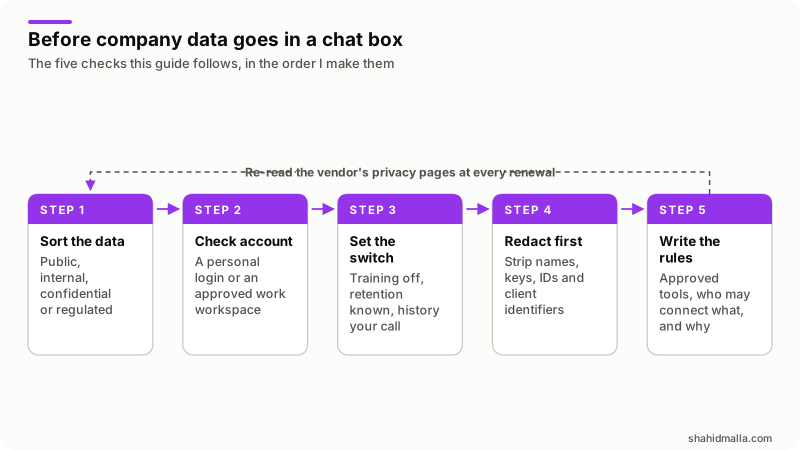
Redaction makes the rest workable. Replace people with roles, clients with letters, and real identifiers with obvious placeholders: CLIENT_A, ACCOUNT_1, api_key_here, and keep the mapping on your own machine. Almost every question survives this, because the model is reasoning about the shape of the problem and not about who the customer is.
Does pasting client work break your NDA?
It can, and the risk has nothing to do with whether the vendor is careful. A confidentiality agreement limits who you may disclose information to. Pasting a client's document into a third-party service is a disclosure, whether or not anything bad happens next.
Three checks cover most agreements I have been asked about:
- Does the contract allow subprocessors or third-party tools at all? Many permit them where you stay responsible. Some require a written list.
- Is there a named-tool or prior-approval clause? If approval is required, the ask is a two-line email, far cheaper than the conversation after an incident.
- Does the client's own security policy ban it? This one bites hardest. Agencies and contractors inherit their clients' policies without reading them.
What makes a business plan usable here is the paperwork, not a promise about safety. Google says prompts are customer data under the Cloud Data Processing Addendum and that Workspace does not train on them without permission. Anthropic says the same of its commercial products. Those sentences can be quoted back to a client, and they apply only to the paid account, never to a free login someone opened on a phone.
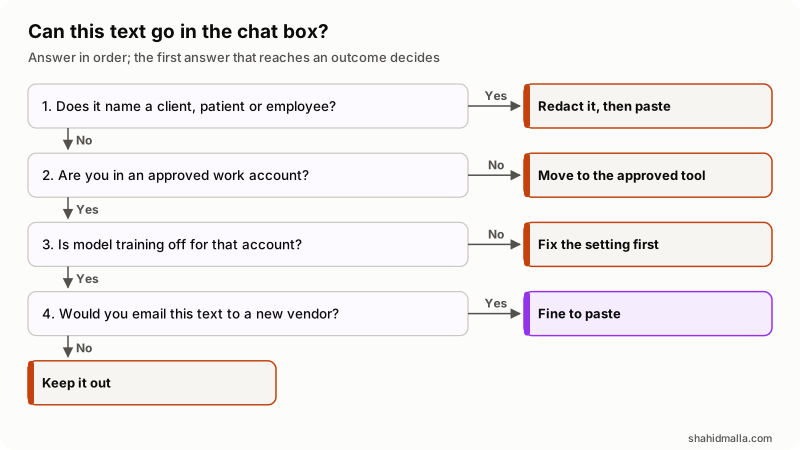
In words: anything naming a client, a patient or an employee gets redacted first, and the rest only goes into an approved account with training off. Then apply the email test. If you would not email that text to a vendor you had just met, it does not go in a chat box either.
How do you write rules your team will actually follow?
Write one page, not a binder, and make the approved route easier than the unapproved one. People paste into personal accounts because the company account is slow to get.
- Name the approved tools, by product and plan, and which data classes each may handle.
- Say what never goes in, using the list above, in words a new starter understands.
- Give everyone a workspace seat on day one, through the same sign-on as email.
- Set the training and retention controls once, at workspace level, and record the date you checked them.
- Decide who may connect a data source, because a connector gives the assistant everything that person can reach.
- List the clients whose contracts need an approval step, with the date each approval was given.
- Re-read the vendor's privacy pages at renewal and note the date you read them.
Read the admin documentation before you promise a client anything. OpenAI's admin FAQ notes that SCIM and synchronized identity groups are not included with ChatGPT Business, and that ChatGPT does not enforce multi-factor authentication across a workspace, so enforce single sign-on and MFA at your identity provider. Google's Workspace hub makes the matching point: the assistant only retrieves content the user can already open, so your existing sharing mess becomes its reach.
When should company data stay out of a hosted chatbot?
When it is regulated and you have no signed agreement, when the tool reaches systems you have not mapped, or when one leak would cost more than the tool saves.
- Connected apps and tools. OpenAI's data controls page says data sent to MCP servers and other third-party destinations follows those parties' retention policies. Google says it does not control, monitor or secure a custom third-party MCP server you add as a connected app.
- Zero data retention is not a checkbox. On the OpenAI API it needs prior approval and extra terms, and the endpoints that store state, including conversations, files, vector stores and batches, are listed as not eligible. Even with it on, image and file inputs are scanned on submission and a flagged image is kept for manual review.
- Agents raise the stakes. A chat window leaks what you paste. An agent with tools can act on text it was given, which is a different class of problem. My guide to vibe coding security risks covers prompt injection.
- Residency has edges. OpenAI's admin FAQ says data and inference residency cover only eligible content, workloads, regions and configurations, and that running a step on a local computer does not make a workflow a zero retention deployment.
When a job cannot leave your control, the answer is usually retrieval over your own documents on infrastructure you choose, not a consumer chat window. That is the shape in my guide to RAG chatbots and most of what I build as AI integration work. My guide to AI automation for small business ranks tasks by payoff and risk.
What else do people ask about putting company data in ChatGPT?
Is ChatGPT safe for business use?
On a business or enterprise workspace it is a normal vendor decision: a contract, an admin console, access controls and published retention periods. OpenAI's administration documentation lists no training on business data by default, encryption in transit and at rest, and audit logging among the Enterprise commitments. On a personal plan holding company data you have no contract and no record, and that is the unsafe part.
Is ChatGPT secure for company data?
Security and privacy are separate questions, and the second causes more trouble. The vendors encrypt data and run compliance programs. Your exposure is decided by which account was used, whether training was on, how long the text is kept and whether a reviewer may see it. Those are settings and contract terms, not encryption.
Is it safe to upload company data in ChatGPT?
An upload is the same disclosure as a paste, with more in it. A spreadsheet carries hidden columns, a PDF carries metadata, an export carries rows you did not mean to share. Open the file, cut what the question does not need, upload the trimmed copy.
Does ChatGPT learn from my chats?
On a personal plan, it can until you say no. OpenAI's help center says Free, Plus and Pro chats may be used for training while Improve the model for everyone is on, under Settings, then Data Controls, and that switch is separate from chat history. On ChatGPT Enterprise and the OpenAI API it is off by default. For comparison, Anthropic uses consumer chats only if you allow it or a conversation is flagged for safety review, and Google uses Gemini activity while Keep Activity is on.
Can my employer see what I type into a work account?
Assume yes. Business workspaces exist so an organization can govern its own data, with admin consoles, log exports and central retention. Google's Workspace hub says admins set Gemini retention anywhere from 90 days to indefinite. That is a feature of a work account, not a flaw.
Does turning off chat history stop model training?
Not necessarily, because they are two controls. OpenAI's documentation links an article about keeping history on while disabling model training, which only makes sense if the two are separate. Google is clearer: with Keep Activity off, chats are still saved for 72 hours, and chats already seen by reviewers stay up to three years.
If you want this decided properly for your own stack, I take it on as AI integration work or hourly when you hire an AI developer, starting with a free scoping call of about 30 minutes and a written quote within one business day.
Last reviewed 14 November 2026. Disclosure: I build AI agents, chatbots and integrations for clients, so I sell this kind of work and I am not neutral. I am CTO at ElySpace, a freelance developer for Marmaids LLC, and founder of WHMCSPilot and MagizAI, an AI chatbot and live chat product. Training defaults, retention periods and settings come from the vendor pages linked above, all read on 14 November 2026.