
MagizAI for hosting providers
MagizAI: AI Live Chat for Hosting Providers That Reads WHMCS
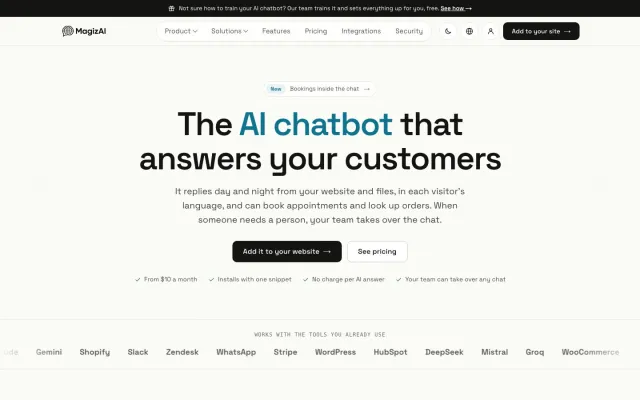
MagizAI is an AI live chat I built for hosting companies. It answers plan, domain, DNS and billing questions from your own WHMCS, shows a signed-in client their services and unpaid invoices, and hands harder cases to your staff. The WHMCS module is free and plans start at $10 a month.
By Shahid Malla, WHMCS developer and hosting infrastructure engineer · Updated
What is MagizAI, and who is behind it?
MagizAI is an AI chatbot and live chat for websites, with a free module that connects it to WHMCS. I am its founder and CEO, so this page describes my own product and I gain if you buy it. Everything below about features and prices is taken from magiz.ai as published on 10 October 2026, and you should check that site for the current details before you decide. The module is also listed on the WHMCS Marketplace.
I built it because of what I see in hosting support queues. A large share of tickets ask the same things: which plan fits, why a domain does not resolve, why a site is suspended, where the invoice is. The answers already sit in WHMCS and in the knowledgebase. MagizAI reads them and replies at any hour, so your staff spend their time on the cases that need a person.
What does MagizAI answer for a hosting company?
It answers pre-sales and account questions from your own WHMCS data, and it treats a visitor and a signed-in client differently.
| Who is asking | What MagizAI can answer | Where the answer comes from |
|---|---|---|
| A visitor on your site | Plans and prices, domain availability and register, renew and transfer prices, open network issues, how-to questions | Your WHMCS plans, domain pricing, announcements and knowledgebase, synced nightly |
| A signed-in client | Service status, domain details, unpaid invoices with pay links, renewal dates, ticket status, upgrade pricing | That client's own records in WHMCS, and nobody else's |
| Anyone it cannot help | An offer to bring in a person | A ticket or a live hand-off to your team |
Replies come in the visitor's language, and the assistant shows which of your documents an answer came from. Answers you pin are given word for word, without the AI rewriting them, which is useful for refund terms and anything legal.
Is everything automatic?
The routine work is automatic, and the risky work is deliberately not. That split is the reason I would trust it on a billing system.
- Automatic: answering from your content, detecting the language, showing sources, capturing a lead's name and email from the conversation, summarizing a chat for hand-off, suggesting tags, re-checking your pages and syncing WHMCS plans and prices each night.
- Automatic only after you switch it on: client actions such as changing nameservers or auto-renew, opening, replying to and closing tickets, renewing or upgrading early, resetting a control panel password, and resending a welcome or invoice email.
- Never without the client's yes: each of those actions waits for a Confirm tap. Showing a password needs a one-time code emailed to the account address, which works once and expires after ten minutes.
- Not handled in chat: card details and domain transfer codes. A transfer code goes only to the account email.
So the honest answer is no, and you would not want it to be. An assistant that changed billing records without a confirmation step would be a liability.
How much does MagizAI cost?
MagizAI lists three plans, all billed monthly, with every AI feature included on each. There is no free tier.
| Plan | Price per month | Messages | Bots and seats | AI provider |
|---|---|---|---|---|
| BYOK | $10 | Unlimited | 3 bots, 3 seats | Your own key; you pay the provider directly |
| Starter | $20 | 2,000 a month | 3 bots, 3 seats | Managed keys, AI included |
| Pro | $49 | 15,000 a month | 15 bots, 15 seats | All providers, plus white label and priority support |
Prices as listed on magiz.ai/pricing on 10 October 2026, excluding GST. A yearly discount is offered; the pricing page has the current figure. Three details matter for a hosting budget:
- On Starter and Pro, AI replies pause when you reach the monthly message limit. You are not charged for going past it, and the inbox keeps working.
- On BYOK, the AI cost is whatever your provider charges you. Set a spending limit in that provider's account.
- MagizAI states a full refund within 7 days of the first payment, and none after that.
How does MagizAI compare with other ways to add AI chat to WHMCS?
It sits between a general chat widget and a custom build. Which is right depends on how much of your support is routine.
| General chat widget | MagizAI | Custom build | |
|---|---|---|---|
| Knows the client's services and invoices | No, unless you build the link | Yes, through the free WHMCS module | Yes, as far as you specify |
| Can act in WHMCS | No | A fixed list of actions, each switched on by you | Whatever you have built and tested |
| Time to first use | Minutes | Minutes for the widget, a short setup for WHMCS | Typically weeks, depending on scope |
| Cost shape | Monthly fee | Monthly fee from $10 | A build cost, then running costs |
| Best fit | Simple contact chat | Common hosting questions and safe account actions | Unusual rules, your own model or deep ticket changes |
I describe the three routes without my own product in WHMCS AI chatbot: module, workflow or custom build. If you need the custom route, that is AI chatbot development.
How is client data protected?
MagizAI does not hold a WHMCS admin API key. According to its WHMCS page, the module signs a short-lived token on each client-area page load and checks it again before any read or change.
- Lookups run for the signed-in client only.
- Only public content, such as the knowledgebase, announcements, plans and prices, is synced out of WHMCS. Client data stays inside it.
- Every request is written to the module's activity log, and every change to the WHMCS activity log. The client receives an email about a change.
- Passwords are not saved in the chat transcript.
Before you rely on this, read the MagizAI security page, and decide what your privacy policy must say about an AI provider processing chat text. That decision is yours, not the vendor's.
When is MagizAI the wrong choice?
It is the wrong choice when you need something a product cannot be bent to do. Choose another route if:
- You need a free tier or a long trial. There is none.
- The model must run on your own servers, with no outside AI provider.
- You want the assistant to issue refunds or credits by itself. I would not automate those in any product.
- Your WHMCS is older than version 8.0, or is heavily modified in ways a standard module will not expect.
- Your knowledgebase is thin or out of date. An assistant answers from what you have written, so fix the content first.
If you want help installing it on a staging copy first, or checking that it sits well with your other modules, that falls under WHMCS support and maintenance.
Who this is for
- Hosting companies whose support queue fills with the same plan, DNS and invoice questions
- Small hosting teams that cannot staff chat through the night
- WHMCS owners who want clients to check services, invoices and tickets in chat
- Resellers and agencies that want to offer AI chat under their own brand
What is included
- Answers from your knowledgebase, announcements, plans and prices, pulled from WHMCS
- Account answers for the signed-in client only: services, domains, unpaid invoices, ticket status
- Optional client actions with a Confirm step, such as changing nameservers or opening a ticket
- Hand-off to your team as a ticket or a live chat when the assistant cannot help
- Replies in the visitor's language, with the source document shown
- A shared inbox, reply suggestions and chat summaries for your agents
- A nightly sync of public WHMCS content, so prices and plans stay current
- Free setup and training by the MagizAI team
How the work runs
-
1
Install the module
Upload the free module to modules/addons/magizai and activate MagizAI Live Chat under Addon Modules in WHMCS.
-
2
Connect
Create a connection code in MagizAI and paste it into the module's Setup tab. The code works once and expires after 30 minutes.
-
3
Choose what it may do
Every account action has its own switch and starts switched off. Turn on only the ones you are comfortable with.
-
4
Train and test
The assistant learns from your knowledgebase, announcements and plans. Ask it your real customer questions before clients see it.
-
5
Go live and review
Watch the conversations, the unanswered questions and the hand-offs, and add the missing answers to your knowledgebase.
Guides on this topic
All guides →-
WHMCS Live Chat Integration: The Upgrade-Safe Method
How to add a live chat widget to WHMCS with a hook that survives updates, identify logged-in clients safely, connect chats to tickets, and avoid the usual breakages.
-
What a WHMCS-Aware AI Chatbot Needs to Do
I founded WHMCSPilot.com. Here is what an AI chatbot for WHMCS support needs to do: use account context, take only safe actions and hand off to a person.
Frequently asked questions
Is MagizAI free?
The WHMCS module is free to download. The AI chat needs a paid MagizAI plan, and there is no free tier. Plans listed on magiz.ai on 10 October 2026 start at $10 a month if you bring your own AI provider key. MagizAI states a full refund within 7 days of your first payment, which is the closest thing to a trial.
Does MagizAI need my WHMCS admin API credentials?
No. According to the MagizAI WHMCS page, it never holds admin access and has no WHMCS admin API key. The module exposes a small signed endpoint that runs only the actions you have enabled, and every lookup runs for the signed-in client only. Asking about another client's domain gets the same reply as a domain that does not exist.
Can MagizAI change things in a client's account?
Only if you allow it. Each action, such as changing nameservers, opening or replying to a ticket, or renewing early, has its own switch and is off by default. When it is on, the client still has to tap Confirm, sensitive steps need a one-time code sent to the account email, and every change is written to the WHMCS activity log.
Which WHMCS versions does the MagizAI module support?
The MagizAI WHMCS page lists WHMCS 8.0 or newer and PHP 7.4 or newer, with WHMCS 8.8 or newer needed for early renewal. The System URL must use https. Check that page before you install, because requirements change with new releases, and test on a staging copy of your WHMCS first, as with any module.
What happens when the assistant cannot answer?
It is built to say that it does not know instead of guessing, and to offer a person. Depending on your setup, the conversation becomes a WHMCS ticket or a live hand-off that your team picks up, with the chat history attached. Unanswered questions are collected and ranked, so you can see which knowledgebase articles are missing.
Is MagizAI only for hosting companies?
No. It is a general AI chat and live chat product that also serves shops, clinics, schools and other businesses, and it connects to tools such as Shopify, WooCommerce, WhatsApp and Slack. This page covers the hosting use because that is my field, and because the WHMCS module is what makes it specific to hosting providers.
Should I use MagizAI or have a custom chatbot built?
Use a ready-made product such as MagizAI when your needs are the common ones: answers from your knowledgebase, account lookups and a few safe actions. Have one built when you need logic no product offers, a model running on your own servers, or deep changes to how tickets are handled. I offer both, so I gain either way, and I will tell you which fits.
Related services
-
WHMCS AI Chatbot: Ready-Made Module, n8n Workflow or Custom Build
What a WHMCS AI chatbot can do, the API actions it needs, and an honest comparison of a ready-made module, an...
-
AI Chatbot Developer for Websites, Support and WHMCS
I'm an AI chatbot developer. I build custom chatbots that answer from your own documents, are built to say 'I...
-
WHMCS Support and Maintenance
Ongoing WHMCS care, hourly or monthly: staged upgrades, PHP changes, cron and backup checks, module updates an...
-
Start a Web Hosting Business: Setup and Launch Help
Compare reseller, VPS and own-hardware models, then set up WHMCS, a control panel, payment gateways and backup...
Ready to talk about your project?
Send the details and I reply within one business day with questions, an estimate and a plan.