MCP, the Model Context Protocol, is an open standard that lets AI apps such as Claude, ChatGPT, VS Code and Cursor connect to outside systems in one common way. An MCP server offers tools the AI can call and data it can read; the AI app connects to it as a client. Your server, not the model, decides what the AI can reach.
The Model Context Protocol is a set of rules for how an AI application discovers and uses capabilities that live outside it, such as a database query, a CRM lookup or a file. The official introduction calls it "an open-source standard for connecting AI applications to external systems" and compares it to a USB-C port for AI apps: one plug shape instead of a custom cable for every device.
Anthropic announced and open-sourced MCP on 25 November 2024. The current specification is version 2026-07-28, marked latest when I read it on 3 November 2026. Every product detail below comes from the vendor's own documentation, read that same day. I build AI agents and MCP servers for clients, and I am not affiliated with Anthropic, OpenAI or the MCP project.
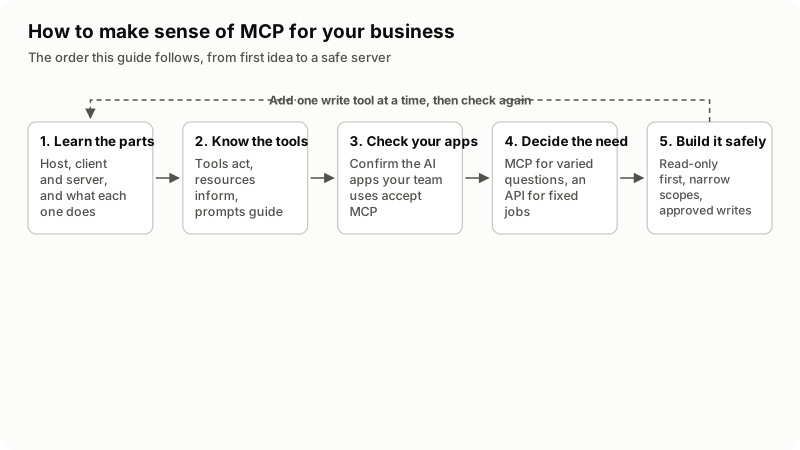
What problem does MCP solve?
MCP removes the need to build a separate connector for every pair of AI app and business system. Before it, connecting an assistant to your helpdesk meant code written for that one assistant. Anthropic's announcement describes the old state plainly: "Every new data source requires its own custom implementation."
With MCP, you describe your system once, as a server, and any AI app that speaks the protocol can use it. One piece of work can serve the team on Claude, the team on ChatGPT and the developers in VS Code.
MCP does not make a model smarter, and it does not decide how the AI uses what it gets. The architecture overview says MCP "focuses solely on the protocol for context exchange". Quality still depends on the model, the tool design and the data behind it.
How do the MCP host, client and server fit together?
The host is the AI app you use, the client is a connector the host creates inside itself, and the server is the program that offers capabilities. The architecture overview says the host creates one client for each server it connects to, and each client keeps its own dedicated connection.
| Part | What it is | Example |
|---|---|---|
| Host | The AI application that manages one or more clients | Claude Desktop, ChatGPT, VS Code, Cursor |
| Client | A connector inside the host with one connection to one server | The piece of VS Code that talks to a Sentry server |
| Server | A program that provides context and actions to clients | A server that reads your CRM through its API |
| Your system | The thing the server talks to; not part of MCP itself | A database, WHMCS, a helpdesk, a file folder |
Messages between client and server use JSON-RPC 2.0, a small, widely used format for requests and replies. They travel over one of two transports:
- stdio: the host starts the server as a local process on the same computer and talks to it through standard input and output. This is a "local" server, usually for one person.
- Streamable HTTP: the server runs on the internet or your network and many clients reach it by URL. This is a "remote" server. The overview says it supports bearer tokens, API keys and custom headers, and that "MCP recommends using OAuth to obtain authentication tokens."
The model never logs in to your system. The server holds the credentials and runs the action, so the server is where every limit belongs.
What do MCP tools, resources and prompts do?
They are the three things a server can offer: tools let the AI act, resources give it data to read, and prompts are templates a person picks. The server concepts page separates them by who is in control:
| Feature | What it does | Who controls it | Business example |
|---|---|---|---|
| Tools | Functions the model can call, which may write to databases or call APIs | The model | "Look up order status", "Create a draft invoice" |
| Resources | Passive, read-only data with a URI, such as a file or a database schema | The application | A price list or a product catalog |
| Prompts | Pre-built instruction templates, often shown as slash commands | The user | "/weekly-sales-summary" |
Tools turn a chat assistant into an agent that does things, which is also why the risk sits there. Each tool has a name, a description and a JSON Schema for its inputs.
What happens when an AI app calls an MCP tool?
The client lists the server's tools, the model picks one, and the client sends a tools/call request and passes the result back to the model. In order:
- The client sends
tools/listand the host gives the tool descriptions to the model with the question. - The model decides a tool is needed and fills in the arguments.
- The host should show the call and ask the user to allow it.
- The client sends
tools/call; the server checks the input, runs the action and replies.
This is the request from the tools page of the specification, shortened the way the spec does (a real request also carries a _meta block with the protocol version and client details):
{
  "jsonrpc": "2.0",
  "id": 2,
  "method": "tools/call",
  "params": {
    "name": "get_weather",
    "arguments": { "location": "New York" }
  }
}
The reply carries a content array of text the model reads, plus isError. Step 4 matters most. The same page says "there SHOULD always be a human in the loop with the ability to deny tool invocations."
Which AI apps support MCP servers?
Claude, ChatGPT, VS Code and Cursor all document MCP support, but they connect in different ways. This is what each vendor's own page said on 3 November 2026:
| App | How you add a server | Worth knowing |
|---|---|---|
| Claude (web, Desktop, Cowork) | Custom connector under Customize > Connectors with the server URL; Team and Enterprise owners add it under Organization settings | Free users get one custom connector. Claude connects from Anthropic's cloud, so the server must be reachable from the public internet. Claude Desktop can also run local servers from claude_desktop_config.json. |
| ChatGPT | ChatGPT Plugins, the plus button, then Add custom MCP server; you accept a risk warning and create it as a plugin | The same page covers remote servers in Codex, deep research and the API. It says ChatGPT asks for manual confirmation before write actions. |
| VS Code | The MCP: Add Server command, then HTTP for a URL or Command (stdio) for a local command | Its docs warn that local MCP servers can run code on your machine. |
| Cursor | The Customize page or an mcp.json file | Supports stdio, SSE and Streamable HTTP. |
I list only the four whose documentation I read. Before a build, check that your staff's apps accept the transport and sign-in you plan.
What is MCP useful for in a business?
MCP pays off when people ask varied questions of your systems from inside an AI app. Typical uses I scope:
- Staff questions across data: "Which clients have unpaid invoices over 30 days and an open ticket?" answered from live data, not a stale export.
- Product access for your customers: a SaaS product that lets its users work with their own account from inside Claude or ChatGPT, signed in as themselves.
- One tool layer for several agents: the same server used by Claude, ChatGPT and an agent you build yourself.
For a worked example in one product, my WHMCS MCP server guide compares the modules and packages that exist, which API actions to expose first and how to keep money and services behind approval. My AI chatbot vs AI agent guide explains where tool use fits.
Do you need an MCP server or a normal API integration?
If a task runs the same way every time, a normal API integration or webhook is cheaper and easier to test than MCP. MCP earns its place when the request changes each time and a person is asking.
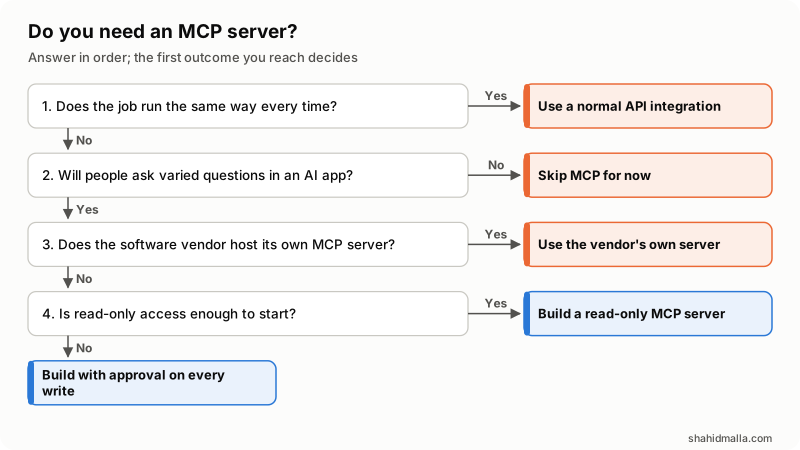
- Does the job run the same way every time? Yes: use a normal API integration.
- Will people ask varied questions in an AI app? No: skip MCP for now.
- Does the software vendor host its own MCP server? Yes: use the vendor's server. OpenAI's page gives the example of connecting to the Stripe server hosted by Stripe instead of an unofficial copy.
- Is read-only access enough to start? Yes: build a read-only MCP server. No: build it with a person approving every write.
Often the answer is both: an integration for fixed jobs and a small read-only server for the questions.
What does it cost to build an MCP server?
The cost depends on how many tools you need, how users sign in and how many write actions need approval, not on MCP itself. My planning hours and token bills for AI agents, including tool work, are in my AI agent development cost guide. What moves the number:
| Cost driver | Cheaper end | Costlier end |
|---|---|---|
| Number of tools | A handful of read tools | Dozens, each with its own schema and tests |
| Transport and sign-in | stdio on one person's computer | Remote server with OAuth, per-user access and scope checks |
| Write actions | None | Several, each behind a confirmation step and an audit log |
| Your API | A clean, documented API with role-based keys | No API, so the server needs one built first |
| Client testing | One AI app | Claude, ChatGPT and your own agent, each tested separately |
What are the security risks of MCP?
The main risks are prompt injection, tools with more permission than the job needs and careless handling of tokens. The spec is frank that "MCP itself cannot enforce these security principles at the protocol level", so the limits live in your server and your system. These rows come from the MCP security guidance, the local server security page and OpenAI's MCP page:
| Risk | What the official guidance says | What I do about it |
|---|---|---|
| Prompt injection | OpenAI's page: for a customer support server, "an attacker could send you a customer support request with a prompt injection attack." Trusting the developer "does not make this safe." | The session that reads customer text gets no write tools; writes need a person. |
| Tool poisoning | Tool descriptions are instructions the model reads; a server can hide directives in them, or change them after approval. | Read every tool description; prefer clients that re-prompt when a definition changes. |
| Over-broad permissions | The scope guidance warns that a stolen token with broad scopes enables "lateral data access" and asks for a minimal starting scope set. | Read-only first, one narrow credential per server, extra scopes only when a tool needs them. |
| Token passthrough | Forwarding a client's token to your API is "explicitly forbidden"; servers "MUST NOT accept any tokens that were not explicitly issued for the MCP server." | The server validates its own tokens and uses its own credential downstream. |
| Local server compromise | A local server can read whatever your account can, including SSH keys. | Pinned versions, a sandbox or container, and secrets passed per server, never from the shell profile. |
The spec's tools page adds four duties every server MUST meet: validate all tool inputs, implement proper access controls, rate limit tool invocations and sanitize tool outputs. It also says tool annotations, such as a read-only flag, must be treated as untrusted unless the server is trusted. So a label is not a control; the credential behind the tool is.
What should you check before you connect or build an MCP server?
Check who wrote it, what it can reach and who approves its writes. My short list:
- The server comes from the software vendor or a publisher you can identify, at a pinned version.
- You have read every tool name and description, ideally in the MCP Inspector, which lists tools without a model involved.
- It uses its own credential with the smallest scope that works, never an admin password or a personal account-wide token.
- Every write tool needs a person's confirmation, enforced on the server and not only in the app's dialog.
- Calls and refusals are logged and rate limited, and the credential can be revoked in one step.
- Results leave out fields the AI does not need, such as card data and private notes.
- You have tested it with a planted prompt injection, such as a ticket asking the AI to issue a refund.
What else do people ask about MCP?
Is MCP the same as an API?
No. An API is the set of actions a system accepts. An MCP server usually calls that API and wraps chosen actions as described tools an AI app can discover and call. The API does the work; the MCP server decides what the AI may reach.
Who created MCP?
Anthropic created MCP and open-sourced it on 25 November 2024. Its announcement names David Soria Parra and Justin Spahr-Summers as its creators. ChatGPT, VS Code and Cursor now document support for it too, so it is not tied to Claude.
Is MCP free to use?
The protocol, its specification and its official SDKs are open source, so there is no license fee for MCP itself. You still pay for building and hosting your server, and for the AI app or model usage on the client side.
Is MCP safe?
It is as safe as the server and its permissions. The spec says tools "represent arbitrary code execution and must be treated with appropriate caution." Use servers you can inspect, start read-only and keep a person approving writes.
What is the difference between a local and a remote MCP server?
A local server runs on your computer over stdio for one person; a remote server runs over Streamable HTTP for many users. The local server security page suggests the remote version when a server only wraps an internet API.
If you want an MCP server for your own CRM, database or product, I build them as MCP server development projects, usually as part of AI agent development, starting with a free scoping call of about 30 minutes and a written quote within one business day.
Last reviewed 3 November 2026. Disclosure: I sell MCP server and AI agent development, so I am not neutral. I am CTO at ElySpace, a freelance developer for Marmaids LLC, and founder of WHMCSPilot and MagizAI. I am not affiliated with Anthropic, OpenAI, Microsoft, Cursor or the Model Context Protocol project, and no link here is an affiliate link.