PHP2Shell is the name for CVE-2026-109618 and CVE-2026-109619, two critical flaws in the PHP engine that can let an unauthenticated attacker run code on a web server. Both fire inside PHP itself, not in your application. The fixed versions are 8.5.12, 8.4.27, 8.3.36 and 8.2.35, released on 21 October 2026. Update, then restart every PHP worker.
PHP2Shell is the name CISA and the researchers use for two memory-safety bugs in PHP itself: one in how PHP stops a request that runs out of memory (CVE-2026-109618), and one in state left over from an earlier request (CVE-2026-109619). This guide explains both in plain English, then walks through the patch step by step.
What is PHP2Shell, and who is at risk?
PHP scores both bugs at CVSS v4.0 9.2, critical, each able to lead to remote code execution without a login. The PHP security advisory puts "all PHP installations serving web requests, including PHP-FPM, Apache with mod_php, php-cgi, FrankenPHP and LiteSpeed" at risk, and rates mod_php highest. Each bug has its own advisory: CVE-2026-109618 and CVE-2026-109619.
The release was rushed. PHP announced it on 20 October, and the same day watchTowr reported that details had leaked and a proof-of-concept tool called "PHP2Shell" had surfaced. PHP shipped the fixes on 21 October at 14:00 UTC, and CISA urged immediate patching. Amazon says its honeypots logged a first attempt on 17 October, four days before disclosure.
How does PHP2Shell work, step by step?
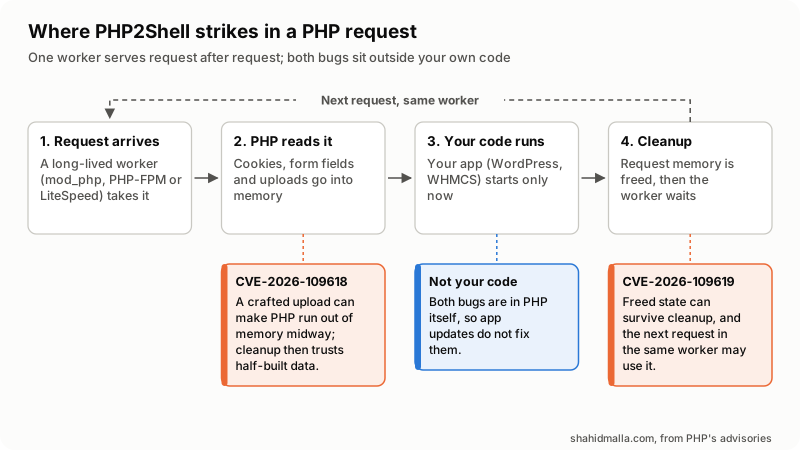
Follow one request through a PHP worker to see where each bug sits and why each fix works. This follows PHP's advisories and leaves out anything that would help build an attack.
Step 1: One worker serves many requests
PHP does not start fresh for each visitor. A worker process (an Apache child running mod_php, a PHP-FPM worker or a LiteSpeed lsphp process) serves one request after another and must wipe the last one's data in between. Both bugs break that rule.
Step 2: PHP reads the request before your code runs
Before the first line of WordPress or WHMCS runs, PHP reads the cookies, form fields and uploaded files into memory. An attacker therefore needs no login and no bug in your application. PHP says its mod_php exploit fires "before any application code runs".
Step 3: Running out of memory halfway (CVE-2026-109618)
When a request exceeds its memory limit, PHP aborts it by jumping straight out of whatever it was doing, using a C mechanism called longjmp. If the jump lands while request data is still being set up, PHP "leaves the request memory in an invalid state", and the cleanup step then reads it as if it were valid. CloudLinux describes the trigger as a crafted multipart request, the format browsers use to upload files. Picture a form thrown away half-filled, then filed as complete.
Step 4: Leftovers from the last request (CVE-2026-109619)
The worker keeps some state of its own, for errors, sessions and extensions, that points at one request's memory. A fatal error or timeout can skip the reset at the end of a request, so the pointer survives after the memory is freed. Some work for the next request, such as session upload progress and early warnings, runs before the reset and can use that stale pointer. This is called a use-after-free. PHP's strongest demonstrated case is the fatal error backtraces feature of PHP 8.5.
Step 5: From bad memory to a shell
Freed or half-built memory can end up holding data an attacker sent. When PHP treats that data as its own, the attacker can steer the worker, up to running commands with the web server's permissions: from PHP to a shell. Red Hat notes that doing this reliably "requires precise heap manipulation and timing". PHP also lists memory disclosure as a confirmed impact, so leaked secrets are a risk too.
What does this tell you about the fix?
- Updating your application does nothing. Both bugs run in PHP, before your code or between requests.
- mod_php is the worst case. PHP says mod_php runs its cleanup even when request startup fails. Red Hat says PHP-FPM workers exit on those early failures instead.
- Restarting is part of the fix. A running worker keeps the old PHP in memory until it is replaced.
- The fixed releases change the design. PHP replaced the jump with a stop at the next safe point, and now resets request state completely.
Which PHP versions are affected, and which fix PHP2Shell?
On each supported branch, every release below the fixed one is affected. The table follows php.net and the NVD records for CVE-2026-109618 and CVE-2026-109619, read on 22 October 2026.
| Branch | Status | Affected | Fixed release |
|---|---|---|---|
| PHP 8.5 | Supported | Below 8.5.12 | 8.5.12 |
| PHP 8.4 | Supported | Below 8.4.27 | 8.4.27 |
| PHP 8.3 | Supported | Below 8.3.36 | 8.3.36 |
| PHP 8.2 | Supported until 31 December 2026 | Below 8.2.35 | 8.2.35 |
| PHP 8.1, 8.0, 7.4 | End of life | Affected; NVD sets no lower bound | No release; source backports from PHP, patched vendor packages |
| PHP 7.3 and older | End of life | Disputed (next section) | Nothing from PHP; some vendors backport |
Where do the sources disagree about PHP2Shell?
- Exploitation. CISA said on 21 October it "has not observed exploitation", and NVD showed no known-exploited listing on 22 October. watchTowr reports "active exploitation attempts"; Amazon says PHP2Shell is "broadly exploited in the wild" but "it's unclear if any of these attempts would have succeeded".
- How far back. PHP and NVD give only upper bounds. Wiz and Cloudflare say versions back to 5.4 are affected; PHP says exact versions depend on the internal state involved.
- Severity. PHP scores both 9.2. Red Hat rates CVE-2026-109618 "Important": on RHEL's default PHP-FPM, code execution "is difficult in practice".
- Configuration changes. PHP says its interim settings "do not make an installation safe"; watchTowr calls ini changes "ineffective".
- Which bug is which CVE. Wiz files the upload-progress bug under CVE-2026-109618; PHP and CloudLinux tie it to CVE-2026-109619. The fix is the same release.
My rule: treat any unpatched PHP as vulnerable and under attack. That is a planning choice, not a confirmed fact.
What should you do about PHP2Shell right now?
Answer five questions in order. The first outcome you reach is your next step.
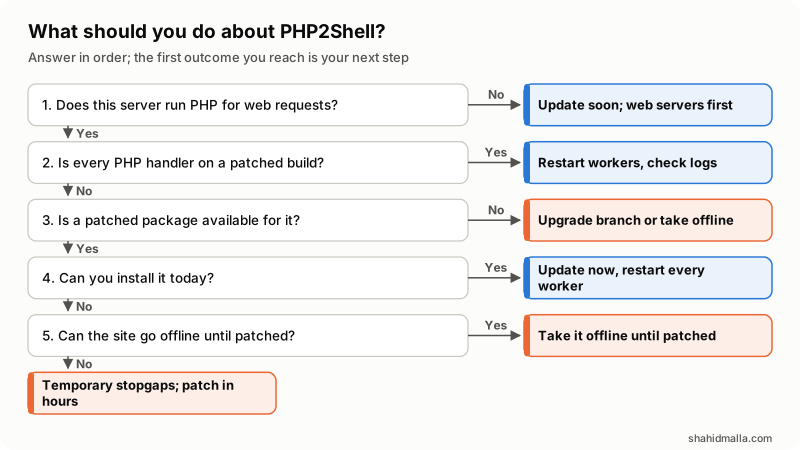
- Does this server run PHP for web requests? If not, update soon, web servers first.
- Is every PHP handler on a patched build? If yes, restart the workers and check the logs.
- Is a patched package available for it? If not, move to a supported branch or take the site offline.
- Can you install it today? If yes, follow the patch tutorial below now.
- Can the site go offline until patched? If yes, take it offline, as CISA advises. If not, use the temporary stopgaps below and patch within hours.
How do I patch PHP2Shell, step by step?
Do these six steps on every server that runs PHP.
Step 1: List every PHP that serves your sites
php -v shows only the command-line PHP. Each site can run another version through PHP-FPM, LSAPI or mod_php, and cron may use yet another.
- Any server. A temporary
phpinfo()file shows "PHP Version" and "Server API" for that site. Delete it right after. - cPanel. WHM's MultiPHP Manager shows each domain's ea-php version;
rpm -qa 'ea-php*'lists installed builds. - Plesk. Tools & Settings > PHP Settings shows versions in the handler names.
- CloudLinux.
selectorctl --list-users --version=7.4lists the users on that alt-php version.
Step 2 on cPanel and WHM: Update the EasyApache PHP packages
cPanel's EasyApache 4 change log, release 25.91 of 21 October, moves ea-php82 through ea-php85 to the fixed versions and backports the fix to ea-php74, ea-php80 and ea-php81, which keep their version numbers. Per cPanel's package manager documentation these are ordinary packages, and if automatic updates are on in WHM's Update Preferences they may already be installed.
dnf upgrade 'ea-php*'          # AlmaLinux, Rocky Linux
yum update 'ea-php*'           # CentOS
apt update && apt upgrade      # Ubuntu
Step 2 on Plesk: Update Plesk and its PHP
Plesk's advice is to update Plesk to the latest version. Its support article lists fixed Plesk PHP 8.2 through 8.5 on Linux and Windows. On Linux, the end-of-life 7.4, 8.0 and 8.1 packages keep their version numbers, and only builds dated 21 October 2026 are fixed. Plesk's own panel engine is fixed in Plesk Obsidian 18.0.81 Update 4 and 18.0.80 Update 11.
Step 2 on CloudLinux: Update alt-php and ea-php
CloudLinux says it backported the fix into every supported alt-php and ea-php branch, including end-of-life ones. Its knowledge base article gives the command below, warns that yum --security may not list these packages yet, and notes that alt-php44 and alt-php51 have no fixed build.
yum clean all && yum update 'alt-php*' 'ea-php*' -yStep 2 on Debian, Ubuntu and Red Hat: Install the security update
Status on 22 October, from the Debian tracker, Ubuntu and Red Hat:
| Distro | Status on 22 October |
|---|---|
| Debian 12 and 13 | Fixed: php8.2 at 8.2.35 (DLA-4848-1), php8.4 at 8.4.27 (DSA-6574-1). Testing still vulnerable |
| Ubuntu 24.04 and 22.04 | Fixed by backport (USN-8948-1, USN-8948-2); version numbers stay old |
| Ubuntu 20.04 and older | Fixed in ESM packages, which need Ubuntu Pro |
| RHEL 8, 9 and 10 | Fixed for most streams; RHEL 9's php:8.4 stream still listed as affected |
| RHEL 6 and 7 | Under investigation |
Step 2 in Docker: Rebuild on a fixed image
The official php image had 8.5.12, 8.4.27, 8.3.36 and 8.2.35 tags by 22 October. Pin your FROM line to one, build with docker build --pull, and recreate the containers. Restarting an old container keeps the old PHP.
Step 3: Restart every PHP process
Running workers keep the old code until they are replaced. These commands come from CloudLinux's article, which says no reboot is needed:
/scripts/restartsrv_httpd              # cPanel: Apache
/scripts/restartsrv_apache_php_fpm     # cPanel: PHP-FPM
/usr/local/lsws/bin/lswsctrl restart   # LiteSpeed
pkill lsphp                            # LiteSpeed: stop old lsphp workers
Elsewhere, restart Apache and each PHP-FPM service through your init system.
Step 4: Confirm the fix is running
Ubuntu, Red Hat, CloudLinux and the end-of-life cPanel and Plesk packages fix the bug without changing the version number, so check the change log or build date. CloudLinux gives this check, which also works for cPanel's ea-php packages; every line must print 1 or more:
for p in $(rpm -qa 'ea-php*-php-cli' 'alt-php*-common' --qf '%{NAME}\n'); do echo "$p $(rpm -q --changelog $p | grep -cE 'CVE-2026-(109618|109619)')"; doneThen recheck each live site with the temporary phpinfo() page from Step 1. On my own cPanel server, checked on 22 October, automatic updates had already installed the fix: the live site reported 8.4.27, and every PHP package's change log mentioned the PHP2Shell CVEs, including an end-of-life branch that only cPanel's backport covers.
Step 5: Check your logs from 17 October
Amazon advises investigating from 17 October, its earliest sighting. Look for:
- POST requests containing PHP_SESSION_UPLOAD_PROGRESS (Amazon).
- Oversized PHPSESSID cookies or bursts of HTTP 500 errors (Wiz).
- Out-of-memory errors, timeouts and other fatal errors in PHP's error log, the triggers PHP's advisories describe.
- PHP worker processes launching shells or downloading tools (CISA).
- New files in web roots, new cron jobs and new accounts (watchTowr).
Step 6: Rotate secrets and plan the next upgrade
- If a server was unpatched and reachable after 17 October and its logs show any sign above, rotate database passwords, payment gateway keys and API tokens.
- Keep
session.upload_progress.enabled=0if you do not use upload progress bars; PHP calls that prudent even after patching. - Leave PHP 8.2 before its end of life on 31 December 2026, and move sites off 8.1 and older, which now depend on vendor backports.
What if I cannot patch PHP2Shell today?
Take the site offline. CISA says organizations that cannot update immediately, or that run PHP 8.1 or earlier, "should take PHP-based systems offline until they can be patched or updated." php.net says "There are no complete mitigations, updating is the only safe choice."
If you must stay online for a few hours, each of PHP's interim settings closes one path from the explanation above. Set them in php.ini, the FPM pool or server configuration, which apply before PHP reads the request; ini_set() runs inside your code, which is too late, and PHP says not to rely on .user.ini either. Restart every worker afterwards.
| Setting | What it does | Bug |
|---|---|---|
session.upload_progress.enabled=0 | "Blocks the confirmed session paths but not other variants" (PHP) | 109619 |
fatal_error_backtraces=0 on PHP 8.5 | "Blocks the confirmed fatal backtrace path only" (PHP) | 109619 |
memory_limit=-1 via php_admin_value | Removes the limit an attacker can push past, but "an underlying allocation failure can still reach the vulnerable path" (PHP) | 109618 |
| No RLIMIT_AS or RLIMIT_DATA instead | "These can cause the vulnerable allocation failure" (PHP) | 109618 |
post_max_size 8M, or 32M with uploads | Less request data to read; keep upload_max_filesize below it | 109618 |
| Remove invalid or deprecated per-request settings | Their warnings fire before initialization; hiding them "does not help" (PHP) | 109619 |
pm.max_requests=1 on PHP-FPM | One request per worker, so nothing carries over; PHP says consider it "if performance allows" | 109619 |
Test afterward: a low post_max_size breaks larger uploads, and an unlimited memory_limit lets a runaway script use all available memory.
Vendor WAF rules. Cloudflare says its managed rules block PHP2Shell by default, though attackers were mutating payloads to evade them, and traffic sent straight to your origin IP skips Cloudflare. CloudLinux advises Imunify360's WAF with ruleset 8.84 or later. CISA says a WAF "may provide some protection". Patch anyway.
What should WHMCS operators check?
WHMCS runs on PHP, so an unpatched runtime exposes it. I found no WHMCS statement on PHP2Shell when I searched on 22 October.
- Stay on a supported branch. The WHMCS 9.0 System Requirements list PHP 8.2 or 8.3, so patch to 8.2.35 or 8.3.36 rather than jumping branches in a hurry. My WHMCS system requirements guide covers other versions.
- Check ionCube Loader. Confirm it still loads after the update (WHMCS asks for 13.0.2+ on PHP 8.2, 14.4.0+ on 8.3).
- Test the billing cron. Run it once by hand with the PHP binary the crontab names, as in my WHMCS cron jobs guide.
- Rotate WHMCS secrets if in doubt. Wiz says it read passwords, tokens and API keys from worker memory, so follow Step 6 for database credentials, gateway keys and provisioning API tokens.
- Do not stop at PHP. WHMCS's own advisories are covered by a WHMCS security audit, and the server by my firewall and hardening guide.
What else do people ask about PHP2Shell?
Is PHP-FPM safe from PHP2Shell?
No. Red Hat says code execution is harder on PHP-FPM because workers exit on early failures, but PHP validated the session path of CVE-2026-109619 against FPM. Patch FPM servers the same day as mod_php ones.
Is PHP 7.4 affected by PHP2Shell?
Treat it as affected. PHP published a source backport for 7.4, and NVD marks every version below 8.2.35. cPanel, Plesk on Linux, CloudLinux and Red Hat ship patched 7.4 packages; without one, CISA says take the system offline.
If you run a fleet of servers and want a second pair of hands to verify every handler, I do this as server security hardening work.
Last reviewed 22 October 2026. This is a developing story; check the PHP project's own pages for later releases. Disclosure: I am CTO at ElySpace, a hosting company, and I sell server hardening and WHMCS work, so I am not neutral. I am not affiliated with the PHP project or any vendor named here.