To update PHP on a server, update it through whatever installed it: your control panel (cPanel, Plesk, DirectAdmin or CloudLinux), your distro's package manager (dnf on AlmaLinux and Rocky Linux, apt on Ubuntu and Debian) or a rebuilt container image. Then restart every PHP worker, confirm the live site runs the new build, and harden the server around it.
Updating PHP means replacing the PHP runtime that serves your sites with a newer build: either a patch release inside the same branch, or a move to a newer branch. It is finished only when every PHP process has restarted on the new code.
Why now: on 21 October 2026, php.net released 8.5.12, 8.4.27, 8.3.36 and 8.2.35 to fix PHP2Shell, two critical bugs that can allow unauthenticated remote code execution, and said "updating is the only safe choice." My PHP2Shell guide covers the bug, vendor status and stopgaps. This guide is the routine for the next one.
What should you check before updating PHP?
Know which kind of update you are making and which PHPs serve your sites. The order never changes:
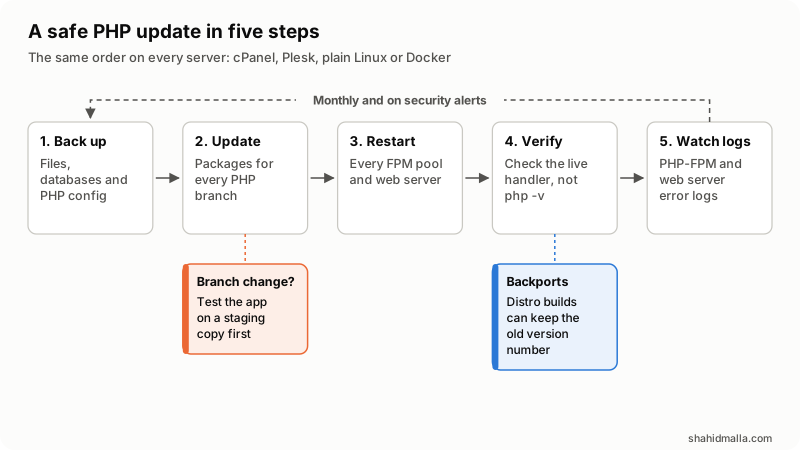
- Back up files, databases and PHP configuration.
- Update every installed PHP branch. For a branch change, test on staging first.
- Restart every PHP-FPM pool, lsphp process and web server.
- Verify the build each site runs; distro builds can keep the old version number.
- Watch logs for new errors.
| Kind of update | Example | Risk | Before you start |
|---|---|---|---|
| Patch release in a branch | 8.3.35 to 8.3.36 | Low: bug and security fixes | Back up, update, restart |
| Distro backport | Ubuntu 24.04's 8.3.6-0ubuntu0.24.04.13 | Low; the version number stays old | Read the changelog, not the number |
| Branch upgrade | 8.2 to 8.3 | Can break code and extensions | Test on a staging copy with PHP's migration guide |
Then list every PHP in use: FPM pools, mod_php, lsphp and the CLI that cron uses can differ. Check support on PHP's supported versions page (read 23 October 2026):
| Branch | Active support until | Security fixes until |
|---|---|---|
| 8.2 | Ended 31 Dec 2024 | 31 Dec 2026 |
| 8.3 | Ended 31 Dec 2025 | 31 Dec 2027 |
| 8.4 | 31 Dec 2026 | 31 Dec 2028 |
| 8.5 | 31 Dec 2027 | 31 Dec 2029 |
8.1 and older are end of life: php.net no longer releases them, so only vendor packages keep them patched.
Which PHP update path fits your server?
Update PHP through the tool that installed it. Mixing sources, such as Remi packages on a cPanel server, leaves two PHPs and no clear owner.
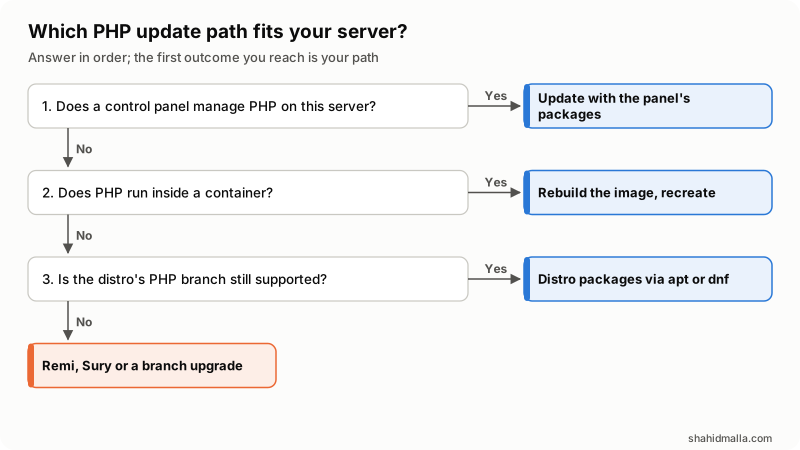
- Does a control panel manage PHP? Use the panel's packages.
- Does PHP run in a container? Rebuild the image and recreate the containers.
- Is the distro's PHP branch still supported by the distro? Use apt or dnf. If not, use Remi or Sury, or upgrade the branch.
How do I update PHP on AlmaLinux, Rocky Linux or RHEL?
Use dnf. AlmaLinux calls itself "binary compatible with RHEL" and Rocky Linux "100% bug-for-bug compatible", so Red Hat's PHP streams apply to all three. From Red Hat's Application Streams life cycle:
| Release | PHP branches | Supported until |
|---|---|---|
| 8 | 7.4, 8.2 | 7.4: life of RHEL 8; 8.2: May 2029 |
| 9 | 8.0 (default package), 8.2, 8.3 | 8.0: life of RHEL 9; 8.2 and 8.3: May 2029 |
| 10 | 8.3 (php), 8.4 (php8.4, since 10.2) | 8.3: life of RHEL 10; 8.4: May 2029 |
Retired streams, such as RHEL 9's PHP 8.1 (May 2025), "do not receive updates or Errata," says Red Hat.
Patch updates stay inside your enabled stream. Per Red Hat's DNF guide:
dnf upgrade --security    # packages with security errata
dnf upgrade               # everything
systemctl restart php-fpm
systemctl restart httpd   # or nginx
Branch changes differ by release. On 8 and 9, Red Hat's stream guide uses dnf module switch-to <module:stream> (for example php:8.2) and says "Back up your data" first; Remi's wizard uses the same command on EL 8. On 10, PHP comes as plain packages (php for 8.3, php8.4): moving up means removing the php packages and installing php8.4 ones, and Red Hat's RHEL 10 PHP guide warns that --allowerasing "can unexpectedly remove PHP extensions."
Remi's repository (third-party, free) carries PHP 7.4 through 8.5 for EL 8, 9 and 10. Remi's wizard gave these commands for EL 9 and PHP 8.4 on 23 October (EL 8 enables powertools instead of crb; change the 9s for 8 or 10):
dnf config-manager --set-enabled crb
dnf install https://dl.fedoraproject.org/pub/epel/epel-release-latest-9.noarch.rpm
dnf install https://rpms.remirepo.net/enterprise/remi-release-9.rpm
dnf module switch-to php:remi-8.4
Remi's 22 October post says its 8.2.35, 8.3.36, 8.4.27 and 8.5.12 builds "fix 2 critical security bugs (CVE-2026-109618, CVE-2026-109619)."
Automatic security updates: install dnf-automatic, set upgrade_type = security in /etc/dnf/automatic.conf, and enable dnf-automatic-install.timer with systemctl enable --now, per Red Hat and the dnf-automatic docs. Its reboot = when-needed option reboots only when necessary, "such as when systemd or the kernel is upgraded", so still check that PHP-FPM restarted.
How do I update PHP on Ubuntu or Debian?
Use apt with the security suite enabled, then restart PHP-FPM and the web server (the Apache command is from Ubuntu's PHP guide). Each release ships one PHP branch, per Ubuntu's and Debian's trackers: Ubuntu 22.04 has php8.1, 24.04 php8.3 and 26.04 php8.5; Debian 12 has php8.2 and 13 php8.4. Debian's tracker lists the PHP2Shell fix under "bookworm (security)" and "trixie (security)" while plain bookworm and trixie stay vulnerable, so a server without the security suite misses it.
sudo apt update
sudo apt upgrade
sudo systemctl restart php8.3-fpm        # Ubuntu 24.04; use your phpX.Y
sudo systemctl restart apache2.service   # or nginx
The version number may not change: the Debian Security FAQ says "we backport security fixes to the version that was shipped in the stable release."
Automatic updates: per Ubuntu Server docs, unattended-upgrades "is installed by default" and installs security updates once a day; logs are in /var/log/unattended-upgrades. The catch: "Just adding another package repository to an Ubuntu system WILL NOT make unattended-upgrades consider it." A PPA needs its Origin, in the form LP-PPA-<user>-<name>, added to Allowed-Origins in /etc/apt/apt.conf.d/50unattended-upgrades.
Third-party repositories give other branches. Ondřej Surý's PPA (sudo add-apt-repository ppa:ondrej/php) is labeled by Launchpad as "unsupported packages from this untrusted PPA." It still serves Ubuntu 22.04 and 24.04 but is being merged into packages.sury.org, which serves Debian and Ubuntu. On 23 October the PPA listed php8.4 8.4.27, published 21 October, but its change note did not name the CVEs, so check the changelog of each php8.x package you run from either source.
How do I update PHP in cPanel, Plesk, DirectAdmin or CloudLinux?
Use the panel's own packages and tools (vendor docs, read 23 October 2026):
| Panel | Update PHP | Automatic updates | Check or restart |
|---|---|---|---|
| cPanel and WHM | EasyApache 4 ea-phpXY packages: dnf upgrade on AlmaLinux and Rocky, apt update then apt upgrade --purge on Ubuntu | Schedule in WHM's Update Preferences | MultiPHP Manager shows each domain's PHP; /usr/local/cpanel/scripts/restartsrv_httpd and restartsrv_apache_php_fpm |
| Plesk | Tools & Settings > Updates, or plesk installer --select-release-latest --upgrade-installed-components | Third-party components, including PHP, are off by default | plesk bin php_handler --list |
| DirectAdmin | da build versions, then da build update_versions | da build set updates yes, then da build cron | Branch change: da build set php1_release "7.4" (your branch), da build php, da build rewrite_confs |
| CloudLinux alt-php | yum groupupdate alt-php | No separate setting in the docs I read | /usr/bin/selectorctl --summary; run cagefsctl --rebuild-alt-php-ini after updating |
cPanel: per its package manager guide, EasyApache 4 PHP builds are ordinary packages with the ea- prefix, so OS updates cover them. Do not hold them on Ubuntu, which "prevents the system from updating it." The restart scripts are in cPanel's restartsrv documentation. On my own cPanel server, checked on 22 October 2026, automatic EasyApache updates had already installed the PHP2Shell fix for every PHP version on the account, and the live site reported 8.4.27.
Plesk: its updates guide says Plesk updates itself automatically, but automatic updates for third-party components "are turned off by default". Turn on "Automatically install updates for third-party components shipped by Plesk" in Tools & Settings > Update Settings, or run the installer command after each PHP release.
DirectAdmin and CloudLinux: see DirectAdmin's CustomBuild and PHP guides and CloudLinux's docs.
How do I update PHP in Docker?
Rebuild the image and recreate the containers; restarting an old container keeps old PHP. Pin an exact tag from the official php image (fixed tags such as 8.4.27-fpm were updated on 21 October), and use the production php.ini, which Docker Hub "strongly" recommends:
FROM php:8.4.27-fpm
RUN mv "$PHP_INI_DIR/php.ini-production" "$PHP_INI_DIR/php.ini"
docker compose build --pull
docker compose up --detach--pull fetches the newer base image, and compose up recreates containers whose image changed. Without Compose, run docker build --pull and replace the containers.
How do I confirm the new PHP is live?
Check what each site runs, not the shell.
php -vis only the CLI. Put a temporary file with<?php phpinfo();in each site, read "PHP Version" and "Server API", then delete it: php.net says phpinfo() "contains all EGPCS (Environment, GET, POST, Cookie, Server) data."- Read the changelog for backports.
rpm -q --changelog php-fpm | head -20on RPM systems (rpm manual; use theea-phpXYnames on cPanel), orapt-get changelog php8.3-fpmon Debian and Ubuntu (apt-get manual). - Confirm the restart.
systemctl statusfor each PHP-FPM service should show a start time after the update. - Read the error logs for a day.
How do I secure a PHP server after updating?
Close the paths the next bug would use:
| Measure | Why it matters |
|---|---|
| Default-deny firewall: firewalld, ufw or CSF on cPanel | Only 80, 443 and SSH from your addresses stay reachable. Allow SSH before you enable the firewall |
SSH keys only: PasswordAuthentication no, PermitRootLogin prohibit-password or no | Guessed passwords stop working; the sshd_config default is yes. Test key login in a second session first |
| Fail2Ban or cPanel's cPHulk | Bans IPs with too many failed logins, though Fail2Ban "cannot eliminate the risk presented by weak authentication" |
| One PHP-FPM pool and system user per site | A hacked site cannot read its neighbors' files (pool user in PHP's FPM manual) |
| FPM on a Unix socket, never a public port | PHP warns: "An exposed FastCGI endpoint allows arbitrary code execution" |
| Hardened php.ini (below) | Fewer leaks, safer session cookies |
open_basedir and disable_functions | Extra limits, but PHP calls open_basedir "just an extra safety net"; both can break apps, so test on staging |
| No 777 permissions; config files readable by the site user only | World-writable files let any process plant code |
| A WAF: ModSecurity, Imunify360 or Cloudflare | Filters known attack patterns. A layer, not a substitute for patching |
| Remove unused PHP branches and old files from web roots | Retired builds get no fixes; forgotten phpinfo() pages and backup archives leak data |
| Malware scanning | Finds web shells planted before you patched |
| Off-server backups, restore tested | A backup on the same disk dies with the server |
| Log monitoring | PHP-FPM, web server and SSH logs show attacks early |
| Update the panel, kernel and OS too | PHP is one layer; a kernel fix needs a reboot (see my CloudLinux kernel guide) |
The php.ini baseline, from PHP's manual pages on errors, session security and hiding PHP:
expose_php = Off                     ; hides PHP version in the X-Powered-By header
display_errors = Off                 ; php.net: "should never be used on production systems"
log_errors = On
session.use_strict_mode = On         ; php.net: "mandatory for secure sessions"
session.cookie_httponly = On
session.cookie_secure = On           ; HTTPS-only sites
session.upload_progress.enabled = 0  ; unless you use upload progress bars
On 23 October, php.net suggested keeping upload progress off "until the next regular bugfix release" because of a further, unlikely issue. For firewall details and the cPanel CSF fork, see my firewall and hardening guide; for panel-level bugs, my cPanel CVE-2026-41940 guide.
How often should you update PHP?
Monthly as routine, and the same day for a critical advisory. php.net's Keeping Current page says "the best approach is to update often."
- Monthly: apply updates on every server, restart, verify each site, read the logs, remove unused PHP branches and test one backup restore.
- On alerts: follow php.net news, your distro's security advisories, cPanel's EasyApache 4 change log, Plesk notifications or Remi's blog. Patch critical PHP bugs within hours.
- Twice a year: plan branch upgrades before end of life. PHP 8.2 ends on 31 December 2026; WHMCS users should check the WHMCS system requirements.
For a hosting fleet, see how I approach hosting infrastructure.
What else do people ask about updating PHP?
Will updating PHP break my site?
A patch release inside your branch rarely does, because it carries only fixes. A branch upgrade can, through removed functions or missing extensions. Test it on a staging copy and keep the old branch installed until the site passes.
Why does php -v still show the old version after updating?
It reports the command-line PHP, which can differ from the build your site uses, and distro packages keep the old number after a backported fix. Check a temporary phpinfo() page and the package changelog.
How do I get PHP 8.4 on Ubuntu 24.04?
Ubuntu 24.04's own packages stay on PHP 8.3. For 8.4 or later you need the third-party Ondřej Surý PPA or packages.sury.org, or a move to Ubuntu 26.04 LTS, which ships PHP 8.5. Unattended-upgrades ignores the PPA until you add its Origin.
Do I need to reboot after updating PHP?
No. Restarting PHP-FPM, lsphp and the web server loads the new code. Kernel and systemd updates need a reboot, which dnf-automatic and unattended-upgrades can schedule.
Is open_basedir enough to separate sites?
No. PHP's manual says open_basedir "can therefore not be relied upon when security is needed" and does not restrict Unix sockets. Separate system users and PHP-FPM pools do the real isolation.
If you run several servers and want every handler checked and hardened, I do this as server security hardening work.
Last reviewed 23 October 2026. Disclosure: I am CTO at ElySpace, a hosting company, and I sell server hardening work, so I am not neutral. I am not affiliated with the PHP project or any vendor named here, including Remi's and Ondřej Surý's repositories.