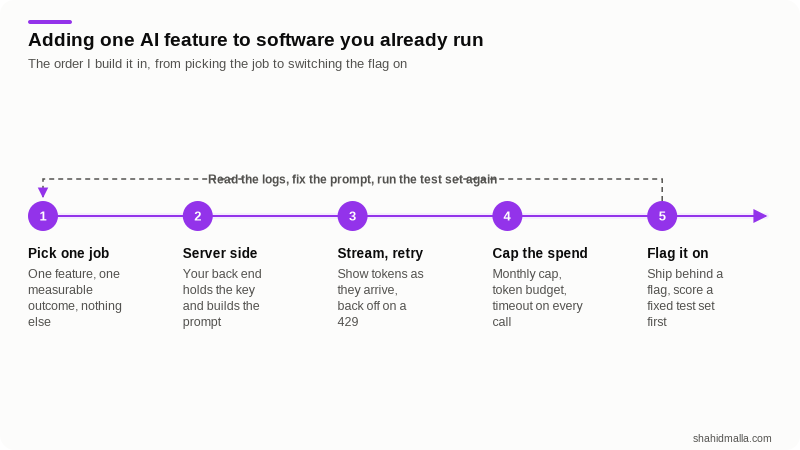
To integrate AI into an existing app or website, pick one job the feature must do, choose a pattern for it, and call the model from your own server so the API key never reaches the browser. Stream the answer, set a timeout, retry rate limits with backoff, cap the monthly spend, log every request, and ship it behind a feature flag you can switch off.
AI integration means connecting software you already run to a model you did not train, almost always a hosted API, so one feature can do a job that used to need a person reading and typing. It is an engineering job rather than a research job. The model is a remote service with a price, a rate limit and a failure rate, and nearly everything hard about the work is the plumbing around the call.
Every status code and limit below comes from the OpenAI and Anthropic developer documentation, read on 14 November 2026. Both change often, so check the page before you copy a number.
Which one job should the AI do first?
Pick the smallest job that happens often, is made of text, and is done today by a person reading something and typing something. That shape is the one a model handles well and the one you can measure.
Write it as one sentence with a number in it: summarize each ticket into three lines so an agent reads half as much. Two jobs are worth avoiding first. Open chat is the hardest thing to judge, because there is no single right answer to score against; my guide to an AI chatbot for a website covers what it takes. An agent that acts is a bigger step again, and how to build an AI agent covers its permissions.
Which AI pattern fits that job?
Nearly every integration is one of six patterns, and the pattern decides how you test it.
| Pattern | What the call does | How you score it |
|---|---|---|
| Summarize | Long text in, short text out | A person who read the source agrees |
| Classify | Text in, one label from a fixed list | Accuracy on a hand-labeled set |
| Extract | A document in, structured fields out | Field by field match against known answers |
| Draft | Context in, a first version a person edits | How often a draft is sent with small edits |
| Grounded answer | A question in, an answer from your documents | Whether the cited passage really says it |
| Agent | A goal in, actions out | Whether the action taken was the right one |
Start with classify or extract, because the output is a value and not an opinion. Ask for JSON against a schema, store it in a normal column, and the feature becomes testable like any other function. A grounded answer needs retrieval behind it, which I explain in what a RAG chatbot is.
Where should the model call live?
On your own server, behind your own endpoint, with the key in an environment variable or a secret manager. Never in the browser, never in a mobile binary, never in a repository.
OpenAI's production best practices page says to keep API keys out of your code and public repositories and pass them in through environment variables or a secret manager. It adds three habits: a project service account rather than a developer's personal key, an expiration date on every key, and rotation by creating the replacement, moving the app across, then revoking the old one.
Anthropic enforces the rule at the edge. Its API and data retention page states that organizations with a zero data retention arrangement "cannot call the Claude API directly from a browser: the API rejects their cross-origin (CORS) requests". The matching 401 on the Claude API errors page is not a key problem: it fires because the browser added an Origin header. Your endpoint then adds what the provider's endpoint cannot: a session check, a per-user rate limit, an input length cap, and a prompt built on the server.
How do you handle slow answers and failed calls?
Stream the answer, put a timeout on every call, and decide per status code whether a retry can help.
OpenAI's production page is exact about streaming: stream: true returns tokens as soon as they are available, which "does not change the time to get all the tokens, but it reduces the time for first token". Anthropic's streaming messages page describes the format you then read, server-sent events from message_start through content_block_delta to message_stop, and warns that new event types may be added.
Three details catch people out. On a stream, errors arrive after a 200, so a half-finished answer counts as a failure. Long non-streaming calls get dropped when a network closes an idle connection, which is why the Anthropic SDK checks that they are not expected to exceed a 10-minute timeout. And OpenAI's rate limits page warns not to replay a request automatically once output has been consumed.
| What you get back | What it means | What to do |
|---|---|---|
| 400 invalid request | Malformed, or a spend limit you set yourself | Fix it. Retrying never helps |
| 401 authentication | Key revoked or expired, or a browser call | Alert a person. Do not retry |
| 429 rate limit | Too many requests or tokens in the window | Wait for retry-after, else back off exponentially with jitter |
429 slow_down | OpenAI: your rate climbed too fast | Cut the rate, then raise it gradually |
| 429 spend or quota | Codes such as enforced_spend_limit_reached | Retrying will not restore access |
| 500 server error | A fault on the provider's side | Retry with backoff, then log the request ID |
| 503 or 529 overloaded | The model (OpenAI 503) or the API (Anthropic 529) is overloaded | Follow Retry-After, then retry more slowly |
| 504 timeout | The request timed out while processing | Move that call to streaming or a batch job |
Do not write the backoff loop first. The Claude errors page says the official SDK already retries transient failures, connection errors, rate limits and 5xx responses, with exponential backoff, twice by default, honoring retry-after when present, and that the client accepts max_retries. Add a layer on top without knowing that, and one user's timeout quietly multiplies into several calls you pay for.
Read the headers too. OpenAI's rate limits page documents response headers such as x-ratelimit-remaining-tokens, so you can slow down before the 429 rather than after, and Anthropic's rate limits page warns that a 60 requests per minute allowance "might be enforced as 1 request per second". Then pick a fallback per call site: a queue, a cached answer, or the old screen.
How do you stop the feature costing more than it earns?
Set a hard cap at the provider first, then a budget inside your own code. Both platforms stop traffic at a cap, and both return something your app has to handle. These are the published controls on each provider's rate limits page, read on 14 November 2026.
| Control | Where it is set | What happens when it is reached |
|---|---|---|
| Monthly spend cap by tier: Start $500, Build $1,000, Scale $200,000 | Anthropic, automatic for the tier | Usage pauses until 00:00 UTC on the first of next month, with a 429 carrying enforced_spend_limit_reached and no retry-after |
| Your own limit below that cap | Anthropic Console, spend limits | Requests return HTTP 400, an invalid request error |
| Monthly usage limit by tier: Free $100, Build $500, Launch $5,000, Grow $200,000 | OpenAI, per organization by tier | 429 with organization_usage_limit_exceeded |
| Spend alert | OpenAI limits page | Sends a notification. Traffic keeps flowing |
| Hard spend limit | OpenAI, organization or project | Affected API requests return a 429 |
Those are limits rather than prices; what you pay is per token. Inside the app, four controls do most of the saving: a cap on input length, a max_tokens that matches the job, a per-user daily quota, and caching. Caching pays twice on Anthropic, whose rate limits page says cache read tokens do not count toward the input tokens per minute limit, so a cached system prompt raises throughput as well as cutting the bill.
What should you log, and what should you never log?
Log enough to reproduce any single answer, and no more personal data than the job needs. Without the first you cannot debug a complaint; without the second you have made a second copy of your customers' data in a place nobody audits.
For every call I store the provider request ID, the model, a prompt version, token counts, latency, the HTTP status, the finish reason and a hashed user identifier. The Claude errors page says every response carries a request-id header, the Python and TypeScript SDKs expose it as _request_id, and support asks for it.
On privacy, read the provider's own page. OpenAI's data controls page states that data sent to the API has not been used to train its models since 1 March 2023 unless you opt in, that abuse monitoring logs are kept for up to 30 days by default, and that Zero Data Retention needs prior approval. Anthropic's retention page says conversation content is not retained by default, with Covered Models the exception at 30 days. Name the provider in your privacy notice, and hash any per-user identifier first, as OpenAI's safety best practices page advises.
How do you know it works before customers see it?
Build a fixed set of real inputs with expected outputs, score it automatically, and run it on every prompt change. Testing by hand is how a tweak that helps one case quietly breaks nine others.
Anthropic's guide to defining success criteria states the standard well. Criteria have to be specific and measurable: it contrasts the useless "Safe outputs" with "Less than 0.1% of outputs out of 10,000 trials flagged for toxicity by the content filter". It also says to cover edge cases, automate grading, and prioritize volume over quality.
The set is cheap: take 50 to 200 real inputs from last month and write the answer you wanted. That page also lists latency and price as criteria next to accuracy.
How do you ship it so you can turn it off?
Behind a flag that is off by default, to a slice of users, with the old path still working underneath. The question is not whether the first version will be wrong somewhere, but how fast you can stop it.
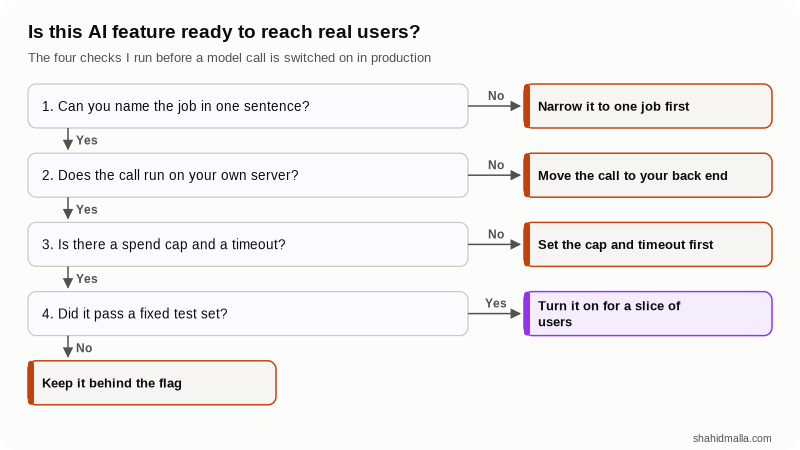
In words: if you cannot name the job in one sentence, narrow it. If the call does not run on your own server, move it there. If there is no spend cap and no per-call timeout, set them first. If it has not passed a fixed test set, keep it behind the flag. The checklist I work through on the day:
- Key in a secret store, never in the repository, with an expiry date.
- Separate staging and production projects, each with its own limits.
- Your own endpoint, with auth, a rate limit and an input length cap.
- A timeout and a retry policy per call, counting the SDK's own retries.
- A hard spend cap at the provider, not only an alert.
- The old path still reachable in one switch.
- A dashboard: requests, errors by status, p95 latency, tokens, spend.
- A report button that reaches a person, which OpenAI's safety page recommends.
Then read the logs for a week. Every integration I have shipped needed prompt changes in week one that no test set predicted, because real users write things nobody on the team would type.
When is adding AI to an app the wrong move?
When the job has one right answer that a query or a lookup table can produce. A model is the slower, costlier, less predictable option and should win on merit.
- No measurable outcome. If nobody can say what better looks like, the project becomes a matter of taste.
- Data you are not allowed to send. Contracts and regulated records need the retention arrangement agreed first.
- A tight latency budget on a blocking path. If the screen cannot wait for the first token, use a background job.
- Nobody to read the logs. An unwatched integration drifts, and the complaint arrives from a customer.
- No human check on costly answers. OpenAI's safety page recommends a person reviewing outputs in high-stakes domains.
What else do people ask about integrating AI into an app?
How do I integrate AI into a website?
The same way as an app, with one extra rule: the page talks to your server and your server talks to the model. Add an endpoint on your back end, keep the key there, stream the response to the page, and gate it with a session check and a rate limit. If you want a chat front door for the whole site rather than one feature, adding AI Mode to your website is a different build.
Can I add AI to an existing app without rebuilding it?
Usually yes, because a hosted model is just another HTTP dependency. The work is a service class, a background job for anything slow, a few columns for the output, and a flag.
How much does it cost to add an AI feature to an app?
Two numbers, and the second never stops. The build is developer time, which for me is $55 to $65 an hour or a fixed quote per scope. The running cost is per token, multiplied by usage. I publish no figure for "an AI feature", because the words cover a one-day classifier and a three-month agent.
Do I need to train my own model?
Almost never for a first integration. A hosted model with a good prompt, your documents retrieved at request time, and a schema for the output covers most business jobs. Training is worth revisiting when a test set shows a gap prompting cannot close.
How long does it take to add one AI feature?
For a narrow classify or extract job on an app I already know, the model call is usually a day, and everything else in this guide is the rest of the work. Chat and agents take longer because judging them takes longer.
If you want this built into your own product, I take it as AI integration work or as hourly AI development, with a free scoping call of about 30 minutes and a written quote within one business day.
Last reviewed 14 November 2026. Disclosure: I build AI integrations, chatbots and agents for a living, including agents for WHMCS, WordPress, SEO and server work, so I am not neutral. I am CTO at ElySpace, a freelance developer for Marmaids LLC, founder of WHMCSPilot, and founder of MagizAI, an AI chat product of my own, which is an interest to weigh when I recommend building rather than buying. Status codes, limits, caps and retention terms come from the OpenAI and Anthropic documentation linked above, read on 14 November 2026.