
Freelance AI agent developer
Hire an AI Agent Developer: Simple AI Agents That Do Real Work
Hire an AI agent developer who has already built working agents. I am Shahid Malla, a freelance developer with 13+ years of client work, and I have built AI agents for WHMCS support, WordPress maintenance, SEO and website chat. They are simple to use: one dashboard, reports in plain English, and nothing risky happens until you approve it.
Free scoping call of about 30 minutes · written quote within one business day · two weeks of support after delivery
By Shahid Malla, AI agent and AI chat developer, full-stack developer · Updated
Proof you can check before you hire me
Clients review my work on Fiverr, Upwork and Google. Every number below links to the profile where you can read those reviews yourself.
- 13+ Years of client work Check it: About me →
- 900+ Projects delivered Check it: Portfolio →
- 600+ Fiverr reviews, 4.9 average Check it: Fiverr profile →
- Top Rated On both Upwork and Fiverr Check it: Upwork profile →
Verify me on: LinkedIn · GitHub · Fiverr · Upwork · Google Business Profile
What do you get when you hire me as your AI agent developer?
You get one developer who has already built AI agents that do real work, and who stays accountable from the first call to support after launch. I write the agent, the tools it uses, the rules it must follow and the dashboard your team uses, and I test it on your real examples before it touches anything live. You can hire me in two ways: install one of my ready-made agents, or have me build a custom agent for your own systems.
I have 13+ years of client work and 900+ projects behind me, and I have been CTO at ElySpace, a hosting company, since 2016. That is why my agents start where things break in real life: servers, billing systems, plugins and support queues.
Which AI agents have I already built?
These are working agents, not demos. Five are my own products, one I built as CTO of ElySpace and one was client work. Each links to a case study.
| Agent | What it does | How simple it is to run |
|---|---|---|
| WHMCS Agent | Checks every WHMCS install and its server once a day, checks the site is up every 15 minutes, and drafts replies to new support tickets. | Ticket replies are sent only after you approve them. It works on live WHMCS installs for hosting companies. |
| WP Agent | Updates WordPress plugins, themes and core with a snapshot and automatic rollback, scans for malware and traces errors to the plugin and line. | One dashboard for many sites, and approvals from the dashboard, Telegram or WhatsApp. |
| SEO Agent | Reads Search Console, crawls the site, ranks the fixes most likely to help and makes the edits. | Three modes per site: watch only, assist or autopilot, with guard rails and undo. |
| Server Agent (in development) | Finds the accounts and sites on cPanel, Plesk, DirectAdmin or plain Linux servers, checks them and fixes problems in four levels. | Rules in plain words, a block list of destructive commands, and approvals before bigger fixes. |
| MagizAI | My own AI chatbot and live chat for websites, with a free module that connects it to WHMCS. | Answers visitors from the site's own pages and files, in their language, and a person on the team can take over any chat. |
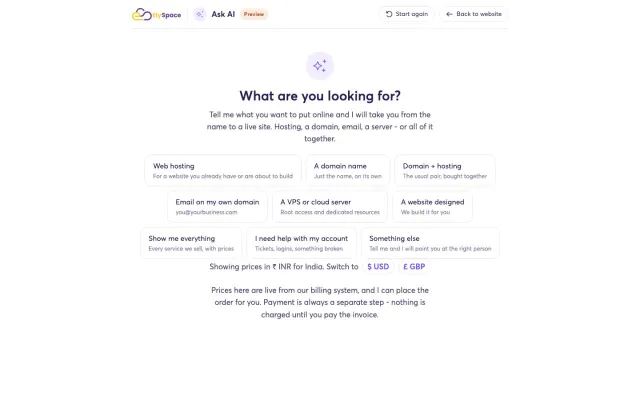
| ElySpace Ask AI | Opens on one question, recommends hosting or domains at live prices and places the order. | The customer just types what they need. |
| OnDemand Psychiatry | Client work: two months as a contract AI engineer rebuilding the AI copilot of a clinical decision-support platform. | A copilot that supports diagnostic reasoning and chart-ready documentation for clinicians. |
Why are my AI agents simple to use?
Because the hard part stays inside the agent, not in your team's day. Every agent I build follows the same few rules:
- One screen. A single dashboard shows what the agent checked, what it found and what it wants to do next.
- Plain English. Reports read like a note from a colleague, not a log file.
- You choose how much it does alone. Each action is automatic, approved after a waiting time, or always asks first.
- Check, act, verify, undo. The agent checks again before a fix, verifies after it, and undoes the change where it can if the result is wrong.
- Money and customers stay with people. Refunds, billing disputes, cancellations and abuse decisions always wait for a person.
- Nothing to learn. Your team needs no code and no prompt writing; they read, approve and get on with their work.
Should you choose a ready-made agent or a custom one?
| Your situation | What I recommend |
|---|---|
| You run WHMCS, WordPress sites or SEO for several sites | A ready-made agent: WHMCS Agent, WP Agent or SEO Agent, $499 each, installed and connected with you within 5 business days. |
| You want an agent inside your own app, CRM, helpdesk or WhatsApp | A custom agent, starting with a prototype on one task. See AI agent development. |
| You want ChatGPT or Claude to use your own systems safely | An MCP server with narrow, logged tools. |
| You only need answers from your documents, with no actions | An AI chatbot is simpler and cheaper than an agent. |
What AI agent work do I not take on?
I do not build agents that send refunds or payments without a person, agents that message people who never asked to hear from you, or agents that log in to sites whose terms forbid it. I also do not promise that an agent will never make a mistake: I build it so that mistakes are caught, logged and easy to undo, and I show you the failures from testing as well as the successes.
Who this is for
- Hosting companies that want an agent watching WHMCS and drafting ticket replies for approval
- Agencies and freelancers who look after many WordPress or WooCommerce sites
- Site owners and SEO agencies who want Search Console problems found and fixed
- SaaS and online businesses that want an agent inside their own app, CRM, helpdesk or WhatsApp
- Teams in the US, UK, EU, Canada and Australia who want one developer accountable from scope to support
What is included
- A short written scope: what the agent does, what it must never do and who approves what
- An agent on the OpenAI or Claude API, with narrow tools for your own systems
- A simple dashboard for your team, with reports in plain English
- An approval rule for every action: automatic, approved after a set time, or always ask
- A log of every action, with a check before and after and undo where the system allows it
- Spending limits on model usage per request and per day
- Testing on your real examples before anything goes live
- Handover notes, and two weeks of support after launch
How the work runs
-
1
Free call
You tell me which job eats your team's time. I tell you plainly whether an agent fits, whether one of my ready-made agents already does it, and what it would cost.
-
2
Scope
A short written scope lists the tasks, the systems the agent may touch, the actions it must never take and who approves what.
-
3
Install or prototype
A ready-made agent is installed and connected with you. A custom agent starts as a working prototype on a small slice of your real work.
-
4
Pilot with approvals
The agent runs with a person approving each action, so you see exactly what it would do before you let it do more on its own.
-
5
Hand over
You get the settings, the rules, the logs and a short guide for your team, followed by two weeks of support.
Recent work
All case studies →-
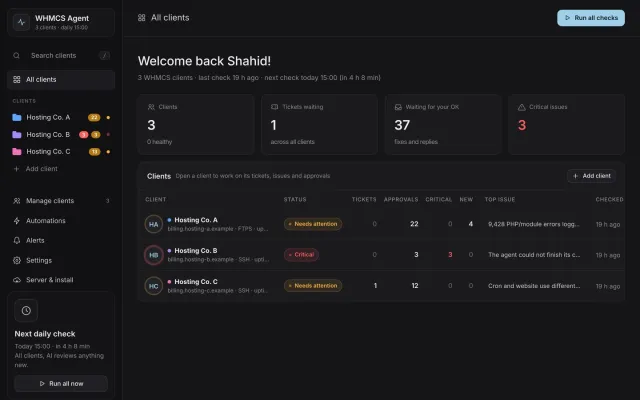
Client project
WHMCS Agent
My own product: an AI agent that monitors WHMCS installs and drafts support replies
-
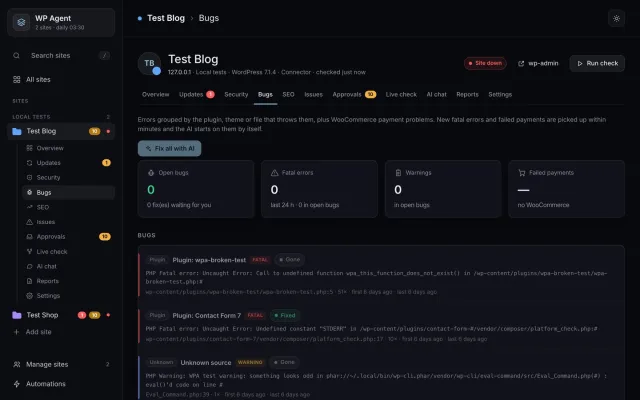
Client project
WP Agent
My own product: an AI agent that maintains WordPress and WooCommerce sites
-
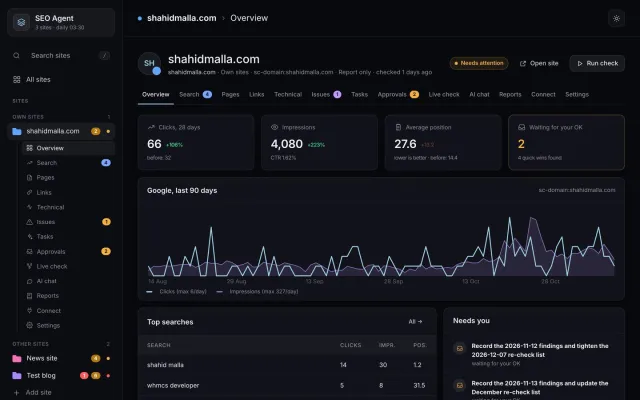
Client project
SEO Agent
My own product: an AI SEO agent that reads Search Console and makes the fixes
-
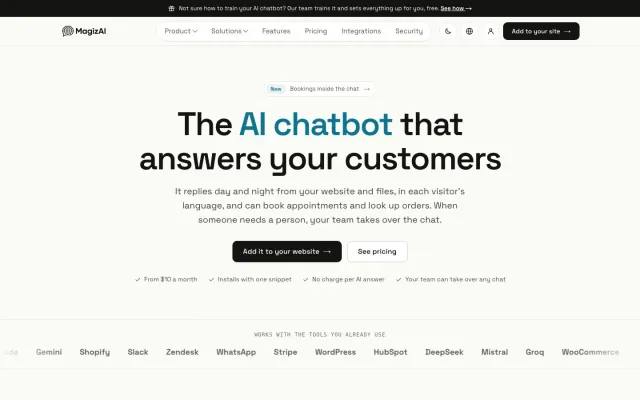
My product (founder and CEO)
MagizAI
My own product: AI chatbot and live chat for websites
-
Client project
ElySpace Ask AI
An AI Mode front door for a hosting company: ask, choose, order
-

Contract (2 months)
OnDemand Psychiatry
Rebuild of the AI copilot for a psychiatric decision-support platform
Guides on this topic
All guides →-
How Much Does It Cost to Build an AI Agent or AI Chatbot?
Build hours by cost driver, monthly token bills worked out with Anthropic and OpenAI prices, the costs people forget, a quote checklist and when not to build.
-
How to Build an AI Agent for Your Business, Step by Step
The eight steps I follow to build a business AI agent: one job with a finish line, a tool inventory, workflow or agent, model and SDK choice, read-only tools and approvals, a real test set, and a supervised launch.
-
AI Chatbot vs AI Agent: Which Does Your Business Need?
A chatbot answers from your content and an agent calls tools that change things. How tool calls work per the provider docs, the workflow option between them, how each is billed, and a decision table.
-
WHMCS AI Agent: Daily Checks, Safe Fixes and Ticket Drafts
A working guide to running an AI agent against WHMCS: the daily checks worth automating, read-only access, fix policies with approval timers, the billing actions that must stay with a person, and how ticket drafts fit.
-
WordPress AI Agent: What It Can Safely Automate on Your Sites
A working guide to running an AI agent across WordPress sites: updates that snapshot and roll back, PHP errors grouped by plugin and line, WooCommerce checks worth automating, and the actions that stay with a person.
-
AI SEO Agents: What They Can Automate and What Needs a Human
An AI SEO agent can read Search Console, crawl a site and make small reversible page edits on its own. Link building, outreach and strategy cannot be handed over. Where the line sits, and why.
-
AI Server Management: What Is Safe to Automate on cPanel and Plesk
A working guide to running an AI agent on cPanel, Plesk and plain Linux servers: four fix levels, scoped tokens instead of root, written deny lists, check-do-verify-undo, and what always waits for a person.
-
AI Ticket Triage: Sort and Route Support Tickets Automatically
AI ticket triage sets the department, category, urgency, language and sentiment on a new ticket. What rules should still decide, how to pick a confidence threshold, and what a hosting desk must never automate.
Frequently asked questions
What does an AI agent developer do?
An AI agent developer builds software in which a language model, such as GPT or Claude, can use tools to do a job: read a support ticket, check a server, update a plugin, look up an order. The developer writes those tools, the rules around them and the checks that stop the model from doing anything it should not. Most of the work is in the rules, the testing and the dashboard people use every day, not in the model.
How much does it cost to hire an AI agent developer?
I charge $55 to $65 an hour, or a fixed price after a short scoping call. My ready-made agents for WHMCS, WordPress and SEO cost $499 each, installed and connected with you. The AI model's usage is billed by OpenAI or Anthropic to your own account, and I set spending limits so a busy day cannot surprise you. My guide to AI agent development cost explains what drives the price of a custom build.
Are your AI agents hard to use?
No. Each agent has one dashboard that shows what it checked, what it found and what it wants to do, in plain English. You decide per action whether it may act on its own, after a waiting time, or only when you approve. WP Agent and Server Agent also take approvals from Telegram or WhatsApp, so you can say yes from your phone. Nobody on your team needs to code.
Can an AI agent change things without asking me?
Only the actions you allow. Every action has a rule: automatic, approved after a set time, or always ask. Before a fix the agent checks again, after it verifies the result, and where the system allows it the fix undoes itself if the check fails. Some things always wait for a person: in WHMCS Agent, billing, cancellation and abuse tickets; in WP Agent, refunds and payment settings are never touched.
Can you build a custom AI agent for my business?
Yes. Besides my ready-made agents, I build custom agents for support, sales and back-office work: answering from your documents, updating your CRM or helpdesk, qualifying leads on WhatsApp and handing over to a person. My AI agent development page explains the uses, the build steps and the safeguards in detail.
Which AI models do you use?
OpenAI's GPT models or Anthropic's Claude, chosen by testing both on your own examples rather than by habit. Where an assistant such as Claude needs access to your systems, I connect it through narrow, logged tools with an MCP server. I am an independent developer, not affiliated with OpenAI or Anthropic.
How long does it take?
A ready-made agent is installed and connected with you within 5 business days. A custom agent starts with a prototype on a small part of your real work, so you can try it before a full build; the full timeline depends on how many systems it connects to and is fixed in the written scope.
Should I hire a freelancer or an AI agency?
A freelancer suits a defined job with one accountable person who writes the code, the rules and the tests; an agency suits work that needs several people at once. My guide on hiring a company or a freelancer for AI work covers how to choose and what to ask either one.
Related services
-
AI Agent Development: Custom AI Agents for Support, Sales and Operations
AI agent development services: custom AI agents for support, sales and back-office work on OpenAI or Claude, t...
-
Hire AI Developer: AI Agents, Chatbots, RAG and AI Features
Hire AI developer Shahid Malla, a freelance AI developer for agents, chatbots, RAG, MCP servers and AI feature...
-
MCP Server Development: Connect Claude or ChatGPT to Your Systems
MCP server development for Claude, ChatGPT and your own AI agents: read-only tools by default, per-user OAuth,...
-
AI Chatbot Developer: Chatbots for Websites, WhatsApp and Support
AI chatbot developer behind MagizAI. I build chatbots for websites, WhatsApp and WHMCS that answer from your d...
Ready to talk about your project?
You deal with me personally from the first message to the handover. Choose the way that suits you; I reply within one business day.