AI for customer service emails is safest as a drafting tool. The model reads the incoming email, writes a reply, and a human reads it, edits it and sends it. Automatic sending belongs to a short list of routine requests you have already reviewed in bulk. Ground every draft in your help center and the customer's own records, write the tone rules once, and measure how much agents edit.
An AI customer service email assistant reads an incoming support email, pulls the facts it needs from your help center and your order or billing records, and produces a reply for a human to approve. On a narrow set of topics it can send that reply itself. It is a writing and retrieval step inside the help desk you already run, and the design decision that matters is where the human sits.
Which customer emails should AI touch first?
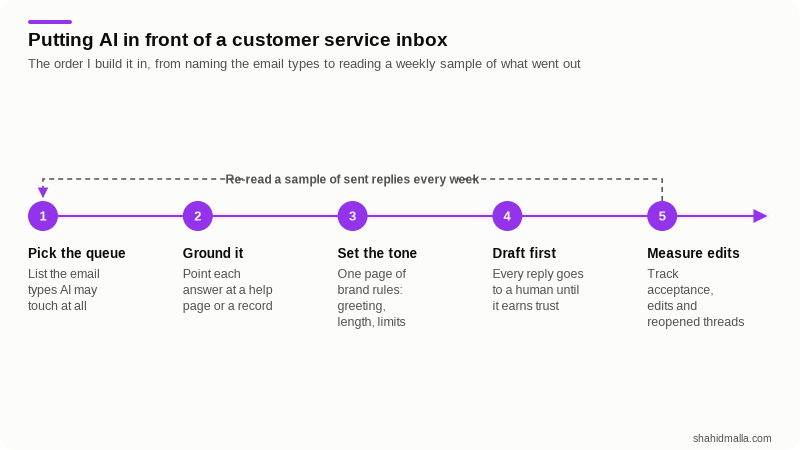
Start with the emails whose answer already exists in writing somewhere you control. If it lives only in a senior agent's head, the model has nothing to retrieve and produces confident prose with no source behind it. Below, "draft" means a human presses send and "auto-send" means nobody reads it first.
| Email type | Facts the reply needs | Where I start it |
|---|---|---|
| Order or service status | The provisioning record | Draft, auto-send later |
| How do I do X in the panel | One help center article | Draft, auto-send later |
| Invoice or receipt copy | Billing record, after an identity check | Draft, auto-send later |
| Password and login help | A documented procedure | Draft only |
| Pricing and upgrade questions | The current price page | Draft only |
| Cancellation, refund or chargeback | History, policy and money | A human writes it |
| Abuse, legal or security reports | A named owner and a process | A human writes it |
| An angry or escalated thread | The history, and judgment | A human writes it |
Sorting incoming mail is a separate, lower-risk job worth doing first: nothing it does reaches the customer. My AI ticket triage guide covers it.
Should the AI draft the reply or send it?
Draft first, in every case. The products split into three patterns:
- Suggestion in the composer. The draft appears where the agent would type. In Zendesk's suggested first replies, Tab accepts and Escape rejects, and rejecting retrains nothing. Do not build on that one: Zendesk says suggested first replies are being discontinued on 19 January 2027.
- Suggestion plus approved actions. Zendesk's auto assist suggests a reply and the actions that go with it. Its documentation says agents review and approve suggestions in most cases, while some low-risk actions an admin pre-approved may run on their own. Help Scout's AI Drafts is the plain version: the reply lands in a draft state and the agent reviews, revises and sends.
- Autonomous reply. The AI answers end to end and hands over when it cannot. Intercom prices Fin on the outcome rather than per seat: its pricing page, read on 23 November 2026, lists $0.99 per outcome, $1.99 per voice outcome and $19 per help desk seat per month when Fin runs on the Intercom help desk.
The tools built into mail clients sit outside all three. Gmail's "Help me write" and Outlook's Draft with Copilot are documented as personal composing tools for the person at the keyboard, and neither describes shared tone rules, an approval queue or a record of what the team sent. Microsoft also notes that in new Outlook and on the web, Draft with Copilot does not support plain text.
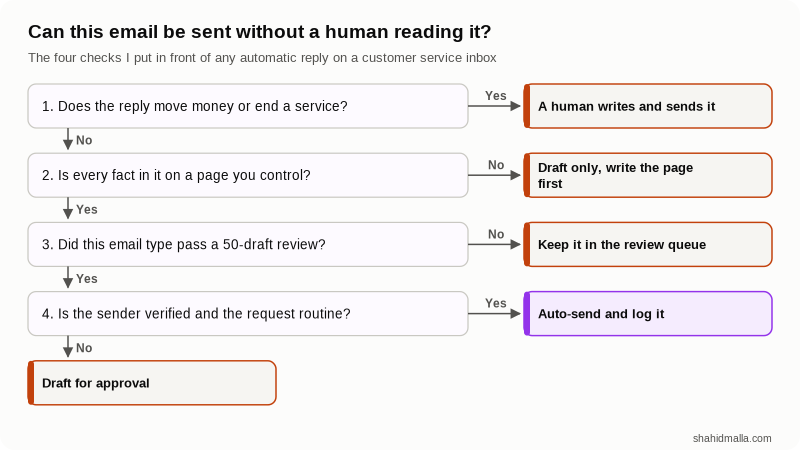
In words: if the reply moves money or ends a service, a human writes it. If any fact in it is not on a page you control, it stays a draft and you write the page first. If that email type has not passed a fifty-draft review, it stays in the queue. Only routine requests from verified senders go out automatically, and those get logged.
What should the reply be grounded in?
Every sentence should trace back to a help center article, a macro, or a field in the customer's own record. A model with no retrieval step fills gaps with plausible policy, and that is how you end up honoring a refund window that does not exist. The vendors ground drafts differently:
- Zendesk's suggested first replies come from your macros and help center articles, and sometimes from the model itself. The banner above the composer says which: a macro suggestion matches the macro exactly, an article suggestion is an AI summary. The same page states you cannot influence the content of suggested replies.
- Help Scout's AI Drafts learn from previous conversations in the account and from your Docs articles. Its documentation notes you need roughly 100 conversation replies in an inbox before drafts appear.
- Gmail's "Help me write" personalizes drafts from your other emails and Drive files, with a Sources control listing what it used. Think about that before using it on a shared mailbox.
If you are building rather than buying, the retrieval layer is the job. My guide to RAG chatbots covers the wiring: fetch a few passages, put them in the prompt, and require the model to answer only from them. Read order and billing facts through a typed function call instead of letting the model guess. If retrieval returns nothing, the draft says so and goes to a human. An empty answer is cheap; a wrong one is not.
How do you write the tone and brand rules?
As short, specific instructions about how to say things, kept apart from the instructions about what to do. Zendesk's best practices for communication guidelines draw that line: guidelines define how to say something, procedures define what to do, and tone instructions inside a procedure should be moved out.
Three details from that page matter first. Guidelines are signals rather than strict rules, so an instruction may not be followed in a complex or emotional conversation, and empathy is prioritized over your tone preference. A guideline can cover several brands, but each brand can have only one. There is a 10,000 character limit, which the page compares to four or five pages of text.
| Rule | Write it like this | Not like this |
|---|---|---|
| Greeting | Always greet the customer with "Hello!" or "Hi". | Greetings: Use "Hello!" or "Hi [Name]," |
| Closing | At the end of each message, apply "Kind Regards". | Signature: "Kind regards etc." |
| Sensitive topics | Be apologetic and professional when discussing refunds. | Always escalate refund requests. |
| Length | Keep email replies under six sentences. | Keep it short where appropriate. |
| Signature | Do not sign off; the desk appends one. | Sign off normally. |
The first three rows are the documentation's own good and bad examples. The third pair shows the other trap: "always escalate refund requests" is a procedure, not a way of saying something. An instruction a new hire could follow on day one is one the model can follow.
Some of this is configuration rather than prose, and a setting beats a prompt because it is deterministic. Help Scout sets the greeting and closing of AI drafts per inbox, each from its own list: the greeting choices are Auto, "Hi (name),", "Hello (name),", no greeting, or a custom line. Outlook adjusts tone and length on a draft and has a Coaching by Copilot mode that reviews a message you wrote and suggests changes to tone, clarity and reader sentiment. Gmail offers Formalize, Friendly and Shorten. One caution from Zendesk: guidelines apply only when the entire message is selected for rewriting, and half-rewritten replies are where house style quietly breaks.
What does a working approval queue look like?
Like a normal inbox with one extra column: who approved this, and how much did they change. The queue catches wrong facts before a customer reads them, so anything that makes approval a formality defeats it. My checklist before any AI-written email goes out:
- One named owner for the queue, not whoever is free.
- Shadow mode for two weeks: drafts generated and logged, nothing sent.
- Fifty drafts per email type read and scored for factual errors before that type may auto-send.
- A rejection reason from a fixed list on every reject, so reasons can be counted.
- Accept and reject on the keyboard, so reviewing beats writing from scratch.
- A plain route to a person in every automatic reply.
- A kill switch that stops auto-send in one click, tested before go-live.
What do you measure once it is live?
Two things that pull against each other: how often agents accept the draft, and whether the customer had to write again. Acceptance alone is a trap, because an agent under pressure accepts bad drafts. Zendesk's Copilot reporting documentation defines acceptance rate as accepted suggestions divided by suggestions shown, with filters including ticket channel so you can isolate email.
| Metric | What it tells you | What a bad reading looks like |
|---|---|---|
| Acceptance rate | Whether drafts are usable at all | High, while reopens also climb |
| Edit distance on accepted drafts | How much of the draft survived | Agents rewrite most of every reply |
| Reopen rate on AI-answered threads | Whether the answer actually landed | Worse than your human baseline |
| Escalations after an automatic reply | Whether auto-send is set too wide | Rising on one email type |
| Satisfaction, AI-touched or not | The honest comparison | A gap you cannot explain |
Edit distance is the metric most teams skip and the one I find most useful. Store the generated draft and the sent text, then compare. A draft that survives almost unchanged is working; one rewritten every time costs reading time on top of writing time and should be switched off for that email type.
Be strict about what counts as resolved. Intercom's documentation on Fin outcomes, read on 23 November 2026, states its own version: you are charged at most one outcome per conversation, and if the customer returns to the same conversation asking for more help, even in a later billing period, that resolution is deducted and not charged. A thread that comes back was not resolved.
What has to stay out of the model?
Card numbers, identity documents, passwords, API keys and anything a customer pasted in a panic. Strip those before the text reaches a model, in your own code if the vendor does not, and keep the raw email in the help desk where your access controls apply. Then read the terms. Two statements I read on 23 November 2026:
- OpenAI's enterprise privacy page, updated 8 January 2026, says it does not train its models on business data by default across ChatGPT Business, Enterprise, Edu and the API Platform, and that you own your inputs and outputs where law allows.
- Anthropic's article on model training, dated 16 March 2026, covers consumer plans: chats improve models only when you allow it, when flagged for safety review, or when you opt in. Commercial products, including the API, have a separate page.
Those bind the model vendor. Your contract is usually with the help desk in between, so what matters is its data processing agreement and subprocessor list, including the region the data sits in. That is the paperwork an EU regulator asks for. More in is ChatGPT safe for business data.
What breaks after a few months?
Not the model. What breaks is the content it reads, the habits of the people approving it, and the roadmap of the vendor you picked.
- Help center drift. A price changes, the article does not, and drafts quote the old version with full confidence. Put the help center on a review schedule the day you turn drafting on.
- Rubber-stamping. Acceptance rises, reading time falls, nobody is checking. Sample sent replies weekly and score them blind.
- Features retiring. Zendesk removes suggested first replies on 19 January 2027. Keep your tone rules in a document you own.
- Prompt injection. An incoming email is untrusted text. If it reaches a model that can call tools or read internal data, instructions hidden in the body or an attachment are an attack surface. My guide on prompt injection covers the defenses.
- Volume economics. Per-outcome pricing is kind at low volume and less kind at high volume. Re-run the arithmetic quarterly.
There is a case for not doing this at all. If one person handles the whole inbox, most emails are genuinely unique, and there is no help center to retrieve from, the review step costs more than it saves.
What else do people ask about AI for customer service emails?
Can AI reply to customer emails automatically?
Yes, and several products do. Intercom prices Fin that way, at $0.99 per outcome on its pricing page read on 23 November 2026. The real question is which email types you allow it for. I keep automatic sending to routine requests from verified senders, where the answer sits on a page I control.
Which customer service emails are safe to automate?
Ones with a single documented answer and no money attached: status checks, how-to questions covered by an article, receipt copies after an identity check. Anything needing judgment or changing a billing state is not a candidate. If you cannot point at the page the answer comes from, that type is not ready.
How do I stop AI replies from inventing policies?
Retrieval plus a refusal rule. Give the model a few passages from your help center or a typed record lookup, tell it to answer only from those, and make the draft say it does not know when retrieval comes back empty. Heavy rewrites usually point at a missing article, not a bad model.
Will AI make our support emails sound robotic?
Only if you let the defaults write for you. Write explicit rules on greeting, closing, length and formality, and use the settings a product offers, such as Help Scout's per-inbox greeting choices. Zendesk warns that tone guidelines are signals, so test them on real threads.
Do we have to tell customers an email was written by AI?
That depends on where your customers are and what you promised them, so take legal advice rather than mine. What I recommend regardless: never pretend an automatic reply is a named person, and give an obvious route to a human in every message sent without review.
What does this cost to build on our own stack?
It depends on where the facts live and how clean the help center is, and I will not quote a number I have not scoped. The work is usually retrieval, a function call layer for order data, the tone rules and the approval screen. I quote a fixed scope, or $55 to $65 per hour, after a free scoping call. All sales are final, so ask before you buy.
If you want this built into an existing desk, I do it as AI agent development or workflow automation, starting with the email types that already have an answer in writing.
Last reviewed 23 November 2026. Disclosure: I build AI agents, chatbots and support automation and I sell this kind of work, so I am not neutral. I am CTO at ElySpace, a freelance developer for Marmaids LLC, and founder of WHMCSPilot and of MagizAI, an AI chatbot and live chat product that competes with some tools named here. Product behavior, settings, limits and prices come from the Zendesk, Help Scout, Microsoft, Google, Intercom, OpenAI and Anthropic pages linked above, read on 23 November 2026.