Live chat for web hosting works when you run it as a support channel with rules, not as a widget. Use it for questions one person can settle in one sitting: plan choice, domains, DNS, billing and suspensions. Send investigations and abuse reports to tickets and outages to a status page, staff only the hours you can keep, and make any AI first line hand off cleanly to people.
I have been CTO at ElySpace, a hosting company, since 2016; this is the operations side of chat, not a software review. For the technical setup, read my WHMCS live chat integration guide; for tools that cost nothing, see what free live chat for WHMCS really includes.
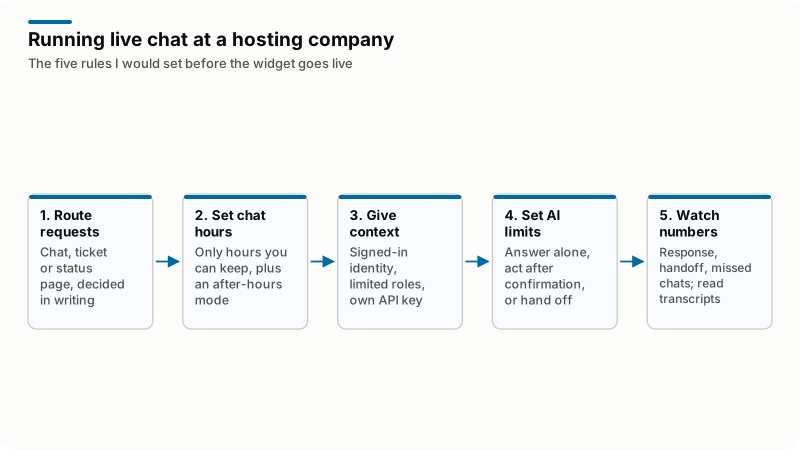
In words: decide in writing which requests go to chat, a ticket or the status page. Show only chat hours you can keep, with an after-hours mode. Give agents the signed-in client's identity, a limited role and, for any bot, its own API credential. Write down what an AI may answer alone, do after confirmation or must hand off. Then track response, handoff and missed chats, and read transcripts.
What do hosting customers actually ask in live chat?
In my experience, hosting chats fall into six groups, and each has a natural place to end.
| Topic | Typical question | Where it should end |
|---|---|---|
| Pre-sales plan choice | "Which plan fits a WordPress site with email for ten people?" | Chat, ending in an order or a clear next step |
| Domains and DNS | "Is this domain free?" "Why does it still show the old site?" | Chat for availability, nameservers and propagation; a ticket when staff must edit a zone |
| Billing and suspensions | "My site is suspended and I just paid." | Chat to check the invoice; a ticket for refunds, disputes and manual overrides |
| Outages | "Is your server down?" | The status page; chat links to it |
| Migrations | "Can you move my site from my old host?" | Chat to scope it; a ticket for credentials and the work log |
| Abuse, legal, data requests | Spam complaints, takedown notices, deletion requests | A ticket or a dedicated address, never chat alone |
Which hosting questions belong in chat, a ticket or the status page?
Use chat when the answer exists now and the person answering can see enough to give it; use a ticket when someone must investigate, touch a server or keep a record; use the status page when one answer fits many customers. Three tests settle most cases:
- Can it finish in this conversation? If not, the agent opens the ticket with the transcript, so the customer never repeats it.
- Does it need server access, money back or a written promise? Then it is a ticket.
- Will many people ask this in the next hour? Then it belongs on the status page, and chat points there.
Scala Hosting's post on its live chat draws the same line: it says abuse issues "need to be documented in tickets" and that complex issues needing investigation still go to a ticket.
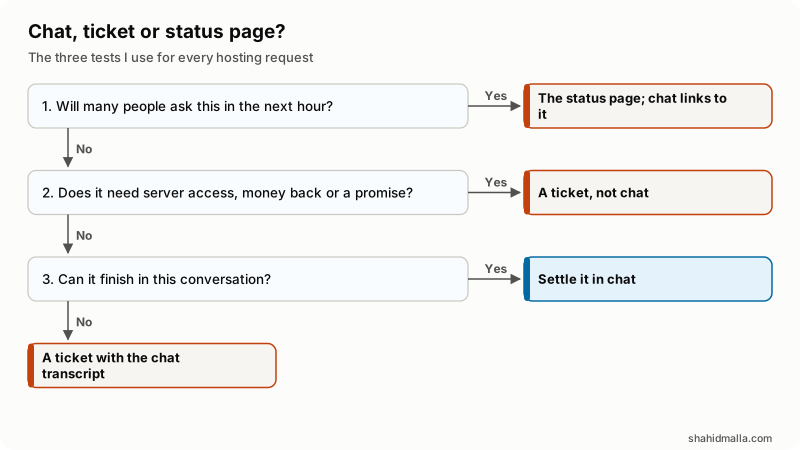
In words: if many people will ask the same thing in the next hour, answer on the status page and link to it from chat. If the request needs server access, money back or a written promise, it is a ticket. If it can finish in this conversation, settle it in chat; if not, the agent opens a ticket with the transcript.
Why should a chat that changes something become a ticket?
Because the ticket is your audit trail. When a customer says months later that an agent promised a free renewal, you check the client's ticket history in WHMCS, not a chat dashboard that a retention setting may have emptied.
My rule: any chat that promised something, changed the account or ended unresolved becomes a ticket on that client, with the transcript and the owner of the next step. The integration guide linked above covers the mechanics, from a transcript email to the OpenTicket API call.
Does live chat for web hosting need to run around the clock?
No. It needs chat hours you can keep, shown honestly on the widget and the contact page, plus a defined after-hours mode. A bubble that says "online" when nobody is there costs more trust than a ticket form.
| Model | Who answers | Out of hours, the visitor sees | Suits |
|---|---|---|---|
| Business hours only | Your team | An offline form that creates a ticket, your hours and the status link | Small hosts serving one time zone |
| Business hours plus an AI first line | People by day, an AI at night | Answers from your knowledgebase and the client's own records; the rest queued for morning | Customers across time zones, no night shift |
| Round-the-clock people | In-house shifts or an outsourced team | The same service as by day | Larger hosts, and managed services sold with night response |
Whoever staffs chat needs an escalation path to someone with server access and a written rule for when to wake them. Outsourcing is an option; Tawk.to, for one, lists hired chat agents at $1 per hour on its pricing page. Outside agents need the same knowledgebase, account view and escalation rule, or they only relay messages.
What should a chat agent see, and how do you give it from WHMCS safely?
The agent needs the client's verified identity, services and their status, unpaid invoices, open tickets and domain expiry dates beside the chat. Four rules keep that safe.
- Identity comes from the client area login, not from a typed email address. Ask visitors to sign in before you discuss an account.
- Agents use a limited administrator role. WHMCS sets these at Configuration > System Settings > Administrator Roles, with separate View, Manage, Delete and Cancel permissions, per its administrator role documentation. Chat agents rarely need Delete.
- Any panel or bot that reads WHMCS gets its own API credential. A credential is authorized only for the actions its API roles allow, as the API credentials documentation describes. Start with read actions.
- No passwords or card numbers in chat. Send resets through WHMCS and payments to the invoice's pay link.
Where should an AI first line stop and hand off to people?
An AI first line should answer from your own content and the signed-in client's own records, and hand off the moment a request needs judgment, money back, data removed or a change the customer has not confirmed.
| Request | Who handles it |
|---|---|
| Explain a plan, a DNS record or a knowledgebase answer | AI alone, linking the source |
| Show the signed-in client's services, invoices or tickets | AI alone, own account only |
| Change nameservers, open a ticket, order, request cancellation | AI, only after the customer confirms exactly what will change |
| Refunds, credits, downtime compensation | Staff only |
| Deleting data, terminating services, abuse, disputes | Staff only, in a ticket |
| Why an outage happened or when it ends | Status page wording only; no guessing |
Hand off when the customer asks for a person, the same question returns twice, legal or angry language appears, or the request is staff-only. Pass the transcript, the verified client ID and what the AI tried. If nobody is online, give a ticket number and the hours when a person will read it.
What are the options for the first line, and how do they compare?
Four common routes: a human-only widget, a help desk suite's AI agent, a WHMCS-specific AI chat such as MagizAI, and a custom build. Disclosure: I am the founder and CEO of MagizAI, so weigh my view of it accordingly. Each product named is one example of its type, with prices from its own page on 17 October 2026.
| Route | Answers first | WHMCS account data | Cost model | Limits to weigh |
|---|---|---|---|---|
| Human-only widget (example: Tawk.to without its AI add-on) | Your staff | What you pass from WHMCS, usually name and email | Free with Tawk.to branding; $29 a month to remove it | Nothing is answered out of hours except offline messages |
| Help desk suite's AI agent (example: Intercom Fin) | The AI, from your help content, then the suite's inbox | Its pricing page does not mention WHMCS; lookups would need your own connection | $0.99 per outcome; its FAQ says Fin also works with other help desks | Cost grows with volume; a second system beside WHMCS |
| WHMCS-specific AI chat (example: MagizAI) | The AI, from your synced knowledgebase, plans and prices | The signed-in client's own services, domains, invoices and tickets; actions start off, and the client confirms each | Module listed as Free on the WHMCS Marketplace; needs a paid plan, from $10 a month with your own AI key, before tax; no free tier | Requires WHMCS 8.0 or later; only useful if your customer data lives in WHMCS |
| Custom build | Whatever you design | Through an API credential with a role you define | A build quote plus model usage billed by the AI provider | You maintain it and retest after WHMCS updates; see WHMCS AI chatbot routes |
Choose on two questions: who answers at 2 a.m., and does the first line need account data? If people answer and account data can wait, a human widget is enough. Whatever answers alone, the permission table above applies to it.
What should live chat do during an outage?
Switch to outage mode: one status link, one canned notice, no proactive invitations, and no separate ticket per customer for a problem you already know about.
- Post the incident at Support > Network Issues in WHMCS. Its Network Issues documentation says the section shows only to signed-in clients by default; turn off Service Status Require Login on the Support tab of Configuration > System Settings > General Settings so anyone can read it. If WHMCS shares a server with client sites, keep an external status page too.
- Pin a canned notice, for example: "Some sites on one server are not loading. Engineers are on it; the status page updates every 30 minutes." Pick your own interval and keep to it.
- Pause proactive invitations and sales prompts.
- Limit the AI to the status wording for outage questions.
- Tag outage chats, send one follow-up when service is back, then switch invitations on again.
How long should a host keep chat transcripts?
Only as long as you have a reason you can state in a written retention policy. Hosting transcripts hold personal data: names, domains, IP addresses and now and then a pasted password. The UK regulator's storage limitation guidance says you "must not keep personal data for longer than you need it" and need "a policy setting standard retention periods wherever possible."
- Set the chat tool's retention to that policy; a transcript copied into a ticket follows ticket retention.
- Delete a pasted password from the transcript and ask the customer to change it.
- Name the chat vendor and any AI provider in your privacy policy, and sign their data processing terms.
- Tell visitors when they are talking to an AI.
Which live chat metrics should a hosting company track?
Track a few, define each before collecting it, and compare against your own previous month, because tools define the same names differently.
| Metric | Definition | What it tells you |
|---|---|---|
| First response time | From the visitor's first message to the first human reply; report AI replies separately | Whether staffing matches the hours you show |
| Resolution in chat | Chats with no follow-up ticket within a window you fix, for example three days | Whether agents and the AI have enough access and knowledge |
| Handoff rate | Share of AI-started chats passed to a person | Where the knowledgebase is thin; a sudden drop can mean the AI answers what it should pass on |
| Chat-to-order | Pre-sales chats followed by a paid order within a window you fix, for example seven days | Whether pre-sales chat earns its staffing cost |
| Missed chats | Chats started with no reply before the visitor left | Whether your shown hours are honest |
Chat-to-order needs the WHMCS client ID passed into the chat. Numbers hide tone, so read a sample of transcripts each week.
When is live chat not worth it for a small host?
When nobody can answer in the hours it shows, when the knowledgebase is too thin for an AI to answer from, or when most requests need server access and end in tickets anyway. A one- or two-person host should first have a ticket system, a public status page and articles on the questions in the first table, then add chat to pre-sales pages during waking hours. That is the order my guide on how to start a web hosting business follows. The server side of that setup, including where WHMCS and the status page live, is what my web hosting expert page covers.
What should be ready before you switch live chat on?
- Chat hours on the widget and contact page, with the after-hours mode working.
- Written routing for chat, ticket and status page.
- Signed-in identity passed from WHMCS; account questions need a login.
- A limited admin role for agents, and an API role limited to the agreed actions for any bot.
- AI permissions written down: answer alone, act after confirmation, never.
- An outage notice drafted and the status page public.
- A chat-to-ticket rule, a retention period and an updated privacy policy.
- Metrics defined, with one named person reading them monthly.
What else do people ask about live chat for web hosting?
Should a small hosting company outsource live chat?
It is an option; Tawk.to, for one, listed hired chat agents at $1 per hour on its pricing page on 17 October 2026. Outside agents need the same knowledgebase, account view and escalation rule as your own team, or they only relay messages. They also need a written rule for when to wake someone with server access.
Is there free live chat for a hosting company?
Yes. Tawk.to is free with its branding, and removing the branding cost $29 a month when I checked on 17 October 2026. Free covers the widget, not the people: nothing is answered out of hours except offline messages. My guide on free live chat for WHMCS covers what the free options include.
Is it safe for customers to share passwords in live chat?
No. Send password resets through WHMCS and payments to the invoice's pay link. If a customer pastes a password anyway, delete it from the transcript and ask them to change it.
Should a host tell visitors when they are talking to an AI?
Yes. Tell visitors when they are talking to an AI, and name the AI provider in your privacy policy along with the chat vendor. Sign both vendors' data processing terms.
If you would rather build the agent panel, ticket handoff or AI first line into your own WHMCS, that is custom WHMCS module development, scoped on a free call of about 30 minutes.
Last reviewed 17 October 2026. Disclosure: I am CTO at ElySpace, a hosting company, a freelance developer for Marmaids LLC and founder of WHMCSPilot, and I sell WHMCS development work. Disclosure: I am the founder and CEO of MagizAI, so weigh my view of it accordingly. Tawk.to, Intercom and Scala Hosting are plain mentions, not affiliate links. Prices and WHMCS menu paths come from the pages linked above as I read them on that date. I am not affiliated with WHMCS.