
WP Agent: AI WordPress and WooCommerce Maintenance Agent
One AI agent for all your WordPress and WooCommerce sites: safe updates with automatic rollback, security scans, a bug fixer and store checks, with your approval before anything risky.
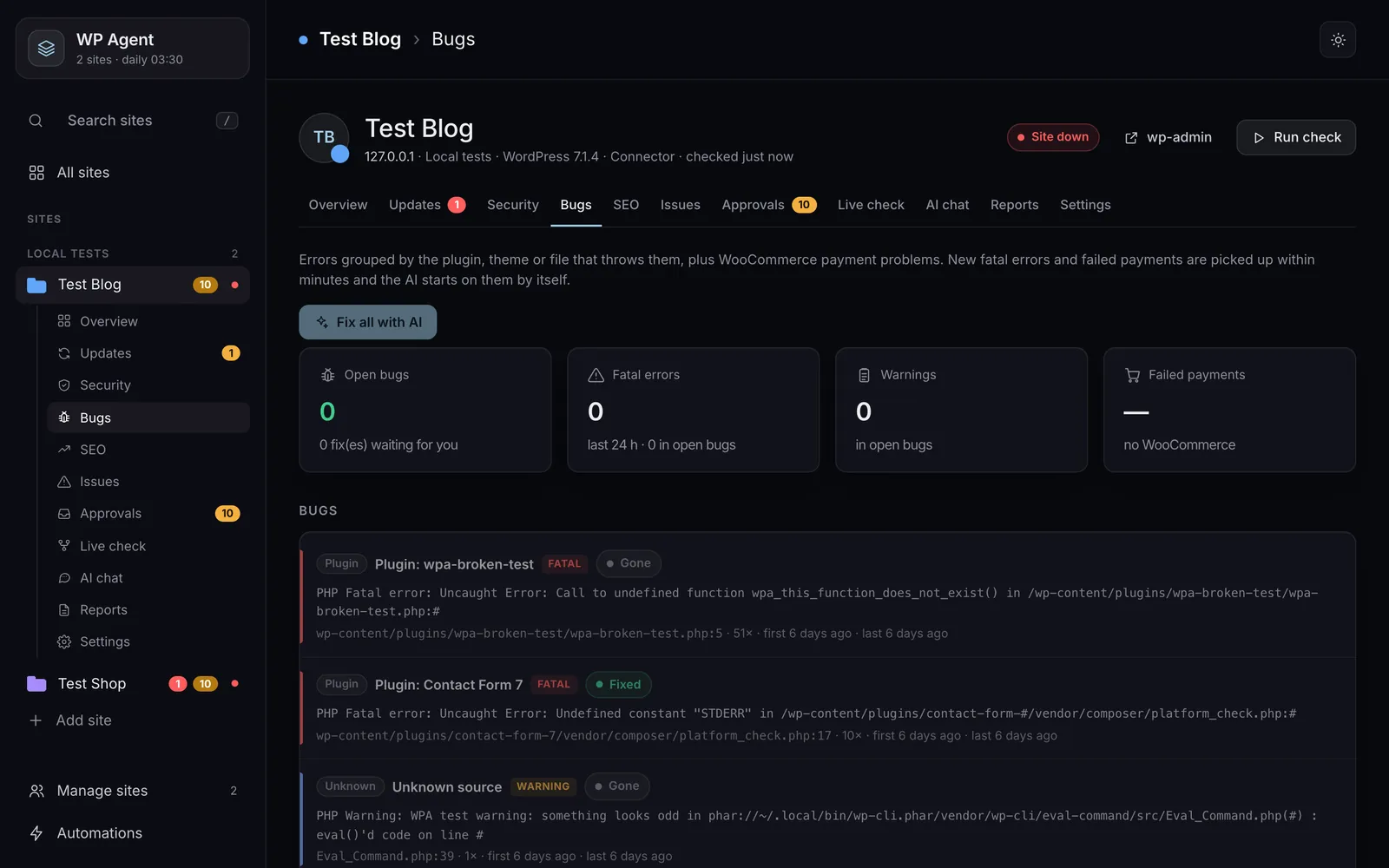
WP Agent looks after many WordPress and WooCommerce sites from one dashboard: it updates them safely, scans them, finds and fixes errors, and checks the store, while every risky change waits for your OK. The screenshots show it on my two local test sites, a blog and a WooCommerce shop.
What does it do on each site?
- Updates with a way back: it takes a snapshot before a plugin, theme or core update, checks the site afterwards and rolls back on its own if something broke.
- Security: it compares core and wordpress.org plugin files with the official copies, scans for malware and checks installed versions against known vulnerabilities.
- Bug fixer: it groups PHP errors by the plugin, theme or file that throws them, with the line. It tries the quick fixes first (update, roll back, or switch off a plugin that crashes the site), then the AI proposes a code fix for you to review.
- WooCommerce: failed payments, paid orders that were never shipped, stock that ran out, broken webhooks and a live order list.
- The rest: SEO basics, speed, database clean-up and an uptime check every 5 minutes.
How much does it do on its own?
Each site gets a care profile (Business, Online shop, Blog, Fully managed or Watch only), and each fix has a policy: automatic, ask and go ahead after a timer, always ask, or off. Anything the AI asks for always waits for a person. Refunds and payment settings are never touched, changes can be undone, and an audit log records who approved what.
How does it connect to a site?
The tested way is a small connector plugin that only answers signed requests (HMAC-SHA256, a 5-minute time window, replay protection, a read-only switch and an IP allow-list). SSH, SFTP, FTP, cPanel and a WordPress login are built in as other ways to connect, and I set them up and test them with you during installation. "Paste access details" fills the form from a hosting welcome email.
What do you need?
A Mac, a Linux server or Docker; your own Claude, ChatGPT or Gemini plan, or an API key for any OpenAI-compatible service; and access to each site. Alerts and approvals can go to Telegram, WhatsApp, email, SMS, Slack, Discord or a webhook. The WhatsApp link uses an unofficial bridge, so use a spare number.
Disclosure: WP Agent is my own product. I install it and connect your first sites with you, and it includes a year of updates and support. Related service: AI agent development.
Key features
- Plugin, theme and core updates with a snapshot, a check and automatic rollback
- File integrity against official copies, malware scan and known-vulnerability checks
- Bug fixer: errors grouped by plugin, theme or file and line, with quick fixes and AI fixes
- WooCommerce: failed payments, unshipped paid orders, stock, webhooks, live orders
- Uptime check every 5 minutes, SEO basics, speed and database clean-up
- Care profiles per site and a policy per fix: automatic, timed, always ask or off
- AI requests always wait for a person; refunds and payment settings never touched
- Signed connector plugin: HMAC, time window, replay protection, read-only switch, IP allow-list
- Approvals from the dashboard, Telegram or WhatsApp; audit log of every decision
- Claude, Codex, Gemini or any OpenAI-compatible API
Why customers buy this module
- →Updates stop being a gamble: a broken update rolls itself back
- →Errors arrive already traced to the plugin and line that caused them
- →Store problems such as failed payments or unshipped orders are flagged the same day
- →One dashboard for every WordPress site you look after
Screenshots
Click any image to enlarge.
Frequently asked questions
Will it update my sites without asking?
Only if you allow it in the site's care profile. Each update takes a snapshot first, and the site is checked afterwards and rolled back if it broke. You can set updates to always ask instead.
Does it work with WooCommerce?
Yes. It flags failed payments, paid orders that were not shipped, stock problems and broken webhooks, and shows a live order list. Order changes need your approval, and refunds stay in WooCommerce.
What is installed on my sites?
Usually a small connector plugin that answers only signed requests. With SSH access it can work without installing anything on the site.
Do I need my own AI subscription?
Yes. It uses your Claude, ChatGPT or Gemini plan through their command-line tools, or an API key for any OpenAI-compatible service. Site passwords are never sent to the AI.
Technical specifications
- Version
- 1.0
- WHMCS
- Not needed
- Works with
- WordPress and WooCommerce sites
- Runs on
- Mac, Linux server or Docker
- Python
- 3.9+ (standard library only)
- AI
- Claude Code, Codex, Gemini or an OpenAI-compatible API, on your own plan or key
- Alerts
- Telegram, WhatsApp, email, SMS, Slack, Discord, webhooks
- License
- Lifetime, 1 year of updates and support included
- Delivery
- Installed and connected with you within 5 business days
- Refund window
- 7 days
Related modules
MagizAI AI Chatbot Module for WHMCS (Free)
The module is free. It needs WHMCS 8.0 or newer and a MagizAI plan, from $10 a month. Built for web hosting companies and IPTV operators.
AI Domain Name Suggestions for WHMCS
I built this module so a WHMCS domain search does not stop at taken. It reads the customer's keywords and type of business, suggests keyword and brandable names, checks each one across several extensions, flags premium names and shows the price of every result.
AI Agent Module for WHMCS
A module I build to order: an AI agent inside WHMCS for staff and signed-in clients. It answers from your WHMCS data, prepares actions through the WHMCS API, and waits for an admin to approve anything that changes data. It runs on your own OpenAI or Anthropic API key.