
AI ticket triage reads an incoming support ticket and sets the fields a human dispatcher used to set: department, category, urgency, language, sentiment and whether it is spam. Rules decide anything a fact can decide, and the model handles the free text. Every label carries a confidence score, and anything under your threshold goes to a human queue instead of an automatic action.
Ticket triage is the first decision made about a support request: which queue it belongs in, how urgent it is and who should see it next. AI triage makes that decision with a classifier instead of a person reading the inbox. It changes who sorts the tickets, not what happens after they are sorted.
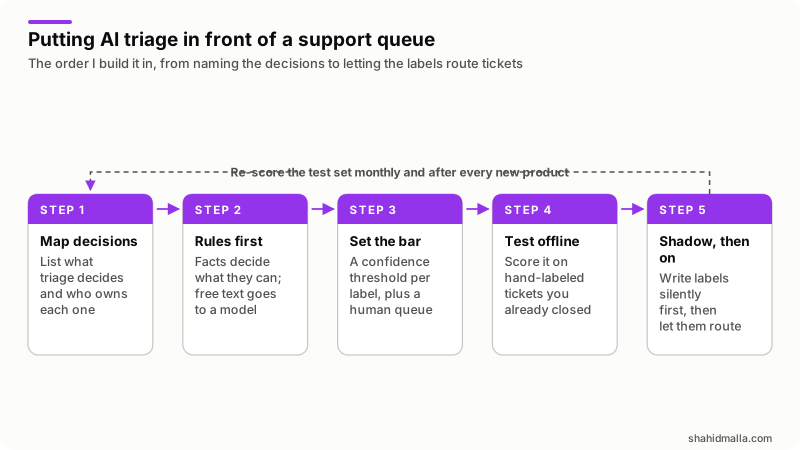
Zendesk, Halo and WHMCS behavior below comes from their documentation, read on 14 November 2026. Check the linked page before copying a setting name. The rest is how I build this work.
Which decisions does ticket triage actually make?
Six, each with a different owner and a different cost when it is wrong. Zendesk's own feature classifies a ticket by topic, sentiment, language and custom entities, as its About intelligent triage page describes.
| Decision | Hosting example | Cost of getting it wrong |
|---|---|---|
| Department | Billing, Technical, Abuse, Sales | The ticket waits in a queue nobody reads |
| Category | Mail delivery, DNS, disk space, invoice dispute | Reports mislead you about what customers want |
| Urgency | A down server against a quota question | The loudest ticket wins, not the worst one |
| Language | A German billing question overnight | A slow reply, or a machine-translated one |
| Sentiment | A third reply about the same outage | A churn risk sits in the normal queue |
| Spam | Bulk SEO pitches to sales@ | Real tickets buried, or a real one deleted |
Two are not AI work. Whether the sender is a client, and which service the ticket covers, are billing-system lookups. Do them first and give the model the answer.
Should a rule or a model make each call?
A rule should settle every decision a fact can settle. The model sees only what is left: free text written by a person.
| Question | Rules | Classification model |
|---|---|---|
| Input it handles | Sender, department picked on the form, product, keyword | Subject and body in any phrasing |
| Cost per ticket | None worth counting | A model call, charged per token |
| How you change it | Edit the rule, effect is immediate | Change prompt or labels, then re-score the test set |
| Typical failure | Misses what the author did not foresee | Picks a plausible neighbor of the right label |
| Good jobs | Spam blocks, entitlement checks, VIP flags | Intent, urgency, language, tone |
WHMCS already gives you the rules layer. Spam filtering runs at Configuration > System Settings > Spam Control, where blocked addresses, subjects and body phrases stop an email becoming a ticket. The Spam Control page names one gap: messages from the contact or submit ticket pages are not subject to those filters, and it recommends captchas there.
Put the rules above the model, not beside it. My order is fixed: block list, entitlement lookup, model, then a rule that overrides the model for phrases you cannot afford to miss. "Chargeback", "DMCA" and "data breach" belong in that last layer.
Which labels should a hosting company use?
As few as you can act on. A label that changes neither who picks the ticket up nor what the Friday report says is a label to delete.
For a hosting desk I start with four departments and a short list under each: Billing (invoice dispute, payment failed, refund request), Technical (site down, email delivery, DNS, SSL, migration), Abuse (spam from a server, copyright complaint, phishing) and Sales (pre-sales question, upgrade, custom quote). Then one label called Other, which exists to be counted: if it passes a few percent of tickets, the label set is wrong, not the model.
In WHMCS the department is not the model's to invent. The Support Departments page states that choosing a department is the first step in ticket submission, and departments are configured at Configuration > System Settings > Support Departments with their own email address, assigned admins, Clients Only setting and custom fields. Triage mostly corrects a human's guess: the customer picks Sales for a suspended account and the classifier moves it to Technical.
Write a one-line definition and an example ticket for every label, and keep the list in code, not buried in a prompt.
How do you set a confidence threshold and a fallback?
Ask for a confidence value with every label, then act in three bands instead of two. Zendesk gives the same instruction in its intelligent triage use cases page: "Determine the necessary confidence level that the topic must have for you to be comfortable taking automatic action on it." Its own fields are coarse: topic and language carry a confidence of High, Medium or Low, as the page on viewing classifications in tickets shows, and agents correct any value from the ticket properties panel.
| Confidence band | What triage does | What the customer sees |
|---|---|---|
| High | Applies the label, moves the department, sets priority | Nothing, except a faster first reply |
| Medium | Writes the label as a suggestion and a private note | Nothing |
| Low or no answer | Sends it to the human triage queue untouched | Nothing |
The third band matters most. Triage fails into a queue a person reads, and that queue also catches the boring failures: a timeout, a rate limit, a malformed response, a label the model invented. Ticket creation never waits on the classifier: the ticket is created first, classification runs after, and if nothing comes back in a few seconds the ticket stays in the default queue.
Set the threshold per label. "Payment failed" can act at a lower bar than "abuse complaint", and one global number ends up set high enough for the riskiest label.
What should triage never answer on its own?
Anything that moves money, ends a service or decides a dispute. Triage can label those tickets and put them in front of the right person fast, which is most of the value, but the action stays human.
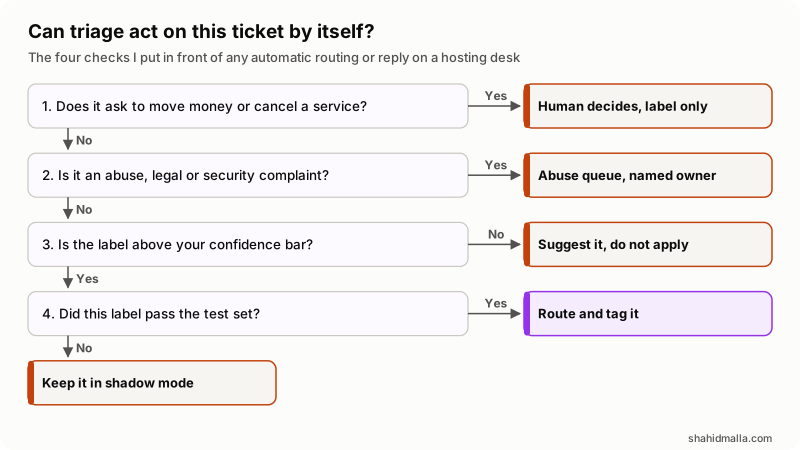
In words: a ticket asking to move money or cancel a service goes to a human, labeled only. An abuse, legal or security complaint goes to the named owner of that queue. A label below your confidence bar is suggested, not applied. A label that has not passed your test set stays in shadow mode. Only a tested, confident label routes a ticket by itself.
- Refunds and credits. A model that approves a refund has signing authority nobody voted for.
- Payment changes and chargebacks. Disputes carry deadlines and evidence rules. Route fast, reply by hand.
- Abuse and DMCA decisions. Suspension is close to irreversible for the customer and often legally loaded.
- Account ownership and password resets. This is the social engineering path into your platform.
- Security incidents and data requests. A compromised server or a GDPR request starts a clock and needs a named person.
- Cancellations. The save conversation is the point, and it is not a classifier's conversation.
- Auto-replies with answers in them. A confident wrong answer is worse than none, because the customer argues with it next.
How do you test accuracy on past tickets before going live?
Score the classifier on tickets you have already closed, against labels a person wrote, before it touches a live queue.
- Export a sample. A few hundred closed tickets across a normal month, including one incident. In WHMCS the
GetTicketsAPI action gives you the list. - Label them by hand. Two people label the same set. Where they disagree, the definition is unclear, so fix the definition before blaming the model.
- Hold some back. Anything you look at while tuning stops being a fair test.
- Run it offline. No writes, no routing. Store the predicted label and confidence beside the human label.
- Count per label. One overall number hides the problem: you want how often each label is right and how often it is missed.
- Read the mistakes. Fifty wrong predictions beat any dashboard, and most cluster into two or three fixable confusions.
Weight errors by cost. A sales question sent to technical costs minutes; an abuse complaint sent to billing can cost a day and a provider relationship. Keep rare but expensive labels in suggest-only mode for longer. No industry accuracy figure is worth quoting here, so set the bar against how often your own staff file a ticket in the right department today.
Then run in shadow mode on live tickets: labels and private notes are written, nothing is routed. Two weeks gives you a second test set on tickets nobody chose. Zendesk's intelligent triage dashboard reports in the same spirit once you are live, with the share of tickets enriched by topic, entity, sentiment and language, filters by confidence, and median first reply and resolution times for enriched tickets against all.
What does the WHMCS wiring look like?
Classify outside WHMCS, write back through the API, and let WHMCS automation do what it already does well. The write-back is one documented action: UpdateTicket takes ticketid plus optional deptid, status, priority of Low, Medium or High, flag for the admin id to flag the ticket to, and customfields. Store the label and its confidence in custom fields so they stay visible and correctable.
| Job | Where it belongs | Why there |
|---|---|---|
| Block known spam | Spam Control, before the ticket exists | Cheaper and more predictable than a model call |
| Classify intent, urgency, language, tone | Your service, after the ticket is created | Keeps model latency off the submission path |
| Apply department, priority, custom fields | UpdateTicket | Documented, logged, reversible by an admin |
| Record why the label was chosen | A private admin note | Agents see the reasoning and can overrule it |
| Chase tickets nobody answered | Escalation Rules | Time-based work the model should not do |
| Plan a follow-up or handover | Scheduled ticket actions | Runs on the system cron with a retry window |
The WHMCS Ticket Actions page documents those last two rows. Escalation rules live at Configuration > System Settings > Escalation Rules and apply by department, ticket status or priority once a ticket has sat in that state for a set period, with one limit worth knowing: they "only apply to tickets that customers submitted after the escalation rule's creation". Scheduled actions change department, priority, status or assignment at a chosen time, the system cron executes them, and an action it cannot run is retried for up to an hour before it moves to Failed. If the cron is unhealthy, none of it happens, which my WHMCS cron guide covers.
I build agents of this shape for WHMCS myself, so treat that as a disclosed interest: my guide to a WHMCS AI agent explains that build, and how to build an AI agent covers the general pattern.
What breaks after triage has been running a while?
Classification quality drifts, and nothing tells you unless you look. The ticket mix changes when you launch a product, raise prices or have an outage.
- First message only. Zendesk classifies tickets "started with a public comment by either an agent or end user", and language is not re-read on each end user reply. A ticket that changes subject in its fourth message keeps its first label.
- Settings that only apply forward. Zendesk's dynamic classification covers tickets created after you turn it on, and WHMCS escalation rules behave the same way.
- Silent corrections. Agents fix wrong labels and say nothing. Log every correction: that stream is your real accuracy measure.
- Privacy. Tickets hold credentials and addresses. Decide what leaves your server and read the provider's retention terms first.
- Cost per ticket. Small, until a bot files ten thousand tickets. Cap spend and rate-limit per sender.
- Plan and add-on gates. Zendesk lists intelligent triage classifications on Suite and Support Professional plans and above, with the Copilot add-on required to use them in workflows, as read on 14 November 2026.
The go-live checklist I work through: label definitions written down; rules in front of the model; per-label thresholds agreed with the support lead; a human queue catching low confidence, timeouts and errors; the test set scored and its mistakes read; two weeks of shadow mode; every automatic change logged; an off switch one person can flip without a deploy; a monthly re-score.
What else do people ask about AI ticket triage?
What is the ticket triage process?
It is the sequence between a ticket arriving and an agent starting work: filter the junk, identify the customer, read what they want, set a category and urgency, put it in the right queue and flag anything that cannot wait. By hand it is one person reading an inbox each morning. AI triage automates the middle and leaves the judgment calls alone.
How does Zendesk intelligent triage work?
Zendesk classifies tickets by topic, sentiment, language and custom entities when a ticket starts with a public comment, writing each into a field with a confidence value. Sentiment runs from Very positive to Very negative, language covers roughly 150 languages, and you pick which channels are classified, with web form, email and the API on by default. Triggers, SLA policies and omnichannel routing then act on those fields.
Can AI triage tickets inside WHMCS?
Yes, through the API rather than a built-in feature. Your service reads the new ticket, classifies it, and writes the result back with UpdateTicket, setting department, priority, a flag to an admin and custom fields. Spam control, departments, escalation rules and scheduled actions handle the rest.
Does HaloPSA have AI ticket triage?
Yes, Halo documents it. Its AI ability use case for auto triage, read on 14 November 2026, says that when a ticket is logged the ticket details go to an AI model, which suggests a category, impact and urgency, and the ticket is updated accordingly. That guide works from the category values you have configured rather than from past ticket data, and it names no confidence threshold. Ask any vendor two questions before you trust it: which model provider processes your ticket text, and whether the bar for acting can be set per field rather than as one switch.
Is AI triage the same as an AI chatbot?
No. A chatbot talks to the customer and tries to resolve the question; triage works behind the ticket, setting fields and routing. They pair well, but they fail differently and are tested separately. My guide on AI chatbots against AI agents covers the difference.
If you want triage built into your own help desk, I take it as AI agent development, or as part of WHMCS support and maintenance when it sits on a WHMCS desk, with a free scoping call of about 30 minutes and a written quote within one business day.
Last reviewed 14 November 2026. Disclosure: I build AI agents, chatbots and support automation for hosting companies, including agents for WHMCS, WordPress, SEO and server work, so I am not neutral. I am CTO at ElySpace, a freelance developer for Marmaids LLC, founder of WHMCSPilot, and founder of MagizAI, an AI chat and live chat product of my own, which is an interest to weigh when I recommend building or buying. Zendesk, Halo and WHMCS behavior, plan names and setting paths come from the pages linked above, read on 14 November 2026.