
A WHMCS AI agent is a scheduled program that checks your WHMCS install and its server, proposes fixes under a policy you set, and drafts ticket replies for a person to send. The safe scope is read-only monitoring plus a short list of reversible fixes. Payments, refunds, credits, suspensions and billing tickets stay with a human.
A WHMCS AI agent is software that runs on a schedule against a WHMCS installation, reads its state through the API or the server, and uses a language model to interpret what it finds. It differs from a chatbot in who it talks to: a chatbot answers your customers, an agent reports to you and asks before it changes anything. The useful part is not the model but the policy that decides which findings may become actions.
Everything below is checked against the documentation linked in the text, read on 14 November 2026. The WHMCS documentation home page lists 9.1 as the General Availability release, with 9.0 and 8.13 on Long-Term Support and anticipated end-of-life dates of 31 December 2026 and 31 January 2027.
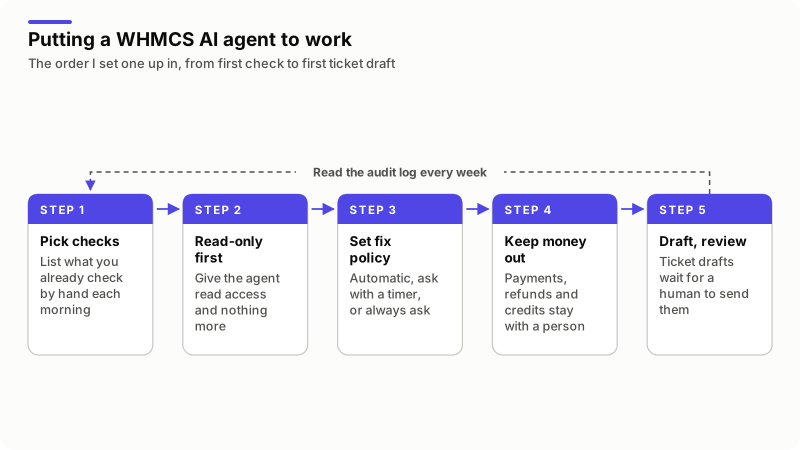
What should a WHMCS AI agent check every day?
Start with whatever you already check by hand on a Monday morning, because those are the checks you will trust an agent to repeat. They fall into three layers: the WHMCS application, the security of the install, and the server under it.
| Layer | What to check | Why it matters |
|---|---|---|
| Automation | When the daily cron last completed, and tasks stuck in progress | When the cron stops, invoicing stops with it |
| Application | License, maintenance mode, a stalled update, module and gateway errors, failed emails | Each one silently breaks orders or payment capture |
| Platform | End-of-life PHP and MySQL, a WHMCS version past its support date | No security fixes are published once support ends |
| Security | New admins, admins without 2FA, configuration.php permissions, changed files, malware scans | An admin account you did not create is the signal that matters most |
| Commercial | Overdue invoices and orders sitting in Pending | Orders stall quietly until the client writes in |
| Server | Services, disk, memory, load, clock drift, waiting security updates | Clock drift pushes the cron out of its Time of Day hour |
WHMCS already does part of this work. The System Health page at Configuration > System Health runs its own list, including an Insecure Permissions Check, a Cron PHP Version Mismatch check, Deprecated Modules and Error Reporting. An agent does not replace that page; it reads it every morning when you do not.
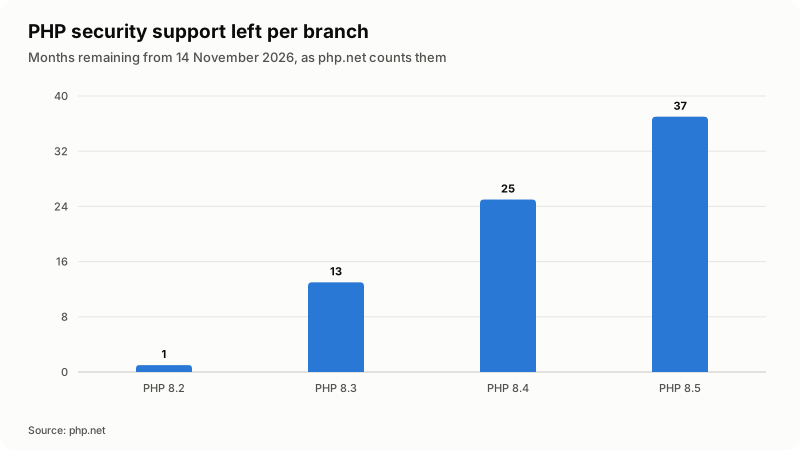
The platform row is the one people put off. On 14 November 2026 the php.net supported versions page gives PHP 8.2 security support until 31 December 2026, 8.3 until 31 December 2027, 8.4 until 31 December 2028 and 8.5 until 31 December 2029: one month left on 8.2, thirty-seven on 8.5.
How do you give an agent access without giving it control?
Give it read access first, and make the limit a permission rather than an instruction. A prompt can be argued with; an API role that lacks an action cannot. The API Credentials documentation says credentials with no assigned role "will effectively have no authorization", and that a request is authorized "if any role provides permission to the requested action". Roles add up, so build one narrow monitoring role and attach nothing else.
These are the read-only actions a monitoring agent needs, from the WHMCS API index:
| What you want to know | Read-only API action |
|---|---|
| When the daily cron last ran | GetAutomationLog, which returns lastDailyCronInvocationTime and currentDatetime |
| Which WHMCS version this install runs | WhmcsDetails |
| Admin accounts and recent admin activity | GetAdminUsers, GetActivityLog |
| Provisioning actions that failed and were queued | GetModuleQueue |
| Overdue invoices and stalled orders | GetInvoices, GetOrders |
| Ticket backlog and individual threads | GetTicketCounts, GetTickets, GetTicket, GetTicketNotes |
| Servers on record | GetServers, GetHealthStatus |
One caveat on the last row: the documented response parameters for GetHealthStatus list only result, so I treat it as a trigger and read System Health itself for detail. The access control page adds two limits worth setting on day one: API access is restricted by IP by default, and an optional $api_access_key in configuration.php bypasses that restriction. Keep the allowlist, and do not give an agent an access key. My WHMCS MCP server guide covers the same ground for assistants you drive by hand.
Server access is the harder half, because SSH has no role system. Keep the probe read-only: a script that reads and never writes, and never holds a shell open for the model. The model gets the output of a probe, never the key that ran it.
Which WHMCS fixes are safe to let an agent apply?
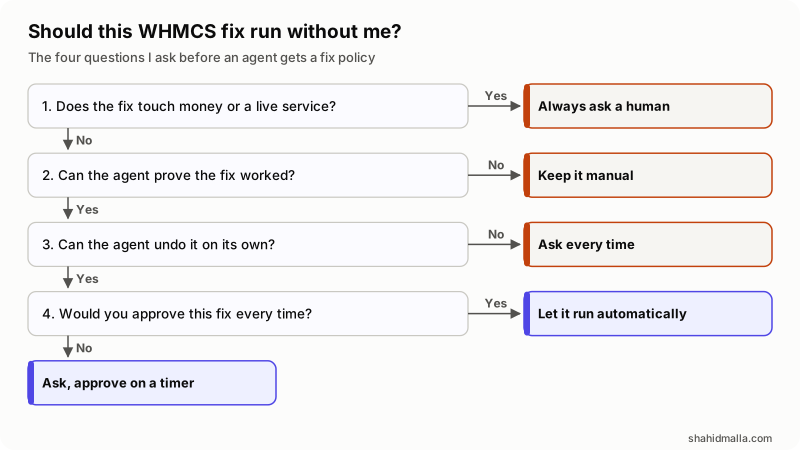
A fix is safe to automate when it is reversible, verifiable, and something you would approve every time without reading the detail. Everything else gets an approval step. Three policies cover almost every case.
| Policy | Fits | Examples |
|---|---|---|
| Automatic | Reversible, verifiable, no client-visible effect | Clearing a stuck automation task, restarting a stopped service, clearing a filled temp directory |
| Ask, then approve itself after a timer | Right in almost every case, but you want the chance to say no | Setting configuration.php to chmod 400, turning Display Errors back off |
| Always ask | Client-visible, hard to undo, or decided by judgment | Switching maintenance mode off, deactivating a module, changing a gateway |
The chmod 400 example shows why the middle row exists. WHMCS documents it on the Secure the Configuration File page, but the same page says some servers need 440 or 444 instead, and that you must set 755 temporarily to update a license key. Right nearly always, wrong occasionally: the shape of a fix that should ask before it acts.
Maintenance mode is always-ask for a different reason. The Maintenance Mode page notes that authenticated admins still reach the Client Area while it is on, and the API, hook system and Admin Area keep working. An agent checking from inside cannot tell whether the mode was left on by accident or switched on deliberately five minutes ago. That is a judgment about your business.
One fix I refuse to automate at all: forcing the WHMCS cron. Running cron.php with -F re-runs daily tasks whether or not they are due, so invoicing and suspensions can fire twice. My WHMCS cron jobs guide covers that flag.
How do you set approval timers that still mean something?
A timer answers one question: if nobody looks at this for six hours, is doing it better or worse than leaving it? Where doing it is better, a timer that approves after one, six or twenty-four hours keeps small problems from sitting over a weekend. Where leaving it is better, there is no timer.
Three rules keep timers from turning into rubber stamps:
- A denial has to stick. If a fix you refused comes back the next morning, you will start approving by reflex. Suppress a denied fix for a set period, a week in my setup.
- Anything the model invents is always-ask, permanently. A fix you wrote and reviewed can carry a timer. A command a language model composed this morning should not be able to.
- Every fix verifies itself. Re-check the problem before acting, check the result afterwards, and undo the change when the check fails. A fix that cannot verify itself belongs in a message to you.
The MCP specification puts this in protocol terms. Its Tools page says that for trust, safety and security "there SHOULD always be a human in the loop with the ability to deny tool invocations".
What must stay with a human in WHMCS?
Money and service state, enforced by leaving those actions out of the agent's API role rather than out of its instructions.
- Payments and refunds.
CapturePayment,AddInvoicePaymentandAddTransactionnever belong to an agent role. - Credit.
AddCreditandApplyCreditchange what a client owes. That is a commercial decision. - Service state.
ModuleSuspend,ModuleUnsuspendandModuleTerminateare visible to the customer within seconds and awkward to reverse. - Invoices.
UpdateInvoiceandCreateInvoicetouch your accounting record. WHMCS 9.1 added an Invoice Immutability setting to stop non-draft invoices being edited. - Clients and admins.
DeleteClient,AddUserand anything that grants access stay with staff.
Write the list down as a policy, then check the API role against it. If the two disagree, the role wins.
How should an agent handle support tickets?
By drafting, not sending. A draft is useful the moment it is correct. An automatic reply is only useful if it is correct every time, and nothing about a language model gives you that.
A good draft is mostly research. Before any text is written, the agent should pull the client's services, invoices and relevant logs, so the draft answers from the account rather than from general hosting knowledge. Labeling helps more than polishing: a category, a sentiment and a confidence score let you sort a morning queue in one pass. Three categories should never carry a draft anyone can send without reading it in full:
- Billing. Any reply about an amount owed is a statement about money.
- Cancellation. A retention conversation is a commercial decision with a cost attached.
- Abuse. These involve a third party and often a legal obligation, and the tone has to be yours.
Mechanically, keep AddTicketReply off the agent's role at first and park drafts as internal notes with AddTicketNote. Staff read the note, edit it and send the reply. After a month you can count how often the note went out unchanged, and widen the role from evidence. My WHMCS AI guide covers the wider picture, including client-facing chat.
How do you tell whether the agent is helping?
By reading its audit log once a week, not by watching the alerts. Alerts say what happened; the log says whether the policy is right. Five things to look for:
- Approvals you granted without reading. Many of those means the fix belongs on automatic, or should not exist.
- Denials. A fix denied twice is a policy error, not a judgment call.
- Fixes that verified, then undid themselves. Each is a bug worth fixing before it becomes a habit.
- Alerts for things that were not problems. Noise trains you to ignore the channel that matters.
- Real problems the agent missed. Add the check and move on.
Approvals also have to arrive where you already are, with an approve and a deny button in the message. A queue you must open a dashboard to see is a queue nobody clears.
When is a WHMCS AI agent the wrong tool?
When the job has one correct answer. A cron that has not run, a disk filling at a known rate, a certificate expiring in ten days: these are threshold checks, and a shell script does them more cheaply. An agent earns its place on the messy half, where the question is "is this normal for this install?"
- It is another system to run. It needs a host, credentials, updates and somebody who notices when it stops. An agent that quietly died three weeks ago is worse than none, because you stopped checking by hand.
- Prompt injection is real. Ticket text is written by strangers. If the model that reads tickets can also call tools, a customer can try to instruct it. Read-only tools and an approval step make the attempt harmless.
- Data leaves your server. Whatever goes into the prompt reaches the model provider, ticket text included.
- WHMCS Cloud changes the picture. There is no server to probe and no cron to watch, so the server half of the checks does not apply.
As one worked example, I build and sell WHMCS Agent: a daily install and server check, a site and login check every fifteen minutes, a ticket sweep every two to three minutes, and per-fix policies of automatic, ask-with-a-timer or always-ask, with anything the model suggests locked to always-ask. It is Python with no outside packages, runs on a Mac, a Linux server or in Docker, and works with the Claude Code CLI, Codex CLI, Gemini CLI or any OpenAI-compatible API, the model holding read-only tools over MCP and never the credentials. The case study shows the dashboard and workflow, and I run it daily on WHMCS 8.13 and 9.1 installs for three hosting companies I look after. Disclosure: WHMCS Agent is my own product.
What else do people ask about WHMCS AI agents?
Does WHMCS have an AI agent built in?
No. WHMCS ships AI features such as domain name suggestions, and the Marketplace lists third-party AI modules such as the WHMCS AI Helpdesk Assistant, but there is no built-in agent that monitors your install and proposes fixes. That is a module you add or a program you run alongside WHMCS.
Is it safe to give an AI access to WHMCS?
It is safe in proportion to what the credential can do. Create an API role with read actions only, keep the default IP restriction, and do not configure an access key for it. The worst case is then a bad message to you, not a change to your billing.
Can an AI agent reply to WHMCS tickets automatically?
Technically yes, through AddTicketReply. I would not start there. Draft into an internal note with AddTicketNote, have staff send the replies, and measure how often the draft went out unchanged before widening the role.
What is the difference between a WHMCS AI agent and a WHMCS AI chatbot?
Audience and direction. A chatbot faces your customers and answers them in the Client Area. An agent faces you: it watches the install, reports what it finds and asks permission to act. The two are often run side by side.
What does it cost to run an AI agent against WHMCS?
Two costs: the agent itself, whether a module, a subscription or your own code, and model usage, which scales with how much text you feed it. Ticket drafting dominates the second, because every draft reads a whole thread.
Can an AI agent fix a broken WHMCS cron?
It can tell you the cron has not completed, and clear automation tasks left stuck in progress. It should not force a cron run or rewrite your crontab, because both can repeat billing tasks. Diagnosing why it stopped is still a person's job.
If you want an agent built around your own install and your own approval rules, I do that work under AI agent development and look after existing installs under WHMCS support and maintenance, with a free scoping call of about 30 minutes and a written quote within one business day.
Last reviewed 14 November 2026. Disclosure: I sell WHMCS development, maintenance and AI agent work, and WHMCS Agent is my own product, so I am not neutral. I am CTO at ElySpace, a freelance developer for Marmaids LLC, and founder of WHMCSPilot and MagizAI. Menu paths, API actions, settings and the version and PHP support dates come from the WHMCS documentation, the WHMCS API reference, the MCP specification and php.net as I read them on 14 November 2026.