To extract data from a PDF with AI, first check whether the file holds real text or only a picture of text. Text PDFs can be parsed directly. Scans need OCR first. Then send the page to a model with a JSON schema that names every field you want, validate the answer against arithmetic and date rules in your own code, and send low-confidence fields to a person.
AI document extraction turns a page written for human eyes into fields a database can store: supplier name, invoice number, dates, line items, tax and total. The model does the reading. Your code does the checking, because a model returns an answer whether or not that answer is right.
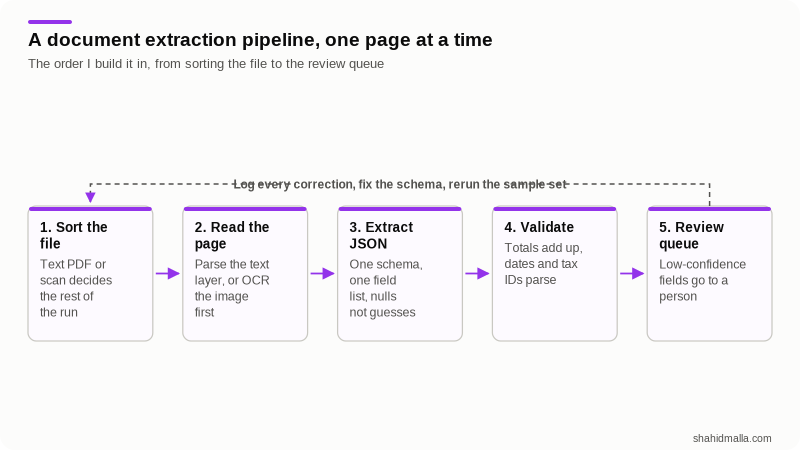
The sections below follow those five steps. Every limit and price comes from vendor documentation I link, read on 14 November 2026.
Is your PDF real text or a picture of text?
Answer that first, because it decides your cost, your accuracy and half your code. A born-digital PDF, the kind an accounting system prints, carries a text layer that any parser reads exactly. A scan or a phone photo saved as a PDF carries only pixels, so OCR has to guess the characters.
My test is blunt: extract the text layer of each page and count the characters. A few hundred per page means a text PDF, near zero means a scan. Mixed files are common, so test per page and not per file.
For scans, OCRmyPDF adds a searchable text layer to the existing file, running Tesseract over pages it rasterizes with pypdfium2 or Ghostscript. It writes PDF/A-2b by default and takes --output-type pdf for an ordinary PDF.
Models that accept PDFs do this themselves. The Claude PDF support page says the system converts each page to an image, extracts the text from each page, and sends both to the model. OpenAI's file inputs guide describes the same split for PDFs, and text only for other document and text files. So a model can read a scan, but it reads a text PDF more cheaply and more exactly.
Which extraction approach fits your documents?
There are four, and the choice turns on how much the layout varies and how many pages you process.
| Approach | Fits | What breaks it | Running cost |
|---|---|---|---|
| Templates and rules | One form you control | Any layout change | Near zero per page, steady maintenance |
| OCR plus a language model | Many suppliers, scans, volume | Poor scans, dense tables | OCR per page plus tokens per page |
| A model that reads the PDF | Varied documents, modest volume | Page and request limits | Tokens per page, images included |
| A cloud document service | Invoices, receipts and IDs at volume | Fields outside the prebuilt schema | List price per page or document |
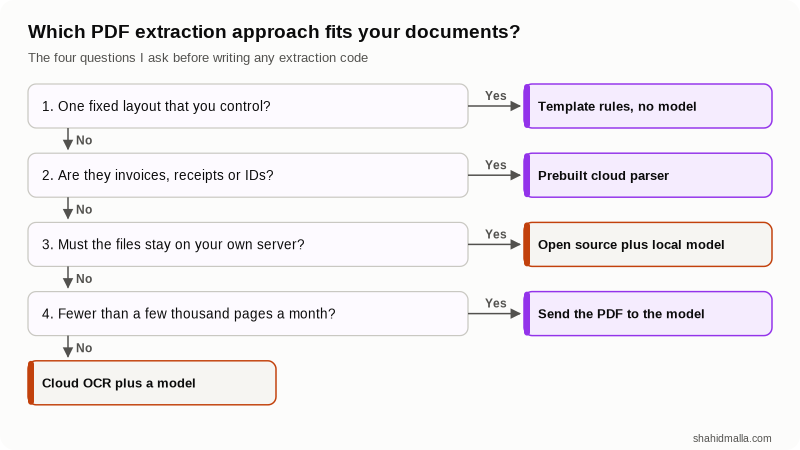
In words: a fixed layout you control needs template rules and no model. Otherwise invoices, receipts and IDs suit a prebuilt cloud parser, and documents that may not leave your server point at open source plus a local model. The rest is volume: under a few thousand pages a month, send the PDF to a model; above that, OCR once and pay a model only for the text.
For the self-hosted route I start from Docling, which parses PDF, DOCX, XLSX and images, handles page layout, reading order and table structure, exports Markdown or lossless JSON, and runs locally for sensitive data and air-gapped environments. It is hosted by the LF AI and Data Foundation.
What should the JSON schema look like?
Write the schema before the prompt. It is the contract between the model and your database, and what makes the output testable.
{
  "type": "object",
  "properties": {
    "supplier_name":   { "type": ["string", "null"] },
    "supplier_tax_id": { "type": ["string", "null"] },
    "invoice_number":  { "type": ["string", "null"] },
    "invoice_date":    { "type": ["string", "null"], "description": "ISO 8601, YYYY-MM-DD" },
    "due_date":        { "type": ["string", "null"] },
    "currency":        { "type": ["string", "null"], "description": "ISO 4217 code" },
    "subtotal":        { "type": ["string", "null"], "description": "decimal string" },
    "tax_total":       { "type": ["string", "null"] },
    "total":           { "type": ["string", "null"] },
    "line_items": { "type": "array", "items": {
      "type": "object",
      "properties": {
        "description": { "type": "string" }, "amount": { "type": "string" }
      },
      "required": ["description", "amount"], "additionalProperties": false
    }}
  },
  "required": ["supplier_name", "invoice_number", "invoice_date", "currency", "total"],
  "additionalProperties": false
}
Four decisions there are worth copying. Money fields are strings, so no float rounding happens between the model and your ledger. Every field is nullable, because a field the document does not contain must come back as null and not as a plausible guess. additionalProperties is false, so the model cannot invent a field. Dates and currency carry their format in the description.
Both big model APIs hold you to that schema. Anthropic's structured outputs page describes passing it in output_config.format with type: "json_schema", and says constrained decoding makes the response schema-compliant, with no parsing errors and no retries. One limit: SDK helpers strip constraints such as minimum and maxLength out of the schema sent to the model and check them on your side instead.
That guarantee is narrower than it sounds, and the distinction is the heart of this job. Constrained decoding guarantees the shape of the answer. Nothing guarantees the values. A total of 1,240.00 read from a document that says 1,249.00 is perfectly valid JSON.
Which cloud service reads invoices without training?
Three. Textract and Azure return a confidence score per field, which is what the review queue runs on. Textract offers AnalyzeExpense for invoices and receipts, AnalyzeDocument for forms and tables, and AnalyzeID for US passports and US driver's licenses. Google splits the work across processors; Azure has one prebuilt invoice model.
| Service | Documented limits, read 14 November 2026 |
|---|---|
| Amazon Textract | Synchronous calls take single-page documents; multipage PDFs go through the asynchronous Start and Get operations. Queries are capped at 15 per page, 30 asynchronously. Every item carries a confidence score and a bounding box. Handwriting, invoice and ID extraction are English only. |
| Google Document AI | Invoice parser: 15 pages online, 200 in batch. 40 MB per online file, 1 GB and 5,000 files per batch. Batch jobs usually finish in 12 to 24 hours and are canceled after 24. |
| Azure AI Document Intelligence | The prebuilt-invoice model covers invoices, utility bills and purchase orders in 27 languages. PDFs and TIFFs up to 2,000 pages, 500 MB on the paid S0 tier. The free F0 tier reads only the first two pages and caps files at 4 MB. |
| Claude or OpenAI, PDF sent directly | Claude: 600 pages per request, 100 when the request context window is under 1M tokens, and 128 MB per request on the first-party API. OpenAI: 50 MB per file and 50 MB combined. No prebuilt field list, so you supply the schema. |
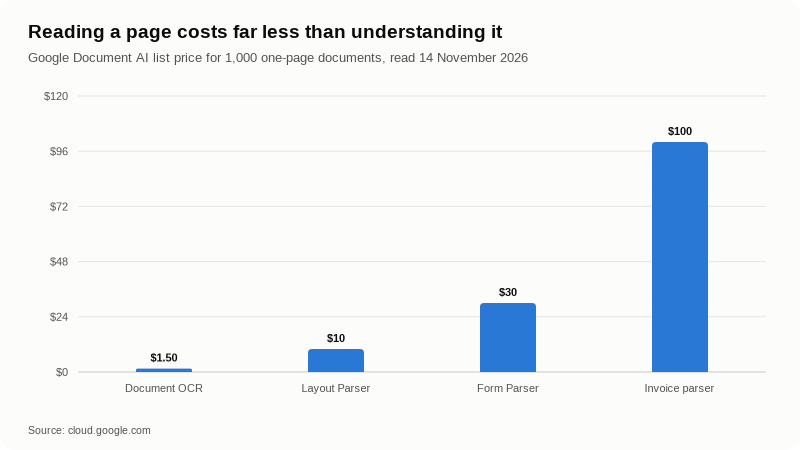
Price is where the approaches separate. On the Document AI pricing page, read on 14 November 2026, reading a page costs a fraction of understanding one.
| Processor | List price | Per 1,000 one-page documents |
|---|---|---|
| Enterprise Document OCR | First 1,000 free, then $1.50 per 1,000 pages | $1.50 |
| Layout Parser | $10.00 per 1,000 pages | $10.00 |
| Form Parser, Custom Extractor | $30.00 per 1,000 pages | $30.00 |
| Invoice and Expense parser | $0.10 per count, up to 10 pages | $100.00 |
The counting rule on the last row catches people out: a one-page invoice and a ten-page invoice both cost $0.10. Custom processor hosting is billed on top at $0.05 per hour, which that page works out as $438 a year. Amazon and Microsoft load their per-page prices with scripts I could not read, so I am not quoting them here.
How do you check the extracted data is right?
In code, with rules the model never sees. This separates a demo from something you can post to a ledger, and most of it is arithmetic.
| Check | Rule | What it catches |
|---|---|---|
| Line items | Line amounts sum to the subtotal, in integer minor units | A missed line, a dropped digit |
| Document total | Subtotal plus tax equals the total, to the cent | OCR errors in the number that matters |
| Dates | Both parse as YYYY-MM-DD, invoice date not after due date, neither years away | Day and month swapped |
| Currency and tax ID | A valid ISO 4217 code, and a tax ID matching the supplier record | A euro invoice posted in dollars, a swapped supplier |
| Invoice number | Unique for that supplier | Paying the same invoice twice |
| Bank details | Identical to the record on file, a change needs approval | Invoice redirection fraud |
| Confidence | Every field above its own threshold | Fields the service was unsure about |
Set the threshold per field, not per document. The Amazon Textract FAQ gives the example of flagging anything below 95% on tax documents; I use a number like that for money and dates and a lower one for an address nobody will act on. Where a model returns no confidence score, the arithmetic takes its place. Never ask the model whether its own answer was right.
How do you run a review queue for low-confidence fields?
Treat it as a product, not an error log: a document fails into the queue, a person fixes a field, and the correction is recorded.
- Route on rules. Into the queue if a required field is null, a confidence is below threshold, the totals do not reconcile, the supplier is new, the bank details changed, or the amount is above your approval limit.
- Show the page beside the field. Textract returns bounding box coordinates for every item and Azure returns bounding regions with confidence, so you can highlight the number on the page image.
- Correct, do not retype. Pre-fill every field, and keep the model value as well as the corrected one.
- Measure three numbers. Share of documents that pass untouched, corrections per field, seconds per review.
- Feed the log back. Most repeat corrections are a schema problem, a missing instruction, or a supplier needing a rule.
None of that is specific to AI, and it is how to price the project: the model cost is small next to the people who handle what it gets wrong.
How do you keep financial documents private?
Invoices and statements carry names, addresses and bank details, so they usually hold personal data under the GDPR and are a fraud target besides. Before sending one file, answer three questions from the vendor's data page: where is it processed, how long is it kept, and is the content used to improve their models. The clouds answer differently.
- Amazon Textract. The service FAQ states that Textract may store and use document and image inputs to maintain and improve the service and other Amazon machine learning technologies, and that some content may be held in another AWS region for that purpose. You opt out of both with an AWS Organizations AI services opt-out policy.
- Azure AI Document Intelligence. Its data, privacy and security page says data is processed in the region where the resource was created, and that input and results are stored for 24 hours after the operation completes, then deleted automatically. The Delete Analyze Result API removes them sooner.
- Model APIs. Anthropic's PDF support page marks the feature as zero-data-retention eligible and HIPAA eligible. Check the terms for your own account.
Two controls do more than any vendor setting. Send less: redact what the extraction does not need, often the bank details. Keep less: once the JSON is validated and posted, your own copy of the PDF is the larger risk, so give it a retention period and a deletion job.
When is AI the wrong tool for this job?
More often than the tooling suggests. Extraction exists because data was flattened onto a page, so the first question is whether you can get it unflattened instead.
- The sender can issue structured documents. A supplier who sends a structured e-invoice removes the problem rather than automating it. My guide to WHMCS e-invoicing covers that side.
- The volume is small. Two hundred invoices a month at two minutes each is under seven hours of work, against weeks of build and upkeep.
- Handwriting beyond English. Textract documents handwriting recognition for English only.
- Figures with legal weight and no review. Tax filings, payroll and payments need a person on anything the checks flag, and a record of who approved what.
Plan for the last few percent: a pipeline that passes 95 in 100 still sends 5 to a person.
What else do people ask about extracting data from PDFs with AI?
How do I extract data from a PDF to Excel using AI?
Extract to JSON first, then write the JSON to a spreadsheet. Going straight to a spreadsheet layout loses the field names you validate against. For a one-off, a chat assistant that accepts PDFs gives you a table to paste into Excel; for anything repeated, the schema above produces the same columns every time.
Can I extract data from a PDF with AI for free?
For small volumes, yes. Google Document AI bills nothing for the first 1,000 pages of Enterprise Document OCR, Azure's F0 tier is free but reads only the first two pages of each document, and Amazon's free tier gives new AWS customers 1,000 pages a month of text detection for three months, all read on 14 November 2026. Docling and Tesseract are free software with no page limit. The review time is never free.
What does an AI document processing pipeline look like?
Five stages: sort the incoming file, read the page with a parser or OCR, extract fields into a schema, validate them, then route failures to a human queue and everything else to the destination system. Put a queue between the stages so a slow OCR job or a rate-limited model call never loses a document.
Which open source tools handle AI document processing?
Docling for layout, reading order and table structure, with its own OCR support and local execution; Tesseract through OCRmyPDF for adding a text layer to scans; then any model you can host for the extraction. Docling also ships an MCP server, so the parsing stage can sit behind a service boundary, which my guide to what MCP is explains.
Is it safe to send invoices to ChatGPT or Claude?
That depends on the account, not the model. Consumer chat products, API accounts and enterprise agreements carry different retention terms, so the answer sits on the vendor's retention page for your plan and in your own data processing agreement. If a client contract forbids third-party processing, no setting in a chat product fixes that.
I build this kind of pipeline as workflow automation or as an AI integration inside software you already run, with a free scoping call of about 30 minutes. If you are still deciding what to automate first, my guide to AI automation for small business ranks tasks by payoff and risk.
Last reviewed 14 November 2026. Disclosure: I sell AI integration and automation work, so I am not neutral. I build AI agents and AI chatbots, and I am CTO at ElySpace, a freelance developer for Marmaids LLC, and founder of WHMCSPilot and MagizAI, an AI chat product of my own. Every limit, feature and price here comes from the vendor documentation linked above, read on that date.