Free live chat for WHMCS exists: tawk.to and Crisp both publish free WHMCS addon modules, and any free widget, such as Tidio or Chatwoot, loads through a short hook file. The software costs nothing. Branding, seat and history limits, privacy paperwork, a server if you self-host, and the people who answer do cost something. The official WHMCS Live Chat addon and LiveChat are paid.
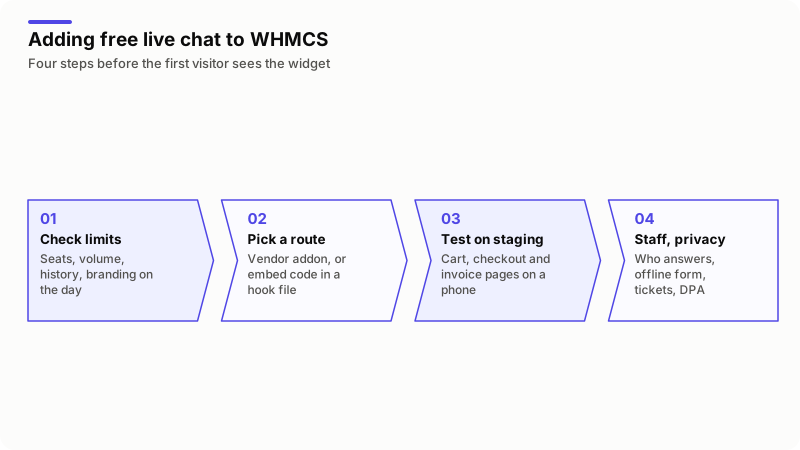
In words: read the free plan's limits on seats, volume, history and branding on the day you install. Pick the vendor's addon, or put the embed code in a hook file. Test the cart, checkout and invoice pages on a phone on a staging copy. Then decide who answers, what visitors see offline, how chats reach tickets and what your privacy policy says.
Is there free live chat for WHMCS?
Yes, by two routes. The first is a vendor's own addon: the tawk.to Live Chat and Crisp Live Chat listings on the WHMCS Marketplace are both marked Free. The second is any vendor's embed code returned from a hook file.
Two products in the same searches are not free. LiveChat's addon is a free download, but its listing says you need a LiveChat license; the LiveChat pricing page offers a 14-day trial without a credit card, then plans from $19 per user a month billed yearly. The official WHMCS Live Chat & Visitor Tracking addon costs from $6.95 a month on its Marketplace listing.
What does free live chat really cost a WHMCS business?
The license is free; most of what surrounds it is not. I price these lines before calling anything free.
| Cost | What it means | What the vendors' pages show today |
|---|---|---|
| Branding | A "Powered by" line stays in your client area | tawk.to charges $29 a month to remove it. Crisp lists watermark removal under its Plus plan. Tidio lists removal as a paid add-on. |
| Seats | How many staff can sign in | Crisp Free: 2. Chatwoot Cloud free plan: up to 2. Tidio Free: 10. tawk.to: no limit, per its FAQ. |
| Volume | Conversations allowed each month | Tidio Free: 50 billable conversations. Chatwoot Cloud free plan: 500. |
| History | How long transcripts are kept | Chatwoot Cloud free plan: 30 days. LiveChat's entry plan after the trial: 60 days. tawk.to: no cap, per its FAQ. |
| AI answers | Replies when nobody is online | Crisp Free: no AI credits. Tidio: 50 Lyro AI conversations, once. tawk.to AI Assist: from $29 a month, or free at low volume. |
| People | Someone has to answer | Not on any pricing page, and usually the largest line. |
| Hosting | A server, updates and backups | Only for self-hosted tools such as Chatwoot Community Edition. |
| Privacy | Client names, emails and messages go to a third party | Your privacy policy, consent tool and a data processing agreement. |
| Upkeep | Who fixes the addon after a WHMCS update | Listing update dates for the addons below run from 2018 to 2026. |
Staff time is the line people leave out: hours a day on the chat, times hourly cost, times working days. As an example only, one hour a day at $15 over 22 working days is $330 a month, more than any single price quoted in this guide. If nobody can cover the hours, switch the widget to an offline form; an unanswered chat does more harm than none. Staffing and daily routine are in my guide to running live chat for web hosting companies.
How do the free WHMCS live chat modules and plans compare?
Each option gets the same four questions, answered from the vendor's own page on 17 October 2026; prices are US dollars before tax. Two paid rows are included because buyers meet them in the same searches: the official WHMCS addon and MagizAI. Disclosure: I am the founder and CEO of MagizAI, so weigh my view of it accordingly.
| Option | What is free | Limits that matter | WHMCS route | Where chats are stored |
|---|---|---|---|---|
| tawk.to | The chat itself; paid extras are branding removal, AI Assist and hired agents | Branding stays unless you pay | Free addon, listing updated 2020 and compatible up to 8.13; or the widget in a hook | tawk.to's servers, until you delete them, per its storage page |
| Crisp Free | Widget, shared inbox, mobile apps (pricing) | 2 seats, 100 customer profiles, no AI credits | Free addon downloaded from your Crisp workspace with a license key (install guide); listing updated 2019 and compatible with 9.0 | Crisp's cloud |
| Tidio Free | Live chat and ticketing (pricing) | 50 billable conversations a month, 10 seats | Widget code in a hook | Tidio's cloud |
| Chatwoot | Cloud plan at $0, or the self-hosted Community Edition (pricing) | Cloud: 2 agents, 500 conversations a month, 30-day retention | Widget code in a hook | Chatwoot's cloud, or your own server |
| LiveChat | A 14-day trial | Paid after the trial | Free addon, listing updated 2018 and compatible up to 7.5 | LiveChat's cloud |
| WHMCS Live Chat & Visitor Tracking | Nothing; from $6.95 a month | Self-hosted WHMCS only, per the documentation | Installed into WHMCS; listing updated 2023 and compatible up to 8.13 | Your WHMCS server |
| MagizAI Live Chat for WHMCS | The module only | A paid plan is required; no free tier | Addon module, listing updated 2026 and compatible with 9.0 | MagizAI's service |
Three notes the table cannot hold. tawk.to's FAQ says there is no limit on agents and no cap on conversations, contacts or chat history; the trade is the branding line. Crisp's free limit of 100 customer profiles can fill quickly on a busy client area, and its pricing page does not state how long the free plan keeps conversations. Tidio counts a conversation only once a person replies, so unanswered chats do not use up the 50.
MagizAI is not a free option, although its module is listed as Free: the chat runs only on a paid plan, from $10 a month with your own AI key up to $99. What it adds over a plain widget is the WHMCS side: a signed-in client gets answers about their own services, domains, unpaid invoices and tickets, and the chat goes to staff or a ticket when it cannot answer. It can cost less in total than a free widget only where staff spend real hours on those account questions; for presales chat with people online, a free widget is cheaper. Details are on its product page.
How does the LiveChat integration for WHMCS work?
You install LiveChat's free addon module and connect it to a LiveChat account. The module is free; the account it needs is not, so this is a paid route once the 14-day trial ends. Its Marketplace listing was last updated in 2018 and is marked compatible up to WHMCS 7.5, so test it on a staging copy before you rely on it. What the license buys over a pasted widget is the ticket link: the integration guide saves a finished chat as a closed WHMCS ticket when the pre-chat survey asks for an email address.
How do I add a free chat widget to WHMCS with a hook?
Put the vendor's embed code in one PHP file in /includes/hooks/ and return it from ClientAreaFooterOutput, which the hook reference defines as HTML output before the closing body tag. It survives theme changes and WHMCS updates, and the hooks documentation says a file name that starts with an underscore is not executed, so a rename switches the chat off.
<?php
// includes/hooks/chat_widget.php

if (!defined('WHMCS')) {
    die('This file cannot be accessed directly');
}

add_hook('ClientAreaFooterOutput', 1, function ($vars) {
    // Paste the vendor's embed code between the markers, unchanged.
    return <<<'HTML'
<script>
  /* vendor embed code here */
</script>
HTML;
});
The quotes around 'HTML' make this a nowdoc, so PHP leaves the code alone. Without them, a $ in the vendor's script, such as Crisp's $crisp object, is read as a PHP variable and disappears. Run php -l on the file before you upload it. This version loads the widget for everyone and tells it nothing about who is signed in. Passing the client so a visitor cannot fake it, skipping admins who use Login as Owner, and testing are in my WHMCS live chat integration guide.
What can a free chat widget not do with your WHMCS data?
A widget knows only what the page hands it, so on its own it cannot see a client's services, domains, invoices or tickets. Whoever answers still searches WHMCS in another tab.
- Identity. Crisp's listing says operators see the customer's name and email. A name in the chat is not proof of who is typing unless your server signs it; tawk.to calls this secure mode and has you compute an HMAC on the server. Until then, staff should not discuss billing because the widget shows a name.
- Account answers. "Is my invoice paid?" and "Why is my service suspended?" need WHMCS data, which the agent looks up by hand.
- Tickets. A finished chat does not become a WHMCS ticket by itself. The official addon does this, and LiveChat's integration guide saves transcripts as closed tickets when the pre-chat survey asks for an email. Otherwise, email transcripts to a department that imports mail, or open the ticket through the API.
- Actions. A widget changes nothing in WHMCS. Updating nameservers, paying an invoice or upgrading a plan from the chat needs code that calls WHMCS with its own permission checks.
Is a self-hosted open-source chat cheaper?
Only if you already run servers and do not count your own time. Take Chatwoot: its license file puts everything outside the enterprise/ directory under the MIT license, and its self-hosted plans page lists the Community Edition at $0, with custom branding, AI and roles and permissions not included.
The requirements page asks for at least 4 GB of RAM and recommends 4 CPU cores, with PostgreSQL, Redis 7.0 or newer, Ruby 3.2 or newer, Node 20, Sidekiq for background jobs and object storage for attachments; Ubuntu 20.04 is the listed supported system. You patch it, back it up and monitor it. The gain is that transcripts stay on a server you choose, which can settle a data-location question. Keep it off the WHMCS server, so a chat stack that runs out of memory cannot take billing down with it.
When should you stop using free live chat?
When a limit costs more than the upgrade would. The signs I watch for:
- You hit a cap: Tidio's 50 conversations, Chatwoot Cloud's 500, or two seats when a third person joins.
- You need transcripts older than the plan keeps, for a dispute or a chargeback.
- Chats arrive when nobody is online and become missed sales; offline handling matters more than price.
- Agents spend most of each chat looking the client up in WHMCS. That time is the case for an integration, bought or built.
- Another company's branding in your client area matters to you, or you resell under your own brand.
- Your privacy policy or a client contract requires data in a set region or on your own server.
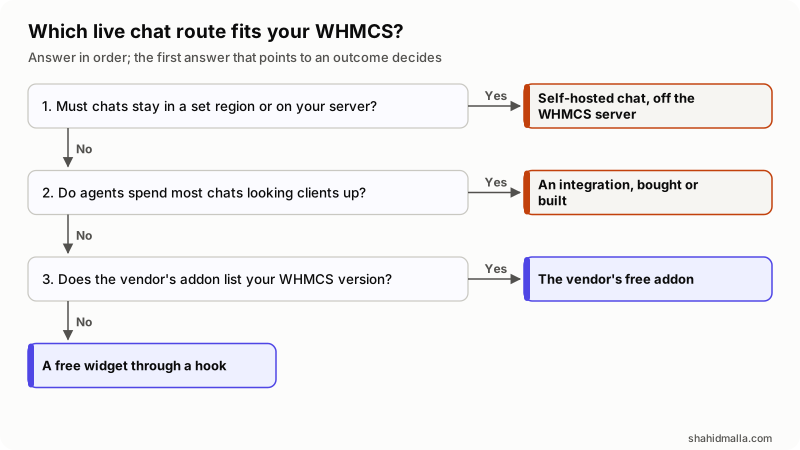
In words: if chats must stay in a set region or on your own server, self-host the chat, away from the WHMCS server. If agents spend most of each chat looking clients up, the case is for an integration, bought or built. Otherwise use the vendor's free addon when its listing covers your WHMCS version, and a free widget through a hook when it does not.
What should you check before installing a free chat on WHMCS?
- Read the free plan's limits on the vendor's pricing page that day: seats, volume, history, branding.
- Check the addon's last update and listed WHMCS versions; if they lag your install, use the hook.
- Install on a staging copy and test the cart, checkout and invoice pages on a phone.
- Decide who answers, in which hours, and what visitors see when nobody is online.
- Send offline messages and finished chats into WHMCS tickets.
- Add the vendor to your privacy policy and consent tool, and sign its data processing agreement if you serve EU clients.
- Write down the date of each check, because free tiers change.
What else do people ask about free live chat for WHMCS?
Does WHMCS come with its own live chat?
WHMCS sells one as an addon, not for free. The WHMCS Live Chat & Visitor Tracking addon cost from $6.95 a month on its Marketplace listing on 17 October 2026, and it runs on self-hosted WHMCS only. The free routes are vendor addons such as tawk.to and Crisp, or any widget loaded through a hook.
Is tawk.to really free for WHMCS?
The chat itself is. tawk.to's FAQ says there is no limit on agents and no cap on conversations, contacts or chat history. The trade is branding: removing the "Powered by" line cost $29 a month on 17 October 2026.
How many agents can use a free chat plan?
It depends on the vendor. On 17 October 2026, Crisp Free allowed 2 seats, Chatwoot Cloud's free plan up to 2 agents and Tidio Free 10, while tawk.to's FAQ said there is no limit. Check the pricing page on the day you install, because free tiers change.
Can a free chat turn conversations into WHMCS tickets?
Not by itself. The official WHMCS addon does it, and LiveChat saves a finished chat as a closed ticket when the pre-chat survey asks for an email address. Otherwise, email transcripts to a department that imports mail, or open the ticket through the API.
If you want WHMCS data inside the chat and no product fits the way you work, that is a custom addon, the kind of job I take on as WHMCS custom module development.
Last reviewed 17 October 2026. Disclosure: I am the founder and CEO of MagizAI, so weigh my view of it accordingly. I also sell WHMCS integration work, am CTO at ElySpace, a hosting company, and founded WHMCSPilot. I am not affiliated with WHMCS or any other vendor named here, and no link is an affiliate link. Prices and limits are as each vendor's page showed them on that date.