A WHMCS 9 upgrade moves a self-hosted install to Smarty 4, PHP 8.2 or higher and a newer ionCube Loader. What breaks is almost always your own work: legacy Smarty tags in templates and email templates, third-party modules that will not decode, and payment gateways whose settings changed. Roll back by restoring the database, the files and configuration.php from the backup you took first.
A WHMCS 9 upgrade is the move from the WHMCS 8 series to WHMCS 9.0 or 9.1, the two releases WHMCS ships today alongside 8.13. It is a major version change, so it replaces core files, alters database tables and drops support for older PHP, ionCube Loader and Smarty features. WHMCS documents no downgrade, which is why the backup and the test copy matter more than the update button does.
The update mechanics are in my WHMCS upgrade guide and the dependency tables in WHMCS system requirements. This guide covers the WHMCS 9 specifics, from docs.whmcs.com as I read it on 29 October 2026.
Which WHMCS 9 version should you upgrade to?
Target WHMCS 9.1 unless a module you depend on only states 9.0 support. On 29 October 2026 the System Requirements page listed three supported versions and marked everything older as End of Life.
| Version | Tier | Most recent release | Anticipated end of life |
|---|---|---|---|
| WHMCS 9.1 | General Availability | 9.1.0, 20 October 2026 | 30 September 2027 |
| WHMCS 9.0 | Long-Term Support | 9.0.9, 24 September 2026 | 31 December 2026 |
| WHMCS 8.13 | Long-Term Support | 8.13.7, 3 September 2026 | 1 December 2026 |
| WHMCS 8.12 and older | End of Life | No further updates | Already reached |
Read those dates twice. Both Long-Term Support versions run out by the end of this year, so an install that stops at 9.0 is back in the same position at the turn of the year. The Updating Through EOL Versions page is plain about End of Life: no maintenance and no updates, regardless of the reason.
What does a WHMCS 9 upgrade need from the server?
PHP 8.2 or higher, and an ionCube Loader that matches both your PHP version and the WHMCS version you are installing. The numbers differ between pages, so here is what each one said on 29 October 2026.
| Dependency | 9.0 release notes | 9.1 release notes | System Requirements page |
|---|---|---|---|
| PHP | 8.2 minimum, 8.3 recommended | 8.2 minimum, 8.4 recommended | 8.2, 8.3 or 8.4 |
| ionCube Loader | 13.0.2 minimum, 14.4.0 recommended | 15.0.0 | 15.0.0 or higher |
| MySQL | 5.2 minimum, 8.0 recommended | 5.2 minimum, 8.0 recommended | 5.2 minimum, 8.x recommended |
Install ionCube Loader 15.0.0 and you satisfy every column. Order is the part people get wrong, and the 9.1 release notes state it twice as a warning: upgrade to ionCube Loader 15.0.0 before updating to WHMCS 9.1, and update to WHMCS 9.1 before moving the server to PHP 8.4. Either one the other way round, the notes say, causes serious problems.
WHMCS 9.0 also removed support for PHP 7.2, 7.3, 7.4 and 8.1, and with them ionCube Loader 10.2, 10.3, 10.4 and 12.0. One consequence catches anyone hoping to upgrade first and fix PHP later: updates only appear at Utilities > Update WHMCS when the server already runs a compatible PHP version.
What breaks when you upgrade to WHMCS 9?
Core WHMCS keeps working. The breakage lands on customizations, third-party code and anything that talked to WHMCS in an old way. These are the removals and behavior changes from the 9.0 and 9.1 release notes.
| Change | Version | What it affects |
|---|---|---|
Smarty updated to 4.0; {fetch}, {php}, {include_php} and {smarty_template.object} removed | 9.0 | Custom themes, order forms, email templates, hook files |
| Non-Draft invoices become immutable | 9.0 | Staff edits to issued invoices, and any module or API call that rewrote invoice lines. 9.1 makes it configurable at Configuration > System Settings > General Settings |
HTTP requests to crons/cron.php return 403 by default | 9.0 | External schedulers that call the cron over a URL, until you allow their IP or CIDR range in the Cron HTTP Access Restriction setting at Configuration > System Settings > General Settings |
| Password authentication removed for Google mail and email importing | 9.0 | Support departments and mail settings on a password; OAuth2 is now required |
| TrustCommerce and CashU gateway modules removed | 9.0 | Installs still billing through either gateway |
| Skrill requires a Secret Word; WorldPay and WorldPay FuturePay require a Payment Response Password | 9.0 | Those gateways, until the new value is saved |
| Plesk module requires XML API protocol 1.6.9.1 | 9.0.9 and 9.1 | Plesk servers older than Onyx 17.8 or Obsidian 18.0 |
| PayPal Basic and PayPal Checkout removed from new installations | 9.1 | See the HTTP 500 trap below |
| Stripe, Stripe ACH and Stripe SEPA deprecated | 9.1 | Still run, but WHMCS points you at Stripe Dynamic Payments |
Legacy includes/api.php no longer returns a session cookie | 9.1 | Integrations that relied on it, including remote ValidateLogin calls |
Two more surprise people after a clean update. Updating to 9.1 ends every admin's Remember Me session, so the whole team logs in again. And 9.1 adds a lastvisit column to tbladmins, filled once from the Admin Log, which the notes warn can take a while where that log is large.
How does Smarty 4 break a WHMCS theme?
Smarty 3 shipped a compatibility layer, SmartyBC, that kept the old PHP tags working inside templates. Smarty 4 has no such layer, so WHMCS 9.0 removed those tags along with the settings that enabled them. The Legacy Smarty Tags page says to clear them before you move to 9.0, not after.
Find them with the Smarty Compatibility report at Reports > Reports. Opening it scans for {php}, {include_php} and {insert} in /includes/hooks, /modules, /templates and /admin/templates, in all email template files, and in any trusted directory in a custom Smarty security policy. It reports the file name, the path and the line number, plus the template type for email templates. Results are cached for 24 hours, so use Rescan Now after each round of edits. While tags remain, a warning sits at Configuration > System Health and at the top of the Admin Area.
The documented replacement is a hook. For email templates, Replace Legacy Smarty Tags shows an EmailPreSend hook returning an associative array whose keys the template reads as merge fields. For .tpl files it shows a ClientAreaPage hook returning an array the template reads as ordinary Smarty variables, narrowed to one page with $vars['templatefile']. Two limits: the scan reads only the directories listed above, and WHMCS Technical Support answers product questions but will not rewrite your customizations. My WHMCS hooks guide covers where these files live.
Which modules and gateways stop working after the upgrade?
The ones whose vendor has not shipped a build for PHP 8.2 or higher, plus the cases above.
The PayPal trap. Updating from WHMCS 8.12 or earlier straight to 9.1 means removing or replacing the PayPal Basic and PayPal Checkout modules first. WHMCS 9.1 does not include them, and an update never deletes files the new version no longer ships, so the old encoded files stay in modules/gateways/. PHP 8.2 and higher cannot decode files that 8.12 and earlier installed, and the Admin Area then returns an HTTP 500. Installs coming from 8.13 or later are not affected. WHMCS also says PayPal will end support for those legacy modules starting in 2027.
For Stripe, 9.1 adds a Migrate from Legacy Stripe Payment Gateways button at Configuration > System Settings > Payment Gateways, with modules/gateways/stripe_dynamic/bin/migrate.php for large migrations. Stored payment methods move without asking clients to re-enroll.
For the rest: open each module's Marketplace listing or vendor changelog and look for a line naming WHMCS 9, then run PHP Version Compatibility at Utilities > System on a copy to see which encoded files still decode on your target PHP. A module with no WHMCS 9 release is a reason to delay, not a reason to upgrade and hope.
What happens to clients and billing while the update runs?
WHMCS puts the install behind a maintenance notice from the moment it starts downloading files. Updating WHMCS sets out who sees what, which is how you pick the hour:
- Clients and other admins see your Maintenance Message, or
Down for Maintenance (Err 3)if you set none. - Payment gateway callbacks get an HTTP 503, so the gateway delivers them again later.
- The cron and other command line scripts print a message and exit without running.
- Email piping returns a temporary failure, and your mail server redelivers afterwards.
- The notice clears when the update finishes or fails, or one hour after it began.
What should you test after a WHMCS 9 upgrade?
Start with the paths WHMCS names: log in as an admin and as a client, view products, submit a ticket, place an order, then watch Configuration > System Health for 24 hours. For a 9 upgrade I add these:
- Place a real order through your live gateway and refund it.
- Open every custom template page: cart, invoice view, client area home, any page with a hook behind it.
- Confirm the Smarty Compatibility report is empty and no Smarty warning sits at the top of the Admin Area.
- Try to edit an issued invoice, so staff meet invoice immutability on a test copy rather than a client's invoice.
- Run the cron by hand, especially if an external scheduler used to call it over HTTP.
- Send one of each customized email and check the merge fields that came from a
{php}block. - Provision and terminate a test service on each server module, Plesk first if you run it.
- Read the Activity Log and Module Log after the first daily cron run.
Work through all of it on the test copy, then repeat the first four on production.
How do you roll back a failed WHMCS 9 upgrade?
You restore; you do not downgrade. WHMCS documents no way to take a 9.x install back to 8.13, so the rollback is the backup from step five of Prepare to Update WHMCS. Which path you take depends on where the update stopped.
It failed before touching files. Read the output. The Update Failed Errors page names the cause after the [RuntimeException] label, and most entries come down to file permissions or disk space. A message that a database upgrade is already in progress is not a failure: that lock expires within 15 minutes once the other process stops, and you try again.
It stopped while replacing files. You get an Update Incomplete page. The updater writes a .whmcs-relocating file in the WHMCS root before replacing anything and will not touch the database while that file exists, which is the safety net. The documented repair is to upload the complete release for the version you were updating to, including the install directory, open install/install.php, finish the upgrade and delete the install directory. If you already have a complete set of files for one version, delete .whmcs-relocating instead.
You are going back to the old version. Restore all three pieces together. Restore the WHMCS Database describes dropping the existing tables in phpMyAdmin and importing the dump, replacing the files from a full release download, then restoring configuration.php. That file is not optional: without the encryption hash it holds, stored card data, passwords and security questions stay encrypted for good.
Two details save a bad evening. Check the version a backup holds before restoring it over a partial update, because files and a database on different versions produce a Down for Maintenance (Err 2) error. And after any restore, re-check General Settings, Payment Gateways, Servers and Domain Registrars, confirm the cron and email forwarders, then place a test order.
When should you wait before upgrading to WHMCS 9?
When any one of four gates is still shut. Each failed gate is work to finish first, not a reason to push on and see what happens.
- The server is not on PHP 8.2 or higher with ionCube Loader 15.0.0. Fix the server first, in the order the release notes give.
- The Smarty Compatibility report still lists files. Replace those tags with hooks first.
- A paid module has no statement of WHMCS 9 support. Ask the vendor first, and treat silence as a no.
- You have not restored your backup into a test copy. Prove the backup first. One nobody has restored is a guess.
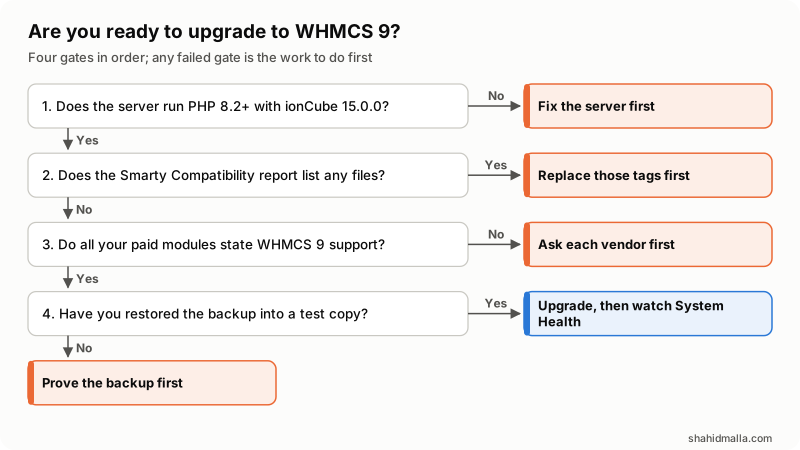
Clear all four and the upgrade is the easy part. One case is not optional: both Long-Term Support versions reach end of life within weeks, so an install sitting on 8.13 or 9.0 in January 2027 gets no security fixes at all.
What else do people ask about upgrading to WHMCS 9?
Can you upgrade straight from WHMCS 8.13 to 9.1?
Yes, and the documentation assumes you might. It asks you to read the release notes for every intermediate version, so an 8.13 to 9.1 jump means reading the 9.0 notes too. The PayPal module trap applies only to installs coming from 8.12 or earlier.
Does WHMCS 9 support PHP 8.4?
WHMCS 9.1 does. WHMCS 9.0 supports PHP 8.2 and 8.3 only. Update WHMCS to 9.1 first, then move the server to PHP 8.4, because the 9.1 release notes say the other order causes serious problems. PHP 8.4 also needs ionCube Loader 15.0.0.
Can you downgrade from WHMCS 9 back to 8.13?
Not through any documented route. WHMCS alters database tables during a major update and there is no reverse migration. Going back means restoring the database, the files and configuration.php from the backup you took first.
Will a custom WHMCS theme survive the upgrade to 9?
It survives if it sits in its own directory and holds no removed Smarty tags. Updates overwrite templates/twenty-one, templates/six, templates/orderforms, the language files and WHMCS-supplied modules, so a theme edited in place is lost. Open-source files you customized, such as aff.php, need putting back by hand.
Does upgrading to WHMCS 9 switch clients to the Nexus cart?
No. The Nexus cart that arrived in 9.0 is opt-in: you set Nexus as the system theme, then select the Nexus cart as the default order form template. The Iris Admin Area template previewed in 9.1 works the same way, chosen by each admin, though WHMCS plans to make it the default later.
How long does a WHMCS 9 upgrade take?
The documentation gives no duration for a major version update and I will not invent one. What is documented is the window: the maintenance notice clears when the update finishes or fails, or one hour after it begins. Preparation and testing take far longer than the update itself.
What if custom code is what blocks the upgrade?
Then it is a development project rather than an update. Legacy Smarty tags become hooks, an abandoned module becomes a replacement, and an integration that leaned on the old API session cookie needs a new authentication path. That is work I take on under WHMCS support and maintenance or as WHMCS development, after a free scoping call of about 30 minutes and a written quote within one business day.
Last reviewed 29 October 2026. Disclosure: I sell WHMCS and web development work, including upgrades, so I am not neutral. WHMCS sells an upgrade service of its own. I am CTO at ElySpace, a freelance developer for Marmaids LLC, and founder of WHMCSPilot and MagizAI. Version numbers, dates, paths and settings come from docs.whmcs.com as I read it on 29 October 2026.