
To run an LLM locally, budget about 2 bytes of memory per parameter at 16-bit, 1 byte at 8-bit and 0.61 bytes at a 4-bit k-quant, then add the context cache and headroom. On a 4-bit build that puts an 8B model near 6 GB, a 14B near 10 GB, a 32B near 22 GB and a 70B near 48 GB of memory.
Running an LLM locally means loading a model's weights into the memory of your own machine and generating tokens there, with nothing sent to an API. The whole model has to be resident at once, which is why the file on disk is close to the memory it will occupy. The llama.cpp quantize documentation says it outright: models are fully loaded into memory, so memory and disk requirements are the same.
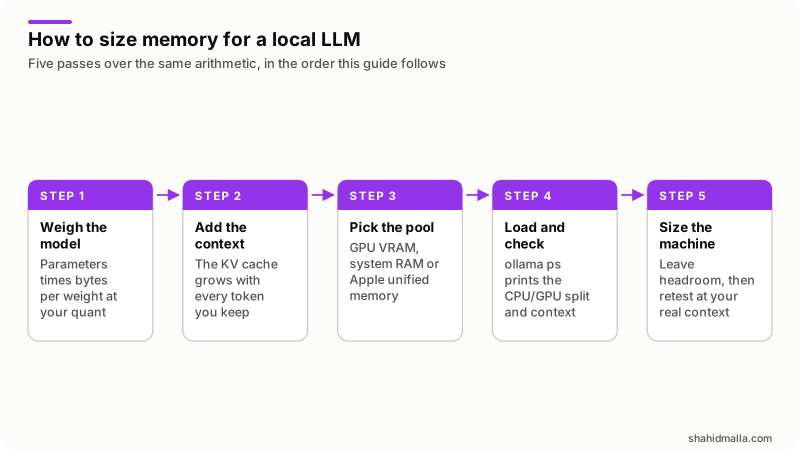
Every figure below comes from one formula, so you can redo the arithmetic for any model. I read every source linked here on 14 November 2026.
How do you work out the memory an LLM needs?
Multiply the parameter count by the bytes used per weight, then add the context cache and a margin for the runtime.
memory = parameters x bytes per weight
       + context cache
       + runtime overhead
Bytes per weight is the part people get wrong. The Hugging Face quantization overview gives the baseline: models are usually loaded in bf16, which takes 2 bytes per parameter, so an 8B model needs about 16GB for its weights in bf16, about 8GB at 8 bits, and about 4GB to 5GB at 4 bits.
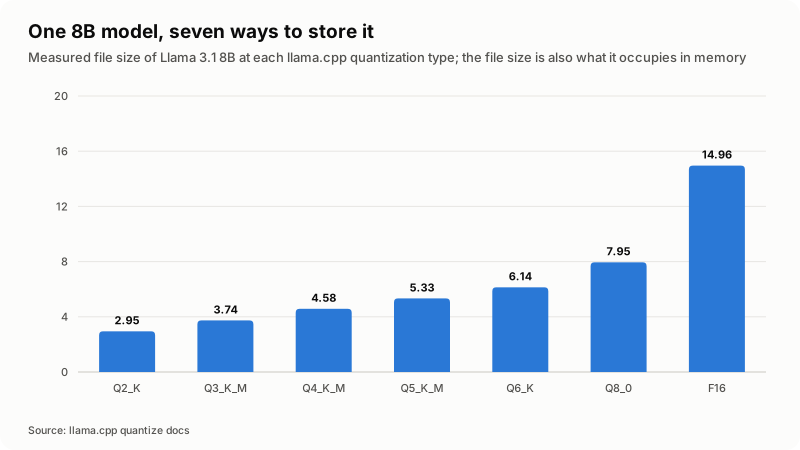
That last range is the clue. A "4-bit" build does not store every weight in 4 bits, because the k-quant formats keep some tensors at higher precision. llama.cpp publishes the measured average for each format, on the same 8B model.
| Stored as | Measured bits per weight | Bytes per weight | Llama 3.1 8B file |
|---|---|---|---|
| F16 | 16.0005 | 2.00 | 14.96 GiB |
| Q8_0 | 8.5008 | 1.06 | 7.95 GiB |
| Q6_K | 6.5633 | 0.82 | 6.14 GiB |
| Q5_K_M | 5.7036 | 0.71 | 5.33 GiB |
| Q4_K_M | 4.8944 | 0.61 | 4.58 GiB |
| Q3_K_M | 3.9960 | 0.50 | 3.74 GiB |
| Q2_K | 3.1593 | 0.39 | 2.95 GiB |
Those figures are from the llama.cpp quantize documentation, read on 14 November 2026. The same page lists Llama 3.1 at Q4_K_M as 4.9 GB for 8B, 43.1 GB for 70B and 249.1 GB for 405B. Multiply 0.61 bytes by 70 billion and you get 42.8 GB; by 405 billion, 247.8 GB. Both land inside one percent of the published size, so the formula holds across two orders of magnitude.
How much RAM does an 8B, 14B, 32B or 70B model need?
For the weights alone, multiply the parameter count by the bytes per weight above. The 4-bit column uses the measured 0.61 bytes of Q4_K_M, not the nominal 0.5.
| Parameters | 16-bit weights | 8-bit weights | 4-bit weights (Q4_K_M) |
|---|---|---|---|
| 8B | 16 GB | 8 GB | 4.9 GB |
| 14B | 28 GB | 14 GB | 8.6 GB |
| 32B | 64 GB | 32 GB | 19.6 GB |
| 70B | 140 GB | 70 GB | 42.8 GB |
Read that as weights only. It covers no context window, no operating system and no runtime. A 32B model at 4-bit does not fit a 24 GB card with 19.6 GB to spare; it fits with about 4 GB to spare, and the next section spends most of that.
How much memory does a longer context window add?
The context window is held as a key and value cache that grows with every token, so doubling the context roughly doubles that cache. Hugging Face's cache explanation gives the shape: caches are a list of layers, and each layer holds a key tensor and a value tensor of shape batch size, heads, sequence length, head dimension. That makes the per-token cost:
bytes per token = 2 x layers x kv heads x head dim x bytes per valueThe 2 is the key and the value. The Qwen3-8B config.json lists 36 hidden layers, 8 key and value heads and a head dimension of 128. At the default 16-bit cache that is 2 x 36 x 8 x 128 x 2 bytes, or 147,456 bytes a token, about 0.147 MB. The Qwen3-32B config.json has 64 layers with the same head counts, so 0.262 MB a token.
| Context length | Cache, 36-layer 8B model | Cache, 64-layer 32B model |
|---|---|---|
| 4,096 tokens | 0.60 GB | 1.07 GB |
| 8,192 tokens | 1.21 GB | 2.15 GB |
| 32,768 tokens | 4.83 GB | 8.59 GB |
| 40,960 tokens | 6.04 GB | 10.74 GB |
At 40,960 tokens, the maximum position count in both configs, the cache on the 32B model costs more than half as much as the 4-bit weights. That is why a machine that loads a model fine still runs out of memory on a long document. Four documented settings change the number:
- Context length. Ollama's context length page picks a default from VRAM: 4k below 24 GiB, 32k from 24 to 48 GiB, 256k at 48 GiB and above. Override it with
OLLAMA_CONTEXT_LENGTH, or-cin llama.cpp. The same page recommends at least 64000 tokens for web search, agents and coding tools. - Cache precision. The Ollama local FAQ documents
OLLAMA_KV_CACHE_TYPE, which needs flash attention enabled: the default is f16, q8_0 uses about half the memory with a very small loss of precision, and q4_0 about a quarter with a small to medium loss that shows more at long context. llama.cpp offers the same as--cache-type-kand--cache-type-v. - Flash attention. Ollama describes it as a feature of most modern models that significantly reduces memory use as context grows, and enables it automatically when the backend supports it. In llama.cpp it is
-fa, set to auto. - Parallel requests. The FAQ is blunt: required RAM scales by
OLLAMA_NUM_PARALLELmultiplied byOLLAMA_CONTEXT_LENGTH, so a 2K context with 4 parallel requests allocates like an 8K context.
Should the model run in GPU VRAM, system RAM or unified memory?
All three hold the same bytes and differ in how fast the processor reads them. Token generation touches the weights for every token, so the pool the model sits in sets the ceiling on speed.
| Memory | What it means for sizing | What to watch |
|---|---|---|
| GPU VRAM | Fastest, and fixed by the card you bought. | Ollama's hardware support page requires Nvidia compute capability 5.0 or newer with driver 550 or newer, and the ROCm v7 driver on Linux for the listed AMD cards. |
| System RAM | Cheap and expandable, so a 70B model is affordable to hold. Speed is the price. | The operating system and everything else want their share. |
| Apple unified memory | One pool for both processors. Apple's Metal storage mode documentation states that Apple GPUs have a unified memory model in which the CPU and the GPU share system memory. | Ollama's macOS page supports the GPU only on Apple M series chips. On an Intel Mac it is CPU only. |
Unified memory is why a Mac is good value for larger models: a 64 GB Mac holds a 70B model at 4-bit that would otherwise need two 24 GB cards, though not at their speed. When a model does not fit the GPU, both runtimes split it, and llama.cpp takes -ngl to set how many layers live in VRAM. A split run is slower, because every token waits on the slowest part of the path. llama.cpp lists this as CPU and GPU hybrid inference, which partially accelerates models larger than the total VRAM.
How do you check where the model actually loaded?
Run ollama ps and read the PROCESSOR column. It reports what happened rather than what should have happened.
NAME             ID              SIZE     PROCESSOR    CONTEXT    UNTIL
gemma4:latest    c6eb396dbd59    9.6 GB   100% GPU     131072     2 minutes from now
The documented readings are 100% GPU for a model loaded entirely into the GPU, 100% CPU for one in system memory, and a split like 48%/52% CPU/GPU. CONTEXT is the context length Ollama allocated.
Models also stay loaded for 5 minutes by default, so ollama stop frees one now, and OLLAMA_MAX_LOADED_MODELS defaults to three times the number of GPUs. An embedding model counts against the same pool as the chat model, which catches people out when they build a RAG chatbot on one box.
How slow is a local LLM without a GPU?
Slow enough to test before you plan around it, and the gap is a multiple rather than a few percent. llama.cpp publishes an example run in its token generation performance notes: an A6000 48 GB GPU, 7 physical CPU cores and 32 GB of RAM, running a 30B model at 4-bit.
| Run | Tokens per second |
|---|---|
| CPU only, 7 threads | 1.7 |
| Offloaded to GPU, 1 thread | 5.5 |
| Offloaded to GPU, 7 threads | 8.7 |
| Offloaded to GPU, 4 threads | 9.1 |
Two things to take from that one machine. At the same seven threads, offloading to the GPU was about five times the CPU-only run, and more threads was not better, since 4 beat 7. Treat the absolute numbers as that machine and that model, and remember a smaller model on CPU is far more usable than a large one.
Which machine fits which model size?
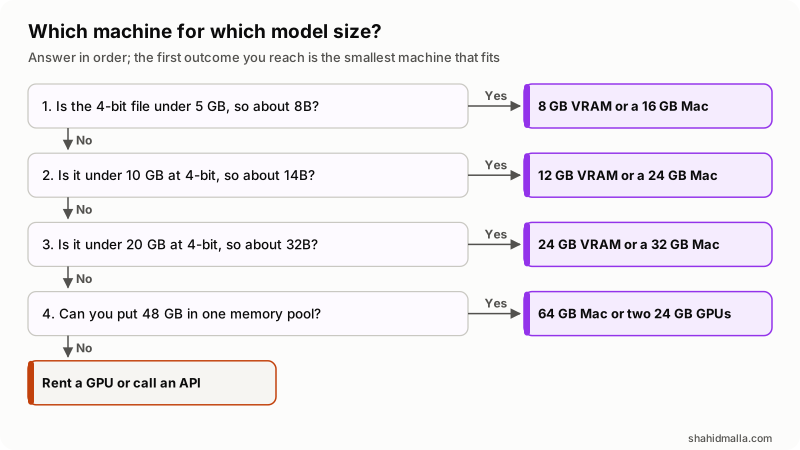
Stop at the first row where the 4-bit weights plus your context cache plus headroom fit. My own margin is weights plus cache plus about 20 percent, which is a rule of thumb rather than a documented figure.
| Model at 4-bit | Weights | Smallest sensible machine |
|---|---|---|
| 8B | 4.9 GB | 8 GB VRAM, or a 16 GB Mac |
| 14B | 8.6 GB | 12 GB VRAM, or a 24 GB Mac |
| 32B | 19.6 GB | 24 GB VRAM, or a 32 GB Mac |
| 70B | 42.8 GB | 64 GB Mac, or two 24 GB GPUs |
Before you buy, walk this checklist:
- Write down the context length the job needs, not the default.
- Compute the cache at that context, and add it to the weights.
- Decide whether more than one request runs at once, and multiply the cache.
- Count what else lives on the machine: an embedding model, a database, the operating system.
- Add headroom, then compare against one memory pool, never RAM and VRAM added together.
- Load the model, run
ollama ps, and confirm PROCESSOR and CONTEXT say what you expected.
What does this memory math not tell you?
It sizes a machine, not whether the model is good enough, and four cases break the arithmetic above.
- Mixture-of-experts models. The parameter count includes experts that are not all active per token. Size for the full count, because the whole file is held, but speed will not track it. llama.cpp has an
--n-cpu-moeflag to keep expert weights on the CPU. - Quantization that unpacks on load. The Hugging Face quantization overview warns that most GGUF checkpoints are dequantized to full precision as they load into Transformers. The 4-bit saving is real in llama.cpp and Ollama, not in every Python pipeline.
- Training and fine-tuning. Inference is the cheap case. The Hugging Face GPU memory usage page counts 6 bytes a parameter for mixed-precision weights, 8 more for Adam optimizer states and 4 for gradients, before activations, and gives an example of a 4B model at batch size 16 needing roughly 85GB.
- Quality. Heavy quantization is what makes a big model fit, and it costs accuracy. The Ollama FAQ notes that models with a high GQA count may lose more precision from cache quantization. Test the quantized build on your own task before buying hardware.
Fitting a 70B model on a desktop does not make it a product. Retrieval, tool calls, logging and approvals all sit outside this arithmetic. I build AI agents and chatbots for WHMCS, WordPress, SEO and server work, and run MagizAI, so I have an interest in saying that. My guide on how to build an AI agent covers what memory sizing does not.
What else do people ask about running an LLM locally?
How much RAM do I need to run a 70B LLM?
About 48 GB in one pool for a 4-bit build. The llama.cpp quantize documentation lists Llama 3.1 70B at Q4_K_M as 43.1 GB, and the context cache plus headroom takes it into the high forties. At 8-bit it needs about 70 GB of weights and at 16-bit about 140 GB, which is server territory.
Is VRAM better than system RAM for running an LLM?
Yes for speed, no for capacity. In the llama.cpp example above, offloading a 30B model to an A6000 was about five times faster than the same model on seven CPU threads. VRAM is fixed at purchase while system RAM can be expanded, so a model you cannot afford in VRAM may still be worth running slowly in RAM.
Can I run an LLM with no GPU at all?
Yes. Ollama and llama.cpp both run on CPU alone, and Ollama's macOS page supports x86 Macs as CPU only. Expect single-digit tokens per second on a mid-size model, or stay near 8B where each token reads far less memory.
Does a longer context window need more RAM?
Yes, and it is linear in tokens. The Ollama context length page states that a larger context increases the memory required, and the per-token formula here gives the exact cost. For the 36-layer 8B example, every extra 8,192 tokens costs about 1.2 GB at the default 16-bit cache.
Does more RAM make a local LLM faster?
Only by preventing something slower. Extra memory lets the whole model stay in the fastest pool, and in the llama.cpp example the run that stayed on the CPU was five times slower. Once the model fits, more memory buys a longer context or a second model, not more tokens per second.
If you want a local or hosted model wired into a real system rather than a terminal, I take that on as AI integration work or hourly as an AI developer, with a free scoping call of about 30 minutes and a written quote within one business day.
Last reviewed 14 November 2026. Disclosure: I build AI integrations and agents for a living, so I am not neutral. I am CTO at ElySpace, a freelance developer for Marmaids LLC, and founder of WHMCSPilot and MagizAI. Every figure here comes from the llama.cpp, Hugging Face, Ollama and Apple documentation linked above, read on 14 November 2026.