Training ChatGPT on your own data is almost never training. In practice you attach your documents and the model reads the relevant parts while it answers: files in a ChatGPT project, a Claude project, or retrieval over the API. Real fine-tuning changes style and format, not facts, and OpenAI has closed its fine-tuning platform to new customers.
"Training ChatGPT on your own data" is the everyday name for giving a model access to your documents at the moment it answers a question. The model's weights never change, so nothing is memorized: delete a file and the answers that came from it stop. The technical name for that lookup step is retrieval, and a chatbot built on it is a RAG chatbot.
Everything below comes from OpenAI's API documentation, OpenAI's own ChatGPT product documentation and Anthropic's help center for Claude, read on 14 November 2026. One thing has changed since most advice on this topic was written: OpenAI is retiring custom GPTs, the feature those guides tell you to use.
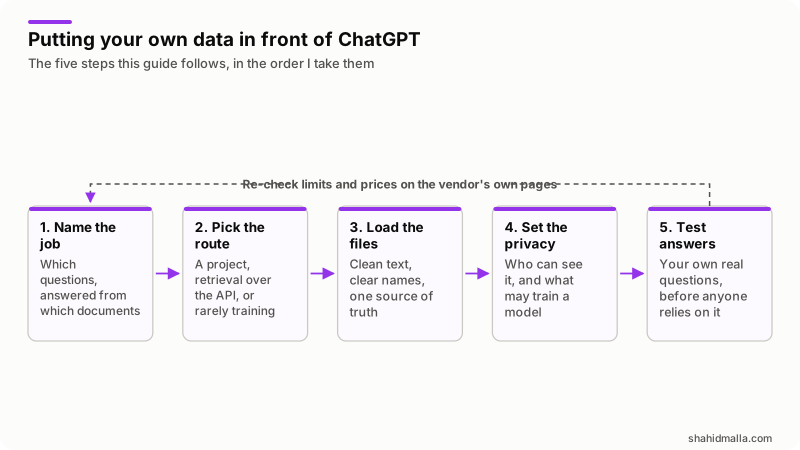
What does training ChatGPT on your own data really mean?
It means one of three jobs, and only the last is training.
- Prompting. You paste the text into the chat. Free, instant, and gone when the chat ends.
- Knowledge, or retrieval. You attach files once and the assistant searches them each time it answers. This is what nearly every business means, and what projects, plugins and API file search do.
- Fine-tuning. You train a model on pairs of prompt and ideal answer so it responds in a particular way. OpenAI's supervised fine-tuning guide lists what it is for: classification, nuanced translation, generating content in a specific format, and correcting instruction-following failures. Facts are not on that list.
The difference shows on the day an answer is wrong. With retrieval you fix the document and the next answer is right; with fine-tuning you collect new examples and run another training job. Retrieval also lets the assistant name the file it used, which is the only practical way to check it.
Which option fits the job you have?
Start from who asks the questions. Staff in a chat window need a project; customers and software need the API.
| Option | Where it lives | Best for | Main limit |
|---|---|---|---|
| ChatGPT project | The ChatGPT app | Your own team, recurring work on the same documents | No folder access: every source is uploaded or connected |
| ChatGPT plugin | The ChatGPT app | Reusable instructions plus reference files and connected apps | Availability depends on app access, workspace settings and the surface |
| Claude project | The Claude app | Long documents, shared with a team on paid plans | Capacity follows the context window, not a file count |
| File search over the API | Your own app or website | Customers, support widgets, anything automated | Needs a developer, and bills per call and per gigabyte |
| Fine-tuning | The API | A fixed output format or tone, from at least ten examples | Closed to new customers, and teaches no facts |
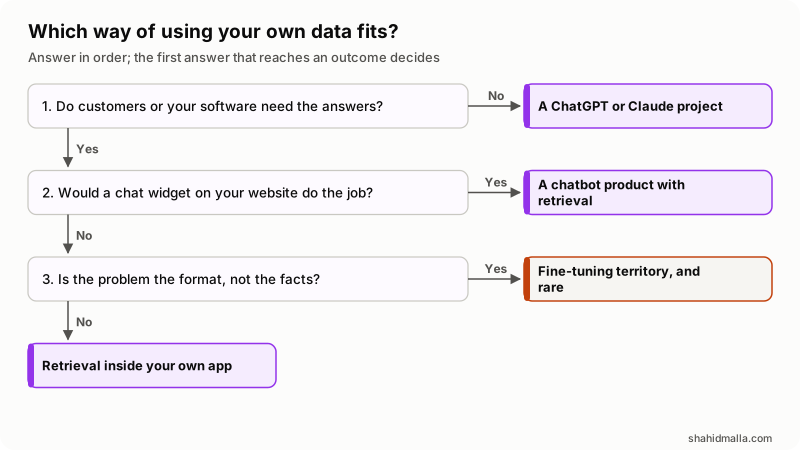
In words: staff questions need a project. Visitor questions, where a chat widget would do, usually mean buying a product rather than building one, which I cover in my guide to an AI chatbot for your website. Questions inside your own software mean API retrieval, and only a complaint about the shape of the output brings fine-tuning into it.
How do you add your own data inside ChatGPT?
Through a project, the supported home for files and instructions you reuse. OpenAI's projects and chats documentation says to create one when the work will continue over time, produce more than one output, or depend on the same files and sources. Each project has a Sources section for uploaded files and connected context, and its instructions apply across all of its chats. A project cannot reach into a folder on your computer, so every document is uploaded or connected.
I am not quoting a per-plan file limit: it is not in that documentation, and the help center page that carries it did not load on 14 November 2026. Check what your own plan allows in the app.
Custom GPTs were the other answer, and they are going away. OpenAI's guide to moving custom GPT workflows to plugins says new GPT creation stops, a GPT you have not migrated stays editable until then, and at retirement custom GPTs stop running and leave the GPT directory. That page sets no public retirement date, so work to the one in your own workspace notice.
The replacement is a plugin: a package for a workflow holding skills, apps, or both. A skill carries instructions for how a task is done and can include reference files; an app connects ChatGPT to another service. In migration the GPT's instructions and reference files become a skill and its connected apps stay with the plugin. Two things do not come across: the model you had selected, and custom actions. If your GPT called your own API through an action, OpenAI's advice is to rebuild it with a supported app's actions or a custom MCP connection. My guide to MCP explains that part. Sharing settings are not copied either, so every replacement starts private.
When is a Claude project the better home for your files?
When the documents are long and you want them read rather than searched. Anthropic's what are projects page describes self-contained workspaces with their own chat histories and knowledge bases, open to every user including free accounts, which get five. Capacity follows the context window, not a file count.
On paid plans, Anthropic's RAG for projects page says that when project knowledge approaches the context limit, Claude switches to a retrieval mode that expands capacity by up to ten times, and that you then see it using a project knowledge search tool. Below that threshold the whole document is available at once, which is why a long contract or specification often behaves better here. Team and Enterprise plans add sharing with view or edit permission, and a new version of projects is in beta, so check your own account first.
How do you connect your own data to the API with file search?
With a vector store and the file search tool, the route behind the phrase "train the ChatGPT API on your own data". Three steps: upload each document through the Files API, create a vector store and add the files to it, then let the model search that store while it answers. OpenAI's retrieval guide covers the mechanics, and chunking, embedding and indexing are done for you. Tool calls are billed on the Responses API.
| Setting | Documented value | Why it matters |
|---|---|---|
| Maximum file size | 512 MB, and no more than 5,000,000 tokens per file | Large exports have to be split |
| Default chunking | 800-token chunks with 400 tokens of overlap | Decides how much context each answer gets |
| Chunk size range | 100 to 4,096 tokens | Tune only when answers miss context |
| Results per search | 10 by default, up to 50 with max_num_results | More results cost more tokens |
| Expiration | expires_after on the vector store | Stops storage charges for stores you forgot |
Supported formats include PDF, Word, PowerPoint, Markdown, HTML, plain text and common code files. Attributes attached to each file let you filter a search, say to one brand or one date range, before the semantic part runs. For a bulk load, a single batch request can carry up to 500 files, and adding files is capped at 300 requests a minute per vector store.
Clean text wins here. A scanned PDF with no text layer indexes as nothing useful, and a price list buried in a slide deck rarely survives chunking. In most of these jobs the documents take longer than the code.
Is fine-tuning still worth considering?
For most readers, no, and the door is closing anyway. The supervised fine-tuning guide carries a notice that OpenAI is winding down the platform: it is no longer accessible to new users, and eligible existing customers can create training jobs until 6 January 2027, unless the base model shuts down earlier. Fine-tuned models stay available for inference until their base model shuts down.
The work itself has not changed: a JSONL file of example conversations, at least ten lines, with OpenAI recommending about 50 well-crafted demonstrations to start, and evaluations set up before you spend anything, because without them you cannot tell whether the result beats the plain model with a good prompt. For a business decision, the summary in my RAG chatbot guide is enough.
What does each option cost to run?
Projects cost whatever your seat costs, and nothing more. The API route is metered, with three meters running at once.
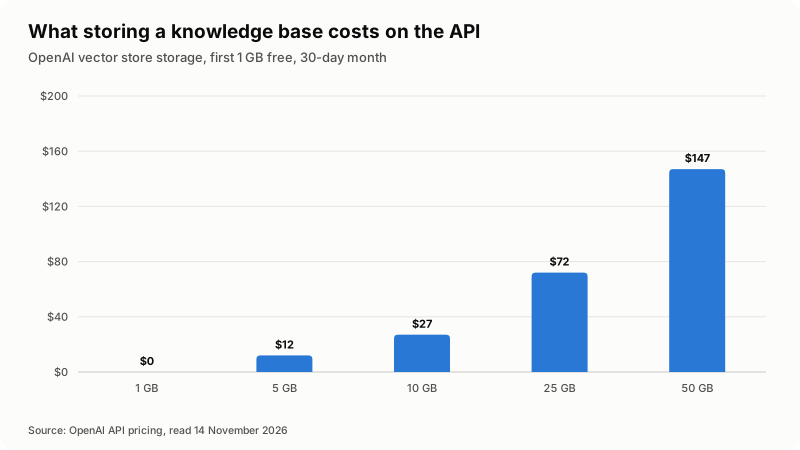
OpenAI's API pricing page, read on 14 November 2026, gives file search storage at $0.10 per GB per day with the first 1 GB free. On that rate a 30-day month costs nothing under a gigabyte, about $12 at 5 GB, $27 at 10 GB, $72 at 25 GB and $147 at 50 GB, before a single question is asked. Storage is measured on parsed chunks and their embeddings, so expect it to exceed the files on disk.
| Meter | Published rate | What drives it up |
|---|---|---|
| Vector store storage | $0.10 per GB per day, first 1 GB free | Keeping every old version of every document |
| File search tool calls | $2.50 per 1,000 calls | Question volume, and models that search twice per answer |
| Model tokens, including built-in tools | The model's own rate on the pricing page | Chunk size, number of results, long conversations |
I am not quoting ChatGPT or Claude seat prices here. Read those on the vendor's own pricing page, not in an article, mine included.
Who can see your files, and will they train the model?
It depends on the product, which is why this is settled before anyone uploads a client file.
| Where your data sits | Used to improve models? | What to do |
|---|---|---|
| ChatGPT personal plans | Decided by your account's data controls | Open Settings > Data Controls and read the setting yourself; I could not reach OpenAI's page on this on 14 November 2026, so I am not stating a default |
| ChatGPT Business | No training on your business data by default | Nothing, unless your workspace signed a separate agreement |
| The API, including file search | No, unless you opt in | Nothing; abuse monitoring logs are kept up to 30 days by default |
The API side is the clearest. OpenAI's data controls page states that data sent to the API has not been used to train or improve its models since 1 March 2023 unless you explicitly opt in. It also shows what is stored rather than trained on: abuse monitoring logs for up to 30 days by default, and, for vector stores and uploaded files, content kept until you delete it. Zero Data Retention exists for approved customers, subject to prior approval. The Business line comes from OpenAI's own plan documentation.
I did not open Anthropic's privacy terms on the day I wrote this, so check them yourself before a project holds anything confidential. Whichever product you pick, strip what does not need to be there: price lists and policies belong in a knowledge base, payroll files and customer identifiers do not.
How do you check it works before you rely on it?
Test it the way an awkward customer would. This is my checklist before an assistant faces anyone:
- Write 20 real questions from your inbox, including two with no answer in the files.
- Check each answer against the source document, not against your memory.
- Confirm it names the file it used. If it cannot, instruct it to quote the source.
- Check that an unanswerable question gets "I do not know" rather than an invention.
- Delete one file and re-ask its question, so you know removal works.
- Upload a document that contradicts another and see which one wins.
- Check who else can open the project, and how the data controls are set.
In the AI agents and chatbots I build, nearly every bad answer traces back to the documents: two versions of a policy, a price that changed in an email, a PDF that is really a photograph.
What else do people ask about training ChatGPT on your own data?
Is it possible to train ChatGPT on your own data?
Not literally. You cannot retrain the models behind ChatGPT, and the self-serve fine-tuning platform that changed a model's weights is closed to new users. What you can do is attach your documents so the model reads them while it answers.
Can I train the ChatGPT API on my own data?
You can connect your data to it. Upload the files, create a vector store and give the model the file search tool, and every answer can search your content. That is the normal route for a customer-facing assistant, and it bills tool calls, tokens and storage rather than a training job.
How do I train an AI agent on my own data?
The same way, with one addition. An agent gets your documents through retrieval and your systems through tools, so the data question splits in two: what it may read, and what it may do. I cover the second half in my guide to building an AI agent.
Can I train ChatGPT on my website?
Not from a URL in the chat app. Export the pages as text or PDF and add them as project sources, or let a chatbot product crawl the site. If the content lives in a CMS, pulling it through an API into a vector store keeps it current without anyone re-uploading files.
Is it free to use my own data with ChatGPT?
Testing costs nothing beyond the plan you are on, because a project adds no charge on top of a seat, and a free Claude account can create five projects. The API route is where meters start, though the first gigabyte of vector store storage is free.
If this has to reach your customers or your own systems rather than your staff, that is the work I do as AI chatbot development, and you can hire me as an AI developer for the build, with a free scoping call of about 30 minutes and a written quote within one business day.
Last reviewed 14 November 2026. Disclosure: I build and sell AI chatbot and AI agent work, so I am not neutral. I am CTO at ElySpace, a freelance developer for Marmaids LLC, and founder of WHMCSPilot and MagizAI. Every limit and price above comes from the OpenAI API documentation, OpenAI's ChatGPT product documentation and the Claude help center as I read them on 14 November 2026. Check them again before you commit, because these products change often.