AI server management means letting an agent watch cPanel, Plesk or plain Linux servers and apply a short list of reversible fixes under rules you write. Service restarts, cache clears, PHP limits and runaway processes are safe to automate. Reboots, database restores, rebuilds and anything touching customer data stay behind an approval step.
AI server management is the practice of giving a program with a language model inside it read access to a server's state, a narrow set of actions it may take, and written rules deciding which findings become changes. It is not a chatbot that types commands for you, and it is not monitoring with a better dashboard. The value sits in the policy layer.
The cPanel, WHM and Plesk behavior below comes from the vendor documentation linked in the text, read on 17 November 2026.
Which server jobs are worth handing to an agent?
The repetitive ones with a clear right answer and a way back. Sorting server work by how hard it is to undo gives four levels, and the level sets the policy.
| Level | Typical actions | How you undo it | Policy I start with |
|---|---|---|---|
| L1 Restarts and caches | Restart Apache, nginx, Exim, Dovecot, MySQL; clear a cache | Restart again | Automatic |
| L2 Limits and versions | PHP limits, PHP version on one site, a runaway process, swap | Put the old value back | Automatic, ask on protected servers |
| L3 Security actions | Quarantine malware, block an attacking IP, close a known PHP hole | Restore from quarantine, drop the rule | Ask first |
| L4 Heavy actions | Reboot, database restore, rebuild a service or account | Nothing quick | Always ask, no timer |
Most of the value sits in L1 and L2. The L2 to L3 line is where people get hurt: an IP block and a PHP limit look equally small in a dashboard. Site-level work has its own rules, in my guide on what a WordPress AI agent can safely automate.
How do you connect an agent without giving it root?
Give it the narrowest credential that still does the job, so the limit is a permission rather than a sentence in a prompt. Both big panels have a scoped token system, and both beat an SSH key.
On cPanel and WHM, the api_token_create documentation states the ceiling: "You can only assign privileges that you possess to the API token." Privileges go in as incrementing acl-0 and acl-1 parameters, and leaving that parameter out assigns all of your privileges to the token instead. The call also takes whitelist_ip values and an expires_at date in Unix Epoch format. Two cautions: cPanel's Manage API Tokens page calls the ability to assign ACL restrictions to tokens "experimental", and an expired token is not removed, so someone has to delete it.
On Plesk, the REST API documentation says every request "must be authenticated and sent via HTTPS" using "either basic authentication or API keys", and recommends keys "because they are more secure". A key takes an optional login naming the user who holds it, and without it "the Plesk administrator's login is used". That default is the whole decision. An ip parameter links the key to one address, and the secret_key utility sets the same thing from the command line with -ip-address, after which the XML API denies "requests that use the secret key but were sent from other IP addresses". Both parameters are optional, so neither limit applies unless you ask for it.
| Connection | What it reaches | How you narrow it | Good for |
|---|---|---|---|
| WHM API token | Server-wide WHM functions | Named ACLs, IP allow list, expiry | Fleet checks and restarts |
| cPanel account token | One hosting account | The account boundary itself | Per-site work, no server reach |
| Plesk API key | Whatever its Plesk user can do | A limited login, bound to one IP | Plesk servers, read-first setups |
| SSH key | Everything the Linux account can | A dedicated user, forced command, sudo rules | Last resort only |
Two rules sit on top of whichever you pick. The model never holds the credential: the agent does, and the model sees only the output of a tool call. And a connection carrying one account's access must not reach server-wide actions, as a property of the token rather than the agent's good manners.
How do you write rules an agent cannot talk its way around?
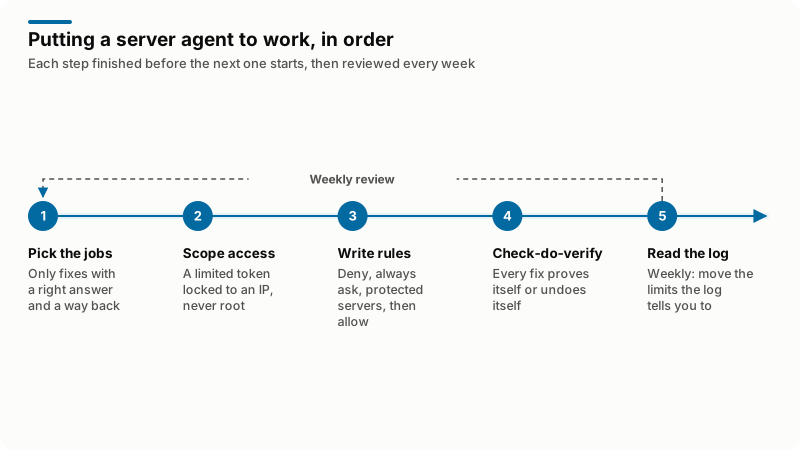
Write them twice: once in plain words the agent reads, for judgment the code cannot express, and once as checks the software evaluates before any command runs. The enforced version is what actually stops things, in a fixed order:
- Deny. Actions that never run, whoever asks. The list is literal: destructive shell patterns, recursive deletes outside a known path, writes to a disk device, anything that disables the firewall or the agent's own logging.
- Always ask. Allowed to exist, never to run unattended. Everything at L4, plus whatever your business cares about more than the documentation does.
- Protected servers. A named list where even L1 and L2 need approval: the billing server, the mail relay, the box whose contract says nobody touches it.
- Allow. What is left, with its level and its policy.
Deny beats allow, and a protected server beats a helpful rule written last week. The OWASP Generative AI project files the general failure under Excessive Agency, names its drivers as "excessive functionality; excessive permissions; excessive autonomy", and advises you to "Utilize human-in-the-loop control to require a human to approve high-impact actions before they are taken".
The plain-word file still matters, because server work is full of local knowledge no permission system encodes: this customer runs a nightly import, that domain's mail must never bounce. Move anything that keeps being violated into the enforced list.
What does one safe fix look like from check to undo?
Four steps, every time: check, do, verify, undo if the verify fails. A fix that skips verify is a guess with a log entry.
Take the common L1 case, a web server that stopped answering. The check is a state read, not an assumption: systemctl is-active httpd on plain Linux, or the Plesk service utility, which documents the three commands an agent needs, --status, --restart and --list.
The check also decides whether a restart is right at all. cPanel's Restart Services interfaces cover services including DNS, FTP, Apache, Dovecot, Exim, PHP-FPM, MySQL and OpenSSH, and state the limit naive automation trips over: "You cannot restart a stopped service. To start or stop services, use WHM's Service Manager interface." The same page adds a sentence worth putting in the agent's own prompt: "If these interfaces fail to restart a service, the service may have additional problems."
Both panels already restart things on their own, and an agent that does not know this will fight them. cPanel's Service Manager explains that the ChkServd driver "attempts to restart a service when it detects that the service fails" and alerts your contact address on failure, recovery and timeouts. Plesk on Linux uses systemd: its page on automatic restart of crashed services says respawn is on by default, Service.RestartSec waits five seconds, and Service.Restart defaults to on-failure, meaning a non-zero exit code.
So the useful L1 policy is not "restart it". It is: wait out the panel's own retry, read the state again, restart once, verify, escalate if the second read disagrees with the first. A running process is not a working service, so verify with a real request, a mail probe or a one-row query.
Which cPanel and Plesk fixes can run unattended?
The ones where the previous state is a value you can store and put back. That is narrower than "low risk", and easier to apply at three in the morning. Undo always means that recorded state.
- Service restarts after a real state check, with the panel's own retry respected first.
- Cache clears. Opcode, object and panel caches. The worst case is a slow minute.
- PHP limits on one site. Store the old value, change one, test the failing request, revert if it does not help.
- One runaway process past a threshold you set, never a whole user's processes, never a database or mail queue runner.
- Memory and disk pressure. Growing swap, rotating logs, clearing a temp directory named in the rules. Never removing swap, never a delete-by-age rule.
A PHP version change on one site sits at the edge of L2: reversible in a click, and it breaks sites. It should run unattended only when the agent can request a page before and after and compare. My guide on updating PHP and securing the server covers the checks that come first.
Which fixes should always wait for approval?
Anything that cannot be undone in minutes, anything affecting every account on the server, and anything the agent cannot verify afterwards. One no answer is enough.
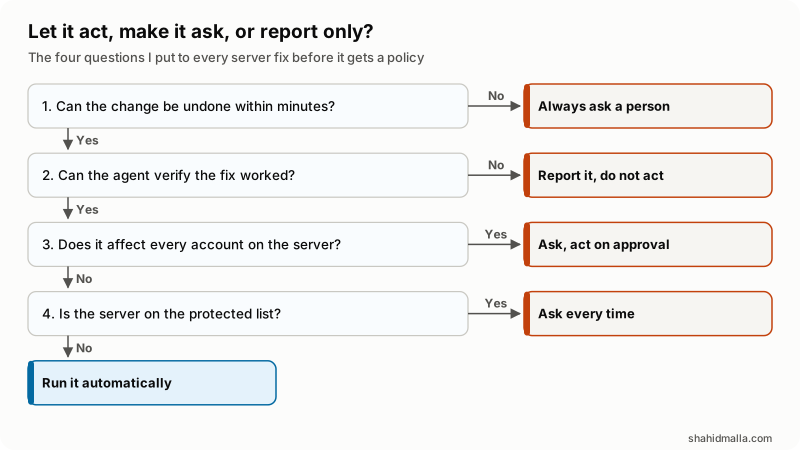
In words: a change that cannot be undone within minutes always asks. A fix the agent cannot prove worked is reported, not applied. A change affecting every account waits for approval. The rest runs automatically, unless the server is protected, where it asks every time.
L3 actions fail these tests in different ways. Quarantining malware is reversible, so it can carry a timer. Blocking an IP address is easy to get wrong, because the attacker and your own monitoring can share a range and the symptom of a bad block is silence. Closing a known PHP hole is sharper still: a vendor patch is routine, as in my guide to the PHP2Shell flaws, while a model writing its own patch is a proposal. The firewall side sits in my hardening checklist, with the rule that saves you here: never change firewall policy without a timed rollback.
L4 fails on undo alone. WHM's Backup Restoration interface restores subdomains, mail configuration and MySQL databases from an account's archive, each a separate choice and all three on by default. Nothing written since that backup ran is in the archive. A reboot fails differently: it is quick, it usually works, and when it does not, every customer is offline.
What should never be automated on a server?
Deletion, access, and anything whose blast radius is the whole machine. These stay with a person even when the agent is right, because being right most of the time is not a safety property.
| Never automatic | Why | What the agent may do instead |
|---|---|---|
| Deleting accounts, databases, mailboxes | Gone is gone, and the backup may be old | Propose a list with sizes and dates |
| Restoring a backup over live data | It overwrites everything done since | Stage it, show the change, ask |
| Rebooting a shared server | Everyone is offline, and it may not come back | Collect evidence, ask, watch the boot |
| Firewall policy and SSH access | A wrong rule locks out whoever would fix it | Propose it, apply with a timed rollback |
| DNS and mail routing | Caching outlives the undo | Alert on drift, ask before writing |
| Creating users, granting privileges | It hands out what you are protecting | Report accounts and role changes fast |
The reason is security as well as operations. A server agent reads text written by strangers: web logs, mail headers, ticket bodies, file names on disk. If a model reading that text can also run commands, someone will try to write instructions into it. That is why the deny list is code, not advice.
How do you check the agent is earning its place?
Read the audit log once a week, not the alerts. Alerts say what happened; the log says whether the policy is right. Before any of that, run a short go-live checklist:
- Every credential is scoped, IP-bound and has an expiry date in the calendar.
- The deny list is tested, not assumed: run a denied command and watch it fail.
- Every automatic fix has a recorded previous state and a verify step that is not a process check.
- The protected server list exists and names the billing and mail machines.
- Approvals reach a person inside your promised response time, and the agent's logs live elsewhere.
Then look for three shapes each week. Approvals you clicked without reading, which means the fix belongs on automatic or should not exist. A refused approval arriving again, because a denial has to stick. And fixes that applied then undid themselves, which usually means the verify step tests the wrong thing.
As one worked example, I am building Server Agent, an AI system administrator for cPanel and WHM, Plesk, DirectAdmin, CyberPanel or plain Linux servers and the sites on them. It is in development and built to order, not finished software you download today. It follows the pattern above: the four fix levels, check-do-verify-undo on every fix, do-and-don't rules in plain words alongside enforced guard rails in the order deny, always ask, protected servers, allow, a connection with one account's access that cannot run server-wide actions, and a built-in block list of destructive shell commands. The case study shows the dashboard, issues queue and approvals screen. Disclosure: Server Agent is my own product, and it is not released yet.
What else do people ask about AI server management?
Can AI replace a system administrator?
No, and the reason is accountability rather than capability. An agent is good at the checking and the small reversible fix, which is most of the hours, but it cannot own an outage or decide a server should be rebuilt rather than patched.
Is it safe to give an AI agent root access to a server?
It is safe in proportion to what the credential can do, not to how carefully you worded the prompt. Issue a WHM API token with named ACLs rather than all your privileges, bind it to an IP address, set an expiry, and put anything that truly needs root behind an approval step.
What can an AI agent for server management do on cPanel?
Read service state, restart the services WHM exposes, adjust PHP limits and versions per site, kill a single runaway process, watch disk and memory, and raise an approval request for anything heavier. The ACLs on its token set the real answer.
Can an AI agent manage a Plesk server too?
Yes, through the REST API with an API key, or the plesk bin utilities over SSH. Create the key against a limited login, because a key made with no login named belongs to the administrator.
Do I still need monitoring if I have an agent?
Yes. The agent consumes monitoring, it does not replace it, and an agent that also decides what counts as an incident has no independent check. Keep monitoring outside the servers the agent manages.
If you want an agent built around your own servers and approval rules, I do that under AI agent development, and the hosting side under web hosting expert work, with a free scoping call of about 30 minutes and a written quote within one business day. Everything I sell is final sale, so ask your questions before buying.
Last reviewed 17 November 2026. Disclosure: I sell hosting infrastructure work and AI agent development, and Server Agent is my own product, so I am not neutral. I am CTO at ElySpace, a freelance developer for Marmaids LLC, and founder of WHMCSPilot and MagizAI.