
A WHMCS backup is not finished until it holds three things: the database, the configuration.php file with its encryption hash, and the attachments, downloads and custom template files that live outside the database. WHMCS automates the database part at Configuration > System Settings > Database Backups. The files, the off-site copy and the restore test stay your job.
A WHMCS backup is a copy of everything needed to rebuild a billing install on a different server: the MySQL database, the configuration file that can decrypt it, and the writeable directories that hold client files. The documentation splits WHMCS into those same three parts, and the built-in backup covers only the first. A backup nobody has restored is an assumption, not a backup.
Everything below is checked against the WHMCS 9.1 and cPanel & WHM documentation, read on 10 November 2026. The WHMCS documentation home page lists 9.1 as General Availability, with 9.0 and 8.13 on Long-Term Support, so read your own version's pages. None of this applies to WHMCS Cloud, where WHMCS manages backups and a restore is a support ticket.
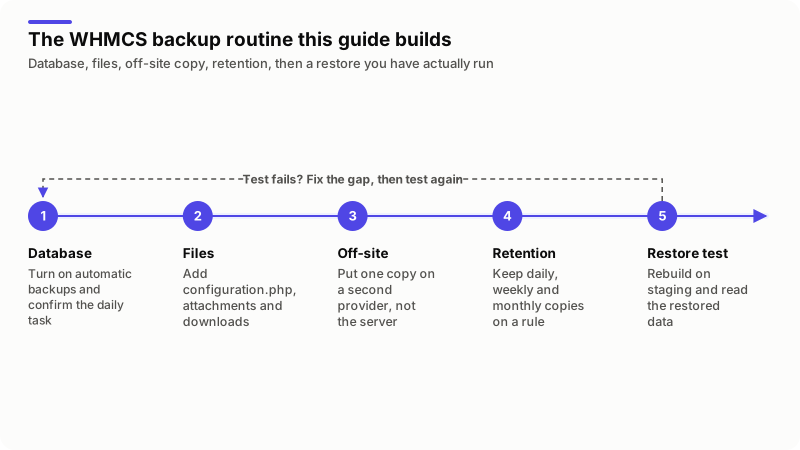
What does a complete WHMCS backup have to include?
Four things: the database, configuration.php, the writeable directories, and any code you wrote. The Database Backups page says you can restore WHMCS as long as you have the database. That is true of the data, not of a ticket attachment or an edited invoice template.
| Part | Where it lives | What backs it up |
|---|---|---|
| Database | Clients, invoices, services, domains, tickets, settings | The built-in backup, mysqldump, or a cPanel account backup |
configuration.php | The main WHMCS directory | Nothing automatic. You copy it and keep it safe |
attachments, downloads | Writeable directories, often above the document root | A file-level backup, or the bucket if you use S3 |
| Custom templates, modules, hooks | /templates, /modules, /includes/hooks | A file-level backup. Version control is better |
templates_c | The template cache | Nothing needs to. It regenerates |
Secure Writeable Directories recommends moving the three writeable folders above the document root. Follow that advice and a backup aimed at the WHMCS folder alone misses two of them.
How do you turn on automatic WHMCS database backups?
Go to Configuration > System Settings > Database Backups, click the option you want, enter the destination, run Test Connection, then Save & Activate. The system cron runs the --DatabaseBackup task daily, listed last in the task order on the System Cron page. If the cron is not running, no backup is either, as my WHMCS cron jobs guide covers.
| Option | What it does | Documented limits |
|---|---|---|
| SFTP/FTP Backup | Stores the zipped SQL file on a remote server | FTP and SFTP only. The docs say it does not support FTPS or FTP/TLD. Tick Use Secure FTP/SFTP |
| cPanel Backups | Calls the cPanel API to start a full Backup Wizard backup | Needs a cPanel API token made in WHM at Development > Manage API Tokens with the basic-system-info and cpanel-api permissions |
| Daily Email Backups | Emails the backup file to an address you set | May fail on large databases on memory or execution limits. Not recommended for large installs |
Read the cPanel row twice. That type only asks cPanel to start a full backup. It does not detect completion, move the file, or notify anyone. It is a trigger, not a backup.
The SFTP/FTP destination is relative to the login folder, not absolute: if logging in lands you at /home/user and the file belongs in /home/user/backups, the value is backups/. Two manual routes also exist: download a backup at Utilities > System > Database Status, or run the task yourself.
php -q cron.php do --DatabaseBackupWhich parts of WHMCS does the database backup leave out?
Every file. The automatic backup produces a zipped SQL dump and nothing else, so the configuration file, the uploads and your code all sit outside it.
Storage Settings lists eight file types WHMCS keeps outside the database, from Client Files and Downloads to Knowledgebase Images and Ticket Attachments. Note where each points: a local path and an Amazon S3 bucket need different treatment.
Custom work is the other gap. A theme change, a custom invoice template, a provisioning module, a hook in /includes/hooks: none of it is in the database. Keep that code in Git, which gives you history rather than yesterday's copy.
Why does the configuration.php encryption hash matter so much?
Because it decides how much of a restored database you can actually read. WHMCS stores ordinary data unencrypted and sensitive data encrypted, and the key is the cc_encryption_hash value inside configuration.php.
The configuration.php reference describes it as a random 64-character string of a-z, A-Z and 0-9, and says that if you lose it the system cannot decrypt your data. Restore the WHMCS Database gives the result: with a database backup but no configuration file, passwords, security questions and card data stay permanently encrypted.
So treat that file as a secret, not as part of a folder sync:
- Keep a copy off the server, in a password manager or secrets store, and out of the Git repository that holds your custom code.
- Set permissions as Secure the Configuration File describes:
chmod 400 configuration.php, falling back to 440 then 444 if WHMCS will not load, and 755 only while you update a license key. - Refresh the copy after any change to the file, such as a license key change or a database move.
The same hash is what goes wrong on server moves, so read my WHMCS migration guide first if one is coming.
How do you back up the WHMCS files with cPanel?
At server level with WHM's Backup Configuration, and at account level with the Backup Wizard. The WHMCS settings cover the database; these cover the files next to it. Four settings in Backup Configuration are worth deciding on purpose:
- Scheduling and Retention. Daily, weekly and monthly runs each take their own retention number, any value from 1 to 9999. Strictly enforce retention removes old backups whether or not they succeeded.
- Back up System Files. cPanel says you must enable this for server restoration.
- Back up SQL Databases. Per Account Only uses
mysqldumpand writes.sqlfiles. Entire MySQL Directory copies/var/lib/mysql/without stopping MySQL, which the docs warn can leave InnoDB problems, and those backups cannot be restored through the interface. - Additional Destinations. cPanel recommends also saving to a remote destination, and advises against remote filesystems such as NFS or CIFS.
At account level, the Backup Wizard writes a full backup as a .tar.gz tarball, to Home Directory, Remote FTP, passive FTP or SCP. Two limits from that same page: a full backup cannot be restored automatically from cPanel, only from WHM, and a backup for an account near its quota can fail.
Where should WHMCS backups be stored, and for how long?
Somewhere a bad day on the WHMCS server cannot reach, and long enough that a problem you notice late is still recoverable. A backup in the account's own home directory survives a mistake inside WHMCS. It does not survive the server.
Both vendors push back on it. WHMCS says a cPanel backup saved to Home Directory counts against the account's disk space limits and should be moved. cPanel recommends a remote destination too, because the backup and transfer queues are separate, so files can pile up and fill the drive.
This is the retention shape I recommend. It is mine, not the documentation's.
| Copy | Where it lives | How long I keep it | What it is for |
|---|---|---|---|
| Nightly database dump | Second server or storage account, over SFTP | 14 days | A bad import, a deleted client |
| Weekly account backup | A different provider | 8 weeks | Files, templates, custom code |
| Monthly archive | Object storage with versioning on | 12 months | Damage found late |
configuration.php | Password manager or secrets store | Current copy and the one before | Decrypting the rest |
Short checklist, the one I work through on an install:
- Automation Status is green and the daily cron run completes.
- The latest file is at the destination, and its size matches the ones before.
- The copy sits on different hardware, behind a different provider login.
configuration.phpis backed up separately and still has 400 permissions.- A restore test has been run and dated in the last three months.
If the storage layer is the work rather than the WHMCS settings, that is what I do under server migration and backup.
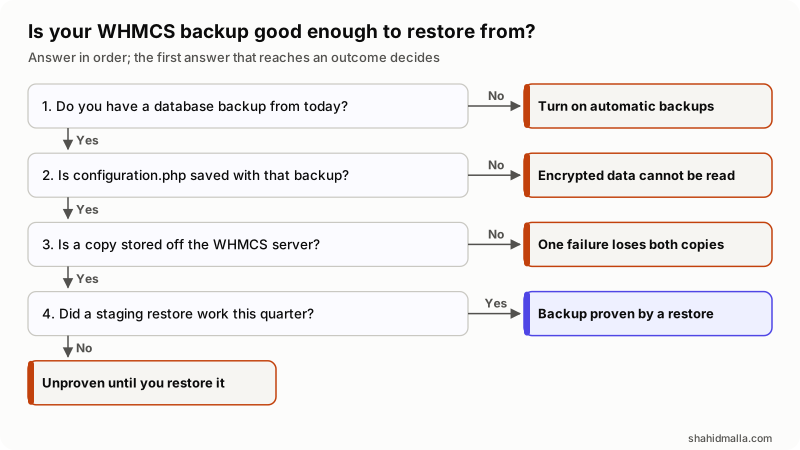
In words: no backup from today means turn automatic backups on first. A backup without configuration.php restores the data but not the encrypted fields. One that exists only on the WHMCS server dies with it. One nobody has restored this quarter is unproven.
How do you run a WHMCS restore test on staging?
Rebuild the install somewhere private from the backup files alone, then read the restored data. These steps combine Restore the WHMCS Database with Set Up a Test Environment.
- Get a development license. WHMCS gives one free per active license bought directly from it, and up to three on Business licenses. Reseller customers buy theirs. The install must be private, returning a Forbidden error or a login prompt.
- Restore the database. In phpMyAdmin, select the staging database, Check all, choose Drop under With Selected, then import the backup file from the Import tab.
- Put the files back. Upload a clean copy of the WHMCS release files, then your templates, modules and hooks on top.
- Restore the configuration file. Upload your backed-up
configuration.php, with credentials and paths changed for staging. - Change the system URL. Set it in the General tab of General Settings, or in the database if you cannot log in yet:
UPDATE `tblconfiguration` SET value ='https://staging.example.com/whmcs/' WHERE setting='SystemURL'; - Stop it talking to the outside world. Set Disable Email Sending to ON in the Mail tab, put gateways and registrars in test mode, and password-protect the directory. WHMCS also suggests adding extra characters to the staging encryption hash, so the install cannot read encrypted data or charge a card.
- Check the data, not the login screen. Review General Settings, Payment Gateways, Servers and Domain Registrars, open recent invoices and tickets, confirm a ticket attachment opens, and place a test order through to provisioning.
Step 6 is the one people skip, and the one that sends real invoices to real clients from a test box.
The test answers what a backup file cannot: does this restore into a working billing system, with attachments present and encrypted fields readable? Run it after a migration, before an upgrade, and once a quarter otherwise. My WHMCS upgrade guide asks for the same staging copy.
What goes wrong with WHMCS backups?
Size and silence, mostly. Databases outgrow what a PHP script can dump, and nothing tells you the file stopped arriving. The Database Backups page lists the documented failures.
| Error or symptom | Documented cause |
|---|---|
| (S)FTP Backup - Uploading Failed | The connection worked, but the destination directory was unreachable or not writeable |
| SFTP Backup - Login Failed | The server was reached but rejected the login details |
| (S)FTP: Unable to write to temp file | WHMCS cannot write a test file in the PHP system directory |
| Backups fail or time out | The database is too large for PHP, one of the most common causes in the docs |
| Missing required zip extension | The ZipArchive PHP class is missing from PHP |
| Please provide a valid dump path | WHMCS cannot access the /tmp working directory |
On size, Large Database Backup Failures gives a figure worth knowing: trouble usually starts once the database exceeds 20 MB. The documented fix on a cPanel server is to switch to the cPanel Backup option, then disable the FTP and email backup features so the cron stops erroring. Off cPanel, use mysqldump from outside WHMCS.
Three risks the documentation does not frame as risks, but which decide how I set this up:
- The backup file is client data. Plain FTP sends it in the clear, and the WHMCS option does not support FTPS, so SFTP is the only safe choice there.
- Email backups put your database in a mailbox, making that mailbox part of your security boundary.
- Nothing checks the file. WHMCS reports that the task ran. A file a tenth of yesterday's size is still a successful run.
There is also a case for not doing this in WHMCS at all. On a server you control, a scheduled mysqldump plus a file-level backup to a second provider is easier to monitor and does not fight PHP limits.
What else do people ask about WHMCS backups?
Does WHMCS Cloud need backups?
No. Every backup page in the documentation opens with the same note: WHMCS Cloud manages backups for you, and a restore means contacting WHMCS Technical Support. Cloud admins cannot reach the backup, storage or update settings.
Does a WHMCS backup include my clients' websites?
No, and this catches people out. WHMCS is the billing system: it holds accounts, invoices and service records, not the hosting accounts those records point at. Client sites, mailboxes and databases are backed up by the server that hosts them.
Can I restore WHMCS without the configuration.php file?
Partly. Restore the database, create a new configuration file, and the unencrypted data comes back: clients, orders, invoices and settings. Passwords, security questions and stored card data stay permanently encrypted, because the hash that read them is gone.
How often should WHMCS be backed up?
The cron runs the database backup task daily by default, and daily is the floor for an install that bills every day. How much more you need depends on how much billing you could stand to re-enter by hand. Pair it with retention, so a problem found late still has a file behind it.
If you want a backup and restore routine designed and proven on your own install, that is WHMCS support and maintenance work, with a free scoping call of about 30 minutes and a written quote within one business day.
Last reviewed 10 November 2026. Disclosure: I am a freelance WHMCS developer and I sell WHMCS maintenance and migration work, so I am not neutral. I am CTO at ElySpace, a freelance developer for Marmaids LLC, and founder of WHMCSPilot and MagizAI. Settings, paths, task names and limits come from the WHMCS 9.1 and cPanel & WHM documentation as I read them on that date.