
To force HTTPS in WHMCS, install a valid certificate, set WHMCS System URL to the exact https:// address at Configuration > System Settings > General Settings, then redirect plain HTTP to HTTPS at the web server for GET and HEAD requests only. WHMCS has no force SSL switch. A blanket 301 turns every POST into a GET, which silently breaks gateway callbacks, API calls and license checks.
"Force SSL" in WHMCS is two jobs. The System URL decides which scheme WHMCS writes into every link, form action, asset path and email it generates. The redirect at Apache, nginx or Cloudflare decides what happens to a request that still arrives over plain HTTP. You need both, and the redirect is what breaks installs, because it also catches requests no browser sent.
Everything below was checked against the WHMCS 9.1 documentation, Cloudflare's SSL/TLS documentation, the Apache mod_rewrite reference, the PHP manual, cPanel's documentation and MDN on 18 November 2026; the WHMCS documentation home page lists 9.1 as the General Availability release. It applies to self-hosted WHMCS only. Firewall ports, the admin directory and the rest of server hardening are in my WHMCS firewall and server hardening checklist, not repeated here.
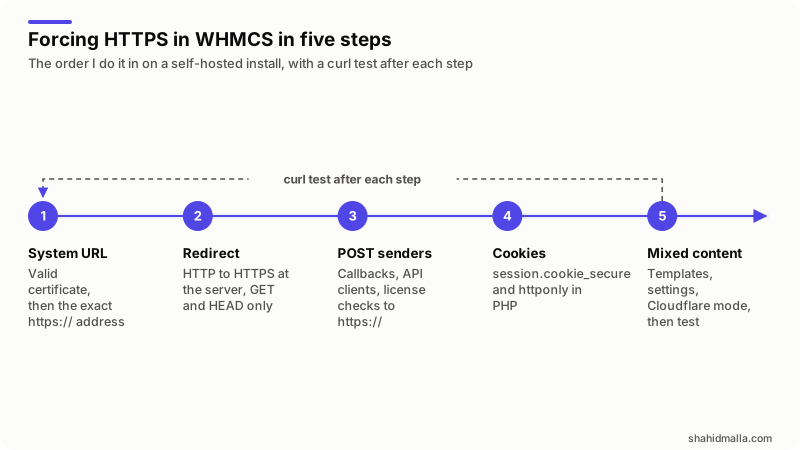
In words: a valid certificate, then the exact https:// address in the System URL; the redirect at the server for GET and HEAD only; every POST sender, so callbacks, API clients and license checks, moved to https://; the session cookie flags in PHP; then mixed content, the Cloudflare mode and a test after each step.
How do you set the WHMCS System URL to https?
Go to Configuration > System Settings > General Settings, open the General tab, enter the full address with https:// and the trailing slash in WHMCS System URL, and click Save Changes. Do it after the certificate loads without warnings, because WHMCS starts building https:// links the moment you save.
The Update the System URL page gives https://www.example.com/whmcs/ as the model and says the value must match exactly: starting it with http://, omitting the www, or other deviations can cause errors, and some features require an https:// system URL. The General tab reference adds that WHMCS sets the value automatically at installation from the location of the files, so an install first opened over http:// usually keeps an http:// URL until you change it. Two more fields there carry a scheme, Logo URL for emails and invoices and Domain for affiliate redirects; set both to https://. A typo here can lock you out of the Admin Area, and the way back in is a direct database edit, so have a database client open before you save.
How do you redirect HTTP to HTTPS without breaking POST requests?
Redirect only GET and HEAD requests. This is the rule I put at the top of the .htaccess file in the WHMCS directory, above the block WHMCS manages:
RewriteEngine On
RewriteCond %{HTTPS} !=on
RewriteCond %{REQUEST_METHOD} ^(GET|HEAD)$
RewriteRule ^ https://%{HTTP_HOST}%{REQUEST_URI} [R=301,L]
The usual two-line version redirects everything, and that is the mistake. MDN's 301 Moved Permanently page spells out why: when a user agent receives a 301 in response to a POST, it uses GET for the redirected request, as the HTTP specification permits. The body is gone. A payment notification, an API call or a license check that hits the redirect arrives as an empty GET, and WHMCS answers as if nothing was sent. The second condition leaves those requests working over http:// while you fix their URLs at the source.
The mod_rewrite reference documents %{HTTPS} as on when the connection uses TLS and off otherwise, and says conditions combine with an implied AND. Placement matters: WHMCS writes its Friendly URL rules between comment markers in .htaccess, custom rules belong outside them, and the managed block ends with the L flag, so put the HTTPS rule before it or it never runs for a friendly URL.
cPanel's Domains interface has a Force HTTPS Redirect toggle for a main domain with a valid certificate. Its documentation does not say how it treats POST, so test a POST through it or leave it off. A 308 preserves the method, but the sender still has to follow the redirect, and a machine client may not.
Which WHMCS requests arrive as POST and have to survive?
Gateway callbacks, API calls, license checks from the Software Licensing addon, and any webhook a registrar, mail provider or module vendor sends. In my experience many of those senders treat a 3xx as a failed delivery.
The lesson that put the second RewriteCond into my template was a license outage. I run a WHMCS install with the Software Licensing addon as the license server for the modules I sell. Its check code, modules/servers/licensing/check_sample_code.php, sends the license key to the $whmcsurl you paste into it and stores the local key that comes back, so later checks stay local for $localkeydays. The copies I had shipped carried an http:// $whmcsurl. When I added a blanket 301 to the billing domain, the remote checks from those installs hit the redirect, arrived as empty GETs and got an invalid-key answer. Because an install only phones home when its local key expires, the failures arrived one at a time and looked like a licensing bug. The fix was one line.
| POST sender | Where it lands | What a blanket 301 does | Fix at the source |
|---|---|---|---|
| Payment gateway notification | modules/gateways/callback/<gateway>.php | Invoice stays unpaid, Gateway Log shows nothing | Re-register the https:// callback or IPN URL at the gateway |
| API client | The WHMCS API endpoint | Arrives as an empty GET and fails | Change the base URL in every client |
| License check from your software | The licensing addon's verification endpoint | Invalid key as each local key expires | Ship the https:// URL in the next release; keep POST working over http:// meanwhile |
| Vendor webhooks | Whatever file the vendor documents | Delivery marked failed on their side | Update the URL in the vendor's dashboard |
The developer documentation's callback files page shows the callback URL shape, https://example.com/whmcs/modules/gateways/callback/gatewaymodule.php, and what the file checks before addInvoicePayment; a notification turned into a GET never reaches that code, and the invoice stays unpaid while the client's bank statement says otherwise. Gateways that store the URL on their side, like PayPal IPN in my PayPal integration guide, need the https:// address entered there; API clients are in my WHMCS API guide.
How do you make the WHMCS session cookie HTTPS-only?
In the PHP configuration that serves WHMCS, set session.cookie_secure = 1 and session.cookie_httponly = 1, after the redirect is live. WHMCS documents no switch of its own for this; the flags come from PHP.
The Sessions page names the cookies: WHMCSInstanceID holds the session ID and expires with the browser; WHMCSUser keeps a client logged in for 365 days when they ask to be remembered. The PHP session configuration reference says cookie_secure makes the browser send the session cookie only over secure connections, so that sessions only work with HTTPS connections, and cookie_httponly hides it from JavaScript; both default to off and both are INI_ALL settings, so php.ini, a .user.ini in the WHMCS directory or a panel's PHP INI editor can set them. That "only work with HTTPS" clause is why the order matters: turn the flag on while a page is still reachable over http:// and logins there fail silently.
If you set session.cookie_samesite, use Lax, not Strict. The same reference says neither value sends the cookie with a cross-domain POST, and only Lax sends it with a cross-domain GET. The return from a bank's 3-D Secure page is a cross-site navigation, so in my experience Strict leaves the session cookie behind and the client lands on a login form instead of the paid invoice. I found no documented Secure setting for the persistent WHMCSUser cookie, so log in with remember me ticked and read the Set-Cookie headers in the network panel.
How do you find and fix mixed content in WHMCS templates?
Open the browser console on the page without the padlock, read each mixed content line, and replace the http:// reference it names with {$WEB_ROOT}, a path without a scheme, or an https:// address.
MDN's mixed content page explains what you see. Images, audio and video over http:// are upgradable: the browser rewrites the request to https:// and the console warns. Scripts, stylesheets, iframes, fetch calls and web fonts are blockable: the browser refuses them. A hard-coded http:// stylesheet does not cost you a padlock, it costs you a styled client area.
The theme variables page lists what to use instead: {$WEB_ROOT} is the base URL of the install, {$BASE_PATH_CSS} and {$BASE_PATH_JS} point at shared assets, and {$systemurl} is the SSL or non-SSL URL depending on whether the page loaded over HTTPS, which matters behind a proxy. My WHMCS theme structure guide covers where the files live. The checklist I run on a client area without its padlock:
header.tplandfooter.tplof the system theme, and the order form template files: tracking scripts, fonts, chat widgets and icon sets pasted in with http://.custom.css:@font-faceandbackground-imageURLs.- The Logo URL setting, which also feeds emails and PDF invoices.
- Admin-entered HTML: announcements, knowledgebase articles, product descriptions and ticket signatures with an old http:// image.
- Third-party modules with their own templates.
Why does Cloudflare Flexible SSL loop with WHMCS, and what fixes it?
Because Flexible mode sends every request to your origin over plain HTTP, your redirect answers with https://, Cloudflare connects over HTTP again, and the browser gives up with ERR_TOO_MANY_REDIRECTS. The fix is a certificate on the origin and the encryption mode set to Full (strict).
Cloudflare's encryption modes page defines them: Flexible encrypts only the visitor-to-Cloudflare leg; Full matches the visitor's protocol without validating the origin certificate; Full (strict) validates it and accepts a certificate from a public CA such as Let's Encrypt or from Cloudflare Origin CA. Its ERR_TOO_MANY_REDIRECTS page describes the Flexible loop and gives two ways out: remove the HTTPS redirect from the origin, or move to Full or higher with a certificate on the origin. Flexible also makes WHMCS see HTTP, so {$systemurl} can resolve to the non-SSL URL, and it leaves the leg to a server holding client data unencrypted. Treat it as a bridge until an origin certificate is issued.
Three settings then interact with the redirect:
- Always Use HTTPS redirects every http request for the zone at the edge. Cloudflare's documentation recommends not redirecting at the origin as well, and notes that forcing HTTPS does nothing for mixed content. With Full (strict) the GET-and-HEAD origin rule does not loop, and I keep it for the day Cloudflare is paused.
- Automatic HTTPS Rewrites rewrites http:// resource URLs that Cloudflare has checked are reachable over HTTPS. Its page states the limit: unless the zone is on the lists Cloudflare uses, only active content is rewritten and images still produce mixed content errors. It patches third-party assets; it does not excuse http:// in your templates.
- Trusted Proxies on the Security tab is covered in the firewall guide linked above. The same page says to turn off Rocket Loader and script minification for the WHMCS domain, because they are not compatible with WHMCS.
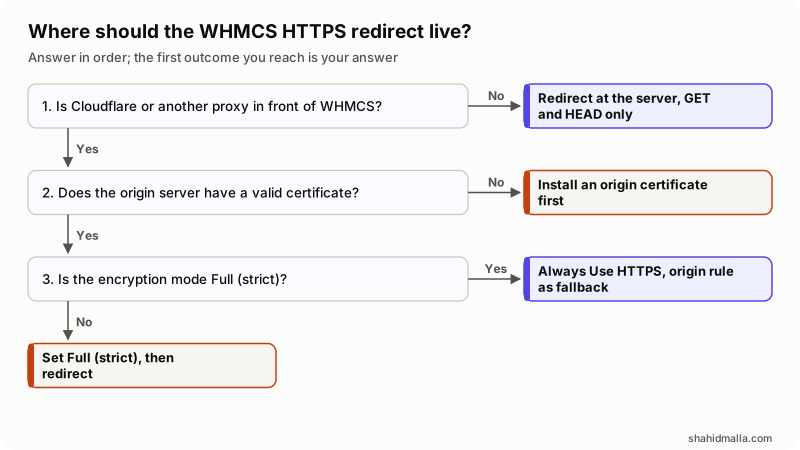
In words: with no proxy in front, redirect at the server for GET and HEAD only. Behind Cloudflare, get a certificate onto the origin first, set Full (strict), then add the redirect. Once both are in place, turn on Always Use HTTPS and keep the origin rule as a fallback. Never redirect at an origin behind Flexible.
How do you test that HTTPS is forced everywhere?
From outside the server, with curl, once per request type, then one test payment. Repeat the first two after every WHMCS update, because Auto-Managed Rewrite rewrites the managed block in .htaccess.
| Check | How | Result you need |
|---|---|---|
| Browser GET over http:// | curl -sI http://billing.example.com/clientarea.php | One 301 with a Location: that starts with https:// |
| POST over http:// is not redirected | curl -s -o /dev/null -w '%{http_code}' -X POST http://billing.example.com/modules/gateways/callback/gatewaymodule.php | Anything but a 3xx; the callback file decides the code |
| Cookie flags | Log in, open the network panel, read Set-Cookie | Secure and HttpOnly on the session cookie |
| Mixed content | Browser console on the cart, client area, an invoice and the Admin Area | No mixed content lines, padlock on each page |
| Gateway callback | A sandbox or small live payment | The invoice turns Paid and the Gateway Log shows the notification |
What can go wrong when you force HTTPS in WHMCS?
Most failures are silent: the site looks fine in a browser while machines fail to reach it.
- Stacked redirects. A cPanel toggle, an
.htaccessrule and Always Use HTTPS can all be on at once, and one blanket redirect in the chain strips a POST. Keep one rule you wrote. - HSTS too early. The
Strict-Transport-Securityheader makes browsers refuse http:// for the period it names. Send it only when every hostname it covers serves HTTPS, with a short max-age first. - Full (strict) with an expired origin certificate. Cloudflare's encryption modes page says Automatic SSL/TLS never moves a zone to a less secure mode, and gives exactly this case as its example: an expired origin certificate does not drop Full (strict) back to Full. Validation fails until you renew, so automate renewal first.
What else do people ask about forcing HTTPS in WHMCS?
Does WHMCS still have a separate SSL System URL field?
No. The General tab in the current documentation has one field, WHMCS System URL. The templates still expose {$systemsslurl} and {$systemNonSSLURL}; forum answers that mention two fields describe older versions.
Why does the browser warn that the WHMCS Admin Area is not secure?
Because the page was reached over http://: you typed it, or the System URL still starts with it and WHMCS built the link. Set the System URL to https://, add the redirect, and open the Admin Area from the https:// address.
Do I have to change payment gateway callback URLs after moving WHMCS to HTTPS?
Where the gateway stores the URL on its side, yes. PayPal IPN, and any gateway with a notification URL field in its dashboard, keeps sending to the address you registered; gateways that receive the URL from WHMCS at payment time pick up the new System URL on the next payment.
Can I force HTTPS only on the WHMCS folder and not the whole site?
Yes. An .htaccess rule applies to its directory and everything below it, so a rule in the WHMCS directory leaves the rest of the domain alone. On Cloudflare, the Always Use HTTPS documentation says to leave the zone-wide setting off in that case and use a single redirect rule for the path.
If you want the redirect, the callback tests and the cookie change done on a live install, that is WHMCS support and maintenance on my WHMCS services page, with a free scoping call of about 30 minutes and a written quote within one business day.
Last reviewed 18 November 2026. Disclosure: I sell WHMCS development, support and integration work, so I am not neutral. I am CTO at ElySpace, a freelance developer for Marmaids LLC, and founder of WHMCSPilot and MagizAI.