WHMCS Notifications is a rules engine at Configuration > System Settings > Notifications that pushes events to a chat app as they happen. WHMCS ships two notification providers, Slack and Email. Telegram and WhatsApp are not built in, so each needs a custom notification module, a third-party addon, or a hook that posts to its API.
A WHMCS notification rule is a saved combination of an event category, one or more events, optional conditions and one provider, evaluated the moment the event fires. Rules are the whole feature: there is no master switch that sends everything, and each rule names one provider and one destination.
Everything below is checked against the WHMCS 9.1 docs, the WHMCS developer docs, the Telegram Bot API and Slack's own API reference, read on 24 November 2026.
Which chat apps can WHMCS notify out of the box?
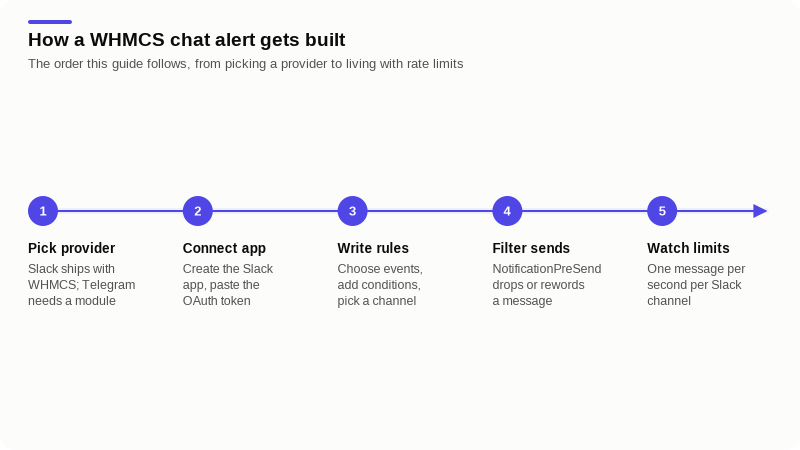
Two. The Notifications page lists Slack and Email as the supported providers, and says you can add your own with a custom notification module. Every other app in this guide sits in that second group.
The Slack module is available for all self-hosted installations and, on WHMCS Cloud, for the Growth and Expansion plans. The Email module ships unencoded on purpose, as the template to copy for your own provider.
| Destination | Ships with WHMCS | What it needs |
|---|---|---|
| Slack | Yes | A Slack app with a Bot User OAuth Access Token, pasted into the provider config |
| Yes, and the source is readable | A sender name and a sender email in the provider config | |
| Telegram | No | A bot token, a chat ID, and a module or hook that calls the Bot API |
| No | An account with a WhatsApp API provider, plus a module that posts to it | |
| Discord, Teams, Matrix | No | A third-party addon or your own notification provider module |
The page adds advice worth keeping: for less urgent messages, use the Staff Noticeboard addon. Chat is for what needs acting on now.
How do you connect Slack to WHMCS?
You create a Slack app, give its bot token four scopes, and paste the token into WHMCS. The Configure Slack Notifications page gives the sequence; the scope list is the part people get wrong.
- At
https://api.slack.com/, click Create an app, choose From scratch, name it, and pick the workspace. - Open OAuth & Permissions and, under Bot Token Scopes, add
channels:join,channels:read,chat:writeandgroups:read. - Click Install App, then install it to the workspace, and copy the Bot User OAuth Access Token.
- In WHMCS, go to Configuration > System Settings > Notifications, click Configure under Slack, and paste the token into OAuth Access Token.
- Click Save Changes. WHMCS verifies the token on save: the window closes on success, and an error means the token is wrong or a scope is missing.
The channels:join scope matters because WHMCS joins the channel for you when you name it in a rule. Private channels are the exception: open Slack, go to the channel, and run /invite @app_name with your app's name. Until you do, the channel does not appear in the rule editor.
How do you write a notification rule that is worth reading?
Start from the conditions, not the events. Most events are noise on their own, and a rule only earns its place in a channel once a condition narrows it to something a human reacts to.
Click Create New Notification Rule, name it, pick an event category, then pick one or more events with Ctrl+Click. Conditions default to unrestricted and depend on the category: free-text conditions such as Subject offer an exact or a containing match, and money conditions such as Order Total offer greater than or less than. The documentation's own examples are the right shape:
- A new Support ticket with High priority goes to the support channel.
- A ticket whose subject contains the word Emergency goes to an emergency channel.
- An invoice paid by a client in the High Value client group goes to the billing channel.
Two habits save pain later. Write the description field as the reason the rule exists, because the name alone will not tell you in six months. Duplicate a working rule with the copy icon for the next department. Deleting a rule is permanent, so retire rules with the toggle.
How do you send WHMCS notifications to Telegram?
You add the transport yourself. Telegram's side is easy: you register a bot with @BotFather, which hands you a token, and then every call goes to https://api.telegram.org/bot<token>/METHOD_NAME over HTTPS, as the Bot API reference sets out. For a text alert the method is sendMessage, with a chat_id and text of 1 to 4,096 characters after entity parsing; parse_mode is optional.
The WHMCS side is where the choice is, and the four routes are not equal.
| Route | What you build | Appears in notification rules | Trade-off |
|---|---|---|---|
| Custom notification provider | A class in /modules/notifications/Telegram/Telegram.php implementing NotificationModuleInterface | Yes, pickable in any rule | You own a small PHP module through every WHMCS upgrade |
| Third-party addon | Install and configure someone else's module | Usually no, it fires from its own hooks | The event list and the update schedule are the author's |
| Plain hook | An add_hook file in includes/hooks that posts to the Bot API | No | Quickest to write, but no rules interface or conditions |
| Email bridge | The built-in Email provider pointed at an email-to-chat address | Yes | An extra hop, added delay, plain-text formatting |
I build the provider route for clients, because it keeps rules and conditions in WHMCS where staff can edit them. Getting Started says to copy /modules/notifications/Email, give the module a single-word name, and put the class in a file named after it. The method that does the work is sendNotification, which receives the notification object, your provider settings and the rule's settings:
public function sendNotification(NotificationInterface $notification, $moduleSettings, $notificationSettings)
{
    $url = 'https://api.telegram.org/bot' . $moduleSettings['bot_token'] . '/sendMessage';
    $text = $notification->getTitle() . "\n" . $notification->getMessage() . "\n" . $notification->getUrl();
    foreach ($notification->getAttributes() as $attribute) {
        $text .= "\n" . $attribute->getLabel() . ': ' . $attribute->getValue();
    }
    // POST $text and $notificationSettings['chat_id'] to $url, then check the response
}
Keep the attribute loop. Attributes vary by event, so a generic loop gives a ticket alert its department and priority without naming either. To let staff pick a destination from a dropdown instead of pasting a chat ID, declare the setting as a dynamic field and return the options from getDynamicField, as the shipped Slack provider does.
If you would rather buy than build, check the compatibility tab first. The Email & Notifications category showed 150 listings when I read it on 24 November 2026, and the Telegram Notifications addon from Nikba Creative Studio listed version 1.2, updated 22 August 2024, as compatible up to WHMCS v8.11, which says nothing about a 9.1 install. My guide to WHMCS addons and modules covers how I judge a listing.
Can WHMCS send notifications to WhatsApp?
Not on its own, and the gap is bigger than Telegram's. WHMCS has no WhatsApp notification provider, so you need a module and an account with an API provider that can send for you. Business-initiated messages sit under Meta's messaging policies, not WHMCS's.
I tried to read Meta's WhatsApp Business Platform documentation on 24 November 2026 and every page I requested returned an error, so I am not quoting its template rules, session windows or per-message prices here. Confirm all three on Meta's developer site before you commit, because they decide what the build costs to run.
Alerts to your own team are a thin wrapper around the same sendNotification method as Telegram. Messaging clients is a different job: it needs a stored number per client, a recorded opt-in, and a way to stop sending when they withdraw it. That is custom work on the WHMCS API and automation side, not a notification rule.
How do you extend WHMCS notifications with code?
With two customization methods, both self-hosted only. The documentation says WHMCS Cloud does not currently support either.
The first is NotificationPreSend, which runs just before a notification goes out. It receives the event type, the event name, the rule, the hook parameters and a \WHMCS\Notification\Notification object. Throw \WHMCS\Notification\Exception\AbortNotification() and the notification never sends, which is how you add conditions the rule editor does not offer. If you let it through, setTitle() and setMessage() rewrite what lands in the channel. Suppressing alerts for a test client group, and prefixing messages with the server name, both live here.
The second is the TriggerNotificationEvent API function, which creates events of your own. Call it from any hook with a unique notification_identifier, a title, a message, a URL, a status and a status style. Then build a rule with the API event category, the Custom API Trigger event, your identifier under Trigger Identifier, and Exact Match. The documentation's example fires on AdminLogin to announce staff sign-ins. Mine are usually module failures and disk thresholds that WHMCS has no native event for. My WHMCS hooks guide covers hook mechanics, and the WHMCS API guide covers localAPI.
What rate limits and failures should you plan for?
The limits belong to the chat services, not WHMCS, and a busy billing run will find them.
| Service | Documented limit | What happens past it |
|---|---|---|
| Slack, one channel | About one message per second, from any method | HTTP 429 with a Retry-After header in seconds |
| Slack, message length | Limit the message text to 4,000 characters for best results | Longer text may be split into messages of about 4,000 characters |
| Telegram, one chat | Avoid more than one message per second | Short bursts may pass, then 429 errors |
| Telegram, one group | No more than 20 messages per minute | Telegram does not let the bot send more |
| Telegram, bulk | About 30 messages per second | 429 errors unless paid broadcasts are enabled |
| Telegram, message text | 1 to 4,096 characters after entity parsing | The request is rejected |
Those figures come from the Slack rate limits reference, the chat.postMessage reference and the Telegram bot FAQ, read on 24 November 2026. Slack notes that sustained bursts risk an app being rate limited and, if it continues, disabled. Three other risks are worth naming.
- Alert fatigue. A channel that fires on every invoice gets muted inside a week, and the ticket that mattered is muted with it.
- Tokens in the wrong place. A bot token in a hook file goes into version control with it. Keep credentials in the module's provider settings.
- Silent failure. Nobody waits for a message that never came. Fire one test event per rule on purpose.
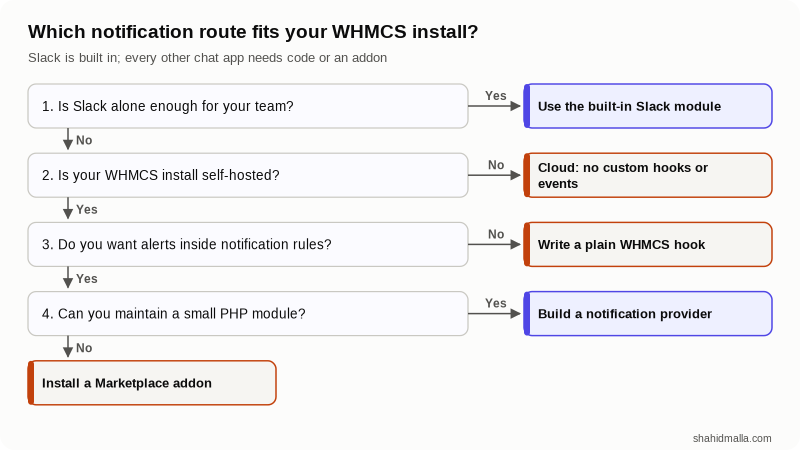
In words: if Slack alone covers the team, use the module that ships with WHMCS. On WHMCS Cloud, the documentation marks advanced notification logic and custom notification events as self-hosted only, so start from the Slack and Email providers. On a self-hosted install, decide whether staff need to edit the rules themselves. If they do, build a provider when you can maintain PHP, or install a reviewed addon when you cannot. If they do not, a plain hook is quick and honest.
What should you check before you switch the rules on?
Run this list once per rule; it catches the failures that show up as silence.
- The rule name and description say which team it serves and why it exists.
- The destination channel has a reader on the other side.
- A private Slack channel has the app invited with
/invite @app_name. - The bot token carries all four scopes, and Save Changes verified it without an error.
- Credentials live in provider settings, not in a hook file or a theme.
- Conditions are set, so the rule cannot fire on every record in its category.
- One deliberate test event has fired, the message arrived readable, and the Activity Log at Configuration > System Logs looks normal.
What else do people ask about WHMCS notifications?
Does WHMCS have a built-in Telegram notification provider?
No. The Notifications documentation lists Slack and Email as the providers WHMCS supports, and says custom providers are something you create. Telegram reaches WHMCS through a custom notification module, a third-party addon, or a hook that calls the Bot API.
Why are my WHMCS Slack notifications not arriving?
Check the bot token's scopes first, since a token missing chat:write or channels:join saves but cannot post. If the target is a private channel, the app has to be invited with /invite @app_name before WHMCS can see it. After that, check the Activity Log at Configuration > System Logs, which holds general system activity and, with error logging on, system errors.
Does WHMCS Cloud support custom notification modules?
The documentation does not promise it. It marks both customization methods, advanced notification logic through NotificationPreSend and custom notification events through TriggerNotificationEvent, as self-hosted features that WHMCS Cloud does not currently support. Slack itself runs on Cloud's Growth and Expansion plans. Confirm what your own plan allows before you budget a custom provider.
Can WHMCS notify clients on WhatsApp, or only staff?
Notifications are built to alert your own team in a channel, so client messaging is a separate build. It needs a stored number per client, a recorded opt-in, a way to honor a withdrawal, and an API account that can send business-initiated messages. Check Meta's policies yourself, because I could not load their documentation on 24 November 2026.
Do notifications replace WHMCS email templates?
No, and mixing them is a common mistake. Email templates are the messages clients receive about their invoices, orders and tickets. Notification rules are internal alerts about the same events, aimed at a staff channel, with their own wording and no client visibility.
If you want chat alerts that match how your desk works, I build WHMCS notification providers and the automation around them as automation development work, with a free scoping call of about 30 minutes and a written quote within one business day.
Last reviewed 24 November 2026. Disclosure: I sell WHMCS and web development work, including notification and automation modules, so I am not neutral. I am CTO at ElySpace, a freelance developer for Marmaids LLC, and founder of WHMCSPilot and MagizAI. All sales of my modules and services are final, so ask me questions before you buy.