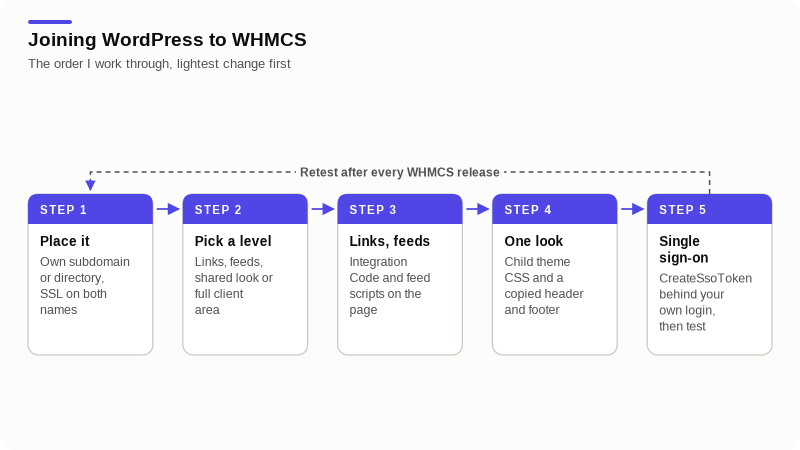
WHMCS and WordPress integration comes in four levels: links from WordPress into the WHMCS cart, data feeds that print live product and domain prices, a child theme that makes both sides look alike, and single sign-on built on the CreateSsoToken API. The first three survive WHMCS updates. Anything that renders the WHMCS client area inside WordPress has to be retested at every release.
WHMCS WordPress integration is the set of links, feeds, templates and tokens that let a WordPress site and a WHMCS billing install behave as one brand. WHMCS stays the system of record for orders, invoices, domains and tickets. WordPress keeps the pages and the search traffic.
Everything below is checked against the WHMCS 9.1 documentation, read on 25 November 2026. The WHMCS documentation home page lists 9.1 as General Availability, with 9.0 and 8.13 on Long-Term Support and 9.0 anticipated to end on 31 December 2026. On an older branch, read these pages under your own version.
Where should WHMCS sit next to a WordPress site?
In its own directory or on its own subdomain, never inside the WordPress install.
WordPress routes almost every request through its own rewrite rules. WHMCS is a separate PHP application with its own entry points, including clientarea.php, cart.php and dologin.php, and its own session cookie. Two applications in one document root fight over one .htaccess file. Two layouts work:
- Subdomain. WordPress on
example.com, WHMCS onclients.example.com, each with its own virtual host and certificate. - Subdirectory. WordPress at the root, WHMCS in a folder of its own. The examples on the Linking to WHMCS page use
http://www.example.com/whmcs.
Put a valid certificate on both names. Single sign-on depends on it later: the OpenID Connect page requires a CA-verified SSL certificate on the WHMCS install and on the server that authenticates against it. And accept early that a WordPress login is not a WHMCS login: the two keep separate sessions.
Which level of WHMCS WordPress integration do you need?
The lowest level that answers the business question, because every level above it adds maintenance at each WHMCS release.
| Level | What the customer gets | What you maintain | What an update can break |
|---|---|---|---|
| Links | Buttons that open the WHMCS cart, login or ticket form | A handful of documented URLs | Little; the formats are documented. |
| Data feeds | Live prices and a domain search on a WordPress page | Script tags and the CSS around them | The markup a feed prints, so your styling. |
| Shared look | One brand across both systems | A child theme plus a copied header and footer | Parent theme markup at a major release. |
| Client area in WordPress | Services, invoices and tickets without leaving WordPress | A plugin, a helper module in WHMCS, single sign-on | New pages, new menu entries, changed API responses. |
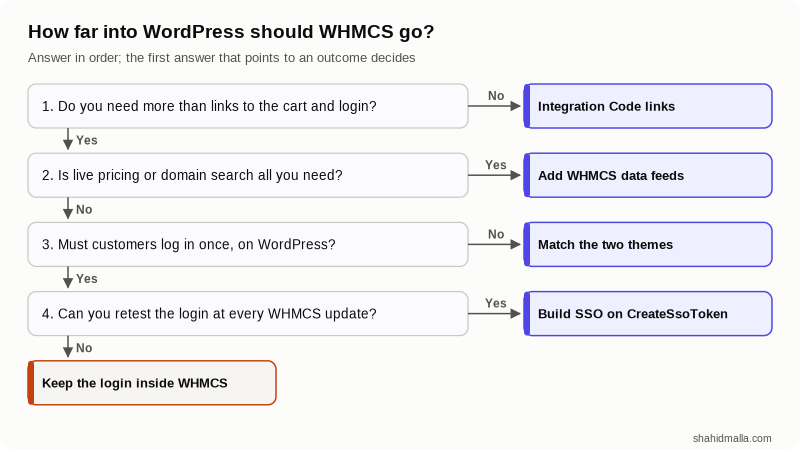
In words: if links to the cart and login page are enough, stop there. If the pages need live pricing or a domain search, add data feeds. If customers still log in on WHMCS, spend the budget on the shared look instead.
How do you link WordPress to WHMCS without writing code?
Copy the snippets WHMCS generates at Utilities > Integration Code. The Integration Code page documents three blocks: Clients Login, Domain Ordering and User Registration. Paste them into a template part or a block that allows raw HTML.
The login form has one condition. An external form that posts to dologin.php needs $allow_external_login_forms = true; in configuration.php, and that section covers self-hosted installs only: WHMCS Cloud gives no direct access to the files. Everything else is a URL from the Linking to WHMCS page:
| Link | What it does |
|---|---|
clientarea.php | Client area home, with a login prompt first if the visitor is not authenticated. |
cart.php?a=add&pid=1 | Adds one product and opens its configuration page. |
cart.php?a=add&pid=1&billingcycle=annually | Same, with the annual cycle preselected. |
cart.php?a=add&pid=1&domainoption=register&sld=example&tld=.net | Preselects the product and registers that domain. Other values are transfer, owndomain, subdomain and incart. |
cart.php?promocode=xxxxxxx | Applies a promotion code on arrival, which is how a campaign page pays for itself. |
cart.php?currency=2&language=Spanish | Sets currency by ID and language, so a localized page lands correctly. |
submitticket.php?step=2&deptid=1&subject=Subject%20goes%20here | Opens the ticket form with a department and subject set. |
You do not have to type these from memory. Each product has a Links tab at Configuration > System Settings > Products/Services, with direct cart links, a product group link and trackable Product URLs. Deleting a Product URL stops that link working, so retire the matching WordPress links too.
How do you show WHMCS prices and domain search on a WordPress page?
With data feeds for a quick build, or server-side API calls when you want your own markup. The Data Feeds page gives copy and paste script tags that print WHMCS data into a page and update when you change the product.
| What you want on the page | Data feed script | API action instead |
|---|---|---|
| Product name or description | feeds/productsinfo.php?pid=1&get=name, or get=description | GetProducts |
| A price for one billing cycle | feeds/productsinfo.php?pid=1&get=price&billingcycle=monthly | GetProducts |
| A table of domain prices | feeds/domainpricing.php | GetTLDPricing |
| One TLD price | feeds/domainprice.php?tld=.com&type=register®period=1&format=1 | GetTLDPricing |
| A domain search box | feeds/domainchecker.php | DomainWhois |
Three notes. Add ¤cy=2 for a second currency, and find the pid after id= in the address bar when you edit a product. The WHMCS install serves the scripts, so when WordPress sits on another host the src has to be the full HTTPS URL. And WordPress strips script tags from post content unless the author holds the unfiltered_html capability, which the roles and capabilities documentation limits to administrators and editors on a single site, and to super admins on multisite. So put feed scripts in a theme template, a custom block or a shortcode.
The API route suits anything that needs cached or custom markup. GetProducts is documented as designed for building custom order forms. It takes pid, gid or module, returns pricing per currency and billing cycle, and returns only the custom fields with Show on Order Form enabled. DomainWhois takes one domain and returns a status of available or unavailable, plus the whois response.
Keep those calls on the server. Create a role at Configuration > System Settings > Manage API Credentials with only the actions the site uses, then generate a credential pair. The API Credentials page is blunt: a role must exist first, a credential with no role has no authorization, and a lost secret means a new pair. API access is restricted by IP by default, says the developer Access Control page, with an access key in configuration.php as the alternative. My WHMCS API guide walks through a first call.
How do you make WordPress and WHMCS look like one site?
With a WHMCS child theme carrying your header, footer and brand CSS, not by editing a shipped theme. The Child Themes page calls this the recommended way to customize WHMCS as of WHMCS 8, because uncustomized files keep coming from the parent and keep getting updates.
- Create a folder in
templates, lowercase letters, numbers, hyphens and underscores only. - Add
theme.yamlwith anameandconfig: parent:set to a shipped theme. The parents are Twenty-One, Nexus and Six. - Add
css/custom.css. Rules there override the parent, and a child theme that only changes CSS needs no template files at all. - To change the header or footer, copy the parent's
header.tplandfooter.tplinto the child folder and edit the copies. The documentation warns against starting those two from an empty file: they carry code the client area needs. - Preview with
?systpl=mythemeon the URL, then switch System Theme on the General tab at Configuration > System Settings > General Settings.
The hard part is not the CSS, it is keeping the copy current: a WordPress menu changes and the copy inside WHMCS does not. Either serve the navigation from one source, such as a cached endpoint on WordPress, or check the drift monthly. My guide to WHMCS theme structure covers the file layout, and WHMCS theme customization is the service version.
How do you set up single sign-on between WordPress and WHMCS?
Pick the method that matches the direction you need, then put your own authentication in front of it. The Single Sign-On into WHMCS page documents the ways in, all built on OAuth 2.0, and WHMCS can also act as an identity provider for another application.
| Method | Direction | What it needs | Documented limit |
|---|---|---|---|
CreateSsoToken API | WordPress signs a known customer into WHMCS | Admin API credentials, called server side | One use, 60 seconds maximum |
| OAuth token endpoint, single sign-on grant | A remote system with only user-level input | An OAuth credential set with that grant type | Trust limited to the individual user |
| OpenID Connect, WHMCS as provider | A WHMCS account logs the user into another application | Client ID and secret from Configuration > System Settings > OpenID Connect | Redirect must match the stored list |
For a WordPress site the first row is the usual answer. Your code calls CreateSsoToken with a client_id and a destination, then sends the customer to the returned redirect_url. Destinations are short names such as clientarea:services, clientarea:invoices and clientarea:shopping_cart. Two take an extra value: clientarea:product_details needs service_id, and the API-only sso:custom_redirect takes an sso_redirect_path.
Read the warning on that page first. The token gives complete authentication to the client account, so the call must sit behind your own login and your own mapping of WordPress user to WHMCS client. The endpoint that redeems it is meant for one-time trusted tokens and skips the captcha and two-factor controls that guard the normal login form. A plugin that mints a token from a page anybody can reach has handed out accounts.
Customers can switch single sign-on off under Hello, Name! > Security Settings; the documented message that follows is Single Sign-On authentication denied per configuration for User ID: xx. Clients in the Closed status raise their own errors. Give the WordPress button a fallback to the normal WHMCS login page.
What breaks a WHMCS and WordPress integration at the next update?
Nearly always one of five things, four of them avoidable on build day.
- An unmaintained bridge plugin. The free whmcs-bridge listing on WordPress.org, read on 25 November 2026, says it was closed on 6 July 2026 for a security issue and cannot be downloaded. It shows version 6.9, last updated four years ago, tested up to WordPress 6.0.19. A plugin that proxies the client area sits in the path of logins and payments, so an abandoned one is a security problem.
- Edits to a shipped theme. Changes made in Twenty-One or Nexus instead of a child theme are overwritten by the next update.
- Hard-coded cart URLs. Carts change between branches: the documentation home page records that 9.0 introduced a new Nexus cart experience. Links built from the documented parameters survive that; links copied out of an address bar mid-checkout often do not.
- API credentials in the browser. An identifier and secret in front-end JavaScript is readable by every visitor.
- Settings lost in a restore.
$allow_external_login_formsand an API access key live inconfiguration.php. Restore that file from an older backup and the WordPress login form stops working for no visible reason.
One more trap: selling WordPress hosting through WHMCS is a different job, built on server modules and product addons, as the WP Toolkit page describes.
What do you check before the integration goes live?
Run this list on a staging copy of both systems, then again on production before you announce anything.
- Place one real order from WordPress through to a paid invoice.
- Retest every Integration Code snippet after a theme or order form change.
- Log in through the WordPress form and the single sign-on button, then log out of both and confirm neither session survives.
- Confirm the single sign-on link lands on the destination you asked for, not the client area home.
- Compare the WordPress page price with the product's Pricing tab, in each currency you sell.
- Check the API credential carries one narrow role, and that no feed script loads over plain HTTP.
- Repeat the list after each WHMCS release.
What else do people ask about WHMCS and WordPress?
Does WHMCS have an official WordPress plugin?
I found none published by WHMCS itself. The documentation gives you Integration Code, Data Feeds, Linking to WHMCS and the API, which covers the first three levels. Plugins for the fourth come from third parties, for example WHMPress on the WHMCS Marketplace, listed at $10.00, marked compatible with WHMCS 9.0 and updated 21 August 2026, read on 25 November 2026. I have not tested it; it is only an example.
Is the WHMCS Bridge plugin still safe to use?
The free listing on WordPress.org is closed as of 6 July 2026 for a security issue and cannot be downloaded, so I would not run it. Reviewers there refer to a paid edition bought separately, and the closure notice says nothing about it, which is not the same as clearing it. If a site you inherited depends on it, treat replacing it as security work.
Can a customer log in once and reach both WordPress and WHMCS?
Yes, with single sign-on. From WordPress into WHMCS the documented route is the CreateSsoToken API, with tokens good for one use and at most 60 seconds. In the other direction, WHMCS can act as an OpenID Connect provider, so another application accepts WHMCS accounts. Either way, one system holds the password.
Can I put the WHMCS client area in an iframe on WordPress?
The WHMCS documentation offers links, data feeds, the API and single sign-on, and no iframe method. I avoid it: payment and card authentication steps redirect out of the frame, and cookies behave differently across names, so it fails where it costs money. A single sign-on link into the real client area gives the same effect.
If you want this built once and kept working, I do the links, feeds, theme match and single sign-on as WHMCS API integration and automation, with a free scoping call of about 30 minutes and a written quote within one business day.
Last reviewed 25 November 2026. Disclosure: I am a freelance WHMCS developer and I sell WHMCS integration, theme and WordPress work, so I am not neutral. I am CTO at ElySpace, a freelance developer for Marmaids LLC, and founder of WHMCSPilot and MagizAI.