
SM Square: Square Payment Gateway for WHMCS
Cards, Apple Pay, Google Pay, Cash App Pay, ACH and Square gift cards in one WHMCS gateway, with an admin dashboard for every payment, refund, saved card and dispute.
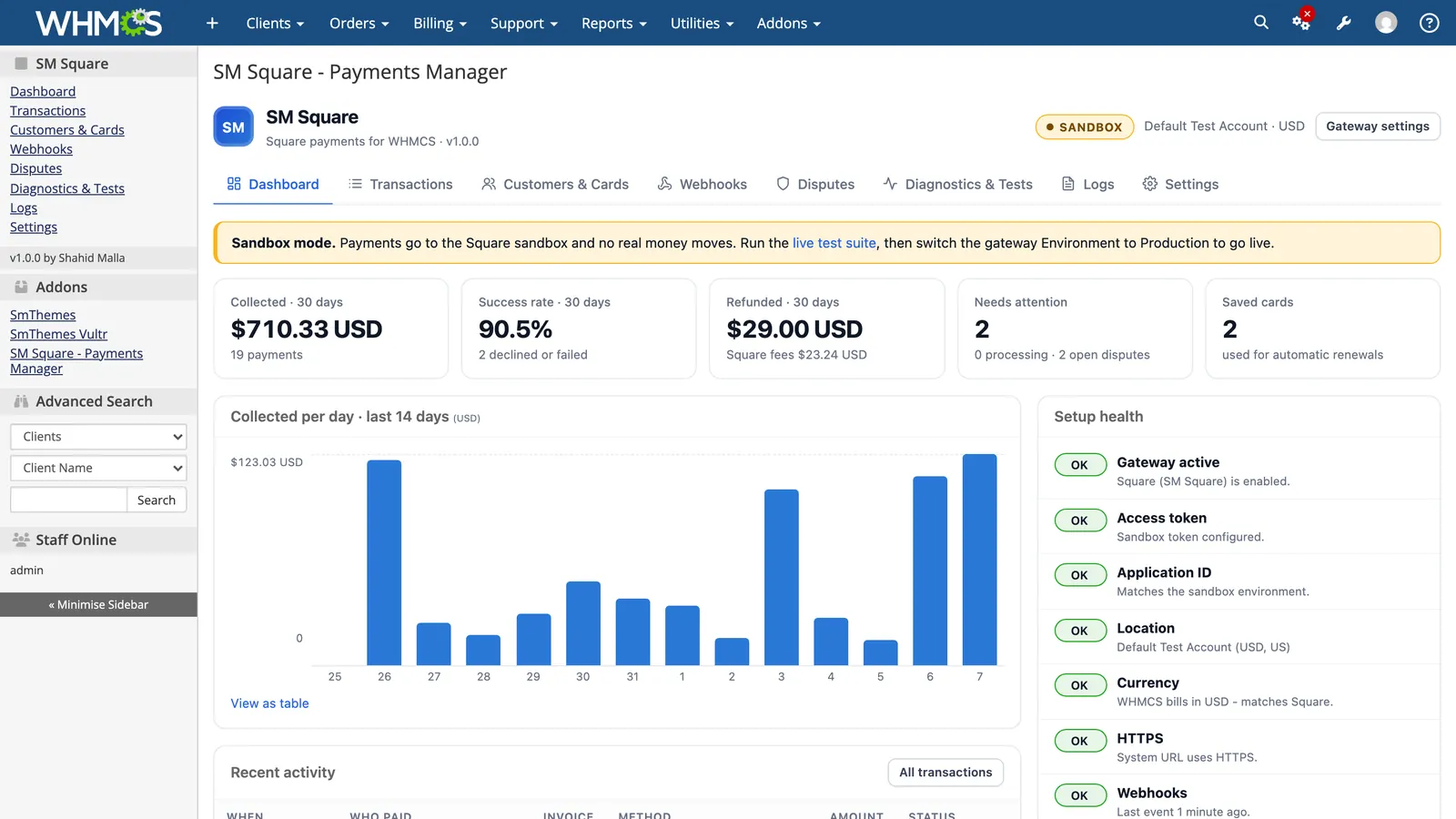
SM Square connects WHMCS to Square and covers every way Square lets your clients pay online: cards, Apple Pay, Google Pay, Cash App Pay, ACH bank payments and Square gift cards. It comes in two parts. The payment gateway is what your clients use at checkout. The Payments Manager addon lives in your WHMCS admin area and shows every Square payment, refund, saved card, webhook and dispute. I built it on Square's current API version (2026-09-16) and tested it end to end on WHMCS 9.1.
In November 2026 I checked every Square module listed on the WHMCS Marketplace. None of them lists Apple Pay, Google Pay, Cash App Pay, ACH or gift cards, and none comes with an admin dashboard. As far as I can find, SM Square is the only Square module for WHMCS that does all of this in one package. The comparison table further down shows exactly what I checked.
What can your clients pay with?
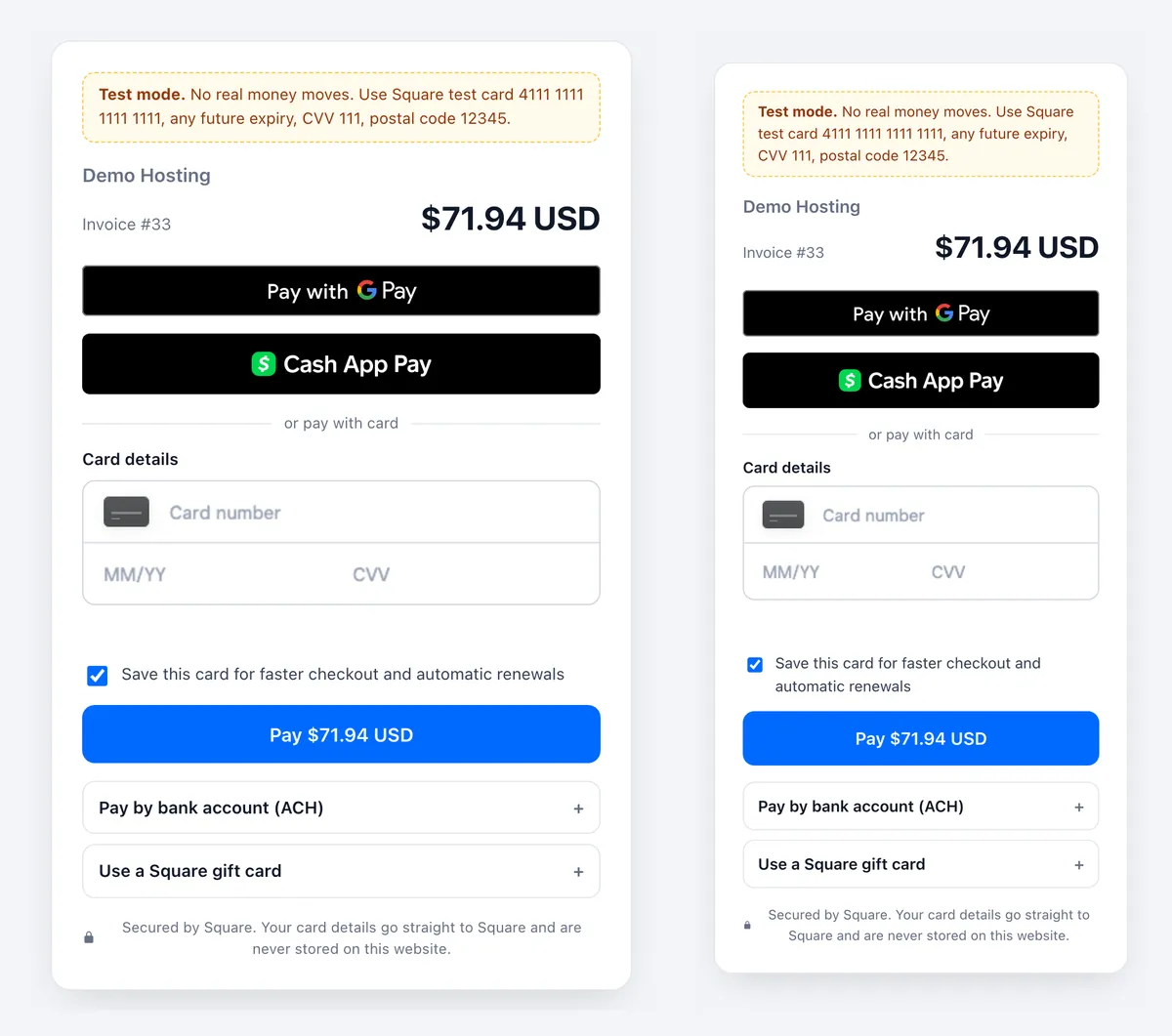
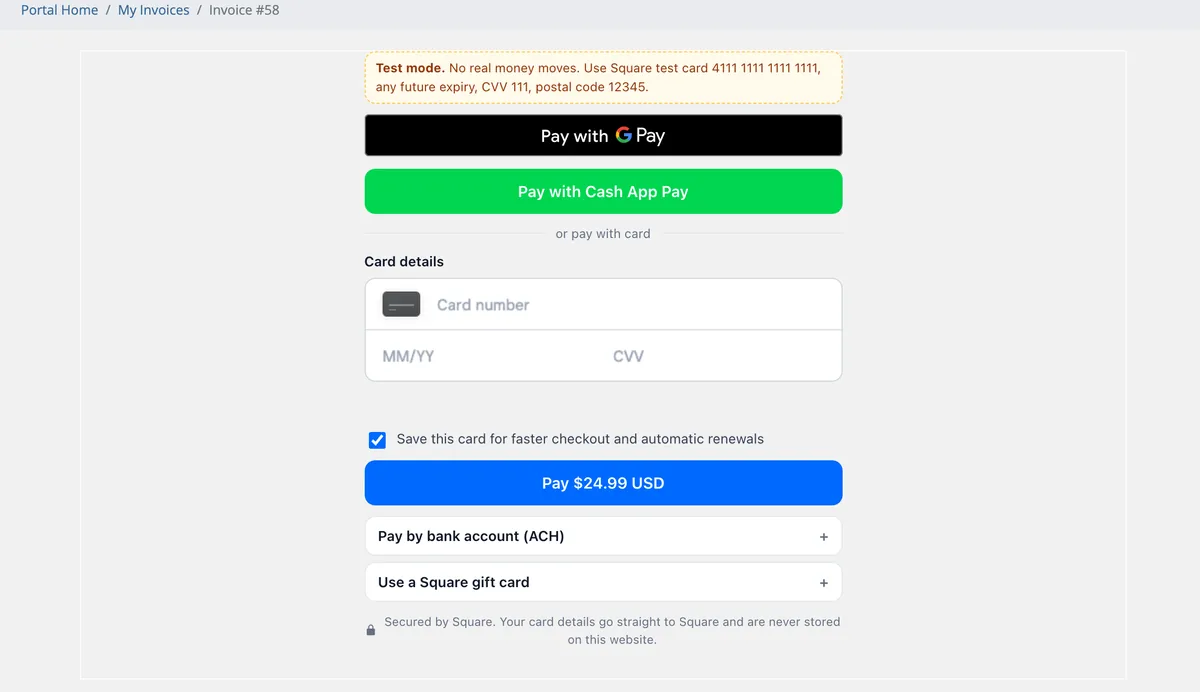
Clients pay on a secure Square form that opens inside the normal WHMCS "Pay Now" page, on desktop and on mobile. Card details go straight to Square and never touch your server.
- Cards, with 3-D Secure (Strong Customer Authentication) when the card's bank asks for it.
- Apple Pay and Google Pay. Apple Pay appears in Safari once your domain is registered with Square, and the addon walks you through that step.
- Cash App Pay, for US sellers billing in USD.
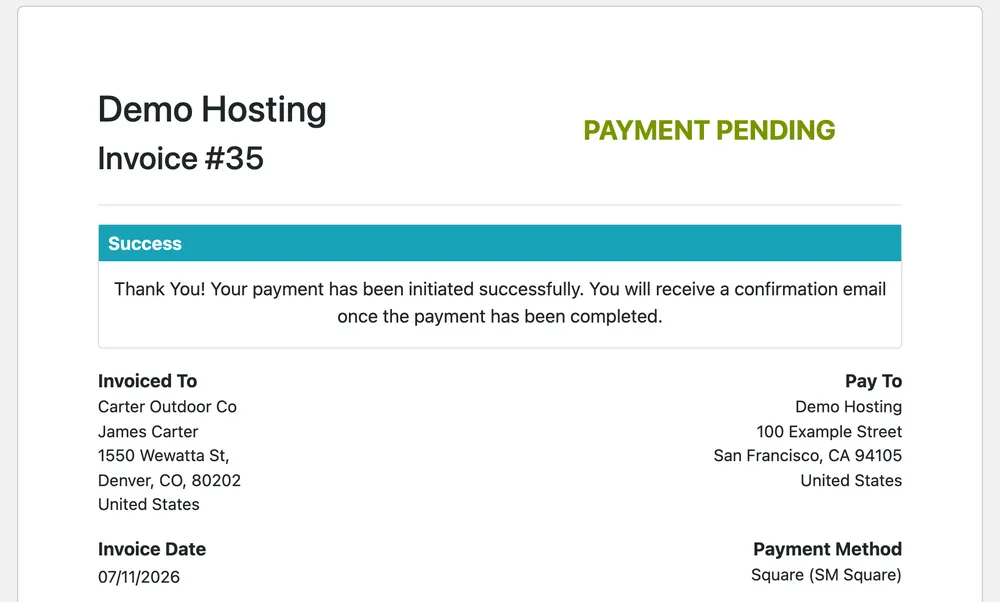
- ACH bank payments from US bank accounts. The invoice shows the WHMCS "Payment Pending" status until the money clears, then it is marked paid on its own. If the bank payment fails, the invoice goes back to Unpaid.
- Square gift cards, for the full invoice amount.
- Saved cards. Clients can save a card at checkout, and WHMCS charges it automatically when a renewal invoice is due. Clients add, replace or remove cards under Payment Methods.
Each payment method has its own on/off switch in the gateway settings.
What do you see in the WHMCS admin area?
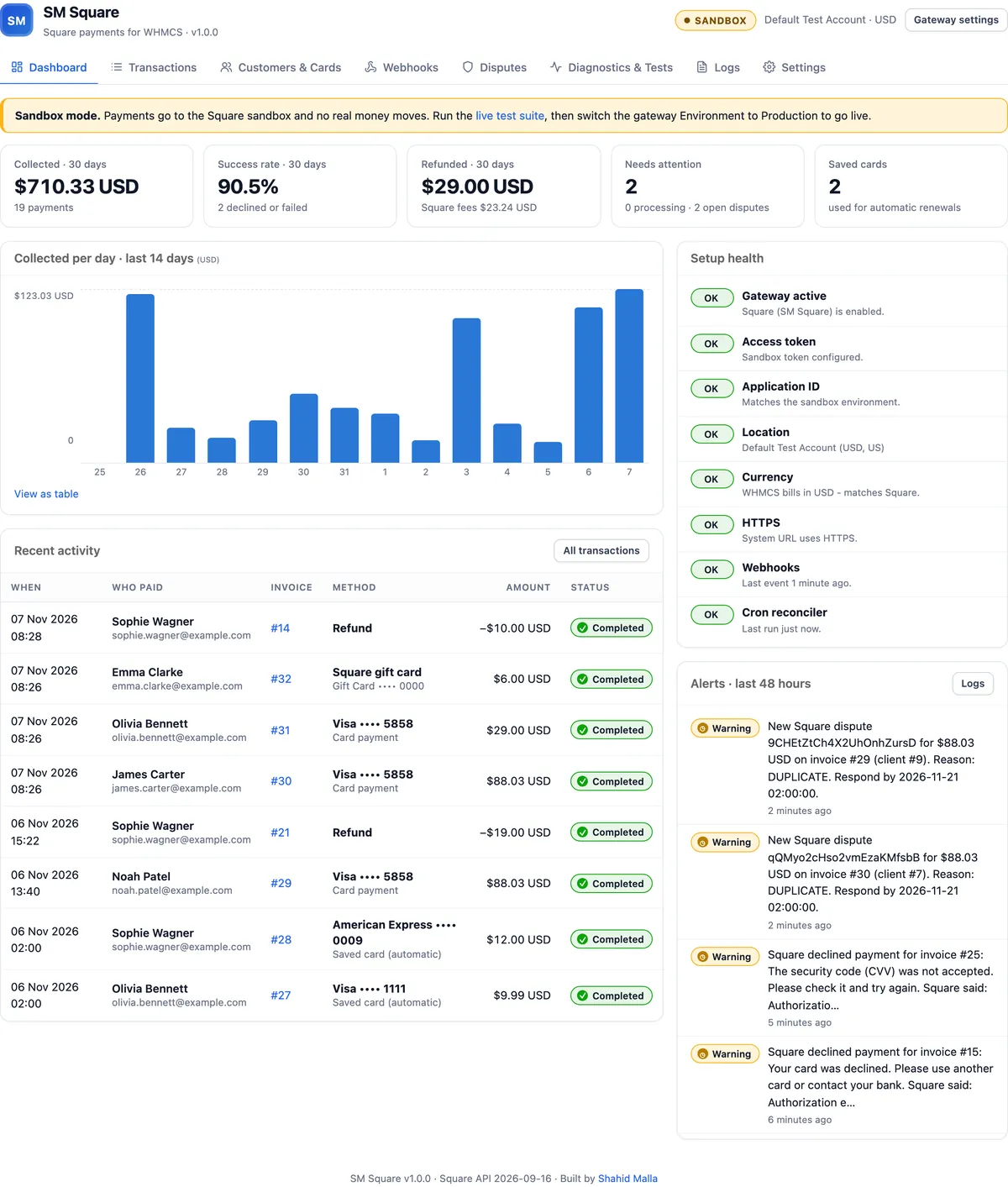
The Payments Manager addon (Addons, then SM Square) puts your Square activity next to your WHMCS billing, so you rarely need to open the Square Dashboard.
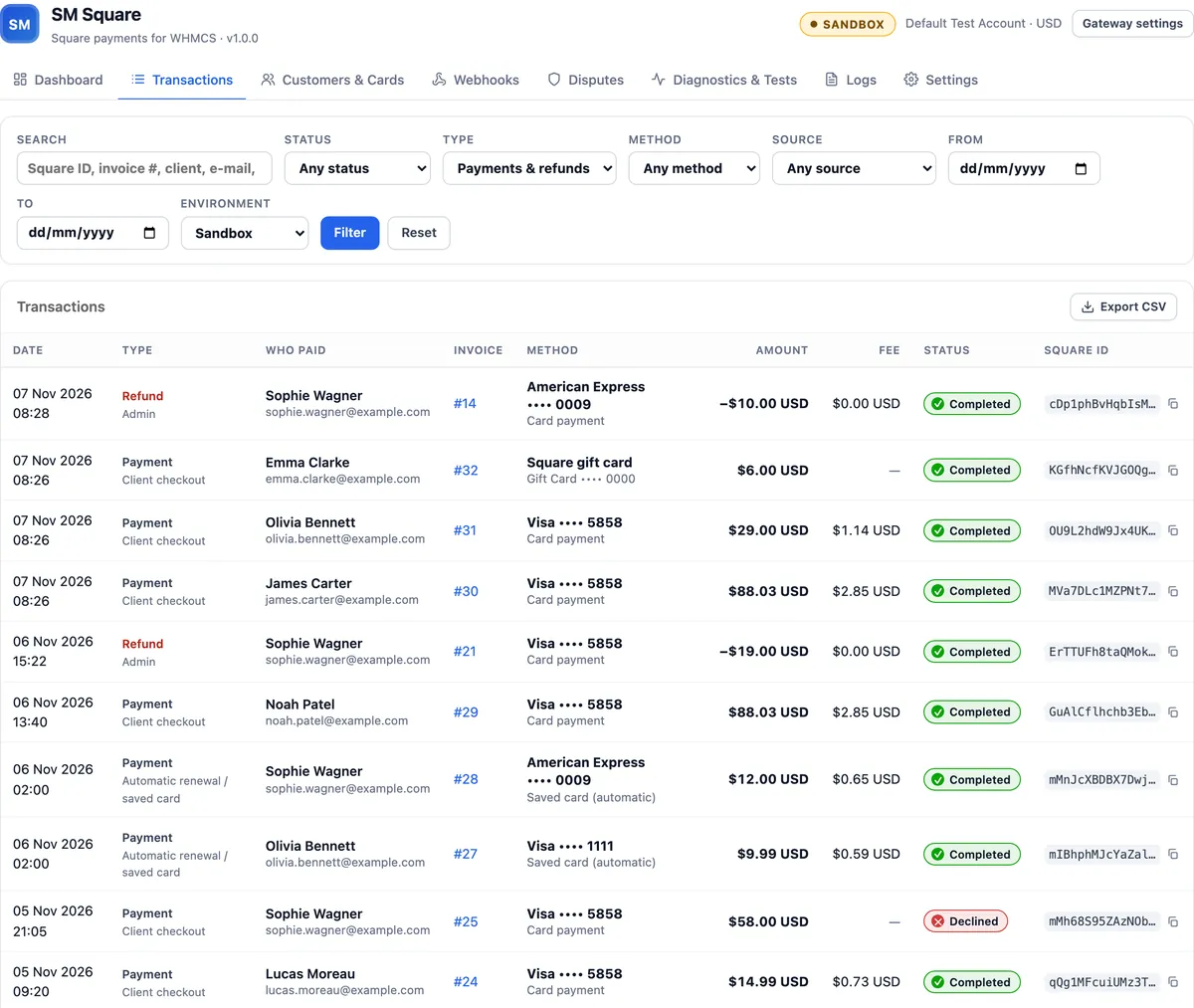
Transactions. Every payment and refund is listed with who paid, the invoice, the card or payment method, the Square fee and the status. You can filter by status, method, source or date, search by Square ID, invoice number, name or email, and export to CSV.
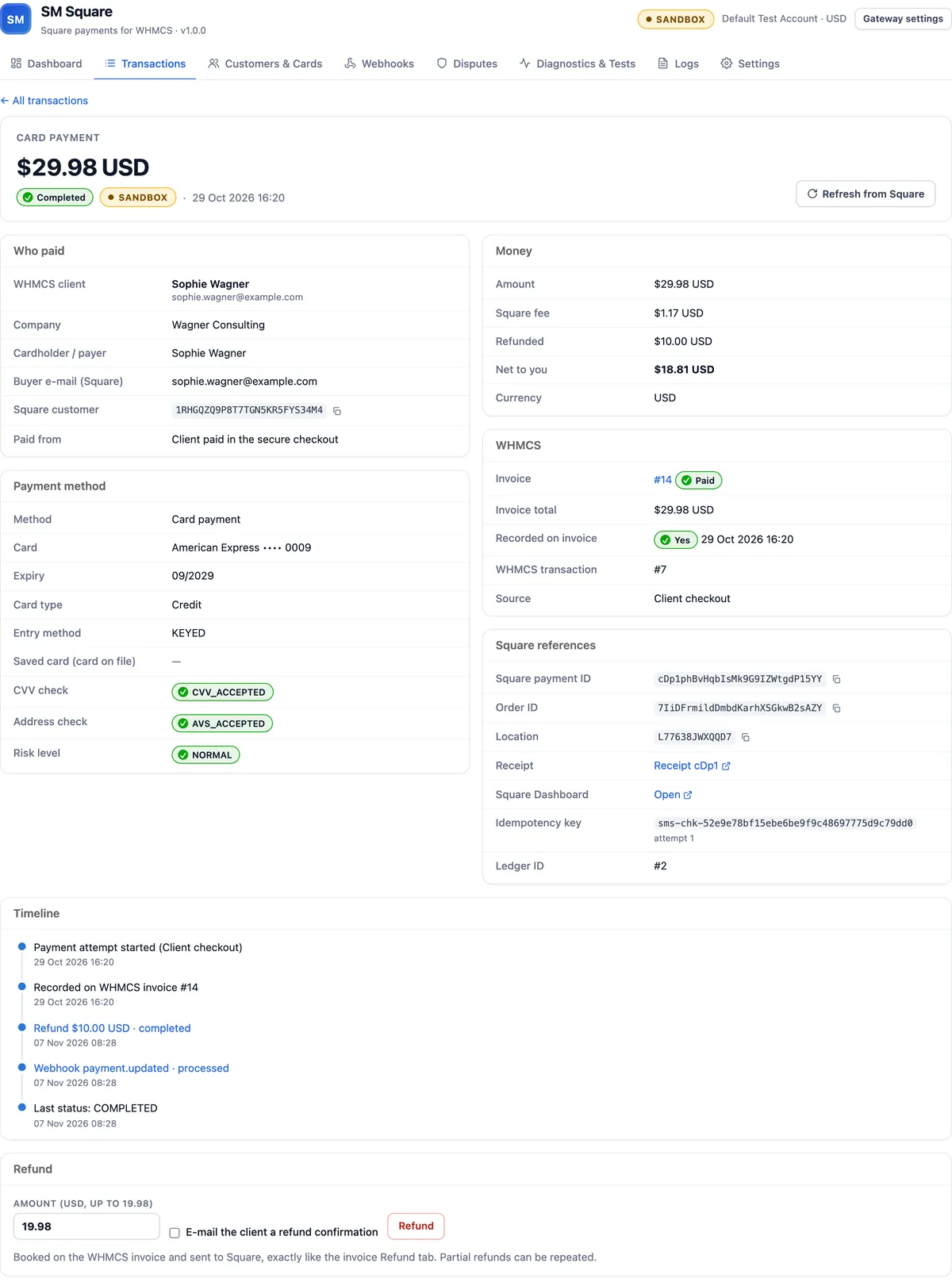
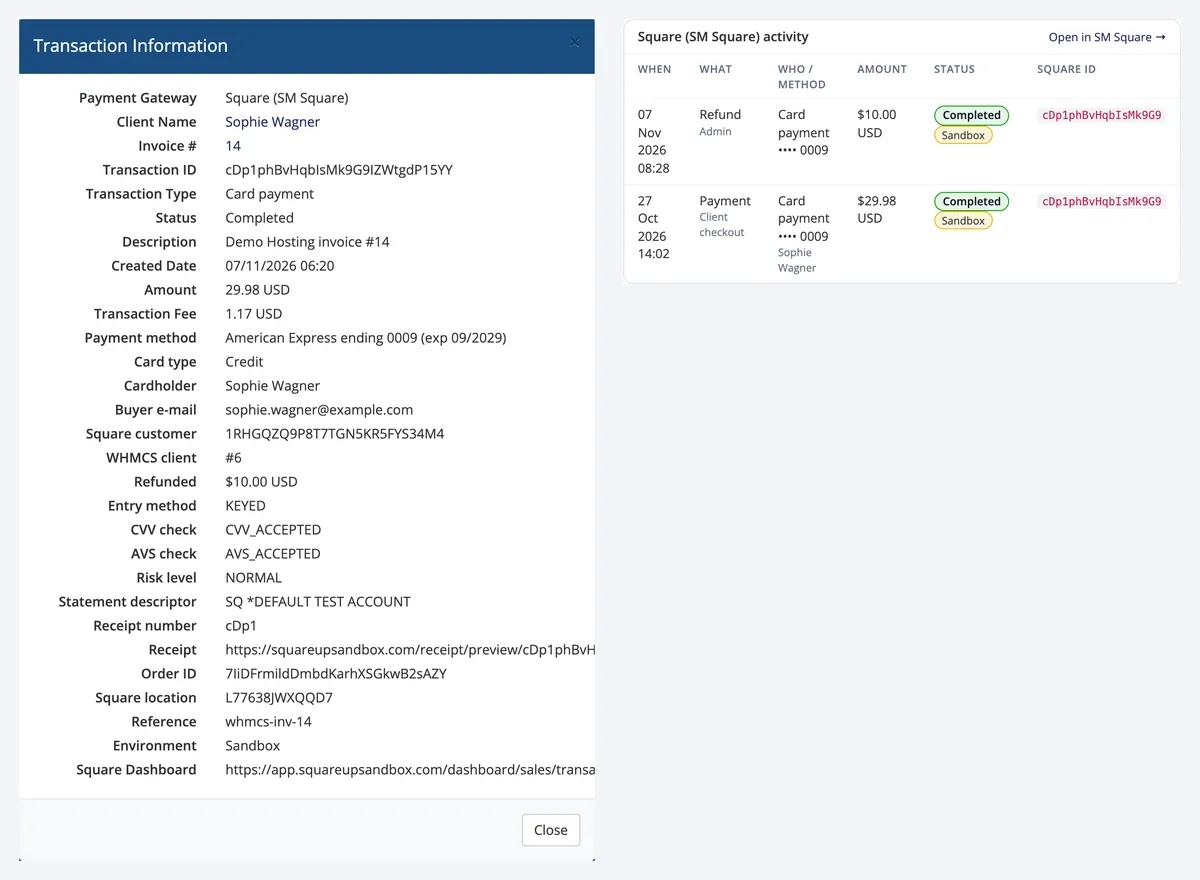
Transaction details. Open any transaction to see the WHMCS client and the cardholder, the card brand and last four digits, the CVV and address checks, Square's risk level, the fee and what you keep, and every Square ID with a copy button. A timeline shows the webhooks and refunds, and a form lets you refund all or part of the payment.
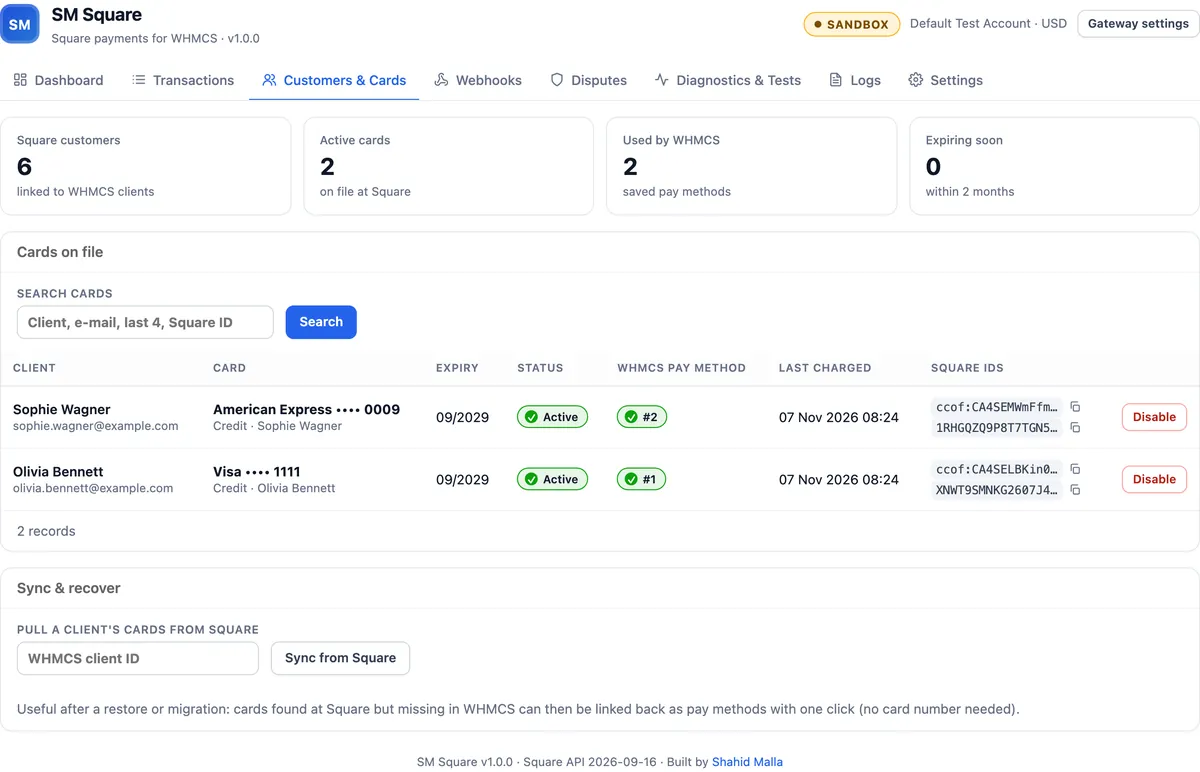
Customers and cards. Every client linked to a Square customer and every saved card is listed with its expiry date and the WHMCS pay method it belongs to. You can disable a card, or pull a client's cards back from Square after a restore.
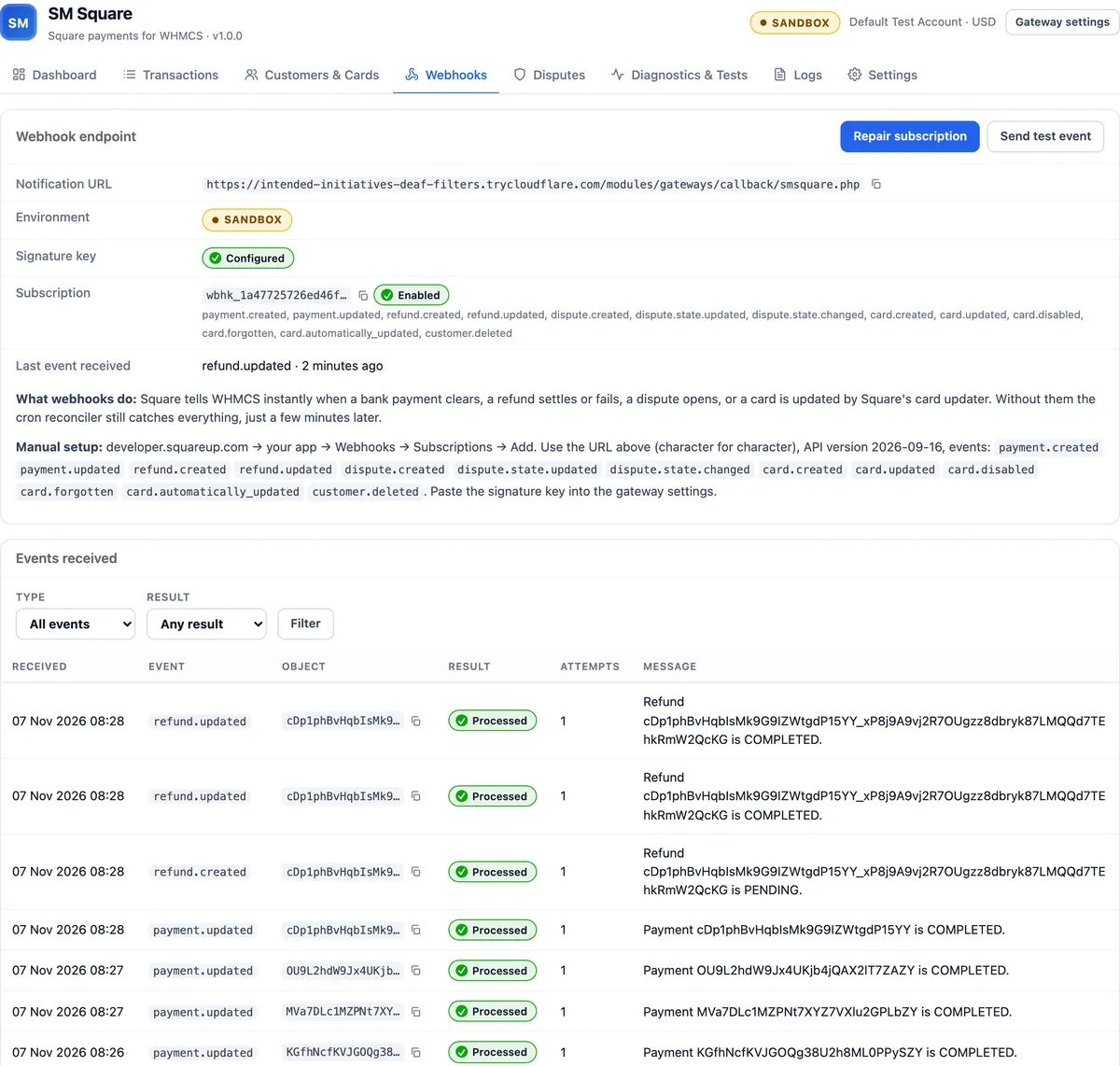
Webhooks. One click creates the webhook subscription at Square and saves the signature key. The page shows the endpoint, the subscription and every event Square sent, with its result. If a webhook never arrives, a cron job finds the payment anyway.
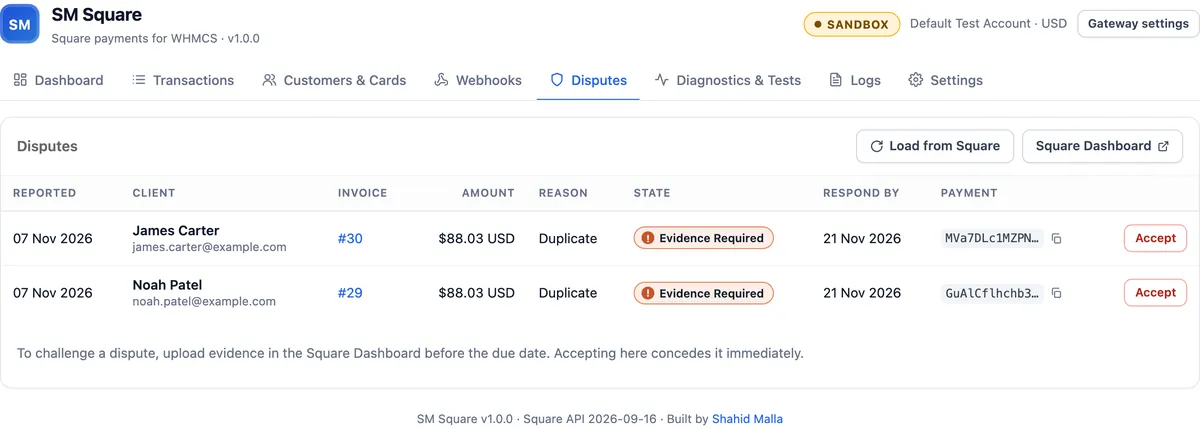
Disputes. Chargebacks are listed with the reason, the amount and the response deadline, and you get an email when one opens.
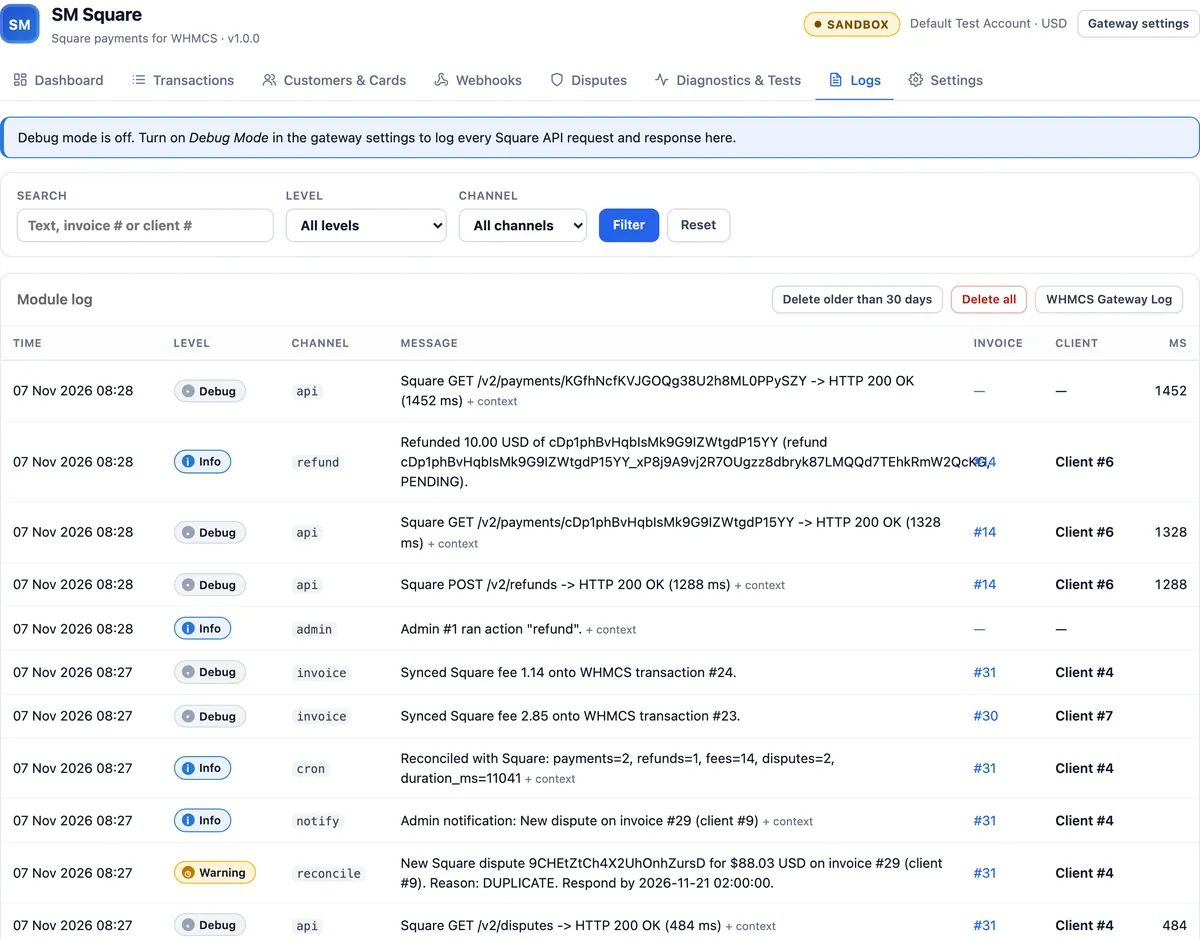
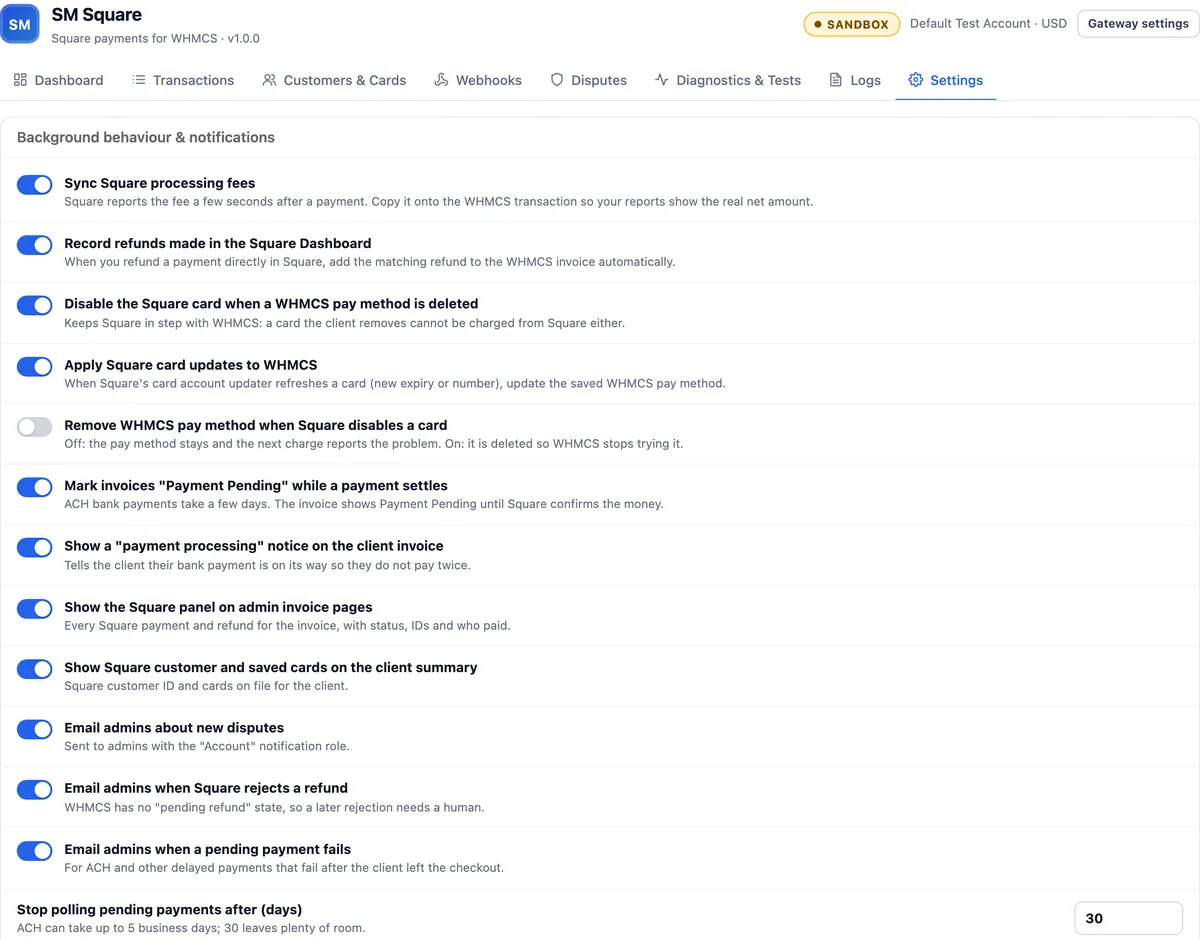
Logs and settings. The log keeps a searchable record of what happened. With Debug Mode on, every Square API call is logged with tokens and card data removed. In Settings you choose how the module behaves: record refunds made in the Square Dashboard, sync Square fees, mark ACH invoices Payment Pending, show the Square panels on invoices and client profiles, and pick which email alerts you get.
How does SM Square compare with other Square modules for WHMCS?
On 7 November 2026 I read the four Square gateway listings on the WHMCS Marketplace. "Not listed" means the listing does not mention the feature. A module may still have it, so ask its developer if it matters to you.
| Feature | SM Square | Other Square modules (4 listings) |
|---|---|---|
| Card payments | Yes | Yes |
| 3-D Secure (Strong Customer Authentication) | Yes | 1 of 4, not for renewals |
| Apple Pay and Google Pay | Yes | Not listed |
| Cash App Pay | Yes | Not listed |
| ACH bank payments with "Payment Pending" | Yes | Not listed |
| Square gift cards | Yes | Not listed |
| Saved cards for automatic renewals | Yes | 2 of 4 |
| Full and partial refunds from WHMCS | Yes | 1 of 4 |
| Refunds made in the Square Dashboard recorded in WHMCS | Yes | Not listed |
| Signed webhooks with one-click setup | Yes | Not listed |
| Disputes (chargebacks) shown in WHMCS | Yes | Not listed |
| Admin dashboard with who paid, fees and a timeline | Yes | Not listed |
| Sandbox mode | Yes | 3 of 4 |
| Built-in live test suite | Yes, 20 steps | Not listed |
| Newest WHMCS version listed | 9.1 (tested) | 9.0 |
How can you test it before you take real money?
The addon includes a live test suite that runs 20 real payment steps against the Square sandbox and cleans up afterward. It covers a charge, a repeated request that must not charge twice, saving a card, a renewal charge on the saved card, partial and full refunds, a refund that is too large and must be refused, four kinds of decline, an ACH payment, a gift card payment and a webhook signature check. You can also run a single test charge and see the exact message a client would get.
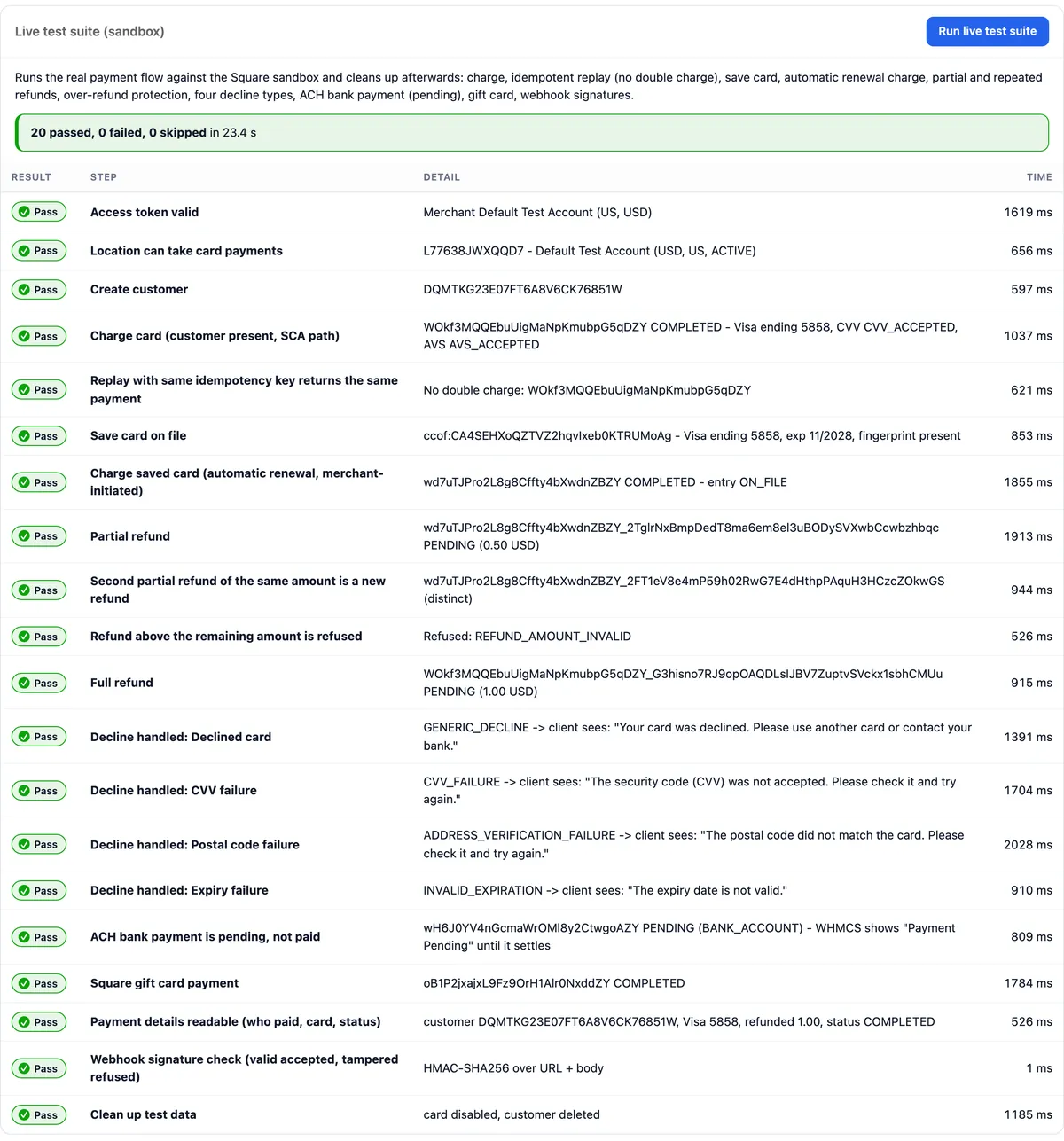
Before release I also tested it in a real browser on WHMCS 9.1. That covered new card payments, saved card payments through the normal WHMCS "Pay Now" page, automatic renewal charges, refunds from WHMCS and from the addon, ACH, gift cards, sandbox disputes, and webhooks delivered by Square to a public HTTPS address.
How does it prevent double charges and lost payments?
- Every attempt is written to the module's own record before Square is called, so nothing is lost if the connection drops halfway.
- Each charge and refund carries a Square idempotency key. A repeated request returns the original result instead of charging or refunding twice.
- A lock on each invoice stops two payments from running for the same invoice at once, and a new charge is refused while an earlier one is still pending.
- When Square's answer is unclear, for example after a timeout, the payment is checked again later. It is never treated as failed and charged a second time.
- A payment can reach WHMCS from the checkout, a renewal, a webhook or the cron job. Whichever arrives first records it, and the others see that it is already there.
Does it work with the standard WHMCS screens?
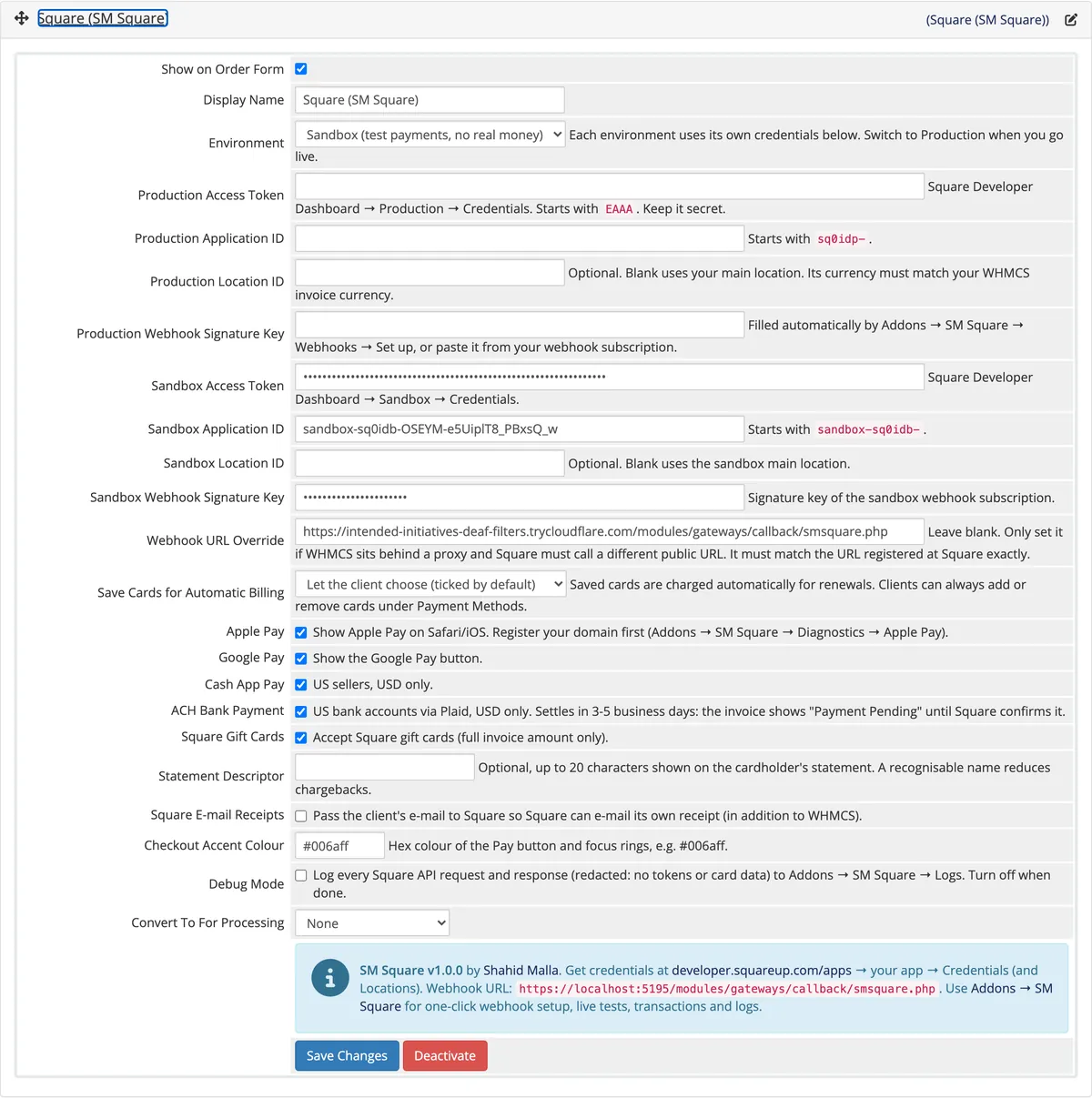
Yes. It uses the normal WHMCS gateway settings with help text on every field, fills the WHMCS Transaction Information window with Square's details, and adds a Square panel to each invoice and client profile. A refund started from an invoice's Refund tab goes to Square like any other WHMCS refund.
What do you need before you switch it on?
Requirements: WHMCS 8.10 or newer (tested on 9.1), PHP 8.1 or newer, HTTPS on your WHMCS site (Square's payment form does not load without it) and a Square seller account. Your WHMCS invoice currency must match the currency of your Square location.
Limits: Square only works for businesses in the countries it supports. Cash App Pay and ACH are for US sellers billing in USD, and Apple Pay needs your domain registered with Square. Fees, payouts and disputes stay with Square under its terms. The module connects WHMCS to Square and does not change any of that.
Moving from another Square module: if your current module saved Square card IDs in WHMCS, the addon can move those saved cards over, so clients do not have to enter their cards again. A dry run shows what will change before anything does.
Licenses: both licenses are paid once for lifetime use. The Regular license ships encrypted. The Open Source license ships 100% unencrypted PHP, so you or your developer can read and change every line. Both include one year of updates and support, and seven days to ask for a refund.
The screenshots on this page come from a demo WHMCS 9.1 store connected to the Square sandbox. The clients in them are fictional.
Key features
- Cards through Square's secure form, with 3-D Secure
- Apple Pay, Google Pay and Cash App Pay
- ACH bank payments with WHMCS "Payment Pending"
- Square gift cards
- Saved cards charged automatically for renewals
- Full and partial refunds from WHMCS or the addon
- Square Dashboard refunds recorded in WHMCS
- Signed webhooks with one-click setup
- Cron safety net for missed webhooks
- Disputes with deadlines and email alerts
- Payments Manager dashboard in WHMCS admin
- Who paid, card, Square fee and every Square ID
- Square panels on invoices and client profiles
- 20-step sandbox live test suite
- Debug log with tokens and card data removed
- Saved card migration from another Square module
Why customers buy this module
- →Every payment method Square offers online, in one WHMCS gateway
- →See who paid, with which card, and what Square charged, without opening Square
- →Renewals charge saved cards on their own, and pending bank payments are tracked until they clear
- →Timeouts and retries never charge a client twice or credit an invoice twice
- →Test the whole payment flow in the sandbox before you take real money
Frequently asked questions
Is SM Square the only Square module for WHMCS with wallets, ACH and an admin dashboard?
As far as I can find, yes. In November 2026 I checked the four Square gateway listings on the WHMCS Marketplace. None of them lists Apple Pay, Google Pay, Cash App Pay, ACH or Square gift cards, and none includes an admin dashboard for Square payments, webhooks or disputes. SM Square has all of these in one gateway and addon. The comparison table on this page shows each feature I checked.
Can SM Square charge recurring invoices automatically?
Yes. When a client saves a card at checkout, Square stores it and WHMCS keeps only a reference to it. When a renewal invoice is due, WHMCS charges that saved card through SM Square without the client doing anything. If a renewal charge fails, WHMCS retries it on the schedule in your WHMCS automation settings, and the addon shows the decline and the reason Square gave.
How do ACH bank payments work in WHMCS?
The client links a US bank account in Square's secure window and pays. Bank payments take a few business days to clear, so the invoice shows the WHMCS "Payment Pending" status in the meantime. When Square confirms the payment, the invoice is marked paid on its own. If the payment fails, the invoice goes back to Unpaid and you can be emailed about it.
Can I refund a Square payment from WHMCS?
Yes, in full or in part, either from the invoice's Refund tab or from the transaction page in the addon. The refund runs through Square and is recorded on the WHMCS invoice. Refunds you make in the Square Dashboard can be recorded in WHMCS automatically too, so both systems stay in step.
Does WHMCS store my clients' card numbers?
No. Clients type their card details into Square's own secure form, so card numbers go straight to Square and never reach your WHMCS server. WHMCS keeps only Square's card reference, the brand, the last four digits and the expiry date, which is what it needs to show the card and charge renewals.
Can I test SM Square before I take real payments?
Yes. Put the gateway in Sandbox mode with your Square sandbox credentials and run the 20-step live test suite from the addon. It charges, saves a card, renews, refunds, declines and checks webhook signatures against the Square sandbox, then cleans up. When everything passes, switch the gateway to Production.
Can I get the full source code?
Yes. The Open Source license gives you lifetime use of the 100% unencrypted PHP code for both the gateway and the addon, so your developer can read it, change it or connect it to your own tools. The Regular license ships encrypted. Both include one year of updates and support.
Technical specifications
- WHMCS
- 9.1 tested, 8.10+ supported
- PHP
- 8.1+
- Square API
- 2026-09-16
- Payment methods
- Cards, Apple Pay, Google Pay, Cash App Pay, ACH, Square gift cards
- Included
- Payment gateway and Payments Manager admin addon
- Needs
- HTTPS on your WHMCS site and a Square seller account
- License
- Lifetime, 1 year of updates and support included
- Open source license
- Lifetime, 100% unencrypted PHP
- Delivery
- License key at purchase
- Refunds
- None, all sales are final
Related modules
Cash App Payment Gateway for WHMCS
I built this gateway so customers in the United States can settle WHMCS invoices with Cash App. Payments are checked and applied to the right invoice, payment requests go out by email, and anything that does not match waits for an admin to reconcile.
Clover Card Payment Gateway for WHMCS
I built this gateway for businesses that run Clover in their shop and bill online in WHMCS. Cards are charged through the Clover API, saved as tokens for renewals, and payments can be refunded or voided without opening the Clover dashboard.
Helium (HNT) Crypto Payment Gateway for WHMCS
I built this gateway so WHMCS can take Helium (HNT) payments wallet to wallet, with no payment processor in between. It quotes the HNT amount at a live rate, looks for the matching transaction on chain, and marks the invoice paid once your confirmation count is reached.