For an IPTV subscription store, a WHMCS theme is the template type that covers the whole job: plans, checkout, recurring invoices, a client login, support and the place your panel module writes the streaming details. A WordPress theme or an HTML template is a storefront only, and a website builder can take the payment but cannot open the account on your streaming panel.
An IPTV website template is a ready-made design for the pages a subscription seller needs: a homepage, a pricing page, a checkout and the area a customer signs into afterwards. What separates one type from another is not the design but how much of the billing work the software underneath it can do. A template is a skin, and the engine under the skin decides whether your store runs itself or runs on your evenings.
This guide is for operators who hold the rights to what they sell. If you are unsure where you stand, read how to start a legal IPTV business before you buy any template.
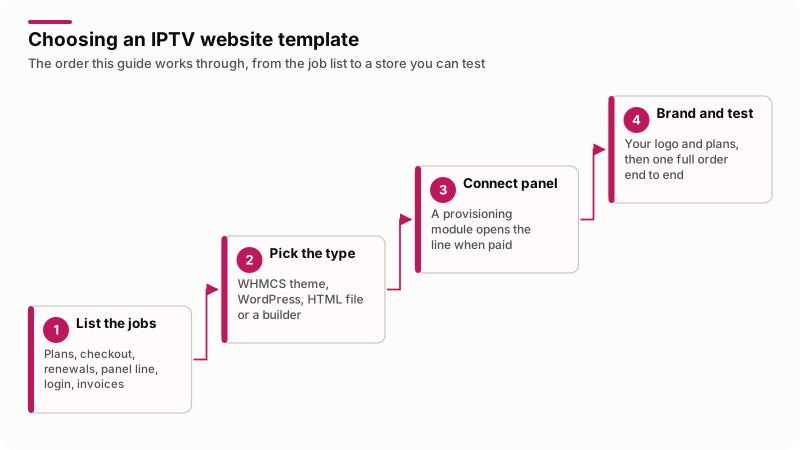
In words: list the jobs, pick the type that can do them, connect the panel, then brand it and put one real order through.
What jobs does an IPTV website template have to do?
Seven, and only two are design work. Write them down before you look at a single screenshot, because this is the list the comparison below scores against.
- Show plans. Durations, connection limits and prices in the visitor's currency.
- Take the first payment. A checkout short enough that a phone user finishes it.
- Bill the renewal. An invoice raised before the period ends and charged automatically.
- Open the account on your panel. The paid order becomes a line with a username, a password and an expiry date.
- Give the customer a login. Streaming details, days left and a renew button, so they stop asking you in chat.
- Keep the paperwork. Invoices, payment history and a receipt they can print.
- Take support requests. Tickets attached to the right subscription.
Nothing on that list is IPTV-specific except the fourth one. WHMCS says the same in its knowledgebase answer on starting an IPTV business with WHMCS, read on 22 November 2026: there is no native IPTV support, but it can bill and automate provisioning for "just about any service" once a module is written for the panel.
Which template type can do each job?
Only WHMCS covers all seven, and even there the fourth job needs a provisioning module written for your panel. No design points are awarded below, because every type on the list can look good.
| Job | WHMCS theme | WordPress theme | HTML template | Website builder |
|---|---|---|---|---|
| Show plans and prices | Yes | Yes | Hand-edited | Yes |
| Take the first payment | Any enabled gateway | With WooCommerce | No | Builder's checkout |
| Recurring invoices and renewals | Built in | Paid subscriptions extension | No | Sometimes, on a higher plan |
| Open the line on your panel | Provisioning module | Custom code | No | Custom code |
| Login showing the streaming details | The client area | Account page plus code | No | Member area plus code |
| Invoices and payment history | Built in | Order history | No | Order history |
| Support tickets tied to a subscription | Built in | Helpdesk plugin | No | Separate helpdesk |
| Suspend on an unpaid invoice | Through the module | Custom code | No | Custom code |
Read it as a bill, not a scorecard. Every "custom code" cell is a developer day you pay once and maintain forever.
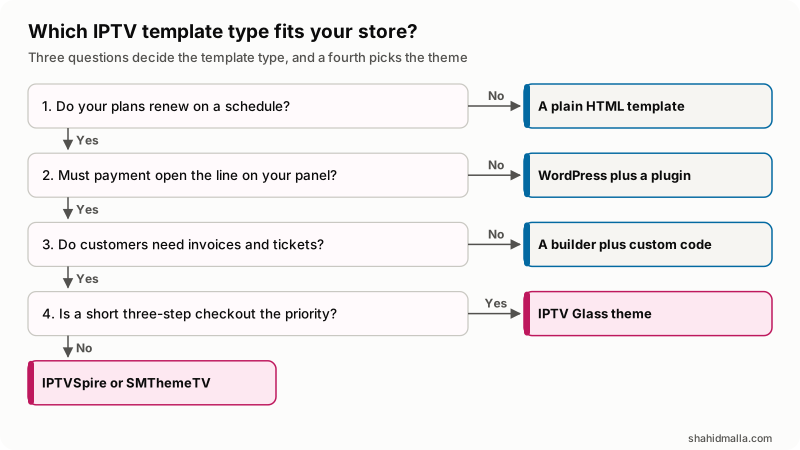
In words: nothing renews, plain HTML. Payment need not open the line, WordPress and a subscriptions plugin. No invoices or tickets needed, a builder plus custom code. Past that, a WHMCS theme, and the only question left is which one.
Is a WordPress IPTV theme or an HTML template enough?
Only if something else is already doing the billing. The WordPress Theme Handbook is blunt about the split: themes control the presentation of content and plugins control the behaviors and features of your site, and it tells theme authors not to put site-critical functionality in a theme. An IPTV WordPress theme is the look; the subscription machinery is separate.
In practice that means WooCommerce plus WooCommerce Subscriptions, which its product page describes as a paid annual extension working with more than 25 payment gateways, retrying failed renewal payments and letting subscribers upgrade, downgrade, suspend or cancel from My Account. Read on 22 November 2026, that page showed version 9.4.1 and a 30-day money-back guarantee. The stack covers jobs one to three and six, and still has no idea your panel exists, so job four is a webhook somebody has to write and keep working.
A plain HTML template is further back again: files with no server-side logic, so it shows plans and a contact button and nothing else. That is not useless. It makes a fast campaign page, the job in my IPTV landing page package, where the plan buttons hand over to billing that already exists. Treat an HTML IPTV template as a front door, never the shop.
What can an IPTV website builder do, and where does it stop?
A builder gets you a good-looking store and a working card payment quickly, then stops at your panel. The builder owns the checkout, the customer record and the renewal schedule, and exposes an API or a webhook. Creating the line, storing its username and password, extending it on renewal and disabling it after a failed payment are yours to build.
That is a fair trade if you sell three plans and do not mind making lines by hand for a while. It turns bad once hand-work costs more than a developer, usually when renewals start overlapping new orders. The other cost is portability: a WHMCS module is PHP in your own install, a builder integration is not.
How does the template connect to your streaming panel?
It does not. A separate provisioning module does, and this is the most misunderstood thing about IPTV templates. The WHMCS developer documentation on provisioning modules lists the core functions as create, suspend, unsuspend and terminate, fired by new order payment, items becoming overdue, payment of an overdue invoice and cancellation requests, with password resets, upgrades and renewals on top.
The division of labor is fixed:
- The theme decides what the customer sees and how short the checkout is.
- The module talks to the panel API and writes the username, password and expiry onto the service.
- WHMCS raises the invoices and fires the events that make the module act.
A vendor who says their template creates panel accounts is bundling a module, or is wrong. Ask which. My guide on connecting an IPTV panel to WHMCS covers the module side, and the same work is a fixed scope in my IPTV websites and billing panels packages.
Which of my three WHMCS IPTV themes fits your store?
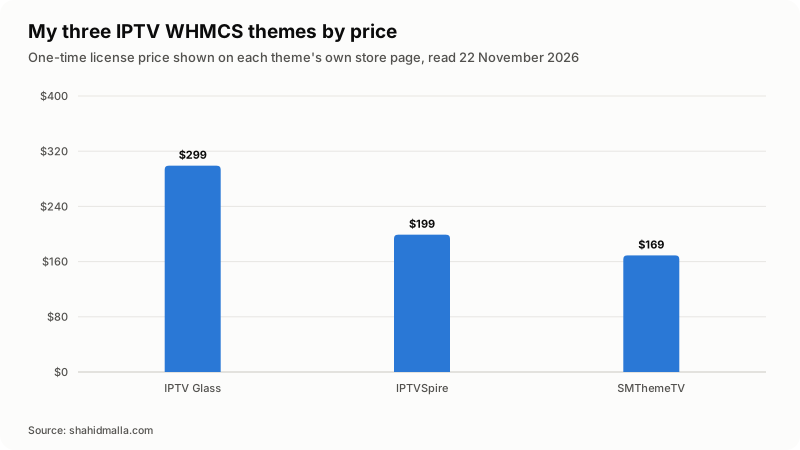
They differ by where the weight sits: the checkout and client area, the public storefront, or admin control over the design. Prices are the one-time license prices on each theme's own store page, read on 22 November 2026.
| Theme | What it leads with | Base | Demo | Price |
|---|---|---|---|---|
| IPTV Glass | The whole journey: a one-page checkout in three steps and a client area built around the streaming login | WHMCS 9.1, child theme of Twenty-One | Screenshots, or a screen share | $299 |
| IPTVSpire | The public storefront: features, devices and reseller pages, plus a pricing page that switches product groups | WHMCS 9, Nexus templates | Live demo you can click through | $199 |
| SMThemeTV | Admin control: a sidebar client area, plan cards from your products and a Theme Manager with 13 tabs | WHMCS 9, PHP 7.4 or newer | No public demo listed | $169 |
All three are themes only. None supplies streams, channel lists, playlists or apps, and none creates accounts on a panel. Each is a lifetime license with twelve months of updates and support, and all sales are final, so ask your questions before you buy. The rest of my catalog, including the panel modules, is at modules and themes.
For the shortest route from a phone visitor to a working login, I would pick IPTV Glass; for a storefront a stranger reads before trusting you, IPTVSpire; to restyle the site yourself every few weeks, SMThemeTV.
What else does an IPTV store cost to run?
The template is the small number. The engine under it is billed monthly by somebody else. Figures below come from the WHMCS pricing page as it stood on 22 November 2026.
| Item | Billed by | Read on 22 November 2026 |
|---|---|---|
| WHMCS self-hosted license | WHMCS | Plus $34.95 a month up to 250 active clients, Professional $54.95 up to 500, Business $84.95 up to 1,000, excluding tax |
| WHMCS fully managed | WHMCS | Starter $9.99 a month up to 25 clients, Growth $25.00 up to 100, Expansion $75.00 up to 300, excluding tax |
| The theme | Me | $169 to $299 once, lifetime license, all sales final |
| Panel module | Me or another vendor | Quoted per panel, depending on which API functions exist |
| Hosting, domain, SSL and panel license | Your host and panel vendor | Your own contracts |
| Payment processing | Your gateway | Per-transaction fees set by the processor |
Two notes from that page, neither of them my policy: WHMCS states a 30-day money-back guarantee on its own licenses subject to its terms, and a notice that its license pricing will be adjusted effective 1 January 2027 for new orders and renewals on or after that date.
Self-hosted matters beyond price. That page gives self-hosted the ability to install any marketplace or custom module and calls the managed tier a curated module set. An IPTV store needs a custom panel module, so read that line before picking a tier.
What should you check before you buy an IPTV template?
Eight questions, and a vendor who will not answer them in writing has told you something useful.
- Which WHMCS version was it built and tested on, and which parent theme does it extend?
- Is it a child theme? The WHMCS documentation on child themes has recommended them since WHMCS 8, so that updates to untouched files carry through.
- Does the checkout ship as its own order form template, or only restyle the stock cart?
- Can you change the accent color, the product group shown as your plans and the sign-up fields from the admin?
- Does it hide fields a subscription does not need, such as domain search, hostname, nameservers and the root password?
- Can you see it running, on a public demo or a screen share?
- Is the panel module included or separate, and what are the buying terms?
- Is the vendor clear in public that they sell software only?
Test before you commit. WHMCS previews a system theme with the ?systpl= URL parameter and an order form template with ?carttpl=, so a candidate loads on your install without going live.
What are the limits and risks of an IPTV website template?
The template is the part least likely to cause trouble. The risks sit on either side of it.
- Rights come first. A template is software and says nothing about what you are licensed to sell. Build on written distribution rights, or do not build.
- Payment acceptance is not yours to decide. Stripe's prohibited and restricted businesses list, last updated 22 September 2026 when I read it, prohibits "any other products or services that are in violation of law in the jurisdictions where your business is located or to which your business is targeted", and requires you to stay compliant with it. Every processor has its own version. Open the accounts in your business name early.
- A theme that edits core files will break. If a template asks you to overwrite parent theme files instead of shipping as a child theme, the next WHMCS update reverts your store or breaks it.
- No template rescues a thin panel API. If your panel cannot change bouquets on an existing line, no front end makes that button work. Confirm the API functions before you design around them.
- Version drift. WHMCS 9.1 was the General Availability release the day I wrote this, with 9.0 and 8.13 on long-term support, per the WHMCS documentation home page. A theme built for 9.x is not a theme for an 8.x install.
What else do people ask about IPTV website templates?
Do I need WHMCS to sell IPTV subscriptions?
No, but you need something that raises recurring invoices and reacts to them. WHMCS gives you that plus a client area and tickets in one install. The alternative is WordPress with a paid subscriptions extension, or a builder, plus custom code for anything touching your panel.
Can I use a WordPress IPTV theme and WHMCS together?
Yes, and plenty of operators do. WordPress runs the marketing site on the main domain, WHMCS runs the store and client area on a subdomain or subfolder, styled to match. The cost is two systems to update and one more place for a customer to get lost, so keep the handoff to a single obvious button.
Does a WHMCS IPTV theme create the account on my panel?
No. A theme changes templates and styling only. Creating, extending, suspending and removing the line is the job of a provisioning module written for your panel, and the theme displays what that module saves on the service. A vendor claiming otherwise is bundling a module, so ask which one and which panel versions it supports.
Is an IPTV website builder enough to start with?
It can be, if you accept making lines by hand at first. Builders handle pages, checkout and sometimes recurring payments, and leave panel provisioning to code written against their API. The trap is that this work cannot move with you later, while a WHMCS module can.
Can I change the plans and prices in a WHMCS IPTV theme myself?
Yes. In all three of my themes the plan cards read your own WHMCS products, so prices, durations and descriptions change in WHMCS and the storefront follows. Colors, menus and sign-up fields are settings in the theme's admin addon. Anything beyond those settings is template work.
What happens to my IPTV template when WHMCS updates?
A properly built child theme keeps working, because files you did not customize come from the parent and update with it. Files the theme does override, including the order form, may need a look after a major release. That is why I would not buy a template that is not a child theme.
If you want this decision made against your actual panel and plan list rather than in the abstract, I quote it as part of an IPTV website build, with a free scoping call of about 30 minutes and a written quote within one business day.
Last reviewed 22 November 2026. Disclosure: I sell WHMCS themes, modules and IPTV website builds, so I am not neutral. I am CTO at ElySpace, a freelance developer for Marmaids LLC, and founder of WHMCSPilot and MagizAI. Prices, version states and policies come from the WHMCS, WooCommerce, WordPress and Stripe pages linked above and from my own store pages, all read on 22 November 2026. I sell software, APIs, automation and websites, never IPTV content, channels, streams or subscriptions.