To set up DMARC, list every service that sends mail as your domain, make each one pass SPF or DKIM with your own domain, then publish a TXT record at _dmarc.yourdomain such as v=DMARC1; p=none; rua=mailto:reports@yourdomain. Read the daily aggregate reports, fix the senders that fail, and only then move to p=quarantine and p=reject.
DMARC (Domain-based Message Authentication, Reporting, and Conformance) is a DNS TXT record that tells receiving mail servers what the owner of a domain wants done with mail that fails authentication, and where to send reports about it. A message passes DMARC when SPF or DKIM passes for a domain that aligns with the domain in the visible From address.
The standard changed this year: in May 2026 the IETF published RFC 9989, which obsoletes RFC 7489, the version Microsoft's and Yahoo's pages still cite. If mail from a cPanel server already lands in spam, start with my cPanel email going to spam guide. This guide is the DMARC rollout itself.
How does DMARC work with SPF and DKIM?
DMARC adds one check on top of SPF and DKIM: the domain they authenticate must match the domain in the From header. RFC 9989 calls this identifier alignment. Without it, SPF and DKIM can pass for a domain your recipient never sees.
| Check | Domain it authenticates | What DMARC adds |
|---|---|---|
| SPF (RFC 7208) | The MAIL FROM (Return-Path) domain, checked against the sending IP | That domain must align with the From domain |
| DKIM (RFC 6376) | The d= domain, checked against a key at selector._domainkey.domain | That domain must align with the From domain |
| DMARC | The From domain | Passes if at least one aligned SPF or DKIM pass exists |
Relaxed alignment, the default, accepts the same organizational domain, so bounces.example.com aligns with example.com. Strict needs an identical name. RFC 9989 says "nearly all Domain Owners have found relaxed alignment sufficient," and Yahoo says "Relaxed alignment is acceptable." I keep both modes relaxed unless someone else runs a subdomain.
How do you set up DMARC, step by step?
Follow the order in RFC 9989 Section 5.1: SPF, DKIM, a reports mailbox, a p=none record, then analysis and fixes before any enforcement.
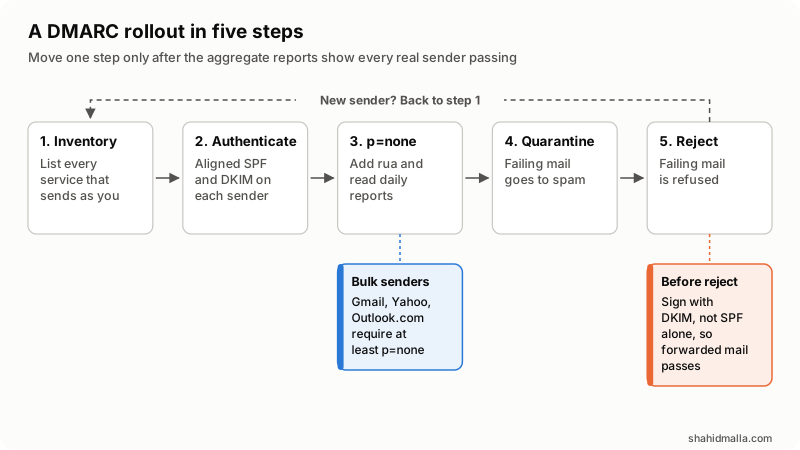
- Inventory every sender: mailbox provider, website forms, billing or WHMCS invoices, newsletter tool, help desk, CRM. Anything that puts your domain in the From line counts.
- Set up aligned SPF and DKIM on each one. One SPF record covering your servers and each service's include, and DKIM signing with your domain wherever offered. Google says to "Allow 48 hours after setting up SPF and/or DKIM before setting up DMARC."
- Create a reports mailbox or group, not a person's inbox. Google warns large organizations can get "hundreds or even thousands of reports daily."
- Publish p=none with rua. Receivers deliver as before and send you reports.
- Fix every legitimate stream that fails. RFC 9989 says this "MUST be addressed" before enforcement and that it "may take many months" for some senders.
- Move to p=quarantine, so failing mail goes to spam, and keep reading reports.
- Move to p=reject when nothing legitimate fails. Section 7.4 says a domain at reject "MUST apply valid DKIM signatures" and must not rely on SPF alone.
Google's recommended rollout suggests p=none "for one week" before quarantine. I wait for a full monthly cycle of reports, because monthly invoices and newsletters only appear once a month. When a new service starts sending as your domain, it goes back to step 1.
What does a DMARC record look like?
It is one TXT record at _dmarc under the From domain. The record for each stage, with example.com in place of your domain:
; 1. Monitoring: no policy, reports on
_dmarc.example.com.  TXT  "v=DMARC1; p=none; rua=mailto:dmarc@example.com"

; 2. First enforcement step
_dmarc.example.com.  TXT  "v=DMARC1; p=quarantine; rua=mailto:dmarc@example.com"

; 3. Full enforcement, softer rule for subdomains still in progress
_dmarc.example.com.  TXT  "v=DMARC1; p=reject; sp=quarantine; rua=mailto:dmarc@example.com"

; 4. A domain that never sends mail (Microsoft's parked-domain record)
_dmarc.example.net.  TXT  "v=DMARC1; p=reject;"

; 5. Published by reports.example.org to accept example.com's reports
example.com._report._dmarc.reports.example.org.  TXT  "v=DMARC1;"
Record 5 matters when rua points to another domain, such as a reporting service: RFC 9990 tells receivers to ignore the address if it is missing. The tags, as RFC 9989 defines them:
| Tag | What it sets | If left out | Notes |
|---|---|---|---|
v | Version, always DMARC1 | Record ignored | Must be the first tag |
p | Policy: none, quarantine or reject | Treated as none | Covers subdomains too, by default |
rua | Where aggregate reports go | No aggregate reports | Comma-separate several mailto: addresses |
ruf | Where failure reports go | No failure reports | Gmail does not support it; Microsoft 365 does not send them |
sp | Policy for existing subdomains | p applies | Ignored in a record on a subdomain |
np | Policy for subdomains that do not exist | sp, then p | Brought in from RFC 9091 |
adkim, aspf | DKIM and SPF alignment: r or s | Relaxed | Strict needs an exact match |
t | t=y asks for one level below the policy | n | New; replaces pct=0 |
pct | Share of failing mail the policy applies to | 100 | Historic in RFC 9989 |
Should you still use pct for a gradual rollout?
Not as your main tool. RFC 9989 removed it because "Operational experience showed that the 'pct' tag was usually not accurately applied, unless the value specified was either 0 or 100." It also dropped rf and ri. Google's Set up DMARC page still recommends pct, and Microsoft's still steps from pct=10 to pct=100; receivers ignore tags they do not know, so a leftover one breaks nothing. I move the whole domain one policy at a time, and test enforcement on a low-volume subdomain first, as Microsoft also recommends.
How do you set up DMARC in Google Workspace, Microsoft 365 and cPanel?
In all three, the DMARC record lives at your DNS host. What differs is where SPF and DKIM are switched on.
| Platform | Where the DMARC record goes | Do first | Worth knowing |
|---|---|---|---|
| Google Workspace | Your domain host, as TXT at _dmarc; nothing in the Admin console | SPF, plus DKIM turned on for the domain; wait 48 hours | Some DNS hosts append the domain to the name; check you did not create _dmarc.example.com.example.com |
| Microsoft 365, custom domain | Your registrar or DNS host; Microsoft has no portal or PowerShell cmdlet for it | SPF on every custom domain and subdomain, and DKIM signing with your own domain | Start with a low-volume subdomain and do the parent domain last |
| Microsoft 365, onmicrosoft.com | Admin center: Settings > Domains, DNS records tab, Add record | Nothing; SPF and DKIM are already set | Microsoft's value is v=DMARC1; p=reject |
| cPanel | Email Deliverability, DMARC section: Install the Suggested Record, or copy it to your DNS host | Valid SPF and DKIM, which the page requires | Repair works only when the server hosts the domain's DNS |
Sources: Google's Set up DMARC, Microsoft's Set up DMARC to validate email in Microsoft 365 and cPanel's Email Deliverability page. On cPanel, the hosting provider must enable Email Deliverability in WHM's Feature Manager. Customers with outside DNS cannot repair records from cPanel, so hosting companies should hand them the suggested values.
What do Gmail, Yahoo and Outlook.com require from bulk senders?
All three require SPF, DKIM and a DMARC record of at least p=none, aligned with SPF or DKIM. They differ on who counts as bulk and on what happens to failing mail.
| Rule | Gmail | Yahoo Mail | Outlook.com |
|---|---|---|---|
| Who is a bulk sender | "more than 5,000 messages per day to Gmail accounts," counted across the primary domain; the status is permanent | "We will not specify a volume threshold." | "domains sending more than 5,000 emails per day" |
| DMARC policy | "Your DMARC enforcement policy can be set to none." | "at least p=none - DMARC must pass" | "At least p=none" |
| Alignment | From domain aligned with the SPF or DKIM domain | Same; relaxed is acceptable | "align with either SPF or DKIM (preferably both)" |
| Reports | rua recommended; ruf not supported | rua "strongly recommended" | Sends rua; no plans to send ruf |
| Failing mail | Temporary or permanent errors, or spam; 4.7.31 for a missing DMARC record, 4.7.32 for no alignment | Spam folder or rejected | Rejected with "550; 5.7.515 Access denied" (April 2025 update to the post) |
Sources: Google's Email sender guidelines and FAQ, Yahoo's Sender Best Practices and FAQ, and Microsoft's Outlook.com high-volume sender post (hotmail.com, live.com and outlook.com addresses). Google's FAQ adds that "Starting November 2025, Gmail is ramping up its enforcement on non-compliant traffic," and that "DMARC alignment with both SPF and DKIM will eventually be a sender requirement," so I align both now. Spam-rate and unsubscribe rules are summarized in my cPanel spam guide.
How do you read DMARC aggregate reports?
Aggregate reports are XML files, usually gzip-compressed and sent once a day; RFC 9990 says each typically covers "a single UTC day." Each record gives a sending IP (source_ip), a message count, the disposition applied, the DMARC dkim and spf alignment results, the header_from and envelope_from domains, and the raw SPF and DKIM results. Google and Microsoft suggest a reporting service or a parser. The patterns to act on, adapted from Microsoft's report table:
| Pattern in the report | What it means | Fix |
|---|---|---|
| Known IP, SPF passes, SPF alignment fails | A real service uses its own bounce domain | Custom return-path on your domain, or DKIM with your domain |
| Known IP, DKIM passes, DKIM alignment fails | The service signs with its own d= domain | Custom DKIM with your domain at the service |
| A real service, SPF and DKIM both fail | Missing from SPF and not signing | Add its include and turn on DKIM |
| Mailing list or forwarder IPs, all failing | Forwarding broke SPF; edits broke DKIM | Normal for forwarded mail; ARC helps |
| Unknown IPs, all failing | Possible spoofing of your domain | Nothing to fix; enforcement stops this |
Why does DMARC fail, and what are the common mistakes?
DMARC fails when no SPF or DKIM pass aligns with the From domain. Take one failing message or report row and answer these in order:
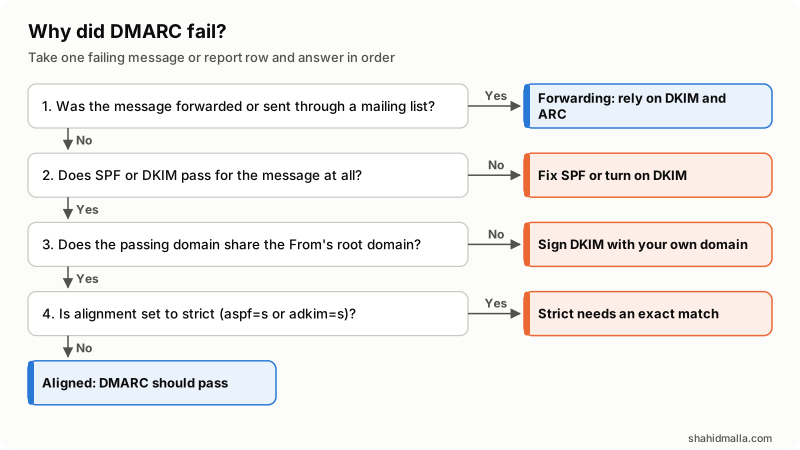
- Was it forwarded or sent through a mailing list? SPF usually fails there, while DKIM signatures "will generally remain valid," per RFC 9989. Yahoo and Microsoft recommend ARC for forwarders.
- Does SPF or DKIM pass at all? If not, fix the SPF record or turn on DKIM.
- Does the passing domain share the From domain's root domain? If not, sign DKIM with your own domain at that service.
- Is alignment strict? Then names must match exactly. If relaxed, DMARC passes.
The setup mistakes behind most of these answers:
- Two SPF records. RFC 7208 returns "permerror" when more than one
v=spf1record exists. Merge them. - Too many SPF lookups. More than 10
include,a,mx,ptr,existsorredirectterms also gives permerror. - Two DMARC records. RFC 9989: "If multiple DMARC Policy Records are returned for a single target, they are all discarded."
- Unaligned third-party senders. SPF passes for the vendor's bounce domain and DKIM signs as the vendor, so DMARC fails although both show pass.
- Subdomain surprises. Microsoft notes a domain's record covers all subdomains, even nonexistent ones, unless a subdomain has its own record. Set
spandnpon purpose. - Reject where staff post to mailing lists. RFC 9989 says such domains "SHOULD NOT" publish p=reject, or should first spend at least a month at none and as long at quarantine. I move bulk and transactional mail to a subdomain and decide on the main domain separately.
Securing the servers that send as your domain is the other half; I cover it in server security hardening.
What is the DMARC setup checklist?
- Every sending service listed, with someone who can change its settings.
- One SPF record, within 10 lookup terms, covering every sender.
- DKIM signing with your domain everywhere; Google and Yahoo require at least 1024-bit keys and recommend 2048.
- A dedicated reports mailbox, plus the
_report._dmarcrecord if reports go to another domain. - Exactly one
_dmarcrecord,v=DMARC1first, starting atp=nonewithrua. - Reports read over at least one monthly cycle until every real stream passes.
- Quarantine, then reject, still reading reports after each change.
- Parked domains at
p=reject.
What else do people ask about DMARC setup?
How long should I stay at p=none?
Until the reports show every legitimate sender passing. Google suggests at least a week; RFC 9989 says it "may take many months" depending on how often you send. I wait for at least one monthly cycle.
Can a domain have two DMARC records?
No. Under RFC 9989, receivers discard all of them, so the domain behaves as if it had none. Put several report addresses in one rua tag, separated by commas.
Does p=none protect my domain from spoofing?
No. RFC 9989 defines none as "no expression of preference," so receivers treat failing mail as usual. It gives you reports and meets the bulk-sender minimum; protection starts at quarantine.
Do subdomains need their own DMARC record?
Not usually. The parent record applies unless sp, np or a subdomain's own record says otherwise. Each subdomain that sends mail still needs its own SPF and DKIM, as Microsoft points out.
Do I need DMARC if I send fewer than 5,000 emails a day?
Below the bulk line, Gmail asks only for SPF or DKIM as authentication, but Google recommends you "always set up SPF, DKIM, and DMARC," and Yahoo "strongly urges" a DMARC policy for each sending domain. Without one, nothing asks receivers to block mail that spoofs you.
If you want someone to inventory your senders, fix alignment and take your domains to reject without losing real mail, I do this as part of my hosting infrastructure consulting.
Last reviewed 26 October 2026. Disclosure: I sell hosting infrastructure and mail setup work, so I am not neutral. I am CTO at ElySpace, a hosting company, a freelance developer for Marmaids LLC, and founder of WHMCSPilot and MagizAI. I am not affiliated with Google, Microsoft, Yahoo or cPanel. Rules and tags are as the linked pages stated on that date.