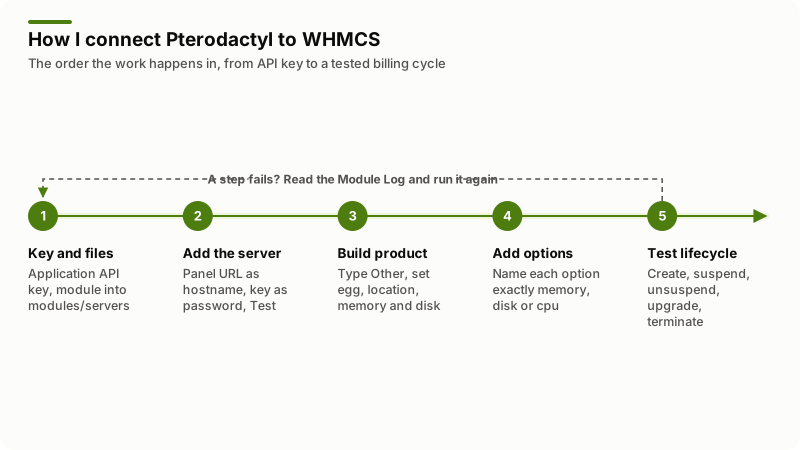
Connecting Pterodactyl to WHMCS takes the free pterodactyl/whmcs provisioning module, an application API key from the panel, and one WHMCS product. Copy the module into modules/servers, add the panel as a server with the key in the password field, point a product of type Other at it, then test create, suspend, unsuspend and terminate before you sell.
A Pterodactyl WHMCS integration is a provisioning link between a billing system and a game panel: WHMCS owns the invoice, Pterodactyl owns the container. The official module turns a paid order into a panel user and a running game server, and turns an overdue invoice into a suspended one. Every call it makes goes to one place, the panel's application API at /api/application.
Everything below is checked against the pterodactyl/whmcs README and module source, the Pterodactyl 1.x API overview and the WHMCS 9.1 documentation, read on 7 November 2026.
What has to exist before you connect Pterodactyl to WHMCS?
A working panel, at least one node running Wings with free allocations, a location, and a WHMCS install whose files you can write to. The module provisions into what the panel already has; it does not build nodes.
The panel's Getting Started page lists PHP 8.2 or 8.3, MySQL 5.7.22 or MariaDB 10.2 and higher, Redis and Composer v2. Wings runs on every machine that hosts games and needs Docker. Three things catch people out:
- Mail must work on the panel. New customers get their password from the panel, not from WHMCS. Set it with
php artisan p:environment:mail, then restartpteroq. - Back up
APP_KEYfrom the panel's.envfile. It encrypts stored API keys, and the documentation says that without it the data is unrecoverable even from a backup. - Allocations decide whether an order succeeds. A location with no free port in the range you ask for fails every order against it.
If you are still choosing a panel, my guide on starting a game server hosting company covers hardware, locations and pricing.
Which Pterodactyl API key does the WHMCS module need?
An application API key, not a client one. The API overview separates them: client keys live at Account > API Credentials and act as one user, while application keys live at Admin > Application API and manage users, nodes, locations and servers, "for example from a billing system". The README shows the permission grid only as a screenshot, but the module's source lists every call it makes. Grant those areas and nothing more.
| Module action | Endpoint it calls | Permission area |
|---|---|---|
| Test Connection | GET nodes | Nodes, read |
| Find or create the client | GET users/external/{id}, GET users?filter[email]=, POST users | Users, read and write |
| Change Password | GET and PATCH users/{id} | Users, read and write |
| Read the game template | GET eggs/{id}?include=variables, then GET nests/{nest}/eggs/{egg} | Eggs, read (Nests too on 1.x) |
| Create, suspend, unsuspend, terminate | POST servers, /suspend, /unsuspend, DELETE servers/{id} | Servers, read and write |
| Upgrade or downgrade | PATCH servers/{id}/build and /startup | Servers, read and write |
The Pterodactyl project page says API keys are scoped, encrypted at rest and can be pinned to IP addresses. Pin this one to your WHMCS server. A key with write access to users and servers is the most valuable string in your billing system, which is true of any WHMCS API integration.
How do you install the Pterodactyl module in WHMCS?
Move the pterodactyl/ folder from the repository into <path to whmcs>/modules/servers/. That is the whole install: the module is MIT licensed, so there is no license key and no purchase. WHMCS does not ship it. The Servers page lists the default modules, among them TCAdmin, SolusVM, Plesk and cPanel, and Pterodactyl is not one. Two version notes matter first:
- The current module needs Panel 1.0.0 or above. A separate
0.7branch exists for older panels. - It works with Panel 1.x and 2.x, and 2.x has no nests, so Nest ID is ignored there. Update the module before upgrading to 2.x: earlier versions cannot create servers or change packages on it.
How do you add the panel as a server in WHMCS?
At Configuration > System Settings > Servers, click Add New Server. Name it anything. Hostname is the panel's address as a domain or an IP, such as my.pterodactyl.panel. Type is Pterodactyl, Username stays empty, and Password holds the application API key. Tick Secure if the panel uses SSL, because the module builds the https:// prefix from that flag. One catch sits in the module source: when the hostname is a bare IP address it forces http:// and ignores the flag, so give it the domain name if your panel runs on HTTPS. Click Test Connection, save, then use Create New Group to put the server in a group.
The group is not paperwork: the module throws "Could not find the panel's hostname" when a product has none. Test Connection is more than a handshake as well: it asks the panel for its node list, so it fails both when the key is wrong and when the panel has nothing to deploy onto.
How do you build the WHMCS product?
Create it at Configuration > System Settings > Products/Services with the product type Other, then open Module Settings and choose Module Name Pterodactyl and your server group. The module's fields appear underneath.
| Field | What it sets on the panel | Notes |
|---|---|---|
| Memory, Swap, Disk (MB), CPU Limit (%) | The container's resource limits | Required. The module sends CPU as a percentage limit. |
| Block IO Weight | The container's block IO weight | 10 to 1000, default 500. |
| Location ID | Where the panel deploys | Required. The panel picks a node with room. |
| Nest ID, Egg ID | Which game template to install | Egg ID required. Nest ID ignored on 2.x. |
| Port Range | Which ports the deploy may use | Optional, 25565-25570,25580-25590. |
| Dedicated IP | Asks the panel to deploy on a dedicated IP | Optional yes/no. |
| Databases, Allocations, Backups | How many of each the client may create | Optional feature limits. |
| Startup, Image | Overrides the egg's command or Docker image | Optional. Blank uses the egg's values. |
| Server Name | The display name on the panel | Optional. Blank generates one. |
| Disable OOM Killer | Whether the kernel may kill the container | Optional yes/no. |
| Pack ID | Nothing | Unused, kept for compatibility. |
Set the Automation Settings on the same tab. By default WHMCS waits for an admin to approve an order; the Automatically Provision Services page gives two alternatives, as soon as an order is placed or when the first payment arrives. For a game host the second is almost always right.
A create runs in that order too. The module looks for a panel user whose external ID is the WHMCS client ID, falls back to a search by email, and creates one only if neither matches. It fills each egg variable with the egg's default unless something overrides it. Then it posts the server, stamps the service ID on it as the external ID, writes the allocated ip:port into the service's Dedicated IP field and blanks the username and password. That blank is deliberate: the panel holds the credentials, WHMCS never does.
How do configurable options change a Pterodactyl plan?
By name. A configurable option or custom field named exactly memory, disk, cpu, swap, io, egg_id, location_id, backups, databases, allocations, port_range, image, startup, server_name, dedicated_ip, oom_disabled, nest_id or username overrides the product setting of the same name. Any egg variable name works too, so an option called Player Slots sets that variable.
Customers should not have to read machine names. Both sides understand a pipe separator, value|display: the README gives dedicated_ip|Dedicated IP for an option name, and the WHMCS Configurable Options page uses the same format for sub-option values.
That pairing makes a sellable memory ladder. Name the option memory|Server Memory, make it a Dropdown, and add sub-options 2048|2 GB, 4096|4 GB and 8192|8 GB, each priced per cycle. The buyer sees gigabytes, the panel receives megabytes. My WHMCS configurable options guide covers the pricing. One warning: upgrades re-read these values and push them back, and the module casts a missing value to an integer, so an option left blank on an upgrade sends 0 as that limit on a live server.
How do you test the billing lifecycle before selling?
Place one real order on a test client and walk it through every module command, watching both systems. This is the test I run.
| WHMCS command | API call | Success | What to check |
|---|---|---|---|
| Create | POST servers?include=allocations | 201 | Server on the panel, ip:port in Dedicated IP, install done |
| Suspend | POST servers/{id}/suspend | 204 | Panel shows it suspended and it stops |
| Unsuspend | POST servers/{id}/unsuspend | 204 | It starts again, files intact |
| Change Package | PATCH servers/{id}/build, then /startup | 200 each | New limits applied, egg variables correct |
| Change Password | PATCH users/{id} | 200 | The whole account changes, not one server |
| Terminate | DELETE servers/{id} | 204 | Server gone, Dedicated IP cleared |
Clicking commands by hand proves the module works, not that your automation does. Real suspensions and terminations are fired by the WHMCS cron, so let an unpaid test invoice age through it too; my WHMCS cron guide covers that side. Before the first paying customer:
- Order one product per game you sell, not one in total. Each egg has its own variables.
- Confirm the new customer gets the panel's account email and can sign in.
- Check the allocated port is reachable from outside your network.
- Run an upgrade and a downgrade, then read the limits and startup variables on the panel.
- Terminate, then reorder on the same client. It should reuse the panel user.
- Turn module debug logging off again.
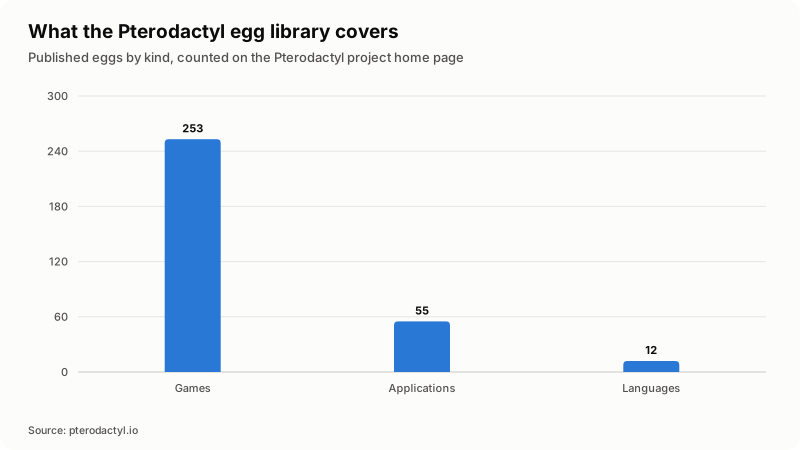
The counters on the Pterodactyl home page, read on 7 November 2026, split 320 published eggs into 253 for games, 55 for applications and 12 for languages. Each is a candidate product with its own test order.
Which Pterodactyl WHMCS errors come up most?
Nearly all are the wrong kind of key, a product pointing at an ID that does not exist, or a location with nothing free to deploy into. Turn on debug logging at System Logs > Module Log, repeat the failed action, and read the request and response. The README notes that 404s there can be ignored.
| What you see | Cause |
|---|---|
| Test Connection returns 403 | The password field does not hold a valid application API key. |
| "Authentication successful, but no nodes are available" | The key works. The panel has no node, so nothing can deploy. |
| "Couldn't find any nodes satisfying the request" | A 400 on create: wrong location, not enough disk, CPU or RAM, or no allocation matching what the product asked for. |
| "Failed to get egg data, received error code: 404" | The Egg ID is wrong, or on 1.x that egg is not under the Nest ID you gave. |
| "Failed to create user, received error code: ..." | The key has no write access to users, or the panel refused the new account. The message carries the code the panel returned; the Module Log has its reason. |
| "Could not find the panel's hostname" | The product has no server group on its Module Settings tab. |
| "The feature_limits.backups field must be present" | An outdated module. The README's fix is to download it again. |
| The server lands on the admin account, not the buyer | Also an outdated module, same fix. |
| CURL ERROR in the module log | The module allows five seconds per request and pins TLS 1.2. A slow panel, or one that will not negotiate that version, fails here. |
Where does the free Pterodactyl module stop?
At anything beyond create, suspend, unsuspend, upgrade and terminate. It is a provisioning module, not a control panel inside WHMCS.
- One port per server. The README says games needing several allocated ports are not possible yet, though planned.
- Password changes are account-wide. Change Password patches the panel user, so it changes the login for every server that client owns.
- No console or power controls in WHMCS. The client area tab links out to the panel.
- Pelican is a different module. Its repository, pelican/whmcs, opens with a caution that the module is not in a functional state and that Pelican is still in beta.
- Configuration support is on Discord. The README asks people not to raise configuration questions as GitHub issues.
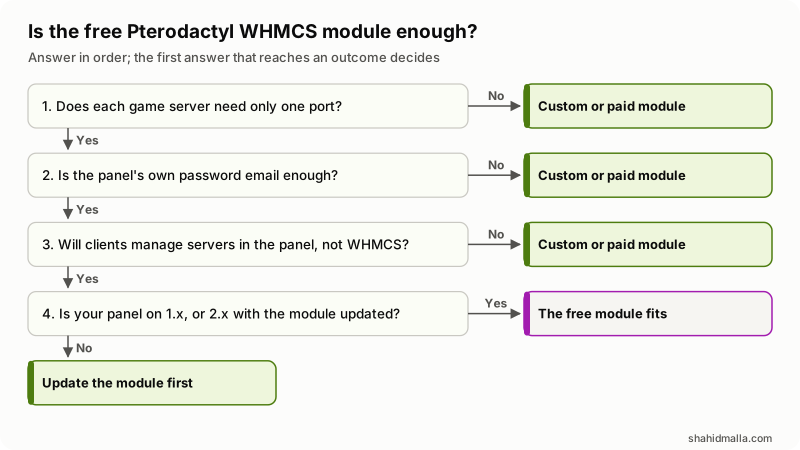
In words: a game needing more than one port rules the free module out, so does a shop that cannot let the panel email the credentials, and so does a client area where customers expect to start and stop servers without leaving WHMCS. Past those three, the last question is only about versions, because a panel on 2.x needs the module updated first. Where the free module does not fit, the work is a fork or a fresh build, the subject of my guide to WHMCS custom provisioning modules and my WHMCS custom module development service.
What else do people ask about Pterodactyl and WHMCS?
Does the Pterodactyl WHMCS module work with Pelican?
No. Pelican has its own module, pelican/whmcs, whose README was still headed on 7 November 2026 by a caution that it is not functional and that Pelican is in beta. Its option names differ too: no nest_id, and oom_killer where Pterodactyl uses oom_disabled.
How does the customer get their panel password?
From the panel, by email. A customer with no panel account receives a setup email; an existing customer keeps the credentials they have. If nothing arrives, check the panel's mail settings, send a test from its admin area, and restart pteroq.
Can one product allocate several ports for a game?
Not with the official module. Its README lists multi-port games as a planned gap, not a feature. Port Range narrows which ports a deploy may pick from; it does not hand several to one server.
Where do I find the Egg ID and the Location ID?
Both come from the panel's admin area, where each location and egg is listed with its numeric ID. The application API also has endpoints for locations, nests and eggs. Enter the numbers, not the names: the module casts both to integers.
Does the module work with Pterodactyl Panel 2.0?
Yes, with one condition. The README says it works with Panel 1.x and 2.x, that 2.x has no nests so Nest ID is ignored, and that older versions cannot create servers or change packages on 2.x, so update the module first. Panel 2.0 is in open beta, so stage it on a copy.
If your Pterodactyl billing needs something the free module does not do, I build that kind of module as hourly work at $55 to $65 per hour or on a fixed quote, after a free scoping call of about 30 minutes.
Last reviewed 7 November 2026. Disclosure: I sell WHMCS and web development work, including custom provisioning modules, so I am not neutral. I am CTO at ElySpace, a freelance developer for Marmaids LLC, and founder of WHMCSPilot and MagizAI. The sources are linked in the text and were read on that date.