
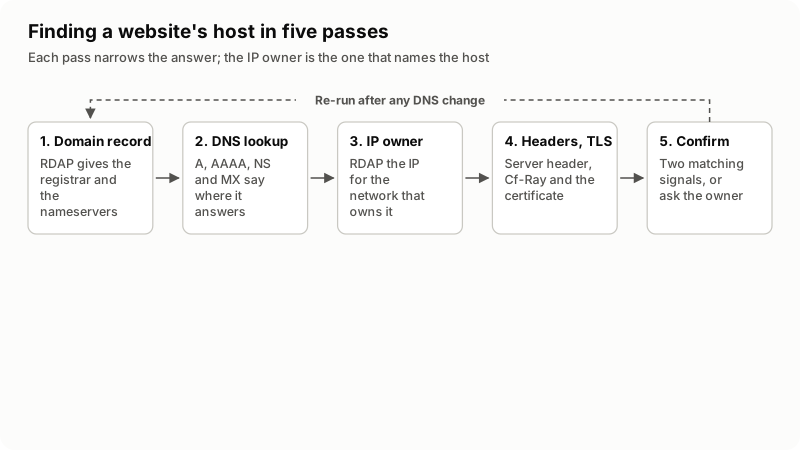
To find out who hosts a website, look up four things in order: the domain's RDAP registration record, its nameservers, the IP address the site answers on, and the owner of that IP address. The IP owner is the host. Response headers and the TLS certificate confirm it. A CDN in front hides the host by design.
A website's host is the company that owns or rents out the machine where the site's files run, and that answers requests for the site's IP address. It is not always the company that sold the domain, the one that publishes the DNS, or the one sitting in front as a CDN. Those are four separate jobs, and a single website can buy them from four different suppliers.
Every lookup below is public and free. I read the pages linked here on 5 November 2026, and the worked example two sections down is a live lookup I ran that day.
Which company are you actually looking for?
Decide that first, because "who hosts this website" is five questions wearing one coat. Most people asking it want the company they would email to move the site, or the one they would report abuse to. Often those differ.
| Role | What it does | Where the answer shows up |
|---|---|---|
| Registrar | Sells and renews the domain name | The RDAP registration record |
| DNS provider | Publishes the domain's records | The NS records |
| Web host | Runs the server the files sit on | The owner of the A or AAAA address |
| Mail provider | Accepts mail for the domain | The MX records |
| CDN or proxy | Sits in front and answers for the host | The IP range and the response headers |
On a cheap shared plan all five are usually one company. On anything built recently they often are not: domain at one registrar, DNS at a CDN, site on a cloud server, mail at a mailbox provider. Keep the roles separate in your notes and the contradictions stop confusing you.
How do you read the domain's registration record?
Query RDAP, not WHOIS. ICANN announced that as of 28 January 2025 the Registration Data Access Protocol is the definitive source for generic top-level domain registration data, in place of the sunsetted WHOIS service, and points users at lookup.icann.org. ARIN's page on Whois and RDAP puts the difference in a line: RDAP is an HTTP protocol returning JSON, while WHOIS was text on its own port with no defined queries.
You do not need to know which server holds a given domain. IANA publishes bootstrap files, specified in RFC 9224, that map every top-level domain to its RDAP server; the domain file at data.iana.org/rdap/dns.json was published on 28 October 2026 when I read it. A front end such as rdap.org reads it and redirects your query.
curl -s https://rdap.org/domain/example.comI ran that on the reserved documentation domain on 5 November 2026. The response named the registrar by its IANA Registrar ID, gave a registration event dated 14 August 1995, and listed two nameservers, ELLIOTT.NS.CLOUDFLARE.COM and HERA.NS.CLOUDFLARE.COM. There was no registrant name and no address anywhere in it.
Public RDAP output stops about there. ICANN's Registration Data Policy took effect on 21 August 2025, setting one framework for handling registration data in line with privacy regulations, and ICANN directs anyone who needs nonpublic registration data to its Registration Data Request Service instead. So the record answers "who sells the domain" and "who runs the DNS", never "who hosts the site".
How do you find the nameservers and the IP address?
Run four DNS lookups. The A or AAAA record is the one that matters, because it is the address your browser actually connects to. Cloudflare's reference on DNS record types sets out what each record holds, including the rule that an A or AAAA record points at an origin server address.
| What you want | Command | What the answer means |
|---|---|---|
| The address the site answers on | dig +short example.com A | The address to look up next. Use AAAA for IPv6 |
| The nameservers | dig +short example.com NS | Who publishes the DNS. Often, not always, the host |
| The mail host | dig +short example.com MX | Who accepts mail. Frequently another company |
| A platform alias | dig +short www.example.com CNAME | A hosted platform the site is parked on |
| The name of an address | dig +short -x 203.0.113.10 | The reverse DNS name the network gave that IP |
| The same on Windows | nslookup -type=ns example.com | Identical answers, different tool |
Nameserver hostnames carry a brand more often than anything else in DNS, so ns1. on a hosting company's domain is a strong hint. It is a hint about DNS, though, and plenty of sites keep DNS at one company and the website at another. Reverse DNS is the quieter signal: a name like srv42.somehost.net says which network administers that address, because only the holder of the block can set it.
Who owns the IP address the site answers on?
This is the question that names the host. Every routable address is registered to an organization at one of the five Regional Internet Registries, and those registries answer RDAP too. ARIN documents the query form as <rdap-url>/ip/<IP address>, with a Source Registry field naming which registry the answer came from.
curl -s https://rdap.org/ip/203.0.113.10Read three fields: the organization name, the size of the block, and the abuse contact. IANA publishes the same kind of bootstrap file for IPv4, IPv6 and autonomous system numbers, so the pattern also works for an ASN lookup.
| What the IP record names | What you can fairly say | Next step |
|---|---|---|
| A hosting company you recognize | That company hosts the site | Confirm with a second signal, then stop |
| A data center, cloud or transit network | The site runs on a rented server there | Who manages it is not published |
| A CDN or proxy network | You have found the CDN, not the host | Read the CDN section below |
| A small block inside a larger one | A reseller or a customer assignment | Look up the parent block |
| The site owner's own company | They run their own address space | Ask them; nothing public says more |
One trap on shared hosting: many sites answer on the same address, so it identifies the server and never the customer. cPanel's Basic WebHost Manager Setup documents a single shared IPv4 address used by every account that does not need a dedicated one. A reverse lookup on it returns the server's hostname, not the website you started from.
What do the response headers and the certificate add?
They confirm or contradict the IP record, and curl -sI https://example.com fetches them alone. The Server header describes the software on the origin server that generated the response, in a format like Apache/2.4.1 (Unix). MDN warns against putting too much detail in it, because fine-grained implementation details may make known vulnerabilities easier to detect. Treat it as the weakest signal here: free text that anyone can change.
Platform headers beat the Server line. Cloudflare documents the headers it adds, including Cf-Ray, a value like 230b030023ae2822-SJC whose three-letter suffix is the data center that handled the request. One in the response settles the CDN question with no guessing.
The TLS certificate gives a fourth, independent view. Publicly trusted certificates go into Certificate Transparency logs, which the project describes as append-only ledgers anyone can query, with Chrome and Safari requiring at least two Signed Certificate Timestamps, depending on the certificate's lifetime. Searching them for a domain returns the issuing authority and every other hostname on the same certificate. One covering a server or control panel hostname is often the clearest evidence of which machine the site lives on.
Running these checks one at a time is tedious, which is why I built SiteScout, a free Chrome extension that reads the DNS, the certificate, the headers, the mail records and the RDAP registration for whatever page is open, in one click. It is my own product, so take that as disclosure rather than a recommendation: the commands above reproduce all of it.
What if the website sits behind Cloudflare or another CDN?
Then the lookup answers "the CDN", and that is the honest answer to give. A proxy terminates the connection, so the address in DNS belongs to the proxy and the host behind it is published nowhere. Hiding it is part of the point. Four things still show:
- The MX records. Mail does not pass through an HTTP proxy, so they name the real mail host, which on a small site is often the web host too.
- The nameservers. They name whoever runs DNS, usually the proxy on a proxied site, but not always.
- The certificate names. One covering a control panel or server hostname tells you which platform issued it.
- The registrar. Still in the RDAP record, and still able to route a message to the owner.
If the site is yours or your client's, stop guessing and log in. Cloudflare's documentation is explicit that a proxied A or AAAA record must contain the origin server address and cannot contain a Cloudflare address, so the origin is sitting in the DNS tab of the account. If the site is not yours, contact the owner or the registrar's abuse address. I do not hunt for origin addresses on sites I have no relationship with.
How do you confirm the host before you act on it?
Insist on two independent signals that agree. One lookup is a hypothesis. This is the checklist I use before telling a client where their site lives:
- The RDAP record gives the registrar and the nameservers.
- The A or AAAA record gives the address the site answers on today.
- RDAP on that address names an organization and an abuse contact.
- A second signal agrees: reverse DNS, the MX hostnames, a platform header, or the certificate.
- A human source agrees: an invoice, a welcome email, a control panel login such as a
:2083URL, or the owner.
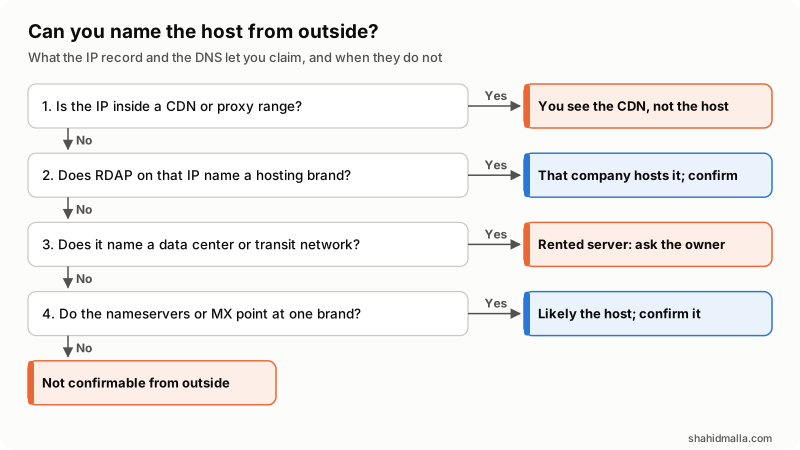
For a migration that answer is not optional, because what you are moving is control, not files. Before any move I want the control panel, registrar and DNS logins confirmed as three separate items, which is the groundwork in my guide on migrating WHMCS.
When can you not find the host, and what then?
More often than the tutorials admit. These are the cases where the public record genuinely stops:
- Resellers and white labels. The reseller bills the client while the registry record names the upstream provider. Both answers are true and only one is useful.
- Redacted registration data. The registrant fields are redacted, so the record will not hand you a person to contact.
- Stale third-party checkers. Sites that name a host from a cached database are reading an old crawl. Run the lookup yourself and trust your own.
- Split setups. Static files on one platform, an API on another, mail on a third. There is no single host to name.
When the lookups run out, the remaining sources are human: billing records, renewal receipts, the owner's email archive, or the registrar account, which almost always predates everything else. That is where I stop charging a client for research and ask them to search their inbox.
Knowing the host matters because it tells you what you can change. If the answer is a plan the site has outgrown, my guide on choosing hosting for your website covers what to move to, and the mail side is in the DMARC setup guide.
What else do people ask about finding a website's host?
How do I find out who hosts a website for free?
Every lookup in this guide is free and public. ICANN's tool at lookup.icann.org covers the registration record, dig or nslookup covers DNS, the regional registries answer RDAP queries at no charge, and curl -sI gives you the headers.
Can I find out who owns a website from a WHOIS lookup?
Usually not any more, and the query has changed too: RDAP replaced WHOIS as the definitive source for generic top-level domains on 28 January 2025. What public output gives you is the registrar, the nameservers and the dates, not a registrant name. For nonpublic data ICANN points at its Registration Data Request Service, meant for people with a legitimate interest such as law enforcement.
How do I find my own web host if I forgot who it is?
Start with money and email rather than DNS. Search your inbox for "welcome" plus "hosting", then your card statements for a recurring charge of the right size. Your registrar account is the other reliable thread, because the nameservers set there almost certainly came from the host.
Does the nameserver always tell you the host?
No, and this is the most common mistake. Nameservers tell you who publishes the DNS, and a site can keep DNS at a CDN or a registrar while the website runs somewhere else. Treat a hosting company's name there as supporting evidence, never as the answer on its own.
Can you find the real host behind Cloudflare?
Not reliably from outside, and that is the design working as intended. The proxy answers in place of the origin, so public DNS holds the proxy's address. If the site is yours, the origin is in your own DNS settings, because a proxied record has to hold a non-Cloudflare address. If not, ask the owner.
How do I find out who handles a website's email?
Look up the MX records with dig +short example.com MX. The hostnames name the mail provider directly, and it is frequently a different company from the web host. The SPF record in TXT cross-checks it, because it lists the services allowed to send mail for the domain.
If you have run these checks and need someone to act on the answer, that is work I take on as a web hosting expert, and moves between providers under server migration and backup, with a free scoping call of about 30 minutes and a quote within one business day.
Last reviewed 5 November 2026. Disclosure: I sell hosting infrastructure and WHMCS development work, so I am not neutral, and SiteScout is my own free Chrome extension. I am CTO at ElySpace, a freelance developer for Marmaids LLC, and founder of WHMCSPilot and MagizAI. The protocol facts, policy dates and header names come from the pages linked above, read on 5 November 2026, with one live RDAP lookup run that day.