Fiverr vs Upwork for developers comes down to how you sell. On Fiverr, clients order a service you list, called a Gig, and you keep 80% of each order. On Upwork, you mostly apply to job posts with proposals that cost Connects, and the freelancer fee is set per contract between 0% and 15%. Packaged work suits Fiverr; custom, hourly or ongoing work suits Upwork.
Fiverr is a freelance marketplace built around Gigs: a freelancer publishes a defined service with a price, and a client buys it. Upwork is a freelance marketplace built around jobs: a client posts the work, freelancers send proposals, and the two agree on an hourly or fixed-price contract. Both collect the client's payment, release it after delivery and a holding period, and take a share of what the freelancer earns.
I sell development work on both and I am Top Rated on both, with 580+ five-star reviews on Fiverr, so I am a user, not a neutral judge. Every platform rule below comes from Fiverr's and Upwork's own help pages, read on 22 October 2026 and linked.
What is the difference between Fiverr and Upwork for developers?
The main difference is who makes the first move. On Fiverr the client usually comes to your listing; on Upwork you usually go to the client's job post. The line has blurred: Upwork's Project Catalog sells ready-to-start projects without a job post, and Fiverr freelancers can send custom offers paid in one payment, milestones, a subscription or weekly hourly billing, as Fiverr's article on offers and briefs lists.
| Point | Fiverr | Upwork |
|---|---|---|
| How work starts | The client orders your Gig, or sends a request first if the Gig uses Request to order | You send a proposal to a job post, or a client buys your Project Catalog project |
| Cost to reach a client | Optional Fiverr Ads, paid per click | Connects per proposal, $0.15 each, number set per job |
| Fee on your earnings | 20%: you receive 80% | 0% to 15%, set per contract |
| Fee the client pays on top | 5.5%, plus $3.50 on orders under $200 | Up to 7.99% on the Basic plan; 3% for qualifying US bank payers |
| Reputation markers | Level 1, Level 2, Top Rated, Fiverr Pro | Rising Talent, Top Rated, Top Rated Plus, Expert-Vetted |
How do Fiverr fees compare with Upwork fees?
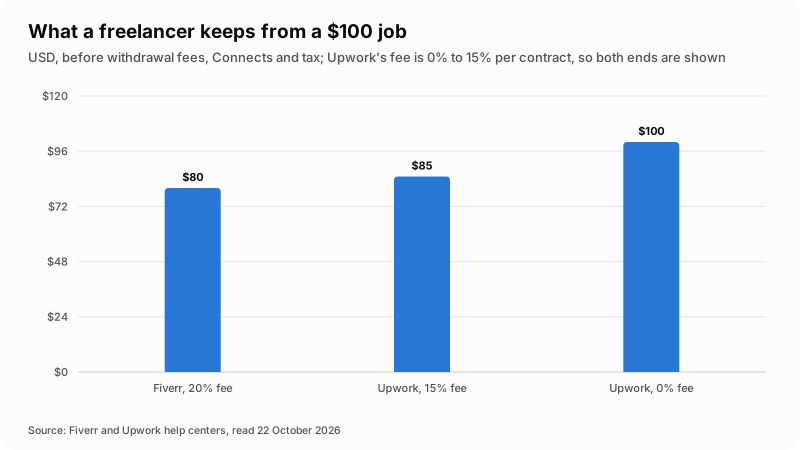
On a $100 job you keep $80 on Fiverr and between $85 and $100 on Upwork, before withdrawal fees. Fiverr's How Fiverr works for freelancers says: "After an order is completed, freelancers receive 80% of the client's cleared payment." Upwork's Freelancer Service Fee page says the fee "ranges from 0% to 15% per contract." Upwork publishes no formula; it shows the fee when you submit a proposal or receive an offer and fixes it once the contract begins.
| A $100 job | Fiverr | Upwork, fee at 15% | Upwork, fee at 0% |
|---|---|---|---|
| Fee on your earnings | $20 | $15 | $0 |
| You keep, before withdrawal fees | $80 | $85 | $100 |
| Client's standard fee on top | $9.00 | Up to $7.99 | Up to $7.99 |
| Client pays in total, before tax | $109.00 | Up to $107.99 | Up to $107.99 |
For clients, Fiverr's payment article says "The standard service fee is 5.5% of your purchase amount, and we add a $3.50 fee to orders under $200," and each extra or tip carries its own fee. Upwork's Client Marketplace Fee page says Basic clients pay "up to 7.99%," more on Business Plus, and qualifying US clients paying by bank account pay 3%.
The headline fee leaves out three costs:
- Connects on Upwork. Upwork's Connects article prices them at $0.15 each, sold in bundles, with the number per proposal set per job. They are not refunded when the client rejects you, hires someone else or lets the post expire.
- Ads on Fiverr. Fiverr Ads are optional, charged per click and available from Level 1.
- Withdrawal fees. Fiverr: $0 to PayPal, $1 for a bank transfer through Payoneer, $3 to a Payoneer account. Upwork: $0.99 for Direct to Local Bank outside the US, $50 for a US dollar wire, $2 for Instant Pay in the US, and free Direct to U.S. Bank for US tax addresses.
Upwork's fee page also lists exceptions: a reduced fee on Direct Contracts, none on Any Hire, typically 10% with Enterprise clients.
When do you get paid on Fiverr and on Upwork?
On Fiverr, money becomes withdrawable after a 14-day clearing period once an order completes. On Upwork, hourly earnings arrive about ten days after the billing week ends, and fixed-price payments five days after the client approves.
| Step | Fiverr | Upwork |
|---|---|---|
| Client pays | At checkout; milestone orders one milestone at a time | Fixed-price: a funded milestone before work. Hourly: invoiced weekly |
| After you deliver | The client has three days to respond, then the order completes | Fixed-price: Submit Work for Payment starts a 14-day countdown to automatic payment |
| Hold before withdrawal | 14 days; shorter for Top Rated, Fiverr Pro and other eligible programs | Fixed-price and Project Catalog: five days after approval. Hourly: invoiced Monday, reviewed until Friday, available the next Wednesday |
| Payout setup | 24-hour wait after a first withdrawal or a method change; up to $5,000 per withdrawal | Tax information first; a new method becomes active in three calendar days |
Sources: Fiverr's Withdrawing your earnings, and Upwork's How to get paid, hourly payments and Fixed-Price Payment Protection pages. Upwork is blunt about one rule: "If a milestone isn't funded in advance, we can't help recover payment later." Hourly protection applies only if your time qualifies, and time over the weekly limit is not invoiced.
How do clients find developers on each platform?
On Fiverr, clients mostly find you through search and your Gig pages; on Upwork, you mostly find them by reading job posts and paying Connects to send proposals.
On Fiverr, the Gig's description, pricing and portfolio do the selling. Fiverr says replying quickly can raise your visibility, and its levels count replies within 24 hours. A new freelancer can publish 4 Gigs, 10 from Level 1. Fiverr's briefs article now says "Mira AI Headhunter has fully replaced the Briefs feature."
On Upwork, the job post comes first, so you can judge the scope before spending anything. You can boost a proposal with extra Connects, turn on an Availability Badge, or list fixed-scope work in Project Catalog, which Upwork says holds more than 290,000 projects.
For developers, the useful question is whether the work can be scoped before anyone talks. A plugin change, a single API integration or a code review fits a package. A new build, a migration or an unknown codebase needs questions first. My guide on retainer, hourly and fixed-price billing explains who carries the risk in each.
What do Fiverr levels and Upwork badges require?
Both reward finished work and satisfied clients; Fiverr publishes exact thresholds, while Upwork describes most criteria in words. The table summarizes Fiverr's freelancer levels and Upwork's talent badges.
| Level or badge | Main requirements |
|---|---|
| Fiverr Level 1 | Success Score 5+, rating 4.4+, 80% response rate, 5 orders, 3 clients, $400 earned |
| Fiverr Level 2 | Success Score 7+, rating 4.6+, 90% response rate, 20 orders, 10 clients, $2,000 earned |
| Fiverr Top Rated | Success Score 9+, rating 4.7+, 90% response rate, 40 orders, 20 clients, $10,000 earned, plus a manual review |
| Fiverr Pro | Application and vetting; Programming and Tech is a listed category; no membership fee |
| Upwork Rising Talent | Complete profile, activity in the past 90 days, no negative feedback, verified identity, a withdrawal method |
| Upwork Top Rated | Job Success Score of 90%+ for 13 of the last 16 weeks, strong earnings history, first project over 90 days ago |
| Upwork Top Rated Plus | The same Job Success Score rule, plus over $10,000 earned in the past 12 months |
| Upwork Expert-Vetted | Screening by Upwork's Talent Managers; badge shown only to Business Plus and Enterprise clients |
Fiverr's Top Rated adds faster payments, Early Payout and priority support. Its Top Rated page says an evaluation team reviews every candidate, and anyone not approved stays at Level 2 and can be reviewed again after six months. The Fiverr Pro page says Pro orders "carry the standard Fiverr commission." Upwork calls Top Rated its top 10%, Top Rated Plus the top 3% and Expert-Vetted the top 1%. For the hiring side, my guide on hiring a developer on Fiverr or Upwork covers what these badges measure.
Which platform fits your kind of development work?
Start from the shape of the work, not the fee. These four questions, answered in order, settle most cases:
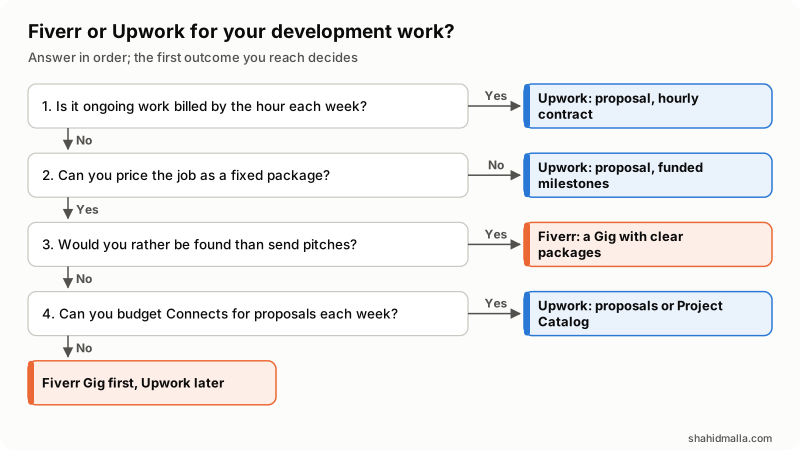
- Is it ongoing work billed by the hour each week? Yes: Upwork, a proposal and an hourly contract.
- Can you price the job as a fixed package? No: Upwork, a proposal with funded milestones.
- Would you rather be found than send pitches? Yes: Fiverr, a Gig with clear packages.
- Can you budget Connects for proposals each week? Yes: Upwork proposals or Project Catalog. No: a Fiverr Gig first, Upwork later.
These are my rules, not the platforms'. Fiverr offers hourly and subscription billing too, though subscriptions start at Level 1, while Upwork's weekly invoicing and hourly protection are built around ongoing hourly work. Connects cost money before your first contract; Fiverr's 20% comes out of completed orders, and its ads are optional.
What have I noticed working on both platforms?
The written scope decides more outcomes than the platform does. A vague request goes wrong on either site; clear deliverables, acceptance checks and an out-of-scope list go well on both. I write those down before I start, as my how I work page describes.
- Custom code rarely fits a package unchanged. On Fiverr, a Gig works well as the entry point, with a custom offer once the scope is clear; on Upwork, a few sharp questions before quoting show the client you read the brief.
- Keep the work on the platform. Upwork's checklist says "Keep everything on Upwork," and Fiverr's offer guidelines warn against links "to direct traffic outside of Fiverr." Protection depends on it.
- Reviews compound. Levels and badges grow from finished orders and ratings, so start with small, well-scoped jobs.
- Say how you use AI tools. If you build with coding agents, explain how you review and test the output; my guide on hiring a Claude Code developer shows what buyers check.
What should you set up before your first order or proposal?
Set up the account, the money side and a scope template before the first client arrives:
- Complete your profile and verify your identity; Upwork's Rising Talent requires both.
- Add tax information and a payout method early; Upwork activates a new method after three calendar days.
- Price after fees. On Fiverr, divide your target by 0.8. On Upwork, use the fee shown on the proposal; Upwork's own example charges $22.22 an hour to take home $20 at a 10% fee.
- On Fiverr, make each of your first 4 Gigs a narrow service you can deliver every time.
- On Upwork, set a weekly Connects budget and read the client's hiring history before spending it.
- Keep a scope template: deliverables, acceptance checks, out of scope, revisions.
- On Upwork fixed-price work, start only when the milestone shows "Funded," and deliver through Submit Work for Payment.
- Answer new messages within 24 hours.
When is neither Fiverr nor Upwork the right fit?
Neither fits when the client needs more than one freelancer can supply, or when the platform's share breaks your margin. A client who needs several specialists or a formal supplier contract may be better served by an agency, as my agency vs freelancer guide explains.
Platform risk is real too: Fiverr says your level "may change at any time due to periodic evaluations." Keep a portfolio you control. If a long-term client wants to work outside the marketplace, read the terms first: Upwork documents Direct Contracts and Any Hire, while Fiverr's guidelines say not to direct traffic outside Fiverr.
What else do developers ask about Fiverr and Upwork?
Is Fiverr or Upwork better for beginners?
Neither is easier by rule; they cost differently at the start. On Upwork every proposal costs Connects before you have earned anything. On Fiverr a new freelancer can publish 4 Gigs, and Fiverr's 20% is taken from completed orders, so a narrow, packaged service is a sensible first test.
Can I use Fiverr and Upwork at the same time?
Yes; I work on both. Keep each platform's messages, files and payments inside that platform, and keep your availability honest, because Upwork's Top Rated criteria include up-to-date availability and Fiverr tracks your response rate.
How much does Fiverr take from $100?
$20. Freelancers receive 80% of the client's cleared payment, so $80 stays with you before withdrawal fees. The client pays a separate 5.5% plus $3.50 on orders under $200, which makes $109.
How much does Upwork take from freelancers?
Between 0% and 15% per contract, according to Upwork's help page on 22 October 2026. You see the percentage before you submit a proposal or accept an offer, and it stays fixed for that contract. Articles quoting other percentages describe older rules.
Do you have to pay to apply for jobs on Upwork?
Yes, in Connects at $0.15 each, with the number per job set by Upwork. Talent badges and some onboarding tasks earn free Connects. They are returned if the client cancels before hiring or Upwork removes the post, not when you are rejected.
If you are a client who would rather hire me directly than through either marketplace, see my page as a Claude Code developer for hire: a free scoping call of about 30 minutes, then a written quote within one business day at $55-$65 per hour or a fixed price.
Last reviewed 22 October 2026. Disclosure: I freelance on both Fiverr and Upwork, so I am not neutral, and I am not affiliated with either platform; no link here is an affiliate link. I am CTO at ElySpace and founder of WHMCSPilot and MagizAI. Fees, timings and criteria above are quoted from Fiverr's and Upwork's help pages as I read them on 22 October 2026.