For a first SaaS release, choose the stack your builder knows best and that already gives you login, billing, an admin panel and background jobs. I mostly build in Laravel with Filament, so I lean that way. Next.js with NestJS suits a team already writing TypeScript, and no-code suits testing demand before any software exists. Host simply, and leave most features out of version one.
Which stack should you choose for a SaaS MVP?
Choose the one that lets your builder ship a working first version with the fewest moving parts. A first release needs accounts, a way to charge money, an admin view for you, email and some background work. How quickly those arrive matters more than which framework is fashionable.
| Option | Good for | Watch out for |
|---|---|---|
| Laravel with Filament | Dashboards, forms, roles, subscriptions and a staff admin panel, built quickly by a small team. | Heavily real-time interfaces. A team that only knows JavaScript has a new language to learn. |
| Next.js with NestJS | A rich interactive front end, or a team that already writes TypeScript and wants one language throughout. | More parts to choose and connect: login, database layer, admin screens, queues and email are separate decisions. |
| No-code first | Testing whether anyone will pay, with one simple workflow and a short timeline. | Limits on billing logic, data export and per-seat or per-record costs. Plan to rebuild if it works. |
Laravel with Filament. Laravel is a PHP framework with queues, a task scheduler, mail and validation built in. Its official starter kits, in React, Vue or Livewire versions, include the routes, controllers and views to register and log in users, using Laravel Fortify. Filament sits on top and produces admin panels and forms quickly. This is where my bias shows: I use it because it is fast for me, not because it is the only good answer.
Next.js with NestJS. Next.js describes itself as a React framework for building full-stack web applications, and NestJS as a framework for server-side Node.js applications, built with TypeScript. It fits a team already in that world. The cost is assembly: you pick and connect more pieces yourself.
No-code first. Use it before you have shown that anyone will pay. A form, a spreadsheet and a payment link can answer that question. If the answer is yes, rebuild properly with real customer requests to guide you.
Where should you host a first SaaS version?
Host it where you can restore it from a backup this afternoon, not where it could scale to millions.
| Option | Fits when | Trade-off |
|---|---|---|
| VPS | Someone can maintain a Linux server, or you hire one. | You own updates, backups, certificates and keeping the queue worker alive. |
| Managed platform | You want deployments from your repository and less server work. | More cost per resource and less control. Check where your data is stored. |
| cPanel hosting | A small first version with modest traffic and a tight budget. | No long-running processes and shared PHP settings. Moving later means a migration. |
A Laravel app on shared hosting needs three things. Laravel's deployment page says the web server must send every request to public/index.php, and warns against moving index.php to the project root, which would expose configuration files. The scheduler needs one cron entry that runs php artisan schedule:run every minute. And the queues documentation expects a process monitor such as Supervisor to keep queue:work running, which shared hosting rarely allows. A common workaround is a cron entry that runs queue:work --stop-when-empty, an option the docs describe as processing all jobs and then exiting. That is fine for a light queue. A heavy one belongs on a VPS.
Wherever you host, keep a staging copy, take automated backups and practice restoring one.
Which billing provider should a SaaS use: Stripe, Razorpay or PayPal?
Choose by where your customers pay. The right provider is the one your customers' banks and cards work well with.
| Provider | Fits when | Check first |
|---|---|---|
| Stripe | Customers pay by card in many countries and you want subscriptions and invoices. | That Stripe's global availability page lists your business's country. In Laravel, Cashier (Stripe) handles subscriptions, coupons, plan swaps, quantities, grace periods and invoice PDFs. |
| Razorpay | Most customers are in India and pay in rupees. | Razorpay Subscriptions lists cards, UPI AutoPay and eMandate, with cards tokenised under RBI guidelines. Check whether international payments are enabled on your account. |
| PayPal | Buyers expect to pay from a PayPal account, beside cards. | PayPal Subscriptions sets the billing cycle, price and trial in a plan, created in the dashboard or through its API. |
Build around the provider's webhooks, the notifications it sends when a payment succeeds or fails, not around the customer returning to your site. Stripe's webhook documentation says it retries delivery for up to three days in live mode, does not promise that events arrive in order, and that an endpoint "might occasionally receive the same event more than once". So log the event IDs you have processed and skip repeats. Store the provider's customer and subscription IDs, never card details.
Tax is a separate question. If cross-border VAT or sales tax worries you, look at a merchant of record, a company that sells to your customer on your behalf. Paddle presents itself as one that handles payments, tax and subscriptions, and Laravel has a separate Cashier package for it. Laravel has no Cashier package for Razorpay or PayPal, so expect more integration code there.
If you already run WHMCS for hosting, billing a SaaS through it can make sense, with the product provisioned through a module or the API. That is the work on my WHMCS API integration and automation page.
How should a SaaS keep each customer's data separate?
This is multi-tenancy, and for most first releases one shared database with a tenant ID on every row is enough, as long as every query is scoped and tested.
| Model | Strength | Cost |
|---|---|---|
| Shared database, tenant ID on every row | Cheapest to run and change. | One missed filter shows a customer another's data. |
| Database per tenant | Clean isolation and easy per-customer export or deletion. | Every migration runs once per tenant. |
| Separate installation per customer | The strongest isolation. | Heaviest to operate. Suits a few large contracts. |
Filament helps with the first model, and its multi-tenancy documentation is frank about the limits. Resource queries in a tenant panel are scoped automatically, but Filament states that securing the application remains your responsibility. You must implement canAccessTenant() so users cannot reach another tenant by changing the ID in the URL, and Laravel's unique and exists rules ignore global scopes, so Filament offers scopedUnique() and scopedExists(). Code outside the panel, such as an API, queued jobs or exports, needs its own scoping and tests.
What should you leave out of version one?
Leave out anything that does not help your first ten customers get value and pay you.
- Custom roles and fine-grained permissions. Start with owner and member.
- A public API and customer webhooks. Add them when someone asks.
- Enterprise single sign-on. Build it for the first deal that needs it.
- Several languages and currencies. One of each until demand is proven.
- Usage-based billing. A flat monthly plan is easier to build and explain.
- White-labeling and custom domains per customer. They add a lot of operations work.
- A mobile app. A responsive web app answers the first question.
- Microservices. One application and one database are easier to change.
- AI agent features. Ship a simple version first. See AI agent development and AI chatbot vs AI agent.
Which stack and setup fits your situation?
| Your situation | Reasonable starting point |
|---|---|
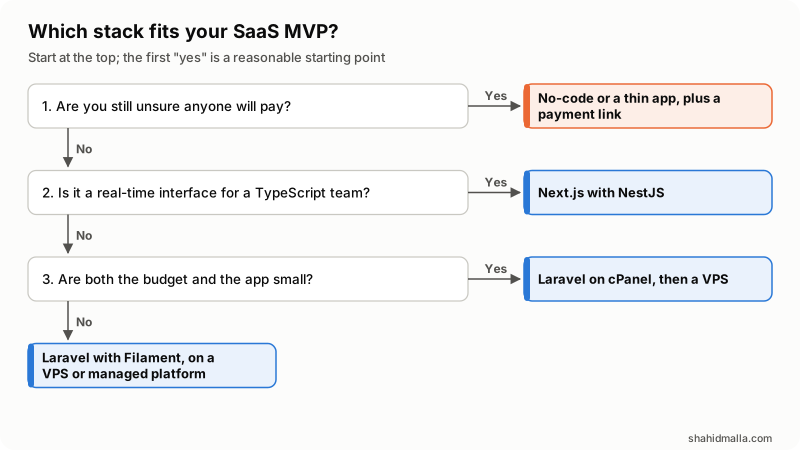
| You are not sure anyone will pay | No-code, or a very thin Laravel app, with a payment link. |
| A business tool with dashboards, roles, subscriptions and staff admin | Laravel with Filament, on a VPS or managed platform. |
| An interactive, real-time interface and a TypeScript team | Next.js with NestJS. |
| Customers mainly in India | Razorpay, with a plan for international cards if needed. |
| Customers spread across countries | Stripe, with PayPal as an option, or a merchant of record if tax is the worry. |
| Small budget and a small app | Laravel on cPanel hosting, with a planned move to a VPS. |
| You already run WHMCS for recurring services | Keep billing there and connect the product through the WHMCS API. |
When is this advice wrong for you?
It is wrong when something outside the code sets the rules. Regulated data, such as health or payment card data, can dictate where you host and how you isolate tenants from day one. A team with years in another stack should usually stay in it. A contract that demands a separate database per customer overrides my default. And a product whose value is real-time collaboration needs a different conversation about architecture than a dashboard does.
What is a sensible next step?
Write down the one workflow your first customers will pay for, who pays and from which country, and mark every feature "first ten customers" or "later". That page is the brief for any developer. My SaaS development page describes how I work on first releases.
Last reviewed 12 October 2026. Disclosure: I sell SaaS and web development work, so I am not neutral, and I have a stack bias: I mostly build in Laravel and Filament, and this site runs on them. Framework, hosting and billing details come from each project's or provider's documentation as I read it on that date.