
Pick React Native if your team already writes React or TypeScript, or if you need to ship JavaScript fixes between app store releases. Pick Flutter if one codebase has to cover phones, desktop and embedded screens, or if the design must look identical everywhere. Both ship production apps on Android and iOS, and neither choice is expensive to reverse in the first month.
Flutter and React Native are the two mainstream cross-platform app frameworks: you write one codebase and it builds an Android app and an iOS app. Flutter is Google's framework, written in Dart, and it draws every pixel of the interface with its own engine. React Native is Meta's framework, written in JavaScript or TypeScript, and it drives the platform's own components from React code.
Every fact below comes from the official Flutter, React Native and Expo documentation, read on 4 November 2026 and linked where it appears. I build apps in both, so treat the opinions as mine and the sources as the check on them.
What actually differs between Flutter and React Native?
The language you write and the way the screen gets drawn. Almost every other difference follows from those two.
Flutter's FAQ says it "doesn't rely on web browser views or system-provided platform widgets" and instead "renders its UI using its own high-performance rendering engine (Impeller)", which uses Metal on iOS and macOS and Vulkan on Android. React Native goes the other way. Its New Architecture page describes the JavaScript Interface (JSI), which lets "JavaScript to hold a reference to a C++ object and vice-versa", so React code drives real platform components.
| Question | Flutter | React Native |
|---|---|---|
| Who maintains it | "An open source project managed by Google" | Meta; release posts are written by engineers at Meta and Expo |
| Language you write | Dart | JavaScript or TypeScript |
| What draws the screen | Flutter's own Impeller engine | The platform's native components |
| Stable release I read today | 3.47 | 0.88, announced 19 October 2026 |
| Stable channel rhythm | "About every three months" | A minor roughly every two months |
| Test tooling in the box | Unit, widget and integration tests | A Jest preset, in its own package since 0.85 |
| Fixes without a store release | Not built in | Expo Update, for JavaScript and assets |
One consequence matters in year two. A control that Apple or Google restyles in a new OS version does not restyle itself inside a Flutter app until Flutter's widget library catches up. In React Native it changes when the OS does, for better and for worse.
Which team can you hire, and keep?
React Native asks for a skill many web teams already have. Flutter asks for one almost nobody has on day one.
React Native's introduction states the prerequisite directly: "To work with React Native, you will need to have an understanding of JavaScript fundamentals." Since 0.87 the Strict TypeScript API is the default JavaScript API. Flutter's FAQ frames Dart as a short hop: "Experience with languages such as Java, Kotlin, Swift, TypeScript, or C# helps you learn Dart and Flutter quickly."
I publish no figure for how many developers use each, because neither project publishes one in the documentation I read today. What the two pages above do settle is the starting point rather than the ceiling: React Native begins from JavaScript a web team already writes, while Flutter begins with a new language whatever the team's background.
The ecosystems also differ in how many decisions they hand you. React Native's own get started page recommends a framework and says Expo provides "file-based routing, high-quality universal libraries, and the ability to write plugins that modify native code without having to manage native files". Flutter ships a widget library but no opinion on dependency injection, and its FAQ points at Riverpod, get_it, Provider and injectable instead. For a small team, fewer decisions is a real advantage.
Which platforms do you need beyond Android and iOS?
This question settles most arguments, because the two projects support very different lists as first-party work.
Flutter publishes a supported deployment platforms page with version ranges. React Native's core covers Android and iOS, and its out-of-tree platforms page lists everything else as partner-maintained or community-maintained.
| Target | Flutter, as of 3.47 | React Native |
|---|---|---|
| Android | Supported on 24 to 37; CI-tested on 24 to 36 | Android 7.0 is the minimum SDK for 0.76 through 0.89 |
| iOS | Supported on 15 to 27; CI-tested on 18 and 26 | Core platform; 0.87 and later need Xcode 26.0 to build |
| Web | Stable; compiles to JavaScript and WebAssembly | React Native Web, community-maintained |
| Windows and macOS desktop | Stable: Windows 10 and 11, macOS 12 to 27 | Partner projects for Windows and macOS |
| Linux desktop | Stable: Debian 10 to 13, Ubuntu 20.04 to 24.04 LTS | Only through the community Skia renderer |
| TV, headsets, embedded | Embedded named in the FAQ; no versions published | tvOS, visionOS and OpenHarmony projects; Meta Quest support announced at React Conf 2025 |
Two caveats cost money if you find them late. Flutter is "phasing out support for Intel (x64) hardware" on macOS, so an older Mac fleet needs a plan. And Flutter's web FAQ is blunt about marketing sites: Flutter "is not suitable for static websites with text-rich flow-based content", and its web output "doesn't align with what search engines need to properly index". Keep landing pages in HTML, a split I cover in my guide to a SaaS MVP tech stack.
How much native code will your app really need?
Count the device features and vendor SDKs first, because that count decides how much Kotlin and Swift someone writes, whichever framework sits on top.
Flutter's platform channels page names the languages per platform: Kotlin or Java on Android, Swift or Objective-C on iOS, C++ on Windows, Objective-C on macOS, C on Linux. For new projects it recommends Pigeon, FFIgen and JNIgen over hand-written channels. React Native's equivalent is the New Architecture, default since 0.76 and the only architecture since 0.82, which its release post calls "the first React Native that runs entirely on the New Architecture". With Expo, config plugins change the native project without you keeping native files in the repository.
- Check the vendor, not the framework. If a payment, KYC or hardware SDK already publishes a Flutter plugin or a React Native module, that settles it for that feature.
- Budget a wrapper when it does not. Writing it twice, for Android and for iOS, is normal, and it is the same work in both frameworks.
- Camera, Bluetooth and background work are the usual surprises. They behave differently per OS version no matter what is above them.
How fast can you ship a fix after launch?
React Native with Expo can push a JavaScript fix to installed apps without a store review. Flutter cannot, without a third-party service.
Expo's Expo Update documentation describes a cloud service that lets an app "update its own non-native pieces (such as JS, styling, and images) over-the-air". One command, eas update --channel production, publishes the bundle, and users get it on their next app launch; a bad update is reverted by republishing a previous one. Flutter's FAQ is equally direct in the other direction: "Flutter doesn't provide built-in code push functionality", with third-party services such as Shorebird filling the gap.
| Change you want to ship | Over the air with Expo Update? | Flutter |
|---|---|---|
| JavaScript bug fix, copy, translations, styling | Yes | New build and store review |
| Screen layout change | Yes | New build and store review |
| Staged rollout to a share of users | Yes, through rollouts | Store staged rollout only |
| New native dependency, permission or SDK bump | No, new binary | New build and store review |
This is not a free pass. Expo's own FAQ says updates "need to follow the App Store and Play Store guidelines", and behavior changes usually still need review. Treat it as a way to fix mistakes in hours, not as a way around the stores.
How often will the framework force an upgrade?
React Native ships about six stable minors a year to Flutter's four, and supports each one for a shorter time. That is an upkeep line in your budget, not a detail.
Flutter's upgrade page says the team updates the stable channel "about every three months", with beta monthly and occasional hot fixes "for high-severity or high-impact issues". One was visible on every Flutter page I read today: a note that 3.47.8 blocks compromised eMudhra certificate authority keys. Measuring the gaps between the announcement dates on React Native's own blog, its eight stable minors after 0.80, up to 0.88, each arrived between 55 and 69 days after the one before.
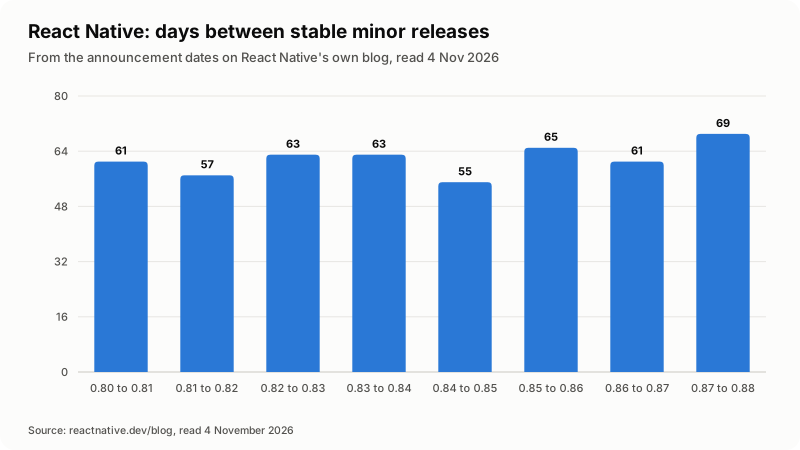
In figures: 61 days from 0.80 to 0.81, then 57, 63, 63, 55, 65, 61 and 69 days up to 0.88, an average of about 62. The release support policy then narrows the window: support is "weighted to focus on the newer versions, while maintaining the previous two minors". At that cadence, the version you ship on today falls out of support in roughly six months.
Upgrades move the toolchain under you too: the same page lists Android 7.0, JDK 17, Xcode 26.0 and Node 22.13.0 for 0.88, and 0.87 raised the floor to Node 22, Android Gradle Plugin 9 and Kotlin 2.0. In fairness, 0.83, 0.86 and 0.88 each shipped with no user-facing breaking changes. Plan a half-day of upgrade work every couple of months on React Native and a longer, rarer one on Flutter; my guide on a developer retainer versus hourly work covers how I price that.
How do you choose between Flutter and React Native?
Answer four questions in order, and stop at the first answer that reaches an outcome.
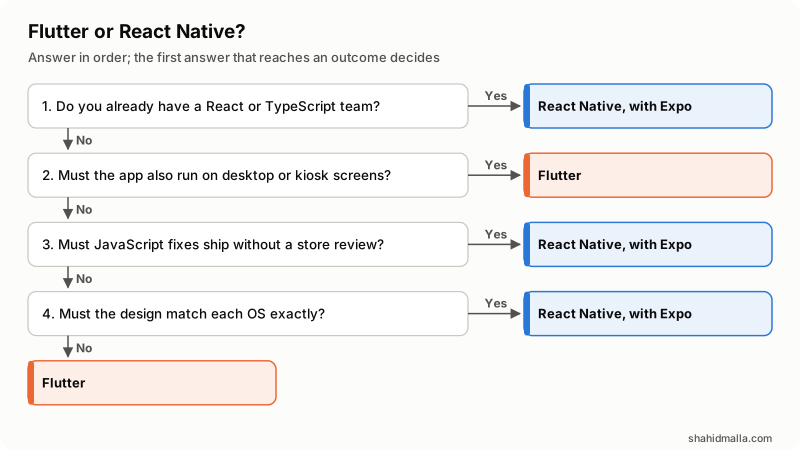
| Your situation | Choose | Why |
|---|---|---|
| You already run a React or TypeScript web app | React Native with Expo | Same language, same people, shared business logic |
| The app must also run on Windows, macOS, Linux or a kiosk screen | Flutter | Those targets are on Flutter's own supported platforms page |
| You need to fix copy and bugs between store releases | React Native with Expo | Expo Update ships JavaScript and assets over the air |
| The brand look must be identical on every device | Flutter | Flutter draws its own widgets rather than the OS ones |
| The app must feel exactly like each OS, control by control | React Native | It renders the platform's real components |
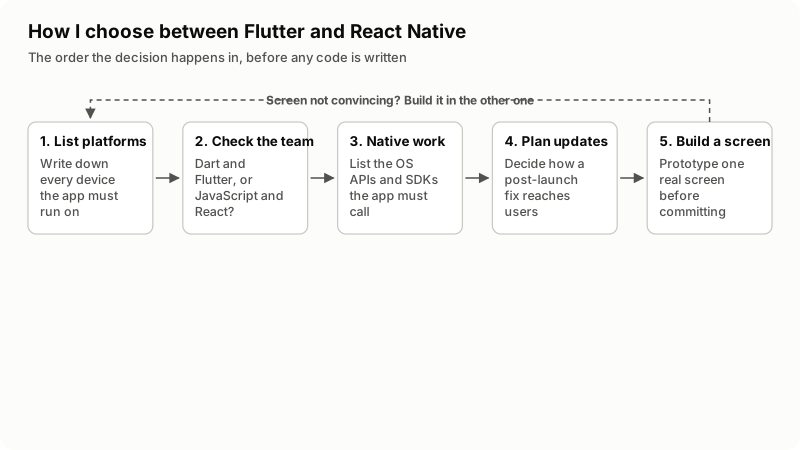
Before you commit, write down:
- Every platform and minimum OS version, including tablets and any kiosk or TV screen.
- Every device feature and vendor SDK the app calls, and whether each publishes a plugin for your candidate.
- Who writes the code in year two, and which language they already know.
- How a critical bug reaches users: a store release, or an over-the-air update.
- Who owns the upgrade when the framework ships its next version.
Then build one real screen, the hardest one, in the framework you picked. A week of that answers more than a month of comparison reading.
When is neither Flutter nor React Native the right answer?
When the thing you need is not an app, or when it is an app for one platform that leans hard on that platform.
- A responsive website is enough. If users visit once to read, book or fill a form, a website costs less to build and nothing to publish. My guide on what a mobile app costs sets out the store fees and yearly upkeep an app adds.
- One platform, deep OS integration. Widgets, watch apps and heavy background processing are simpler in Kotlin or Swift than in a wrapper around them.
- Content and search traffic are the product. Flutter's own web FAQ rules out text-rich static sites, and React Native Web is a community project, not a content platform.
- Nobody owns upkeep. Both frameworks ship new versions, Apple and Google change the rules each year, and an unmaintained app stops building long before it stops working.
One honest limit on this comparison: neither project publishes a benchmark against the other, so I quote no speed numbers. A business app that feels slow is usually slow because of its network calls, its lists or its images, and that is true in both.
What else do people ask about Flutter and React Native?
Is Flutter better than React Native?
Neither is better across the board, and the documentation of each is careful not to claim it. Flutter is stronger when one codebase must cover phones, desktop and embedded screens, or when the design has to look identical everywhere. React Native is stronger when you already have React people and want fixes to reach users without a store review.
Which is faster, Flutter or React Native?
There is no honest single answer, and I will not invent one. Flutter compiles Dart ahead of time to native machine code and targets 60fps and 120fps animation; React Native's New Architecture replaced the old asynchronous bridge with direct references through JSI. For a business app, API latency and list rendering matter far more than the gap between the two.
Is Flutter easier to learn than React Native?
It depends on what your team already knows. React Native expects JavaScript fundamentals, so a React web developer starts from a running start. Flutter expects Dart, which its FAQ says comes quickly to anyone with Java, Kotlin, Swift, TypeScript or C# behind them, but it is a new language on day one.
Will Flutter replace React Native, or the other way round?
Nothing in either project's public work suggests it. Both are shipping: the Flutter documentation reflects 3.47 on a roughly quarterly stable channel, and React Native 0.88 was announced on 19 October 2026 on a roughly two-monthly one. Plan for both to exist for the life of your app.
Can I reuse my React website's code in React Native?
You can reuse the language, the libraries that are not browser-specific, and most of your business logic, but not your DOM components. React Native renders native components, not HTML, so screens are rebuilt. What carries over is state management, validation, API clients and types, still a large share of a SaaS product.
Does Flutter or React Native cost more to build?
Scope decides the price far more than the framework does. The framework shows up in two smaller lines: what your developers already know, and how often the version you shipped on falls out of support. A React team building in Flutter pays for a learning curve; a Flutter app needing weekly copy fixes pays for store reviews.
If you want a second opinion before you commit, or an app built in either one, see mobile app development: a free scoping call of about 30 minutes, a written quote within one business day, and $55-$65 per hour or a fixed price per scope.
Last reviewed 4 November 2026. Disclosure: I build mobile apps in both Flutter and React Native and I sell that work, so I am not neutral. I am CTO at ElySpace, a freelance developer for Marmaids LLC, and founder of WHMCSPilot and MagizAI. I am not affiliated with, paid by or endorsed by Google, Meta or Expo. Versions, platform ranges, release dates, support terms and quoted sentences come from the official Flutter, React Native and Expo documentation as I read them on 4 November 2026; product names are trademarks of their owners.