
To connect XUI One, NXT or Xtream UI to WHMCS, install a provisioning module made for that panel, give WHMCS panel access that only its own server can use (API access for XUI, a remote MySQL user for NXT), add the panel at Configuration > System Settings > Servers, map each WHMCS product to a panel package, then test create, suspend, unsuspend, renew and terminate before launch.
IPTV panel WHMCS integration is a WHMCS provisioning module that turns billing events into panel actions: a paid order creates a line, an overdue invoice suspends it, payment restores it and a cancellation removes it. WHMCS has no IPTV support of its own; its knowledgebase answer on IPTV says it can still bill and automate provisioning for "just about any service" through a module.
I sell modules for all three panels, so check my claims against the linked pages, read on 5 November 2026. I found no official documentation for any of the three panels that day, so their own menus are left out: take those from whoever supplied your copy.
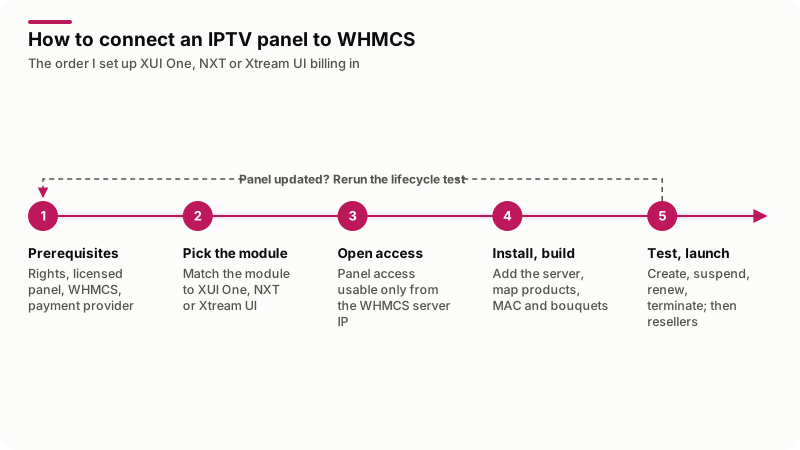
In words: settle the prerequisites, pick the module, open access only WHMCS can use, install and build products, then test every billing event.
What do you need before you connect an IPTV panel to WHMCS?
Five things. Unsure whether your IPTV service is legal? Start with my guide on how to start a legal IPTV business.
- Rights to the content. A written license for every channel you sell. My modules supply no streams, channel lists or apps.
- A legitimately obtained panel you control. XUI One, NXT or Xtream UI, with an admin login, on a server whose firewall you manage.
- A WHMCS license and a server. WHMCS is self-hosted, and automation needs the system cron running at least every five minutes.
- Network reach. The WHMCS server must reach the panel's API or database. Note its public IP address for step 3.
- A payment provider that accepts the business. Stripe's prohibited and restricted businesses page (updated 22 September 2026, read 5 November 2026) prohibits "sales or distribution of music, films, software or any other licensed materials without appropriate authorization." Apply in your business name and keep the licenses ready.
Which module fits XUI One, NXT or Xtream UI?
The one built for your panel: a module for one panel does not drive another. From my module pages:
| Module | Connects through | A paid order creates | Resellers | Requirements |
|---|---|---|---|---|
| XUI One WHMCS module | The XUI panel API | An account with the product's package | Not listed | WHMCS 8.13 tested, PHP 8.1+ |
| NXT panel WHMCS module | Remote MySQL to the panel database | Lines, MAG or Enigma2 device lines, hourly trials, reseller accounts | Resellers, super-resellers, credits, client area dashboard | WHMCS 8 (confirmed at purchase), PHP 7.4+, NXT Dashboard addon |
| Xtream UI WHMCS module | Admin access from the WHMCS server | A line with the product's package and bouquets | Reseller accounts, panel credits | WHMCS 8.13 tested, PHP 8.1+, several servers |
All three suspend and terminate in step with billing; the NXT and Xtream UI pages also list restoring a line on payment and extending it on renewal. The NXT module also imports existing lines and resellers.
Another panel, or a fork whose API differs, needs a custom module; my WHMCS provisioning module guide shows how one is built. If you sell only IPTV and want no WHMCS, my standalone IPTV reseller billing portal connects to XUI, Xtream UI and NXT panels on its own.
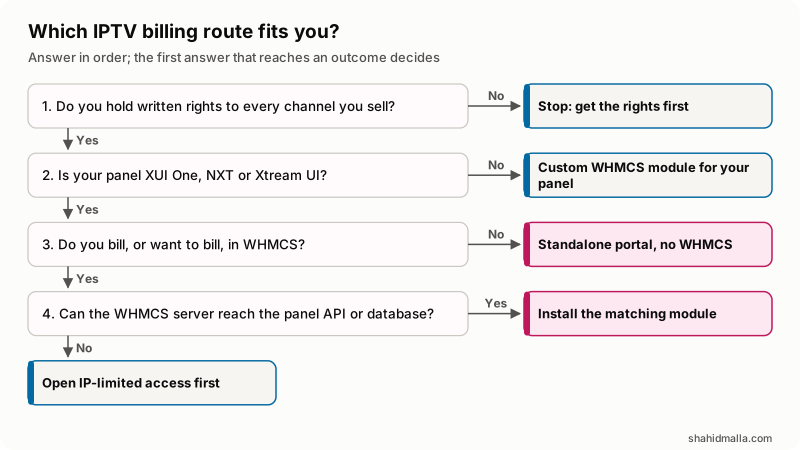
In words: no rights means stop; another panel needs a custom module; no WHMCS points to the portal; otherwise install the module once WHMCS can reach the panel.
How do you give WHMCS access to the panel without exposing it?
Create a credential only WHMCS uses, accepted only from the WHMCS server's IP address.
| Connection | What you create | How you lock it down | Risk if you skip it |
|---|---|---|---|
| API access (XUI) | API credentials for WHMCS alone | WHMCS server IP only, if the panel allows it; HTTPS; firewalled admin port | Leaked credentials can create or remove lines from anywhere |
| MySQL user (NXT) | A user with rights on the panel database only | Host part set to the WHMCS IP; MySQL port closed to all other addresses | An open database port is attacked directly |
| Admin access (Xtream UI) | The access the install notes ask for, used by WHMCS only | Admin port reachable from the WHMCS server and your IP only | Anyone who reaches the port can try the login |
For NXT, MySQL's page on account names gives the form 'user_name'@'host_name' and says a name with no host part equals 'user_name'@'%', which matches any host. So name the WHMCS server in the host part. The GRANT reference says privileges granted ON db_name.* apply to that one database. The shape, with 203.0.113.10 for your WHMCS server and nxt_panel for the panel database:
CREATE USER 'whmcs_billing'@'203.0.113.10' IDENTIFIED BY 'a-long-random-password';
GRANT SELECT, INSERT, UPDATE, DELETE ON nxt_panel.* TO 'whmcs_billing'@'203.0.113.10';
Use the privilege list from the module's install notes; mine is an example. Never grant ON *.* or GRANT OPTION, which the manual warns lets a user pass privileges on. Then close the MySQL port at the firewall to everything except the WHMCS server: two separate locks.
How do you install the module and add the panel server in WHMCS?
On a staging copy, or after a full backup:
- Upload the server module to
/modules/servers/and any addon part to/modules/addons/. - For an addon, open Configuration > System Settings > Addon Modules, click Activate, then Configure, pick the admin roles under Access Control and save, as the addon modules page describes. On NXT, the NXT Dashboard addon must be active before the server module can be set up.
- Open Configuration > System Settings > Servers, click Add New Server, select the panel module, fill in its fields and click Save Changes.
The WHMCS servers page lists Hostname, IP Address, Username, Password, Access Hash, Secure and Port; each module uses the ones it needs. For NXT you enter the database host, user and database name. Server groups put servers in a set that products are assigned to; the Xtream UI module supports more than one server. With a single server, check that an asterisk marks it as the default.
How do you map WHMCS products to panel packages?
One product per thing you sell, each pointing at one panel package. Click Create a New Product at Configuration > System Settings > Products/Services and work through the tabs in the products documentation:
- Details. Product Type Other, for non-hosting products. Untick Require Domain. Pick the Welcome Email that carries the login details.
- Pricing. Payment Type Recurring, with Enable checked for each cycle you sell. Keep Allow Multiple Quantities at No on device products: a product that allows it cannot require custom fields.
- Module Settings. Module Name set to the panel module, then the package on XUI, package and bouquets on Xtream UI, or connection limit, bouquets and owning reseller on NXT. Choose to set the product up when the first payment is received.
- Upgrades. The products a customer may move to; WHMCS calls
ChangePackagewhen the upgrade is paid.
Trials
The WHMCS free trials tutorial gives two kinds. An auto-terminating trial is set in days with Auto Terminate/Fixed Term and a Termination Email on the Pricing tab; WHMCS ends it when the cron runs that many days after the registration date. A recurring trial is a 100 percent promotion at Configuration > System Settings > Promotions and Coupons, free for a set number of billing cycles, then full price. Neither counts hours. The NXT module's trial type does, 24 by default.
MAG and Enigma2 devices
Device products are tied to the box's MAC address. NXT has device product types that check the MAC and let customers change it themselves. The Xtream UI module maps custom fields to panel values. The XUI module page lists no device type, so do not plan MAG lines on XUI.
For your own field, add a product custom field: Text Box, Required Field, Show on Order Form, and a validation rule such as /^([0-9A-Fa-f]{2}:){5}[0-9A-Fa-f]{2}$/ for six colon-separated hex pairs. The custom fields documentation says customers can view a product custom field after ordering but not edit it, so without module self-service, a new box means a ticket.
Bouquets the customer chooses
My IPTV bouquet selection addon lets customers pick bouquets at checkout and change them later. It saves the choice on the WHMCS service as the addon's own bouquet IDs and does not send it to the panel: a module that reads its Select Bouquets field can apply it, or staff work from its history lists, so match its IDs to your panel's bouquets.
How do you test the billing lifecycle before going live?
Run every billing event once against a test line with the Module Log on: Configuration > System Logs, Module Log, Module Logging On. The logs documentation says your role needs the View Module Debug Log permission and the WHMCS database user needs the DROP privilege temporarily. The function names are from the supported functions page:
| Event | How to trigger it | Function | Check on the panel |
|---|---|---|---|
| New order | Order as a test client and pay | CreateAccount | Right package, expiry and connection limit |
| Overdue | Suspend from the service's Module Commands, or leave an invoice unpaid past Suspend Days | SuspendAccount | Line disabled |
| Overdue invoice paid | Pay it | UnsuspendAccount | Active again, same credentials |
| Renewal | Pay a renewal invoice | Renew | Expiry agrees with the Next Due Date |
| Upgrade | Place and pay an upgrade | ChangePackage | New package on the same line |
| Cancellation | Terminate, or let the cron reach Termination Days | TerminateAccount | Line removed |
Overdue rows run by themselves only when you enable them at Configuration > System Settings > Automation Settings: Enable Suspension with Suspend Days, Enable Unsuspension, Enable Termination with Termination Days. The automation settings page warns that a service suspended by hand with a custom reason is not unsuspended when the customer pays. It all runs from the system cron; my WHMCS cron jobs guide covers it.
Failed automatic actions land at Utilities > Module Queue, and the module queue page says WHMCS will not retry them by itself.
Before the first real order:
- Every table row passed, with a clean Module Log entry.
- Panel access is refused from any other IP.
- The welcome email shows the right login details.
- A test trial ended when expected.
- Module Logging is Off and the Module Queue is empty.
How do you add resellers, the client area and a theme?
After direct customers work. On NXT, a reseller product creates a panel account with startup credits, and a credits product tops it up. Resellers use a client area dashboard to add lines, watch trials, switch auto renewal and buy credits; super-resellers create resellers below them. The Xtream UI module manages reseller accounts and the panel's credit system.
With NXT, the service page shows login details, an M3U or M3U Plus download, the MAG portal link if enabled and your set-top box auto-scripts.
My SMThemeTV IPTV WHMCS theme builds homepage plan cards from your products, uses the first free product as the trial card, reads device counts from names like "1 Month 2 Device" and hides checkout fields such as hostname and nameservers. It needs WHMCS 9, while the XUI and Xtream UI pages list 8.13 as tested, so test the pairing on staging first.
What are the limits and risks of an IPTV panel integration?
- Panel updates. The NXT module works on the panel database, and an NXT update that changes it can need a module update. Rerun the lifecycle test after every panel update.
- Two sources of truth. Plans edited by hand in the panel are not in WHMCS; change plans only in WHMCS.
- Credentials. The server record's login can change every line: keep it single-purpose and IP-limited, and Module Logging off between fixes.
- No legal cover. A module automates billing; it does not make an unlicensed service legal.
- When not to use WHMCS. If IPTV is all you sell, the standalone portal may fit better than bending WHMCS around credit packs.
What else do people ask about IPTV panel WHMCS integration?
Can I start an IPTV business with WHMCS?
For billing, yes, with a module: WHMCS has no native IPTV automation, as its knowledgebase says. Content rights and the panel stay your job.
Is XUI One the same as Xtream UI?
No. They are different panels, and I sell a separate module for each. Check the panel name and version in your admin login before you buy.
Can one WHMCS install bill more than one IPTV panel?
Yes. Each panel is its own server record, and each product points at one module, so NXT and XUI products can share one WHMCS install.
How do customers get their M3U link after they pay?
The Welcome Email set on the product, which WHMCS sends on activation, carries the login details. With NXT, customers also download the M3U or M3U Plus playlist from the service page, and the bouquet addon's panel detail fields can build a playlist link from the service's username and password.
Do I need WHMCS to bill IPTV resellers?
No. My standalone portal handles credit packs and sub-resellers for XUI, Xtream UI and NXT panels without WHMCS. Keep WHMCS if you also sell hosting.
If your panel is not one of these three, or a module needs changing, I scope it on a free call of about 30 minutes with a written quote within one business day under custom WHMCS module development.
I do not sell IPTV content, channels, streams or subscriptions. I am a software developer who builds software, APIs, automation and websites.
Last reviewed 5 November 2026. Disclosure: I sell the XUI, NXT and Xtream UI modules, the bouquet addon, the SMThemeTV theme and the standalone portal named here, so I am not neutral. I am CTO at ElySpace, a freelance developer for Marmaids LLC, and founder of WHMCSPilot and MagizAI. WHMCS paths and functions come from the WHMCS 9.1 and developer documentation, MySQL syntax from the MySQL 8.4 manual, and module behavior from my module pages, all read on that date.