A WHMCS license key lives in two places: the $license line of configuration.php in your WHMCS root directory, and the WHMCS Member Area at Services > My Licenses. Each key is tied to one domain, one IP address and one directory path. After a server move, reissue the key in the Member Area and paste the new value into configuration.php.
A WHMCS license key is the string WHMCS issues for a single installation of the software. WHMCS keeps it in configuration.php as $license and binds it to the domain, IP address and directory path the installation runs on. Change any one of those three and the Admin Area stops opening until the key is reissued.
Everything below comes from the WHMCS 9.1 documentation, knowledgebase and pricing page, read on 28 November 2026. The documentation home page lists 9.1 as the General Availability release, with 9.0 and 8.13 on Long-Term Support.
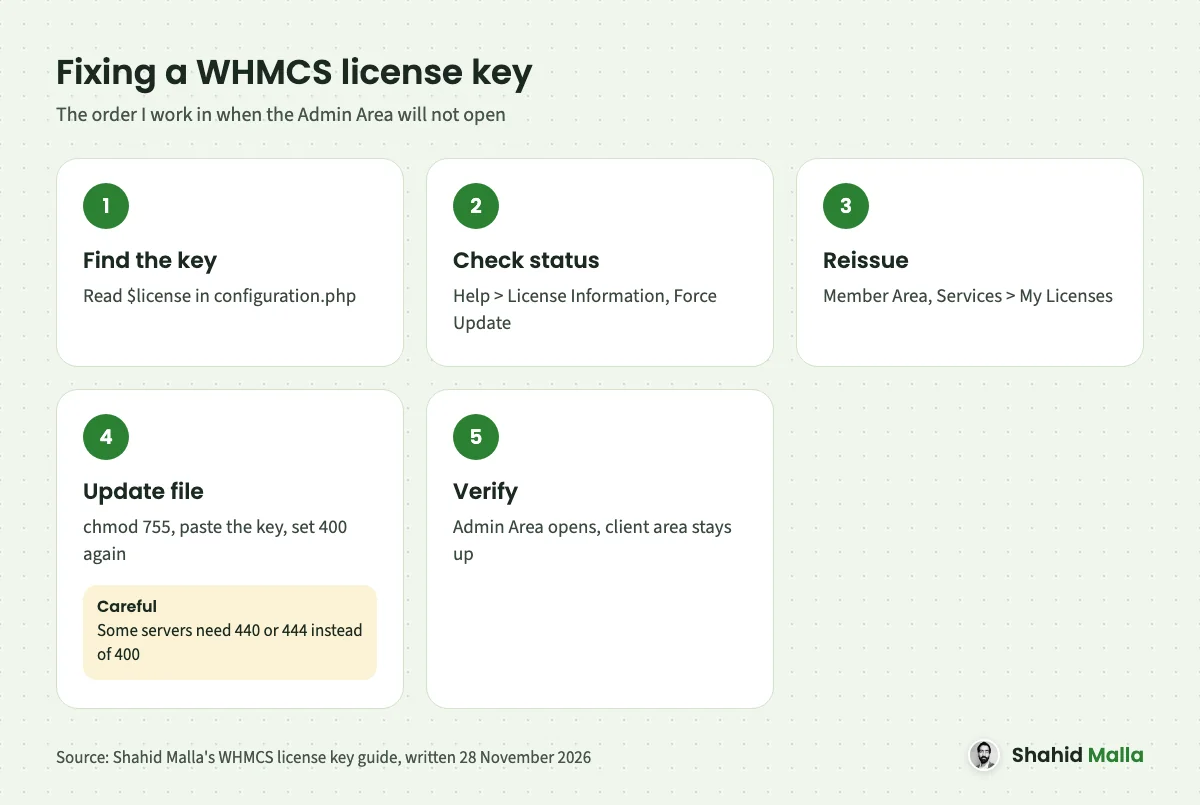
In words: find the key, check it, reissue it if the install has moved, write the new value into the file, then confirm the Admin Area opens.
Where does WHMCS keep the license key?
In configuration.php, in the root directory of a self-hosted install. The configuration.php File page lists license as the variable holding "the full WHMCS license key", and its example file opens with it:
<?php
$license = "";
$db_host = "localhost";
$db_username = "";
$db_password = "";
$db_name = "";
$cc_encryption_hash = "";
$templates_compiledir = "templates_c/";
The key shares a file with your database password and encryption hash, so whatever exposes one exposes all three.
Inside WHMCS, Help > License Information displays that same stored key, its type, valid domains, directories and addons. If a hosting provider issued your license, they hold the Member Area record. None of this applies to WHMCS Cloud, which has no direct file access.
How do you check that a WHMCS license key is valid?
Open Help > License Information and click Force License Update. The License Information page describes that button as forcing an immediate license check.
The same page explains the mechanism. WHMCS uses a local key with remote verification once every seven days, confirming the install still runs in the right location. If that check cannot connect, WHMCS allows up to three more days before the Admin Area goes inactive. The Client Area always stays online, even on an invalid or expired license. An outbound firewall change can therefore take a week to surface.
For a check that does not need the Admin Area, the No Connection Errors page gives a test URL:
https://example.com/admin/login.php?conntest=1A successful test proves the server can reach WHMCS, not that the key is right. I found no public license lookup form in the documentation on 28 November 2026.
What does the License Invalid screen mean?
It means WHMCS received a key it does not accept for this location. The Invalid License Errors page gives two causes: an invalid key, or an install moved without the license being updated. Its check is to compare $license with the issued key and look for stray spaces, line breaks or extra quotation marks.
The licensing screens do not all mean the same thing. Reading the exact wording stops you reissuing a key that was never the problem.
| What you see | Where it appears | Documented cause |
|---|---|---|
License Invalid | Admin Area login | An invalid key, or the install moved without updating the license. |
No Connection | Admin Area login | The server cannot reach the licensing server, usually cURL or DNS. |
| A license suspended message | Admin Area | Most often an overdue payment, or an automated check on how the license is used. |
A license key is required. | Step 3 of install.php | PHP session configuration on the server, not the key. |
Your license key is invalid | API response | A license check from a non-web context whose outbound IP differs from the license IP. |
For the install-time message, the License Key Required Errors page blames PHP sessions failing to store the temporary install data. Upload test_sessions.php and refresh it: the counter should rise each time. If it does not, your key is fine.
The Invalid License API Errors page covers the API message instead, which it says happens when a license check runs from a CLI script or cron job with a different outbound IP. The fix is to send HTTP requests to includes/api.php on the licensed domain instead of calling localAPI, as my WHMCS API guide explains.
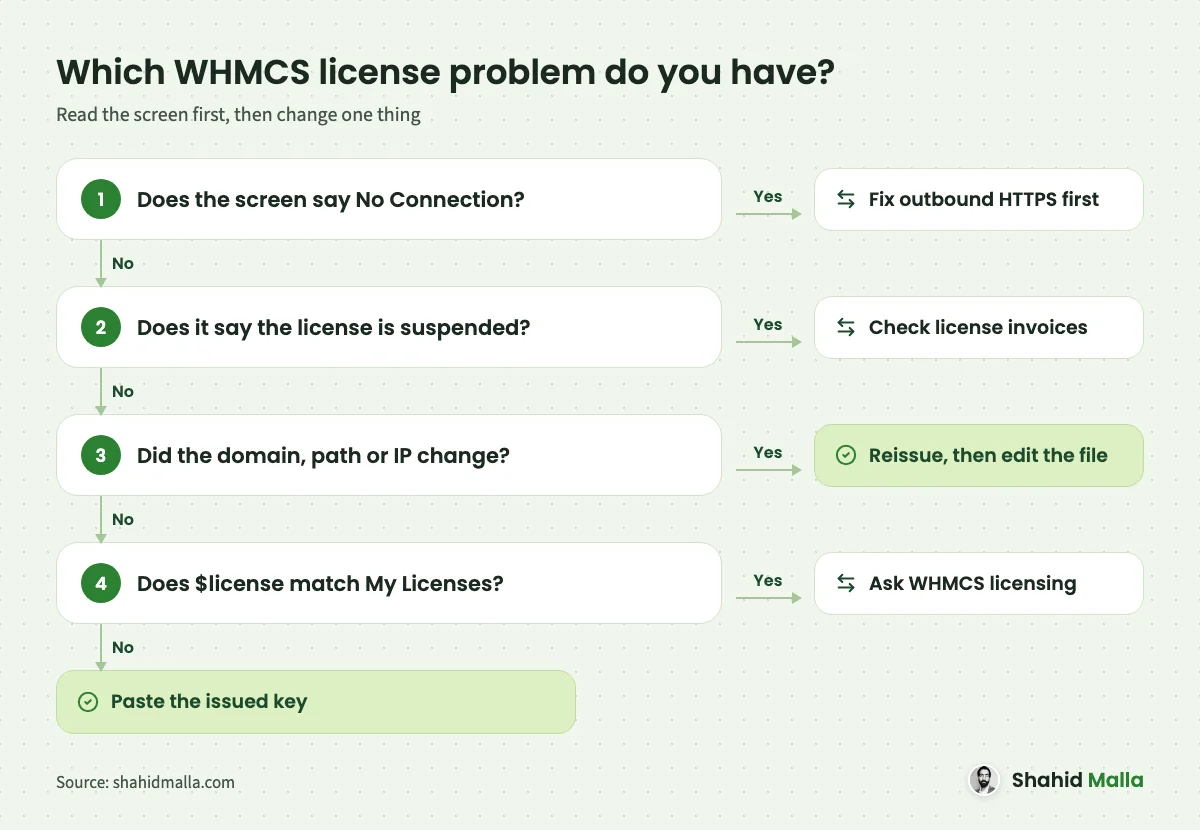
In words: No Connection is a network problem. A suspended message starts with the license invoices. A domain, directory or IP change means reissue. Otherwise compare $license with the issued key, and contact WHMCS licensing if they match.
How do you reissue a WHMCS license key after a server move?
Log in to the Member Area, go to Services > My Licenses, select the key and click Reissue. That is the documented route on the Invalid License Errors page and on Move WHMCS to a New Server, step 7 of 12. If a provider issued the license, only they can reissue it.
| What changed | Reissue? | What else to update |
|---|---|---|
| New server, same domain | Yes | Database settings and absolute paths in configuration.php, DNS, System URL, cron |
| New subdomain, same server | Yes | Domain, Logo URL and System URL in General Settings, storage paths, crons/config.php |
| New directory or home path | Yes | Storage Settings paths and the update temporary path |
| Server IP address changed | Yes | Nothing else, but confirm the Admin Area opens |
| Different hosting provider | Depends who issued the key | A provider-issued key does not travel with you |
| Parked domain, same name | No | Ask WHMCS licensing to add the domain |
The knowledgebase article Can I use my WHMCS license on more than one domain? says a license is valid for one install only. Parked domains are allowed when the second-level name and branding match, so the .com, .net and .org of one name are acceptable while three separate brands are not. Reseller-provided licenses do not get that option.
A short checklist before you move anything:
- Note the current key from
configuration.phpand from License Information. - Know who issued it: WHMCS directly, or a hosting provider.
- Keep the old install reachable until the new one logs in.
- Reissue only after DNS has propagated to the new server.
- Confirm
configuration.phpis writable before saving a key. - Afterwards, open the Client Area as a customer, not just the Admin Area.
My guide on how to migrate WHMCS to a new server covers the other eleven steps, and I do them as WHMCS migration work.
How do you put a new key into configuration.php safely?
Two routes exist, and file permissions decide which one works. License Information has a Change License Key button that asks for your admin username and password first. If an invalid license error blocks the login, that screen carries its own link reading "Click here to enter a new license key."
Both routes write to configuration.php, which is a problem if you hardened it. The Secure the Configuration File page recommends chmod 400, with 440 or 444 as fallbacks when 400 stops the application loading, and says you must set 755 to update the key and revert afterwards. On a hardened install:
chmod 755 configuration.phpin the WHMCS root directory.- Change the key, through the Admin Area or by editing the
$licenseline. - Check the value for stray spaces, line breaks and extra quotation marks.
- Load the Admin Area and confirm it opens.
chmod 400 configuration.php, trying 440 then 444 if the application fails to load.
Paste the key exactly as issued, with nothing trimmed from either end.
Leaving the file at 755 is the mistake I find most often on installs I audit. The same reasoning covers backups and repositories: my guide on fixing an exposed Git repository on WHMCS shows what that leak looks like.
What does a suspended WHMCS license mean?
It usually means money, not configuration. The knowledgebase article on license billing terms, read on 28 November 2026, says WHMCS invoices five days before the renewal date and allows up to five days after the due date before treating a license as unpaid and suspending it. Admin Area access is restricted when the install next calls home, typically a few days later.
What does not stop is everything your customers touch. That article says automation and all public and client-facing functions continue uninterrupted, and the article on a license suspended message repeats it. If automation also stopped, read my WHMCS cron jobs guide.
Payment is not the only trigger. That second article adds two: licenses obtained through certain providers can be suspended automatically when used off that provider's servers, while licenses bought directly from whmcs.com work anywhere; and a PHP environment that fails to output a valid domain, IP address and file path during the check can suspend one on its own.
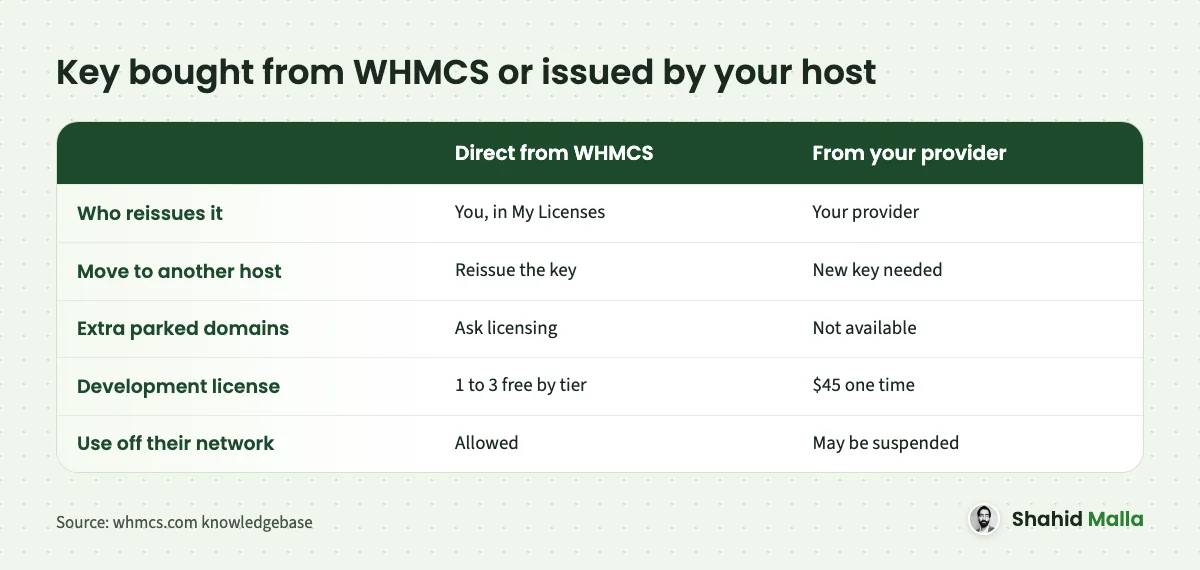
| Direct from WHMCS | From your provider | |
|---|---|---|
| Who reissues it | You, in My Licenses | Your provider |
| Move to another host | Reissue the key | New key needed |
| Extra parked domains | Ask licensing | Not available |
| Development license | 1 to 3 free by tier | $45 one time |
| Use off their network | Allowed | May be suspended |
The Invalid Licenses on HostGator page reports mass home directory changes there, from /home/username to /home2/username, invalidating the license and breaking file storage at once.
Why does WHMCS show No Connection instead of a license error?
Because the problem is the network path out of your server, not the key. The No Connection Errors page attributes it to a cURL or DNS resolution problem.
Run the ?conntest=1 URL. Its successful output names the endpoint https://a.licensing.whmcs.com/1.0/test, the IP it resolved to, a 200 response and Connection Successful!. If it fails, confirm DNS resolves whmcs.com correctly, then work with your host on the cURL connectivity the test exposed. In practice that is a firewall blocking outbound HTTPS, or a resolver that is not answering. The page also notes the error can persist in very restrictive shared environments even when the test succeeds, where it suggests changing the PHP version to 7. Treat that with care: the System Requirements page, read the same day, lists PHP 8.2, 8.3 or 8.4 for every supported version. Take it to your host instead of downgrading, and see my system requirements guide for the rest.
What does a WHMCS license key cost?
These are the self-hosted plans, the ones that give you a key for configuration.php, read on the WHMCS pricing page on 28 November 2026 in US dollars per month, excluding tax.
| Plan | Active clients | Price per month |
|---|---|---|
| Plus | Up to 250 | $34.95 |
| Professional | Up to 500 | $54.95 |
| Business | Up to 1,000 | $84.95 |
An active client is any client with at least one active product, service, addon or domain. A notice there says pricing will be adjusted effective 1 January 2027 for new orders and renewals from that date. My WHMCS pricing guide covers the fully managed plans and the costs that follow the license.
Development keys are separate. The article on development licenses gives one free key per direct Plus or Professional license and three per Business license, while a reseller-obtained license can buy one for $45 once. Development instances must stay internal.
What are the limits of a WHMCS license key?
One key covers one install, and WHMCS states it offers no license valid for more than one.
- Three bound values. Domain, IP address and directory path. A host that silently migrates your account breaks the Admin Area overnight.
- Staging needs its own key. A copy of production on a test domain is a second install, so use a development license.
- A provider-issued key is not portable. Only they can reissue it, and it may be suspended off their network.
- The key is a credential. Keep
configuration.phpout of public directories, repositories and shared backups. - Losing the Admin Area is not losing the business. The Client Area and automation keep running.
The one thing I will not help with is working around licensing. If a key cannot be reissued, the answer is a license that fits the install.
What else do people ask about WHMCS license keys?
How do I check my WHMCS license key?
Open Help > License Information in the Admin Area, where Force License Update runs an immediate check. If you cannot log in, read the $license line in configuration.php and compare it with Services > My Licenses.
How do I verify a WHMCS license is working?
Three checks in order. Force License Update confirms WHMCS accepts the key. The ?conntest=1 URL confirms the server reaches the licensing endpoint. The Member Area, or your provider, confirms the license is current.
How much is a WHMCS license key per month?
On the WHMCS pricing page on 28 November 2026, the cheapest self-hosted plan was Plus at $34.95 per month excluding tax for up to 250 active clients, rising to $84.95 for Business. The fully managed plans, which give you no file access, started at $9.99.
Can I use one WHMCS license on two domains?
Not as two installs. A license covers one install, bound to a domain, IP address and directory path. WHMCS does allow extra parked domains when the second-level name and branding match, and the licensing team adds them.
Do my clients see an error when my WHMCS license fails?
No. The documentation states the Client Area always remains online even with an invalid or expired license, and the knowledgebase says a suspended license leaves ordering and the client area working.
If a license error survives these checks, or a move broke more than the key, I take it on under WHMCS support and maintenance or as part of a WHMCS migration, with a free scoping call of about 30 minutes and a written quote within one business day.
Last reviewed 28 November 2026. Disclosure: I am a freelance WHMCS developer and I sell WHMCS migration, support and maintenance work, so I am not neutral. I am CTO at ElySpace, a freelance developer for Marmaids LLC, and founder of WHMCSPilot and MagizAI.