An AI-ready website is one that AI search engines are allowed to reach and can read, and that AI agents can use to finish a task. Check four layers in order: access (Search Console's Search generative AI setting, your CDN's AI bot policy, robots.txt), readable pages (HTTP 200, no stray noindex, the answer in the HTML), usable pages (real buttons, labeled form fields, a stable layout) and accurate business data. Google says no llms.txt or special schema is needed.
Two settings changed recently, and either one can take a site out of AI answers with one click. Since 31 August 2026, Search Console has had a switch that excludes a whole site from AI Overviews and AI Mode. Since 15 September 2026, Cloudflare's "Block" option for AI training crawlers also blocks Googlebot, Bingbot and Applebot. Both come first in this checklist.
This is the cross-engine checklist. For engine-specific detail, see my guides to Google AI Mode SEO and ChatGPT, Perplexity and Copilot SEO.
What does "AI-ready" mean for a website in 2026?
It means being ready for four kinds of automated visitor, each controlled in a different place:
| Visitor | Examples | What it does | Where you control it |
|---|---|---|---|
| Search crawlers | Googlebot, bingbot, OAI-SearchBot, Claude-SearchBot, PerplexityBot | Index pages so AI answers can cite and link them | robots.txt, CDN bot settings, and for Google the Search Console AI setting |
| User-triggered fetchers | ChatGPT-User, Claude-User | Fetch a page when a person asks about it | CDN and firewall; OpenAI says robots.txt rules "may not apply" |
| Browser agents | Agents that open pages and click for a person | Fill in forms, compare options, book or buy | Your page markup, and the CDN's agent setting |
| Training crawlers | GPTBot, ClaudeBot; the Google-Extended token | Collect content for model training | robots.txt; a business choice, not a visibility requirement |
Google's guide Optimizing your website for generative AI features on Google Search (May 2026, last updated 10 July 2026) describes the third group: "browser agents may access your website to gather the data they need to complete these tasks, such as analyzing visual renderings (like screenshots), inspecting the DOM structure, and interpreting the accessibility tree."
Training is separate from visibility. OpenAI's crawler documentation says "Each setting is independent of the others", so a site can disallow GPTBot and still appear in ChatGPT search through OAI-SearchBot. Anthropic splits ClaudeBot, Claude-User and Claude-SearchBot the same way.
What is on the AI-ready website checklist?
Twelve checks across four layers. Work down the table; the first fail is your next fix.
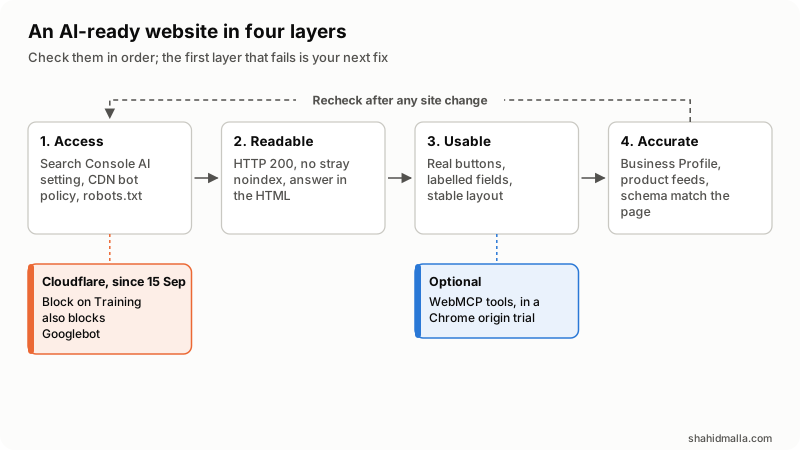
| # | Check | How to test it | Pass |
|---|---|---|---|
| 1 | Search Console AI setting | Search Console > Settings > Search generative AI | "Include", the default, or inherited from a parent property that includes |
| 2 | CDN AI bot policy | Cloudflare: Security settings, AI bot policies; or your CDN's bot rules | Search allowed; Training on Allow or Disallow AI Training, not Block; Agent set on purpose |
| 3 | robots.txt | Open /robots.txt on every subdomain | No Disallow: / for Googlebot, bingbot, OAI-SearchBot, Claude-SearchBot or PerplexityBot |
| 4 | Firewall and host | Server or WAF logs for 403 and 429 responses to AI user agents | Verified bots get 200 |
| 5 | Status code | curl -I or Search Console's URL Inspection | 200 on every page you want cited |
| 6 | Index and snippet controls | Robots meta tag and X-Robots-Tag header | No stray noindex, nosnippet or noarchive |
| 7 | Text in the HTML | Fetch the raw HTML and search for a key sentence | The answer is there before JavaScript runs |
| 8 | Answer-first, sourced pages | Read the first paragraph of key pages | It answers the page's question and names its sources and date |
| 9 | Real controls | Inspect buttons and links | <button> and <a href>, not clickable <div>s |
| 10 | Labeled form fields | Chrome DevTools, Accessibility pane, for each field | Every field has a name, usually from <label for> |
| 11 | No ghost overlays, stable layout | Run your key task on a phone and a desktop | Nothing transparent covers controls; key buttons stay in one place |
| 12 | Business data | Business Profile, Merchant Center, Organization schema | Name, address, hours and prices match the site |
Can AI crawlers and agents reach your site?
Check access in three places: Search Console, your CDN and robots.txt. A block in any one of them wins.
Search Console's Search generative AI control. Search Console's help page says "As of August 31, 2026, we've rolled out this control to all websites worldwide." It sits under Settings > Search generative AI and covers AI Overviews, AI Mode and generative AI features in Google Discover. "Include" is "the default control for all properties". If someone chose "Exclude", Google says "links to your site and your site's content won't appear in Search generative AI features". Google's new guide makes inclusion a condition of eligibility. The control "isn't used as a ranking or inclusion signal affecting other parts of Search" and "doesn't affect AI training"; for training, Google points to Google-Extended.
Cloudflare's AI bot policies. Cloudflare now sorts AI traffic into Search, Training and Agent, each with Allow, Block on pages with ads, or Block. Its 15 September 2026 post changed what Block means: "Block and Block on pages with ads now apply to mixed-use crawlers, including Applebot, Bingbot, and Googlebot, so either setting impacts search as well as training. To stop training and keep search, use Disallow AI Training." So Block on Training removes a site from Copilot and AI Mode, and from ordinary search too.
The Agent setting covers "user-directed agents visiting a page on behalf of a human, such as chat fetch bots and browser-use agents". Since 15 September, new domains are offered presets: a site that shows ads gets Disallow AI Training and Agent on Block on pages with ads; a site without ads gets everything allowed. Existing settings carried over, so open the page once and confirm each choice is one you made.
robots.txt and IP rules. My ChatGPT SEO guide has a robots.txt example that allows search crawlers and keeps training crawlers out. Opt out with robots.txt, not IP blocks. Anthropic warns that blocking IP addresses "may not work correctly or persistently guarantee an opt-out, as doing so impedes our ability to read your robots.txt file." OpenAI says robots.txt changes take "~24 hours" to reach its search systems.
How do you test AI access in ten minutes?
Four terminal commands cover checks 3 to 7. Replace the URL with one of your key pages:
# 1. Who does robots.txt block?
curl -s https://example.com/robots.txt

# 2. Does the server answer an AI search bot's user agent?
curl -s -o /dev/null -w '%{http_code}\n' \
  -A 'Mozilla/5.0 (Macintosh; Intel Mac OS X 10_15_7) AppleWebKit/537.36 (KHTML, like Gecko) Chrome/131.0.0.0 Safari/537.36; compatible; OAI-SearchBot/1.4; +https://openai.com/searchbot' \
  https://example.com/your-page

# 3. Any noindex or nosnippet in the header or the page?
curl -sI https://example.com/your-page | grep -i x-robots-tag
curl -s https://example.com/your-page | grep -io '<meta[^>]*robots[^>]*>'

# 4. Is the answer in the HTML before JavaScript runs?
curl -s https://example.com/your-page | grep -c 'a sentence from your first paragraph'
Command 2 tests only rules that match the user agent. CDNs verify real bots by IP address or signature, so a request from your laptop with a borrowed user agent can be treated differently from the real crawler. For the real picture, use server logs or your CDN's report, such as Cloudflare's AI Crawl Control.
On shahidmalla.com on 27 October 2026, robots.txt allowed all crawlers except on private paths such as /checkout/; the OAI-SearchBot, ChatGPT-User, GPTBot and ClaudeBot user agents each got 200 through Cloudflare; the robots meta tag read index, follow; and a guide's opening sentence was in the raw HTML. The same audit found one fail, in the agent layer below.
Can AI systems read and quote your pages?
They can when the page returns 200, carries no stray noindex and holds its main text in the HTML. Google's guide says "Google is able to process content within JavaScript as long as it isn't blocked", but adds that SEO on a JavaScript-framework site "is generally more complex". Not every AI crawler renders JavaScript as Googlebot does, so server-rendered HTML is the safe choice for pages you want quoted.
Readable also means worth quoting. Google's guide asks for "non-commodity content", meaning "unique expert or experienced takes that go beyond common knowledge". In practice:
- Put the direct answer first.
- Name your sources and the date you checked them.
- Add what only you know: your prices, your process, a test you ran.
Can an AI agent use your website?
An agent can use your site if it can find each control, tell what it does and act on it without guessing. Google's web.dev article Build agent-friendly websites says "Agents can view your website in 3 primary ways: screenshots, raw HTML, and the accessibility tree", and modern agents combine them. Its practical list:
- Avoid ghost elements. Transparent overlays over buttons can make an agent discard the controls underneath.
- Use semantic HTML. Use
<button>and<a>rather than styled<div>and<span>elements. Where you cannot, add aroleandtabindex. - Connect labels to inputs. Add the
forattribute on each<label>so the field's purpose is attached to it. - Show actionability. Set
cursor: pointeron clickable elements, and keep required controls "larger than 8 square pixels". - Keep the layout stable. An Add to cart button that moves between product types confuses agents that work from screenshots.
These are standard accessibility practices; as the article puts it, "Everything we suggest to make a site 'agent-ready' also makes sites better for humans."
This is where my own site failed. The project form at /start-project showed a label over each text field (name, company, email, phone, password), but the labels were not connected to the inputs, so those fields had no accessible name. A person sees "Full name"; an agent or a screen reader gets an unnamed text box. I fixed it on 27 October 2026, the day I found it.
Challenges and confirmations. A CAPTCHA or Cloudflare Turnstile on a form stops spam and also stops many agents. Keeping one on a contact form is a fair trade; this site's forms use Turnstile. For payments or anything hard to undo, require a human confirmation step either way.
WebMCP, optional. WebMCP is "a proposed web standard" that lets a page declare tools, such as a booking or checkout action with a JSON schema for its inputs, so an agent calls the tool instead of clicking through the page. It is in a Chrome origin trial from Chrome 149, "can be added as a progressive enhancement", and "is in active development and may change". Worth testing on a booking, quoting or support flow; a basic site does not need it.
What business data should AI answers get right?
AI answers repeat your name, address, hours, services, prices and stock. Google's guide says Merchant Center feeds and Google Business Profiles "can help your products and services to be visible in both AI responses and other Google Search results". Keep them identical to the site.
- Local or service business: keep the Business Profile current. Google also offers Business Agent, "a conversational experience on Google Search that helps customers chat with your brand".
- Online store: keep the Merchant Center feed current. Google adds that "Protocols like Universal Commerce Protocol (UCP) are emerging that will allow Search agents to do more". OpenAI's commerce docs cover "agentic checkout, delegated payment, and product feeds" for ChatGPT, starting with "a structured product feed".
- Structured data: keep it matched to the visible page. Google says it "isn't required for generative AI search", but it still helps with rich results.
What can you skip?
Google's guide lists "AEO/GEO hacks" you can ignore for Google Search:
- llms.txt and other AI files: "Google Search itself doesn't use them." Google adds that keeping one for other services is "completely fine" and will "neither harm nor help" in Google Search. This site publishes an
/llms.txtfor other tools, not as a ranking lever. - Chunking: "There's no requirement to break your content into tiny pieces for AI to better understand it."
- Rewriting for AI: "You don't need to write in a specific way just for generative AI search."
- Inauthentic mentions: seeking them "isn't as helpful as it might seem".
- Special schema: "there's no special schema.org markup you need to add."
On tools that promise AI rankings, Google says: "No third-party tool has access to our internal ranking or AI systems."
How do you measure whether it worked?
No single report covers every AI engine. Use these together and compare them month to month:
| Source | What it shows | What it does not show |
|---|---|---|
| Search Console Generative AI performance report (worldwide since 31 August 2026) | Impressions in AI Overviews and AI Mode, by page, country, date and device | AI Mode and AI Overviews separately; its help page describes impressions, not clicks |
| Bing Webmaster Tools AI Performance | Citations in Copilot and Bing AI answers | Clicks or traffic |
| GA4 "AI Assistant" channel | Visits from ChatGPT, Gemini, Copilot and similar assistants | Google's AI Overviews and AI Mode, which the channel excludes |
| CDN AI crawler report or server logs | Which AI crawlers fetch which pages, and what status they get | Whether any answer cited you |
If the Generative AI report is missing, Search Console says that "usually happens when your site hasn't received enough impressions in generative AI features", or because the site was excluded. My ChatGPT SEO guide covers the Bing and GA4 reports in detail.
When do you need a developer for this?
Checks 1 to 6 need only admin access. A developer is worth it when the main text appears only after JavaScript runs, when labels and buttons need fixing across many templates, when WAF rules must tell real crawlers from impostors, or when you want WebMCP tools, a product feed or an agent-ready booking flow.
That work is part of my web design and development projects. See also AI Mode website development and AI integration services.
What no developer can promise is a citation. Which pages an AI answer picks is the vendor's decision. In Google's words, "Indexing and serving aren't guaranteed."
What else do people ask about AI-ready websites?
Is my website AI-ready if it runs behind Cloudflare?
Check the AI bot policies under Security settings. Since 15 September 2026, Block on Training also blocks Googlebot, Bingbot and Applebot. Use Disallow AI Training to refuse training and keep search, and leave Search on Allow.
Will blocking GPTBot or ClaudeBot remove my site from ChatGPT or Claude answers?
Not by itself. GPTBot and ClaudeBot are training crawlers. Search visibility runs through OAI-SearchBot and Claude-SearchBot, and OpenAI says "Each setting is independent of the others".
Should I block AI agents?
It depends on how you earn money. An agent can book, compare or buy for a customer, which suits shops, booking sites and service businesses. Cloudflare's preset for ad-funded sites blocks agents on pages with ads, because "agents fetch the page with nobody there to see the ads". Whatever you choose, keep a human confirmation step on payments.
How long do changes take to show?
It varies by vendor:
- Search Console AI setting: Google says exclusion takes effect "within 1-2 days", and some content takes longer.
- OpenAI: robots.txt changes take "~24 hours".
- Google crawling: Google's AI features page says crawling "can take anywhere from several days to several months".
Disclosure: I am a freelance web developer who builds websites and offers this work as part of web development projects, so I am not neutral. I am not affiliated with Google, Cloudflare, OpenAI or Anthropic. I am CTO at ElySpace, a freelance developer for Marmaids LLC, and founder of WHMCSPilot and MagizAI. Quotes come from each vendor's pages as I read them on 27 October 2026; these settings are changing fast, so check the linked pages before acting.
Last reviewed 27 October 2026.