AI video editing for freelancers is a throughput change, not a style change. Premiere Pro and After Effects already transcribe footage, cut from text, mask moving subjects, clean dialogue and extend clips, which removes most of the slow repeatable work. Editors who take on more clients keep the creative judgment, price per deliverable instead of per hour, and disclose generated footage.
AI-assisted video editing means a model does the mechanical parts of a job inside your normal timeline: transcription, a rough cut built from text, captions, masks, noise removal and generated frames. The editor still chooses the cut, the pacing and the look, and still signs off every frame. Nothing about it delivers a finished video on its own.
Where does AI save real time in a video edit?
In the stages that are repetitive and have a correct answer: transcription, assembly, captions, dialogue cleanup, masking and search. Those are the hours that scale badly when you add a second or third client. Creative stages do not compress the same way, because there is no right answer for a model to find.
| Stage of the edit | What a model does well | What still needs you |
|---|---|---|
| Ingest and logging | Transcribe on import, make shots searchable | Which takes are usable at all |
| Assembly | A rough cut from transcript text | Pacing, where a beat lands, what to cut |
| Captions | Timed captions and translation | Names, numbers, jargon, guessed lines |
| Dialogue | Noise reduction and speech cleanup | Judging when cleanup sounds processed |
| Masking | Isolating and tracking a moving subject | Hair, motion blur and fast turns |
| Gaps and clean plates | Extending a clip, filling removed objects | Every generated frame, before it ships |
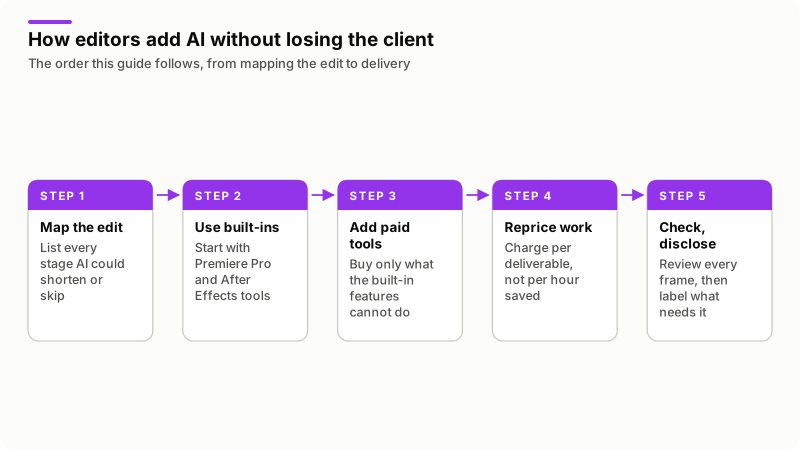
Map your own edit this way before buying anything. Tools pay for themselves only where your hours go, and for most freelance editors that is captions, dialogue cleanup and the first assembly.
What can Premiere Pro and After Effects already do without a plugin?
More than most editors use. Adobe describes these on its own product pages, which I read on 6 November 2026.
| Feature | App | What Adobe says it does |
|---|---|---|
| Text-Based Editing | Premiere Pro | Transcribes on import, then builds a rough cut from copied and pasted text |
| Enhance Speech | Premiere Pro | Improves audio quality, removes background noise |
| Object Mask | Premiere Pro | Masks and tracks a subject from a hover and a click |
| Generative Extend | Premiere Pro | Extends clips, adds frames, generates missing ambient sound, using Firefly |
| Media Intelligence | Premiere Pro | Finds clips from a description in everyday language |
| Caption translation | Premiere Pro | Translates captions in 18 languages |
| AI Object Matte | After Effects | Isolates a moving subject from a hover and a click, with refinement brushes |
| Content-Aware Fill | After Effects | Fills the gaps in every frame after something is removed |
| Motion tracking | After Effects | Follows the movement of any object in a clip |
On the US store that day, Adobe listed both Premiere and After Effects as single apps at $22.99 a month on an annual plan billed monthly, a price the same pages describe in their FAQ as first year only. Creative Cloud Pro was $34.99 a month for the first three months and $69.99 after that, for new subscribers. The Premiere page and the After Effects page carry both the features and the prices, which change by country and by offer.
Generative Extend costs more the more you use it, because the Firefly features spend generative credits. The Premiere page lists 25 monthly generative credits with the single app and 4,000 with Creative Cloud Pro. Adobe's generative credits page says the amount a feature needs "varies based on output, size, resolution, and AI model used", and neither page gives a per-second figure for Generative Extend. Run one test extend at a client resolution and watch your own balance before quoting.
Which extra AI tools are worth paying for, and what do they cost?
Only ones that cover a stage Adobe does not: usually a text-based editor with its own transcription and voice tools, and a generative video tool for shots that do not exist. Prices read on the vendors' pricing pages on 6 November 2026, in US dollars.
| Plan | Billed annually | Billed monthly | What it includes |
|---|---|---|---|
| Descript Hobbyist | $16 a month | $24 a month | 10 hours of media a month, 400 AI credits |
| Descript Creator | $24 a month | $35 a month | 30 hours of media a month, 800 AI credits |
| Descript Business | $50 a month | $65 a month | 40 hours a month, 1,500 credits, translation and dubbing |
| Runway Standard | $12 a month | $15 a month | 625 credits a month, no watermarks |
| Runway Pro | $28 a month | $35 a month | 2,250 credits a month |
| Runway Max | $76 a month | $95 a month | 9,500 credits a month |
Both have a free tier, Descript at 60 minutes of media a month with 100 one-time credits and Runway with 125 one-time credits: enough to test a workflow, not enough to run a client on. Figures from the Descript pricing page and the Runway pricing page.
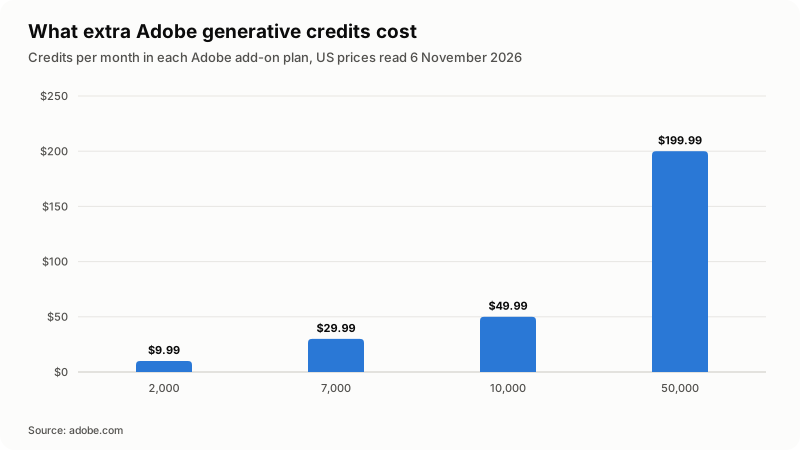
When the credits in a subscription run out, Adobe sells add-ons: on that date, 2,000 credits at $9.99 a month, 7,000 at $29.99, 10,000 at $49.99 and 50,000 at $199.99. The rate per credit barely moves across those tiers, and the 10,000 tier buys no more per dollar than the 2,000 one, so generative work does not get cheaper as you do more of it. Treat credits as a per-job cost and put them in the quote.
A third option keeps the AI inside Premiere Pro and After Effects but pays the model provider directly. ShahidAI Studio, an extension I built, edits from a typed request on your own Anthropic, Google or OpenAI key. It is my own product, so read that as an interest, not a recommendation.
How do you change your workflow so one editor can take more clients?
By standardizing everything that is not creative, so each new client slots into a process you already run. Speed alone does not add clients; a repeatable process does, because it makes your turnaround predictable enough to promise.
- One project template per client type. Bins, sequence presets, caption style, grade, export presets, saved once.
- Transcript first. Transcribe on import and build the first assembly from text.
- Write your style down once. Most AI tools take standing instructions, which saves correcting the same thing every job.
- Batch like work across clients. All captions in one sitting, all cleanup in another.
- Keep one human review gate. Nothing leaves without a full-length watch. This is the step people drop when they get busy.
The ceiling is not the editing. It is revisions, feedback and client communication, none of which get faster because your masks do.
How should you price AI-assisted video editing?
Per deliverable, not per hour. An hourly rate charges the client for your slowness, so every tool you buy cuts your own income. A price per finished minute, per video or per month keeps the gain.
| Pricing model | What happens when AI speeds you up | Fits |
|---|---|---|
| Hourly | Your invoice falls as you get faster | Unclear scope, messy media, rescue jobs |
| Per finished minute | Income holds, long-form becomes worth taking | YouTube long-form, courses, interviews |
| Per deliverable | Income holds and quotes are easy to compare | Short-form sets, ads, social cutdowns |
| Monthly retainer | Income is stable and capacity is planned | Clients publishing on a fixed schedule |
Three rules I hold to. Do not advertise an AI discount, because you sell a finished video, not a count of hours. Put tool and credit cost in the quote as its own line, so a client who asks for four generative extends sees the cost. Set a revision limit in writing, since AI speeds up the first version far more than round three. I found no authoritative rate survey for AI-assisted editing, so I quote no figures. My guide on AI for freelancers covers pricing across other professions.
What do clients accept, and what has to be disclosed?
Clients accept AI for production work and get nervous about generated performance. The line most platforms use is whether the result could be mistaken for something that really happened.
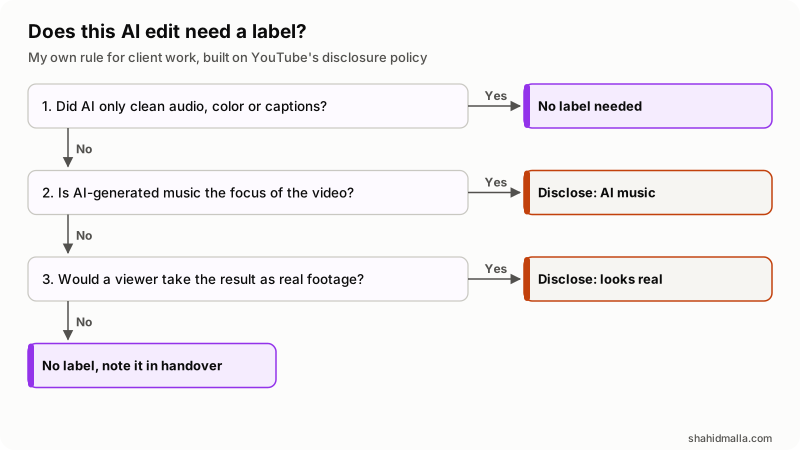
YouTube's policy on disclosing use of GenAI content asks for disclosure in four cases: making a real person appear to say or do something they did not, altering footage of a real event or place, generating a realistic scene that never happened, and AI-generated music as the main focus. Unrealistic content and minor edits need no label, and YouTube counts caption creation, color and lighting filters, upscaling, audio repair, script and thumbnail help and cloning your own voice among them. A label may appear in the player for music or photorealistic content, and in the expanded description otherwise. Creators who consistently do not disclose risk a manually applied label, removal, or suspension from the Partner Program.
With the client, two documents decide what you may do: the NDA you signed and the terms of any service you upload footage to. Name your tools in writing. On its Firefly approach page Adobe says its models are trained on "a dataset of licensed content, such as Adobe Stock" and "public domain content where copyright has expired", and that it has never trained Firefly on customer content. Adobe's generative AI user guidelines say Adobe may attach Content Credentials to content created or modified with generative AI features, and that you must not remove, alter or disable them.
Who owns AI-assisted video work?
In the United States you own the human parts and nobody owns the purely generated parts. The Copyright Office set this out in Copyright Registration Guidance: Works Containing Material Generated by Artificial Intelligence, 88 Federal Register 16190, dated 16 March 2023 and published on copyright.gov.
- Where a model determines the expressive elements of its output, that material "is not the product of human authorship", is not protected, and "must be disclaimed in a registration application".
- A work with generated material can still be registered where a human selects or arranges it creatively, or modifies it enough. Protection covers only the human-authored parts.
- Using a tool is not the problem. The Office's own example is that an artist who uses Adobe Photoshop to edit an image "remains the author of the modified image". A footnote adds that edits made with Photoshop's AI-powered features are judged by the same test.
- Applicants "have a duty to disclose the inclusion of AI-generated content", in the Standard Application's "Author Created" field, with generated material excluded under "Limitation of the Claim".
- An uncorrected registration can be canceled, and a court may disregard one under section 411(b) if the applicant knowingly gave inaccurate information.
Its copyright and artificial intelligence page tracks the later reports, including Part 2 on copyrightability, published 29 January 2025. This is US practice and I am a developer, not a lawyer. If a client needs registered rights, name the generated parts before signing.
What should you check before you deliver an AI-assisted edit?
Watch the export, do not scrub it. The rest is mistakes that are cheap to catch and expensive to ship.
- Watch the full-length export with sound, at the delivery resolution.
- Inspect every generated frame at 100 percent: hands, faces, logos, on-screen text.
- Check mask edges on hair, fast motion and contrasting backgrounds.
- Read the captions against the audio and fix names, numbers and product terms.
- Listen for over-processed dialogue, the giveaway of automatic speech cleanup.
- Confirm you were allowed to upload that footage to every service that touched it.
- Leave Content Credentials intact and decide the platform label before upload.
- Note in the handover which tools ran and where generated material appears.
When does AI cost you more time than it saves?
When the footage is hard, the brief is subjective, or the correction loop is longer than doing the job by hand. I have lost more time fixing a bad automatic result than doing the same task manually.
- Difficult mattes. Hair, motion blur, smoke and fast turns still need manual cleanup, and fixing an auto-matte frame by frame is slower than starting clean.
- Noisy multi-speaker audio. Accuracy falls, and correcting timings costs more than captioning from scratch.
- Music-led pacing and brand color. A transcript-driven cut has no feel for a beat, and a described look is not a sign-off against a brand guide.
- Confidential footage. Anything under an NDA that bars third-party processing stays on your own machine.
- Long generative extends. Credits are spent per generation, including attempts you throw away.
What else do people ask about AI video editing?
Do AI-edited videos need a label on YouTube?
Only when the result seems realistic: a real person appearing to say something they did not, altered footage of a real event or place, or a realistic scene that never happened. AI-generated music that is the focus of the video also needs disclosure. Color adjustment, filters, upscaling and audio repair do not.
Can I use AI to edit client videos without telling them?
Your contract decides that, not the tool. If the NDA restricts sending material to third parties, uploading footage to a cloud service breaks it whether or not the edit looks different. I name the tools in the handover note on every project. It takes one line.
How much does AI video editing cost a freelancer per month?
It depends which stages you automate. On 6 November 2026 Adobe listed Premiere as a single app at $22.99 a month, Descript's paid plans ran from $16 to $50 a month billed annually, and Runway's from $12 to $76. Generative credits are extra.
Should I charge less because AI makes editing faster?
No, and pricing by the hour is what forces the question. Clients buy a finished video at an agreed quality and turnaround. Price the deliverable, keep tool and credit costs visible in the quote, and let the faster process pay for the time you spent building it.
Can I copyright a video that used AI?
In the United States you can register the human authorship in it. Purely generated material is not protected and must be disclaimed, while your own selection, arrangement and editing can be. The Copyright Office requires applicants to disclose AI-generated content.
Which AI video editor is best for freelancers?
There is no single best one, and anyone naming one without asking what you edit is guessing. Start with what is already in your editing app, track where your hours go for two weeks, then buy the one tool that covers the biggest remaining stage.
If you want a custom AI tool built around your own pipeline rather than another subscription, I take that on as an AI developer, with a free scoping call of about 30 minutes, a written quote within one business day, and a rate of $55 to $65 an hour.
Last reviewed 6 November 2026. Disclosure: I sell AI development work and I make ShahidAI Studio, an extension for Premiere Pro and After Effects, so I am not neutral. I am CTO at ElySpace, a freelance developer for Marmaids LLC, and founder of WHMCSPilot and MagizAI. Features and prices come from Adobe's Premiere, After Effects, generative credits and Firefly approach pages, the Descript and Runway pricing pages, YouTube's disclosure policy and the US Copyright Office registration guidance, all read on 6 November 2026.