A working set of AI tools for freelancers is one tool per job, not one tool per task. On 7 November 2026 the entry paid plans I read came to $10 a month for GitHub Copilot Pro, $20 for Claude Pro, $16.99 for Otter Pro, $20 for Fathom Premium and $24 for Descript Hobbyist. Free tiers cover light use, and only some plans keep client data out of training.
An AI tool stack for a freelancer is the short list of AI subscriptions a one-person business pays for, picked so that each one owns a different job: writing, code, design, video, meetings or admin. It is a budget line, not a toolbox. The useful question is never which tool is best, but what the cheapest plan that clears your real monthly volume costs.
Every price below comes from the vendor's own pricing page, read on 7 November 2026, taking the monthly side of the billing switch wherever the page showed both. Three pages gave me no US price to quote. Canva's pricing page and OpenAI's ChatGPT pricing page both answered with "Enable JavaScript and cookies to continue" instead of plans. Grammarly's plans page served India-only pricing in rupees. Read those three yourself before you budget.
Which jobs does a freelance AI stack have to cover?
Six, for most freelance businesses: writing and research, code, design, video, meetings and notes, and admin. Work out which of the six you actually bill for before you look at a single price, because the other categories are where subscription money leaks.
- Writing and research. Proposals, scopes, documentation, client email. A general assistant takes the blank page away, not the judgment about what to promise.
- Code. Boilerplate, test scaffolding, unfamiliar syntax, a first pass at a review. Responsibility for what ships stays with you.
- Design. First layout passes, variations on something that already works, cleaning up images.
- Video. Transcription, filler-word removal, captions, a rough cut from a long recording, covered in depth in my AI video editing guide.
- Meetings and notes. The transcript, the summary and the action list, so a call ends with a written record.
- Admin. Moving data between the tools you already pay for, chasing invoices, filing receipts. Mostly automation with a little AI inside it.
Which tasks inside those jobs AI can genuinely take, profession by profession, is a separate question, and I answer it in AI for freelancers. If what you want is a tool that builds a whole app from a prompt, that is a different category again: see vibe coding tools.
What does one tool per job cost?
Nothing to about $24 a month per job at the entry paid tier, and more once your volume pushes you up a tier. The table holds the plans as each vendor's page showed them to me on 7 November 2026.
| Job | Tool | Free tier | Entry paid plan | What it takes off your plate |
|---|---|---|---|---|
| Writing and research | Claude | Yes, limited usage every 5 hours and every week | Pro, $20 billed monthly, or $17 a month with $200 up front | First drafts, long documents, research passes |
| Code | GitHub Copilot | Yes, 2,000 completions a month | Pro, $10 per user a month, including $15 of monthly AI credits | Completions, boilerplate, pull request review |
| Design | Figma | Starter, 150 AI credits a day up to 500 a month | Professional full seat, listed at $16 a month beside a monthly and annual switch, with 3,000 AI credits | Layout passes, handoff, generated first drafts |
| Video | Descript | Yes, 60 minutes of media a month and 100 one-time AI credits | Hobbyist, $24 a month billed monthly, or $16 annual | Transcript editing, filler words, studio sound |
| Meetings | Otter | Basic, 300 transcription minutes a month | Pro, $16.99 per user a month monthly, or $8.33 annual | Transcripts, summaries, action items |
| Meetings | Fathom | Yes, unlimited recordings and AI call summaries | Premium, $20 per user a month monthly, or $16 annual | Advanced summaries, action items, call assistant |
| Admin | Zapier | Yes, 100 tasks a month, two-step Zaps | Professional, listed as starting from $19.99 a month | Re-keying data between apps |
| Admin and notes | Notion | Yes, with a trial of Notion AI | Plus listed at $10, Business at $20 per member a month | Project notes, meeting notes, agent tasks |
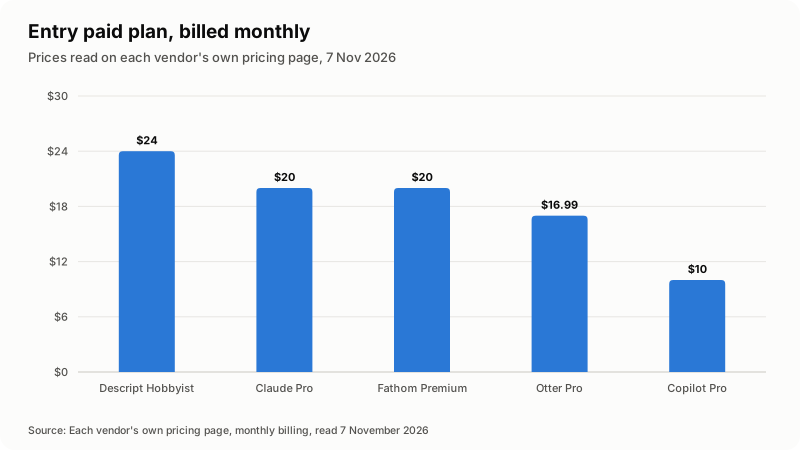
The chart plots only the five vendors whose pages showed a monthly figure I could be sure of. Figma, Notion and Zapier are missing from it on purpose, and a later section explains why.
One oddity worth knowing on Fathom: on monthly billing the two-seat Team plan is listed at $19 per user a month, a dollar below the single-user Premium plan at $20. Fathom's higher tiers run to Business at $34 a month and Enterprise at $35 per user a month, annual only. Descript climbs faster, to Creator at $35 and Business at $65 a month on monthly billing, and Copilot climbs to Pro+ at $39 and Max at $100 per user a month.
Where does each free tier stop?
At volume, almost always, and the limit is usually a quantity rather than a missing feature. Here is what runs out first.
| Free tier | What you get | What runs out or is missing |
|---|---|---|
| Claude Free | Chat on web, desktop and mobile, web search, files, memory, up to 5 projects | Limited usage every 5 hours and every week; no Claude Code, no Opus models, no Research |
| Copilot Free | 2,000 completions a month, Copilot CLI, agent mode, a wide model list | Limited chat and agent usage, no pull request review, no Copilot in the cloud |
| Figma Starter | Unlimited drafts, UI kits and templates | 150 AI credits a day, capped at 500 a month; unlimited files and projects start at Professional |
| Descript Free | Text-based editing, a taste of the AI tools, 2 hours of recording | 60 minutes of media a month, 100 AI credits once, and exports carry a watermark |
| Otter Basic | Live transcription, AI chat, Zoom, Teams and Meet | 300 minutes a month, 30 minutes per conversation, 3 file imports for the life of the account, last 25 conversations only |
| Fathom Free | Unlimited recordings and transcriptions, instant AI summaries, clips and search | No advanced summaries, no AI action items, no meeting assistant |
| Zapier Free | Unlimited Zaps, Tables and Forms, Zapier Copilot | 100 tasks a month and two-step Zaps only, so no branching |
Fathom's free plan is the outlier on this list: unlimited recordings, transcriptions and instant summaries with no minute cap on the page. If meeting notes are the only job you want covered, test that before you pay anyone.
Which plans keep client data out of training?
Business and team plans, as a rule, and consumer plans only after you change a setting. This is the part of a pricing page freelancers skip, and it is the part a client contract can hinge on.
| Product | What the vendor's own page says |
|---|---|
| Claude Free, Pro, Max, Ultra | The model training row of the plan comparison reads "Opt-out", so the control is yours but it is a setting you have to change |
| Claude Team and Enterprise | "No model training on your content by default"; Enterprise adds custom data retention controls |
| Copilot Free, Pro, Pro+, Max | From 24 April 2026 GitHub may use inputs, outputs, code snippets and context to train models, with an opt-out in personal Copilot settings |
| Copilot Business and Enterprise | GitHub does not use that data to train models, and says it is covered by its Data Protection Agreement |
| Descript | Opting out of training and custom retention are listed under the Enterprise plan |
| Notion | Zero data retention with its LLM providers is listed under Enterprise only |
| Otter | Custom data retention appears in the administration and security list on the pricing page, which makes no claim about model training either way |
GitHub writes the Copilot rule out plainly in its documentation on managing Copilot policies as an individual subscriber, including where the switch lives and why Business and Enterprise users never see it. Claude's plan comparison at claude.com/pricing marks consumer plans "Opt-out" and Team and Enterprise "None by default".
Read that as a practical rule: a paid consumer plan is a cheaper plan, not a private one. If a client contract says their material must not be used to train anything, the cheapest honest answer is usually a team seat rather than a personal subscription.
How do you read an AI pricing page without overpaying?
Find the billing switch first, because the number most pages show by default is the annual one. Figma, Notion and Zapier each show a single figure beside a monthly or annual toggle without saying which side is selected, which is why I left them out of the chart.
- The billing switch. Annual billing was cheaper on every page that offered it, and it locks you in. The gap ran from 15 percent on Claude Pro, $20 down to $17, to the 51 percent Otter advertises, $16.99 down to $8.33.
- Seats, not users. Figma prices per seat type, so on Professional a full seat at $16 a month, a dev seat at $12 and a collab seat at $3 are three different things. Fathom's team plans need a minimum of two users.
- Credits and minutes. Descript counts media hours and AI credits, Otter counts transcription minutes, Copilot Pro includes $15 of monthly AI credits, Notion sells custom agent runs at $10 per 1,000 credits. The monthly fee is a floor, not a ceiling.
- Tax. Claude's page says the prices shown exclude applicable tax. Assume the same everywhere until a page tells you otherwise.
- Currency and country. Zapier's page offers a currency menu with nineteen options. Grammarly served me India-only pricing in rupees. A price you read from one country is not the price someone else sees.
What does a working stack add up to in a month?
Adding up only the monthly-billing prices I verified: a developer paying for Claude Pro and Copilot Pro spends $30 a month. A consultant on Claude Pro and Otter Pro spends $36.99. A video editor on Claude Pro, Descript Hobbyist and Fathom Premium spends $64. All three figures are before tax, and none of them includes a design tool.
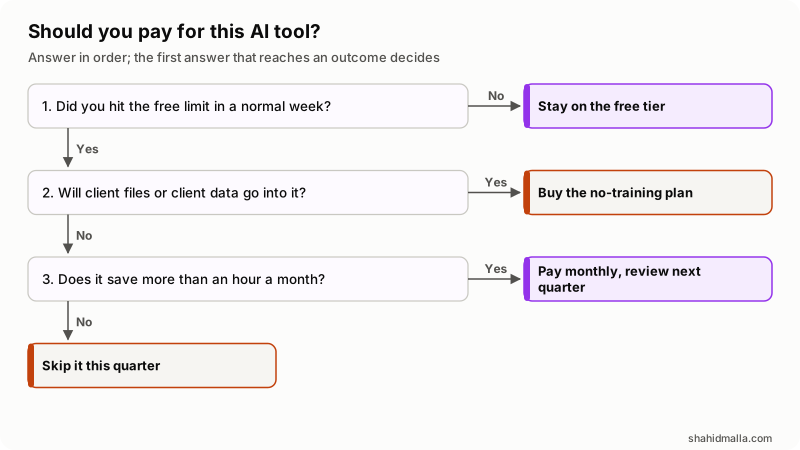
In words: if a normal week never hits the free limit, stay free. If client files go into the tool, the plan you want is the one that excludes your data from training, whatever it costs. If neither applies, pay only when the tool saves you more than an hour a month, and look again next quarter.
What should you check before you add another subscription?
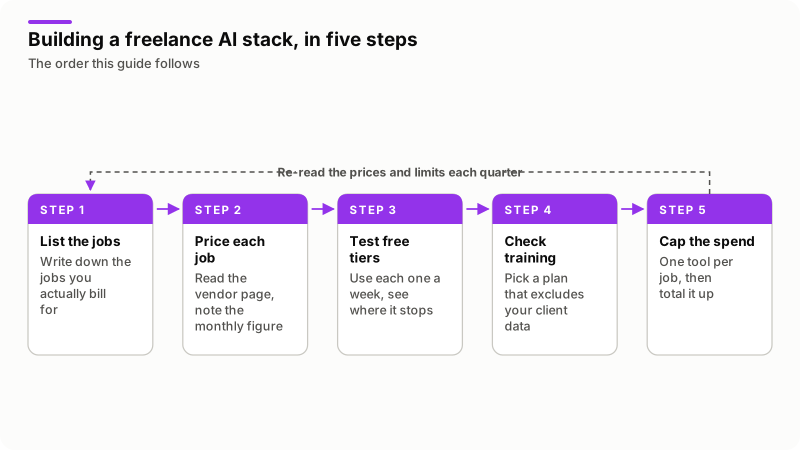
Run this before the card comes out. It takes ten minutes and it has stopped me buying things more than once.
- Name the job it owns. If an existing subscription already owns that job, cancel one of them.
- Run the free tier for a full working week and write down the exact limit you hit.
- Open the billing switch and note both the monthly and the annual price.
- Find the training and retention policy for the tier you are buying, not the Enterprise tier.
- Check whether the plan is per seat, and whether it has a seat minimum.
- Add the new figure to your current total, then put a calendar note three months out to re-read both.
When is a new AI subscription the wrong answer?
When the bottleneck is not the work. A subscription buys speed on a task you already do well. It does not buy you clients, it does not make a vague scope clear, and it will not rescue a project that was mispriced.
Three more cases where I would not pay. When a client has said no AI tools, the honest move is to work without them, not to find a quieter tool. When the job runs a few times a year, an annual plan costs more than the hours it saves. And when what you need is a one-off build, stitching your own tools together with an API call and a scheduled job is often cheaper than a platform plan.
A limit on this guide itself: these prices are a snapshot of one day, and several of the pages carry a line saying they can change.
What else do people ask about AI tools for freelancers?
What AI tools should a freelancer start with?
One general assistant, plus one specialist tool for the job you bill most. For a developer that is a coding assistant; for an editor, a video tool; for a consultant, a meeting recorder. Add the third only after the first two have run out of free capacity on real work.
How much should a freelancer spend on AI tools a month?
I will not invent an average, because none of the vendors publishes one. What I can say from the prices read on 7 November 2026 is that a two-tool stack of Claude Pro and Copilot Pro is $30 a month, and a three-tool stack with Descript and Fathom reaches $64 before tax.
Can you run a freelance business on free AI tools?
For light volume, yes. Fathom's free plan lists unlimited recordings and summaries, Copilot Free gives 2,000 completions a month, and Zapier Free runs 100 tasks a month. The ceiling arrives as a quantity: minutes, credits, completions or tasks.
Do AI tools train on client files you upload?
It depends on the tier. Claude marks its consumer plans "Opt-out" and its Team and Enterprise plans "None by default". GitHub says Copilot Free, Pro, Pro+ and Max data may be used for training from 24 April 2026 with an opt-out, while Business and Enterprise data is not. Check the tier you are on, not the brand.
Is Claude Pro or ChatGPT Plus better for freelance work?
I cannot give you a price comparison today: OpenAI's pricing page answered my request with a JavaScript check and showed no plans at all, so the only figure I can quote is Claude Pro at $20 billed monthly. Pick on the work instead. Try both free tiers on one real task from your own pipeline and keep the one that needed fewer corrections.
If what you actually need is your own tools wired together rather than another monthly seat, I build that under AI integration services and automation development, with a free scoping call of about 30 minutes and a written quote within one business day.
Last reviewed 7 November 2026. Disclosure: I sell AI integration and automation development, so I am not neutral. I am CTO at ElySpace, a freelance developer for Marmaids LLC, and founder of WHMCSPilot and MagizAI. Every price, limit and training policy here comes from the vendor's own pricing or documentation page as I read it on 7 November 2026, and I have named the pages I could not read.