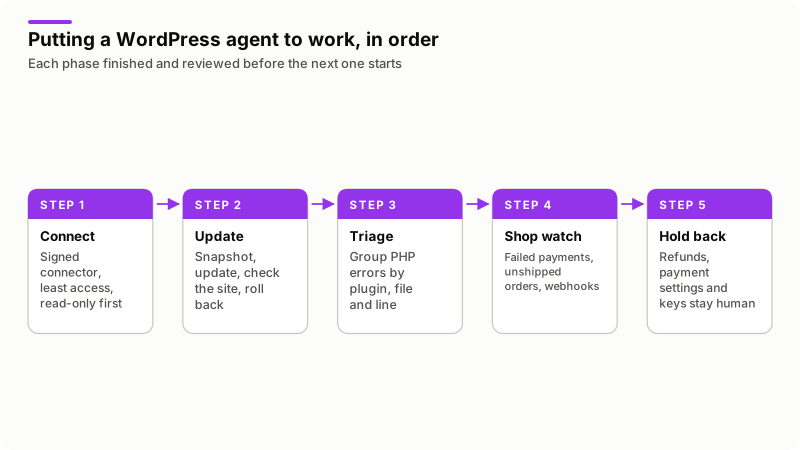
A WordPress AI agent is a program that watches your WordPress sites on a schedule, applies a short list of reversible fixes under rules you set, and asks before anything else. Updates with a snapshot and automatic rollback, PHP error triage and read-only WooCommerce checks are safe to automate. Refunds, payment settings and anything that cannot be undone are not.
A WordPress AI agent is maintenance software with a language model inside it. It reads the state of core, plugins, themes, error logs and orders on each site, and turns what it finds into either a fix or a message to you. It is not a chatbot for visitors and not a plugin that writes posts: the useful part is the policy deciding which findings may become changes.
Every WordPress and WooCommerce behavior below comes from the documentation linked in the text, read on 15 November 2026.
Which WordPress jobs are worth handing to an agent?
The repetitive ones with a clear right answer and a way back. An agent moves the checking, not the deciding.
| Job | Safe to run unattended | Still needs you |
|---|---|---|
| Updates | Snapshot, update, check the site, roll back on failure | Major versions, paid plugins |
| Error triage | Group PHP errors by plugin, file and line | Accepting the code fix |
| Security | Compare files with the official copies, check known vulnerabilities | Cleaning a compromised site |
| WooCommerce | Failed payments, orders waiting to ship, stock, dead webhooks | Order changes, every refund |
| Uptime, clean-up | A check every few minutes; transients and revisions after a snapshot | Schema changes, table drops |
Weighing this against paying someone monthly? My guide on website maintenance cost covers the labor and the vendor bills.
How do you connect an agent without handing over an admin login?
Give it the narrowest credential that does the job, so the limit is a permission rather than a line in a prompt.
The obvious route is a WordPress application password, added in WordPress 5.6. It authenticates REST API requests with Basic authentication over HTTPS and is revoked from the user's profile without changing the password. One limit decides how you use it: an application password inherits the user's full capabilities. The application passwords integration guide says scoping is expected in future versions, so one issued for an administrator is, today, an administrator.
A connector plugin is worth the extra work, because you choose the surface instead of inheriting it. The pattern I build to: every request carries an HMAC-SHA256 signature over the body and a timestamp, anything outside a five-minute window is rejected, recent request identifiers are remembered so a captured call cannot be replayed, there is a read-only switch, and it answers only from an IP allow-list. WooCommerce uses the same idea for outgoing calls, as its webhooks documentation describes: a secret generates a hash of the payload, sent in the headers. SSH and SFTP are the last resort, granting the whole account with no capability system at all.
Whichever you pick, the model never holds the credential: the agent holds it, the model sees the output of a tool call. My guide to MCP covers that boundary. Then set DISALLOW_FILE_EDIT to true, which the WordPress hardening page recommends to stop PHP files being edited from the dashboard.
How do you automate updates so a bad one undoes itself?
Snapshot, update one thing, check the site, restore when the check fails. WordPress already does part of this, and knowing which part saves you from trusting the wrong half.
Since WordPress 6.3, a failed manual plugin or theme update restores itself. The announcement, New in 6.3: Rollback for failed manual plugin and theme updates, says the old copy moves to wp-content/upgrade-temp-backup/plugins/PLUGINNAME and returns if anything gives a WP_Error from WP_Upgrader::install_package(). Its limit is stated plainly: that folder is not a way back after an update that succeeded, and it empties as soon as the update finishes.
That leaves the case that hurts, an update installing cleanly and then throwing a fatal error. The Rollback Auto-Update merge proposal of 19 April 2024 describes the fix for plugin auto-updates: a loopback request to the home page, the previous version restored and a notice to the site's administration email when a fatal error appears. It was written for the WordPress 6.6 cycle, and I could not confirm it landed in core, so treat it as a proposal and keep your own snapshot.
Core's defaults sit in two constants, documented under Configuring Automatic Background Updates on the upgrading handbook page: WP_AUTO_UPDATE_CORE takes true, false or 'minor', and AUTOMATIC_UPDATER_DISABLED turns everything off.
| Update class | WordPress default | Policy I give the agent |
|---|---|---|
| Core minor and security | Automatic on most sites | Leave on, verify after, alert on failure |
| Core major | Automatic on installs created from 5.6 onward | Snapshot and ask: themes and builders break here |
| Plugins from wordpress.org | Off unless enabled per plugin | Snapshot, update in small batches, check, roll back |
| Paid plugins with a license | The vendor's own updater | Always ask: a lapsed license stops updates silently |
| PHP version at the host | Nothing to do with WordPress | Never automatic, never without a staging run |
The check afterwards is the part people skip, and a home page returning 200 is not proof. On a shop, request a product page and the cart, compare the response codes against the previous run, and read the error log for new fatal errors.
How does an agent triage a PHP error to a plugin and line?
By reading the log WordPress already writes and grouping it, which is dull work and exactly what software is for.
Turn logging on in wp-config.php the way the debugging documentation sets it out: WP_DEBUG true, WP_DEBUG_LOG true and WP_DEBUG_DISPLAY false, so visitors never see the errors. The log lands at wp-content/debug.log, and that constant also accepts a path somewhere less public. Every line carries a file path and a line number, and the folder in that path names the owner. Group by plugin, file and line, then count: a thousand entries collapse into five problems with an owner each.
WordPress hands over a second signal. Fatal error protection has shipped since WordPress 5.2, and as the recovery mode announcement explains, the site shows a technical difficulties page and emails the administrator a secret link. Following it pauses the broken plugin or theme for that one client, and an admin notice names which extensions are paused and what the errors are. Route that email where the agent reads. Do not define WP_DISABLE_FATAL_ERROR_HANDLER to make an agent's life simpler: that turns off the protection to improve the reporting.
Then work in the order a careful person works in:
- Prove the files are official.
wp core verify-checksumscompares the install against the WordPress.org checksums and prints lines such asWarning: File doesn't verify against checksum: wp-includes/version.php.wp plugin verify-checksums --alluses the same wordpress.org checksums for plugins, so paid plugins are outside its reach. - Try the cheap fixes. Update the plugin, roll it back, or deactivate it if it is taking the site down. All three reverse in seconds.
- Only then look at code. A model can read the trace and propose a patch, and that patch is a proposal.
Which WooCommerce checks can run unattended?
The read-only ones, and they catch more money than anything else here. The order statuses documentation gives each status a precise meaning, and two of them are where revenue goes quiet.
| Status | WooCommerce definition | What the agent watches for |
|---|---|---|
| Pending payment | Order received, no payment made | A rising count after a gateway change |
| Failed | The payment failed or was declined | A cluster: the gateway, not the customers |
| On hold | Awaiting payment confirmation, stock reduced | Orders past your bank transfer window |
| Processing | Payment received, stock reduced, awaiting fulfillment | Paid orders past your shipping promise |
| Canceled, Refunded | Canceled by an admin or customer, or fully refunded after payment | Any move here the agent did not expect |
Webhooks need their own alert because they fail quietly. The webhooks documentation states that WooCommerce disables one automatically after more than five consecutive delivery failures, counting any response that is not a 2xx, 301 or 302. Records sit under WooCommerce > Status > Logs, filtered to webhooks-delivery. A disabled webhook means your fulfillment, accounting or CRM system has stopped hearing about orders, and nothing on the site says so.
Why does an AI code fix still need a human review?
Because a language model produces plausible code by construction, and plausible is not correct for your site. Three failure shapes keep coming back.
- The fix edits a file inside a plugin. The next update overwrites it, and meanwhile that file fails its checksum, so your integrity check cries wolf daily.
- The fix silences the symptom. A suppressed warning cleans the log and lets the empty value travel into an order total.
- The fix is right in general and wrong here. A hook two other plugins use, a template override you forgot, a cache layer the model never saw.
There is a security reason too. Site content is written by strangers: comments, form submissions, order notes, plugin readme files. If a model reading that text can also call tools, someone can try to write instructions into it. The OWASP Generative AI project files this under Excessive Agency, and recommends that you "Utilize human-in-the-loop control to require a human to approve high-impact actions before they are taken".
So one rule never moves. A fix a person wrote and reviewed can carry a policy, including a timer that approves it if nobody objects. A fix the model composed this morning is always-ask, with no timer, and it goes to a staging copy first. The same instinct applies to code an assistant writes for you by hand, which I covered in vibe coding security.
What should never be automated on a WordPress or WooCommerce site?
Money, access, and anything you cannot undo in minutes. Refunds head the list, and WooCommerce's own documentation shows why the mistake is easy.
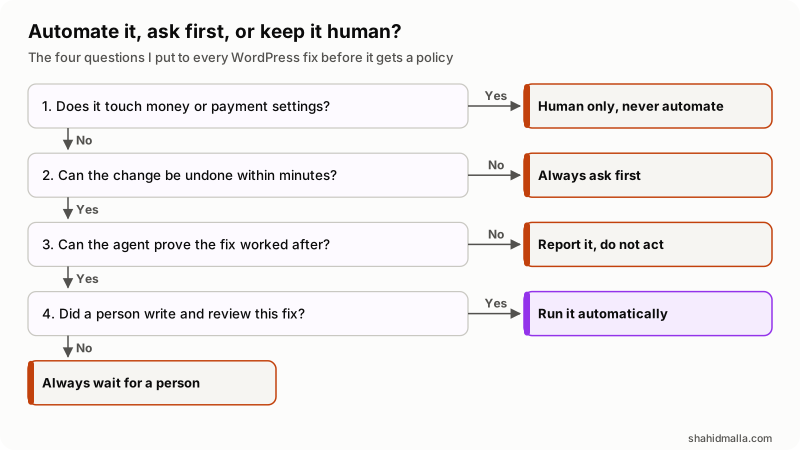
In words: if the action touches money or payment settings, a person does it. If it cannot be undone within minutes, it always asks. If the agent cannot prove afterwards that the fix worked, it reports instead of acting. What is left runs automatically when a person wrote and reviewed the fix, and always waits for a person when the model proposed it.
The WooCommerce refunds documentation separates an automatic refund, which returns the money through the original payment method, from a manual refund, which only records it. It then warns that "Directly changing an order's status to Canceled or Refunded will not automatically refund your customer." Two expensive errors live in that gap: a customer marked refunded who is never paid, and a customer paid twice.
| Never automatic | Why | What the agent may do instead |
|---|---|---|
| Refunds, full or partial | Real money, and the status alone does not move it | Flag refund requests and overdue ones |
| Payment settings and keys | One wrong key stops every sale | Alert when a setting or key changes |
| New users, role changes | It grants access, the thing you are protecting | Report new administrators within minutes |
| Deleting orders or tables | Gone is gone, and a snapshot is not always current | Propose a list, with counts, for review |
How do you tell whether the agent is earning its place?
Read the audit log once a week instead of watching the alerts. Alerts say what happened; the log says whether the policy is right. Four things to look for:
- Approvals you clicked without reading. Several of those means the fix belongs on automatic, or should not exist.
- An approval you refused arriving again. A denial has to stick, or you start approving by reflex.
- Fixes that applied and then undid themselves, and alerts for things that were not problems.
- Snapshots never restore-tested, and credentials still live for sites you no longer look after.
As one worked example, I build and sell WP Agent, for people looking after many WordPress and WooCommerce sites from one dashboard. It follows the pattern above: snapshot and roll back on a failed check, PHP errors grouped by plugin, theme or file and line, cheap fixes first and an AI code change only as a proposal, core and wordpress.org plugin files compared with the official copies, known vulnerabilities checked against the open WPVulnerability database API, and the shop watched for failed payments, unshipped orders, stock and webhooks. Refunds and payment settings are never touched. Sites connect through a signed PHP connector plugin whose test suite passes 103 of 103 checks, every fix carries a policy of automatic, ask-then-proceed-on-a-timer, always-ask or off, and anything the AI asks for waits for a person. The case study shows the dashboard and the approvals queue. Disclosure: WP Agent is my own product.
What else do people ask about WordPress AI agents?
Is it safe to let an AI agent manage a WordPress site?
It is safe in proportion to what its credential can do, not to how carefully you worded the prompt. Give it the narrowest connection that works, keep refunds and payment settings out of reach, and require approval for anything you cannot undo.
Is there a WordPress AI agent plugin?
Yes, products carrying that label exist, and the label is the least useful thing about them. Judge any of them on what the connection can do, whether every change can be undone, and whether high-impact actions need a human. Administrator rights with no approval step is a convenience, not a safety design.
Can an AI agent update WordPress plugins by itself?
Yes, and it is the task agents do best, as long as the sequence is snapshot, update, check, roll back. WordPress restores a plugin itself when a manual update fails, but that does not cover one which updates cleanly and breaks your checkout.
Can an AI agent fix "There has been a critical error on this website"?
It can often identify the cause and apply a reversible fix. WordPress emails the administrator a recovery mode link when a fatal error happens, and recovery mode shows which plugin or theme failed and what the error was. From there the agent can deactivate it, roll it back or restore the snapshot.
Does an AI agent need my WordPress admin password?
No, and it should not have it. Use an application password, revocable on its own, or a connector plugin that answers only signed requests. An application password inherits its user's capabilities, so create it on an account holding only what the agent needs.
If you want an agent built around your own sites and approval rules, I do that under AI agent development, and I build and look after the sites themselves as a web designer and developer, with a free scoping call of about 30 minutes and a written quote within one business day.
Last reviewed 15 November 2026. Disclosure: I sell WordPress work and AI agent development, and WP Agent is my own product, so I am not neutral. I am CTO at ElySpace, a freelance developer for Marmaids LLC, and founder of WHMCSPilot and MagizAI.