To start a VPS hosting company, get servers by renting dedicated machines, colocating your own or reselling a cloud provider's API. Run a virtualization panel such as Proxmox VE, Virtualizor or VirtFusion, secure IPv4 addresses, and connect WHMCS so orders provision and suspend on their own. Then publish an acceptable use policy, staff an abuse desk, plan for DDoS and backups, and sell to a narrow first market.
A VPS hosting company rents out virtual private servers: slices of physical servers, each with its own operating system, root access, fixed resources and usually a public IP address. Behind the storefront it runs hypervisor nodes, a panel that creates the machines, a billing system that charges and provisions them, and an abuse process that keeps its IP addresses clean.
I have been CTO at ElySpace, a hosting company, since 2016, and I build WHMCS modules for hosts. Disclosure: ElySpace sells hosting, so I am not neutral; this guide uses no ElySpace figures. This is the order I would set a VPS company up in today. Every price and policy below comes from the vendor or registry page linked next to it, read on 5 November 2026.
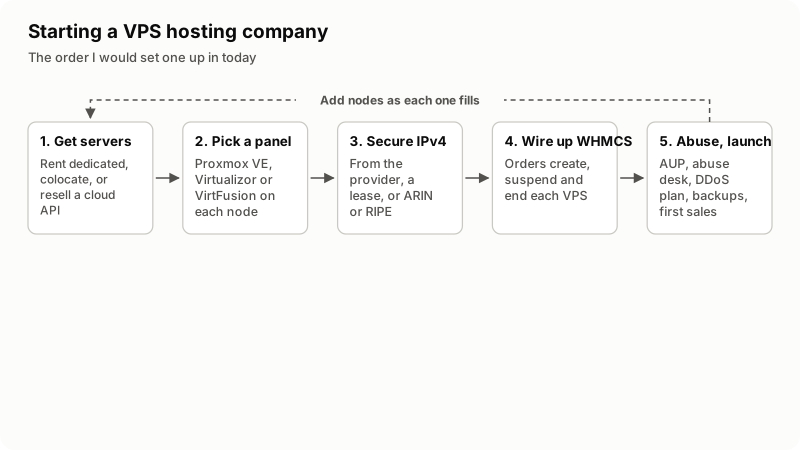
Where will your VPS servers come from?
You have three routes: rent dedicated servers, colocate hardware you buy, or resell a cloud provider's API. They differ in what you own, what you control and who fixes a dead disk at night.
| Route | What you own | What you depend on | Upfront cost | Fits when |
|---|---|---|---|---|
| Rent dedicated servers | A contract, not hardware | The provider's hardware swaps, network, DDoS filtering and usually its IPs | Low: monthly rent | You are testing demand with your first nodes |
| Colocation | The servers, often your own IP space | The data center's power and cooling, plus transit you buy | High: hardware paid up front | Demand is steady and someone can reach the rack |
| Resell a cloud API | Nothing below the API | The cloud's prices, terms and abuse rules | Lowest | You want to prove a brand before buying anything |
The cloud route skips the panel and IP steps, because the cloud creates the machines and owns the addresses. Read its reselling terms first.
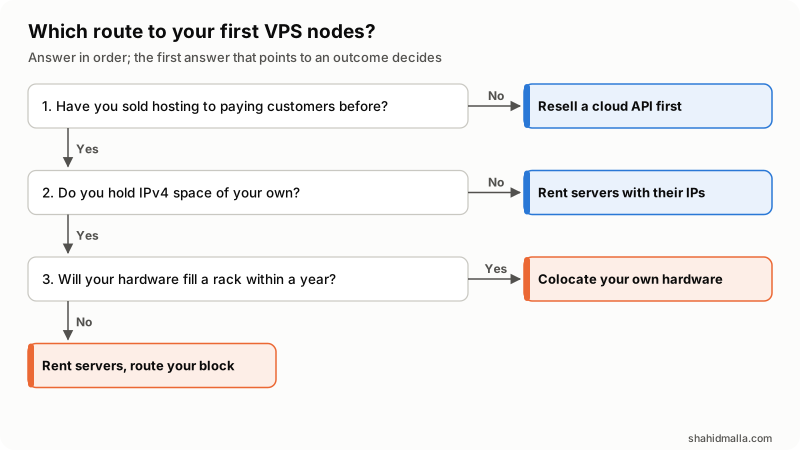
In words: if you have never sold hosting to paying customers, resell a cloud API first. If you have, but hold no IPv4 space, rent servers that come with addresses. With your own block, colocate when your hardware will fill a rack within a year; otherwise rent servers from a provider that will route your block.
Which virtualization panel should run your nodes?
Pick the panel before ordering hardware, because its license is charged per node or per CPU socket, and that changes how big each node should be. I compare three common choices here, with prices from their own pages on 5 November 2026.
| Panel | How it is licensed | Published price | Link to WHMCS |
|---|---|---|---|
| Proxmox VE | Open source; optional subscription per CPU socket per year | Basic €370, Standard €550, Premium €1,100 per socket per year, net of VAT | Third-party WHMCS module |
| Virtualizor | Leased license, one per node | Unlimited VPS: Premium $9 a month or $95 a year, Professional $18 a month or $195 a year. Backuply backups $10 a month per server | Own WHMCS module |
| VirtFusion | Commercial license per hypervisor; HA storage add-on per cluster | Per hypervisor: $1.50 a month for 1 VPS, $10 for 5, $15 for 35, $18 for unlimited | VirtFusion Direct Provisioning module |
Sources: the Proxmox VE pricing page, the Virtualizor pricing page and the VirtFusion pricing page.
- Proxmox VE is free to run, but not free to run well. The Proxmox VE administration guide puts the code under the GNU AGPL v3 and says the no-subscription repository is not recommended for production. The subscription is per socket, so a dual-socket node costs twice.
- Proxmox VE is a hypervisor platform, not a hosting panel. In a hosting setup, the customer's power, console and reinstall buttons usually come from the WHMCS module.
- VirtFusion's non-commercial license ($50 a year) must not be used for hosting. Price the commercial tiers.
How do you get IPv4 addresses for a VPS company?
Rent them with your servers, lease them from a holder, or get your own block from a regional registry: ARIN for the United States and Canada, the RIPE NCC for Europe and the Middle East. VPS buyers usually expect a public IPv4 address, and new ones are scarce. ARIN's IPv4 Waiting List page says its free pool ran out in September 2015, and the list is filled mainly from space revoked for non-payment. The RIPE NCC's waiting list is open only to LIRs (member accounts) that have never received an IPv4 allocation from it.
| Item | ARIN | RIPE NCC |
|---|---|---|
| Waiting list size | Up to a /22; closed to holders of more than a /20 | One /24 (256 addresses) per LIR |
| Strings attached | No transfer of that space for 60 months; 90 days before applying again | Only for LIRs never given an IPv4 allocation by the RIPE NCC |
| Annual fee | $275 for a /24 or smaller; $550 above a /24 up to a /22 | €1,800 per LIR (member) account |
| One-off fees | $50 to create the organization; $187.50 recipient fee for a transferred /24 | €1,000 sign-up fee |
Fees come from ARIN's fee schedule, in effect since 1 January 2026 with the next year's already posted, and the RIPE NCC's Charging Scheme 2026. ARIN's next waiting-list distribution is planned for about 4 January 2027.
Buying a block on the transfer market adds the seller's price, which I could not confirm from a primary source, so I quote none. Whatever the route, check the block against blocklists before you use it, and give every VPS IPv6 from day one.
To use your own block in a rented server, you (with your own ASN) or the provider must announce it over BGP; ask which before you sign.
How do you connect WHMCS billing to the panel?
Through a provisioning module that WHMCS calls at each point in a VPS's life. The supported functions reference lists them:
CreateAccountruns when a new order provisions, at checkout or on payment.SuspendAccountruns when the WHMCS cron finds the service overdue;UnsuspendAccountwhen the invoice is paid.TerminateAccountruns for long-overdue services when termination is enabled.ChangePackageruns when a paid upgrade or downgrade arrives.
All of it depends on the cron, which my WHMCS cron jobs guide covers.
VirtFusion's WHMCS integration documentation shows the usual shape: pick a server group, a hypervisor group ID and a package ID, then add configurable options with exact names such as IPv4, Location, Memory and CPU Cores. Virtualizor documents its module in its billing documentation.
Proxmox VE needs a third-party module. I sell one, the Proxmox VE VPS provisioning module for WHMCS, which creates KVM and LXC machines and assigns addresses from an IP pool. It is my own product, so I am not neutral; compare it with the Marketplace options in my WHMCS Proxmox integration guide. Product setup is in my guide to WHMCS VPS and cloud provisioning.
Before launch, run one test order through create, suspend, unsuspend, upgrade and terminate, and confirm the IP address returns to the pool.
What acceptable use policy and abuse process do you need?
A written acceptable use policy (AUP) before the first sale, and an abuse mailbox someone reads every day. VPS customers get root on your addresses, and complaints about their traffic land on you and your upstream.
The AUP should name what is banned (spam, scanning, attacks, phishing, malware, open proxies) and say you suspend first and ask questions after. In the RIPE region the contact is policy: RIPE-705 requires an abuse-c: with a single abuse-mailbox:, public in whois, validated by the RIPE NCC at least once a year.
| Report | First action | Before you close it |
|---|---|---|
| Spam sent from a VPS | Block outbound port 25 for it, or suspend | Get the cause; check whether the IP is listed |
| Port scanning or brute force | Confirm in logs; suspend if still running | Often a hacked server: ask for a reinstall |
| Phishing or malware hosted | Suspend and keep the evidence | Unsuspend only once the content is gone |
| Outgoing DDoS | Shut down or null-route the VPS at once | Terminate if it was deliberate |
| Copyright notice | Forward it to the customer with a deadline | Follow the process your lawyer sets |
Three settings prevent many reports. Block outbound port 25 by default and open it for customers you have checked. In Proxmox VE, turn on the IP filter and put each VM's addresses in its ipfilter-net* set; the administration guide says outgoing traffic from any other source IP is dropped, which prevents spoofing. And in WHMCS, set each VPS product to "Automatically setup the product when you manually accept a pending order" (see the WHMCS products documentation), because stolen-card orders arrive through the order form.
How do you handle DDoS attacks and backups?
DDoS protection comes from your upstream, not your panel. Ask whether filtering is included, how large an attack it absorbs, and what happens above that. Often the answer is a blackhole: RFC 7999 describes the BLACKHOLE BGP community, which asks a neighboring network to discard all traffic to the tagged prefix. The customer's IP goes dark until the attack stops, so write that into your terms.
The Proxmox VE administration guide says its backups are always full backups, run from the GUI or vzdump, and recommends Proxmox Backup Server on a dedicated host, which stores de-duplicated chunks. It documents three modes for VMs (containers work differently):
- Stop: the most consistent, at the cost of a short shutdown.
- Suspend: kept for compatibility; snapshot is recommended instead.
- Snapshot: the least downtime, with a small risk of inconsistency, reduced when the QEMU guest agent runs.
Keep backups off the node they protect, set retention with prune-backups, and restore one VPS each month. Then say on the order form whether backups are included, a paid add-on or not offered.
How do you price plans and win the first customers?
Price from your cost per VPS. Add the node's rent or hardware, panel license, IPv4 addresses, backup storage, WHMCS license, payment fees and support time, then divide by the VPS the node can safely hold.
License cost per VPS falls fast with density. At 30 VPS per node, a one-socket Proxmox VE Basic subscription (€370 a year, about €30.83 a month) is near €1.03 per VPS a month. Virtualizor Premium at $9 a month is $0.30. On VirtFusion the 35-VPS license, $15 a month, is $0.50 per VPS and cheaper than the $18 unlimited tier.
For the first customers, pick one buyer and one location, such as developers who want a VPS near a market the big clouds serve poorly. Start with one or two nodes, publish a status page, and say plainly what support covers. Skip free trials; they attract abuse. My guide on starting a web hosting business covers the website, SEO and ads.
A short launch checklist:
- AUP and terms published, with backup and DDoS terms spelled out
- Abuse contact in whois, read daily
- Test order run through the full lifecycle
- Port 25 blocked by default; IP filter on
- One backup restored from the backup host
- IP block checked against blocklists; IPv6 working
- VPS orders held until you accept them
When is a VPS company the wrong business to start?
When you cannot answer abuse reports within hours. An upstream that gets no reply can null-route your addresses or end your contract, and every customer on that block goes down with the offender.
It is also wrong if you plan to beat large clouds on price alone, or want income that never needs you at night: a VPS company is on-call work. With hosting experience but no wish to build, buying an existing host can be faster; my guide on buying a web hosting business covers what to check. With neither, start with reseller hosting and add VPS once customers ask for root.
What else do people ask about starting a VPS hosting company?
How much does it cost to start a VPS hosting company?
There is no single figure, because server rent and IPv4 prices vary by provider and region. The fixed lines I could confirm are the panel license (for example $9 a month per node for Virtualizor Premium with unlimited VPS) and, for your own addresses, registry fees: $275 a year at ARIN for a /24, or €1,000 to join the RIPE NCC plus €1,800 a year.
Do I need my own IP addresses to sell VPS?
No. You can rent addresses with your servers, which is the simplest start. Your own block lets you change providers without renumbering customers, but it costs registry fees and needs someone to route it.
Can I resell VPS from another provider under my own brand?
Yes, if the provider's terms allow it. You connect its API to WHMCS through a provisioning module and sell under your name. You still handle support and abuse, and the provider can suspend servers under its own rules.
Is a VPS hosting business profitable?
It can be, but I have found no reliable public figures on VPS margins, so I will not quote one. The profit sits in how many VPS fit on each node, how long customers stay and how few tickets they open.
Do I need an ASN to start a VPS company?
Not to start. You need an autonomous system number when you announce your own IP block over BGP yourself. If the provider announces it, or you use its addresses, you can run without one.
If you want the WHMCS side built or audited before launch, I do that as WHMCS developer work, and the infrastructure decisions as a web hosting expert, starting with a free scoping call of about 30 minutes.
Last reviewed 5 November 2026. Disclosure: I sell WHMCS development and modules, including the Proxmox VE module linked above, so I am not neutral. I am CTO at ElySpace, a freelance developer for Marmaids LLC, and founder of WHMCSPilot and MagizAI. Prices and policies come from the vendor and registry pages linked above, read on that date.