To self-host an LLM, rent a server with enough memory for the model you picked, install Ollama from the official Linux script, leave its API bound to 127.0.0.1 on port 11434, and publish it through a reverse proxy that adds TLS and a password. A small quantized model runs on a CPU-only VPS. Anything larger, or busier, needs a GPU.
A self-hosted LLM server is a machine you rent or own that loads model weights into its own memory and answers inference requests on an HTTP endpoint you control, instead of forwarding prompts to a vendor's API. The software part is small: a runtime such as Ollama, the model files, and a proxy in front. Everything else is ordinary Linux server work, which is where the mistakes happen.
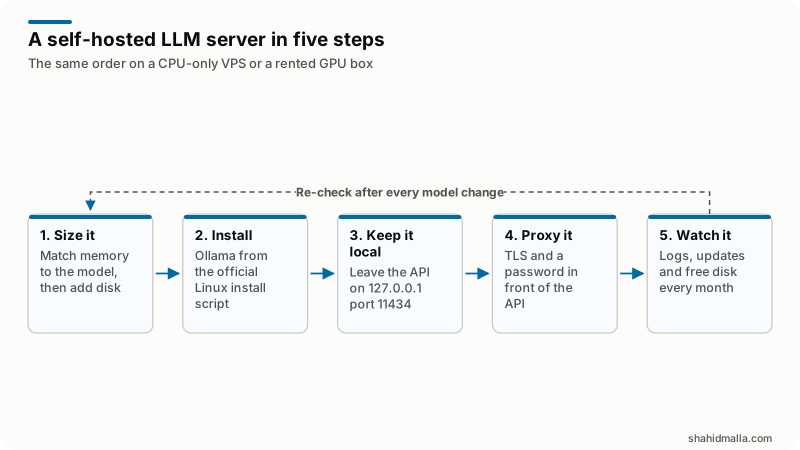
- Size it: match memory to the model, then add disk for the weights.
- Install Ollama from the official Linux install script.
- Keep the API on 127.0.0.1, port 11434.
- Put TLS and a password in front with a reverse proxy.
- Watch the logs, the updates and the free disk every month.
All documentation and prices below were read on 14 November 2026.
Should you self-host an LLM or buy a hosted API?
Self-host when the prompts must stay on hardware you control, or when the machine will be busy enough that a flat hourly bill beats per-token pricing. Below that line a hosted API is cheaper and less work.
Here is the arithmetic. The cheapest on-demand card on DigitalOcean's GPU Droplets pricing page is an RTX 4000 Ada, 20 GB of GPU memory at $0.76 per GPU-hour. The page also says a powered-off Droplet is still billed, and that use past its standard 672-hour month is charged per second. Call it $511 for 672 hours, more if it runs longer.
On Together AI's pricing page, read the same day, two chat models were listed at $0.15 per million input tokens and $0.50 per million output tokens. By my arithmetic, $511 at those rates buys roughly 3.4 billion input tokens, or roughly 1 billion output tokens. A chatbot answering a few thousand questions a day is nowhere near either figure.
Three reasons survive that math: a contract that forbids sending customer data to a third party, a workload that must answer when an upstream API throttles you, and a model you fine-tuned and will not upload.
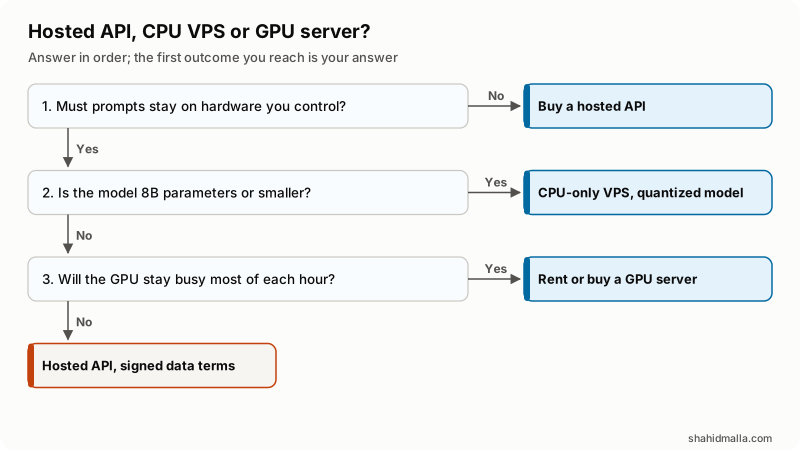
- Must the prompts stay on hardware you control? If not, buy a hosted API and stop here.
- Is the model 8B parameters or smaller? If yes, a CPU-only VPS with a quantized build is enough.
- Will the GPU stay busy most of each hour? If yes, rent one. If not, use a hosted API with signed data terms.
Do you need a GPU server, or will a CPU-only VPS do?
In my experience a CPU-only VPS runs a small quantized model at roughly reading speed, which suits one or two users, a nightly batch job or a prototype. A GPU is what you buy when several people wait on the same endpoint at once.
For memory, use Ollama's own worked example. The Local FAQ shows ollama ps listing llama3:70b at 42 GB loaded 100% on GPU, about 0.6 GB per billion parameters. The FAQ does not name the quantization, so treat that as the rule for a compact quantized build, roughly double for an 8-bit one, and leave headroom for the context cache and the OS. Disk follows the same numbers, plus room for a second model.
That command is also the post-deployment test. Its PROCESSOR column reads 100% GPU, 100% CPU or a split such as 48%/52% CPU/GPU. A split means the model did not fit on the card.
Before renting a GPU, check the card against the hardware support page: Nvidia cards need compute capability 5.0 or newer on driver 550 or newer, cards at 5.0 through 6.2 need driver 570 or newer, and AMD cards need the ROCm v7 driver on Linux. Providers do not always name the card before checkout, so ask.
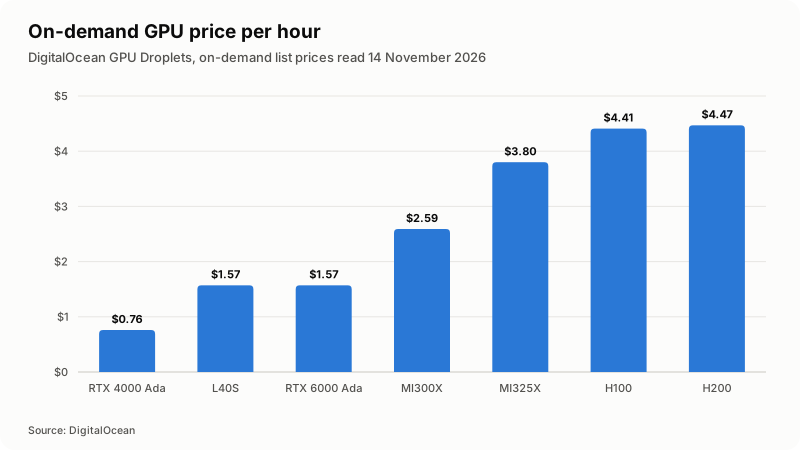
| GPU | GPU memory | On-demand price per GPU-hour | 672 hours, my arithmetic |
|---|---|---|---|
| NVIDIA RTX 4000 Ada | 20 GB | $0.76 | about $511 |
| NVIDIA L40S | 48 GB | $1.57 | about $1,055 |
| NVIDIA RTX 6000 Ada | 48 GB | $1.57 | about $1,055 |
| AMD Instinct MI300X | 192 GB | $2.59 | about $1,740 |
| AMD Instinct MI325X | 256 GB | $3.80 | about $2,554 |
| NVIDIA HGX H100 | 80 GB | $4.41 | about $2,964 |
| NVIDIA HGX H200 | 141 GB | $4.47 | about $3,004 |
One provider on one day, and prices change. GPU memory, not the name on the card, is what decides which model loads.
How do you install Ollama on a Linux server?
With the install script on the Linux page, then a systemd service so it survives a reboot.
curl -fsSL https://ollama.com/install.sh | sh
sudo systemctl enable --now ollama
ollama -v
If your policy forbids piping a script into a shell, that page documents a manual install: extract ollama-linux-amd64.tar.zst into /usr, with separate ARM64 and ROCm packages, and remove the old libraries with sudo rm -rf /usr/lib/ollama before an upgrade. Its service file runs as a dedicated ollama user, and OLLAMA_VERSION pins a build.
Model files land in /usr/share/ollama/.ollama/models on Linux. The FAQ says OLLAMA_MODELS moves them, and that the ollama user then needs read and write access, given with sudo chown -R ollama:ollama <directory>. On a VPS with a small root disk and a large attached volume, set it before the first pull.
How do you keep the LLM API on 127.0.0.1?
By leaving OLLAMA_HOST alone. The FAQ is explicit: Ollama binds 127.0.0.1 port 11434 by default, and only that variable changes it. The common mistake is setting it to 0.0.0.0:11434 so a laptop can reach it, then putting nothing in front.
That matters because there is no authentication to switch on. Ollama's OpenAI compatibility page says it plainly: the client requires an API key value, but Ollama ignores it. An open port is an open model.
How common is the mistake? Ollama in the Wild, a study by Xu, Li, Qiu and Sun accepted at the ACM Internet Measurement Conference, probed port 11434 daily from February 2025 to February 2026 and reports 152,137 cumulative IP addresses, mostly on cloud and hosting networks. Those are rented servers, not hobby laptops.
Prove it: ss -ltnp should show 11434 on 127.0.0.1, and a request to the public IP on that port from another machine should fail to connect. To pin the bind address on a systemd install:
sudo systemctl edit ollama.service

[Service]
Environment="OLLAMA_HOST=127.0.0.1:11434"

sudo systemctl daemon-reload
sudo systemctl restart ollama| Environment variable | What it does | Documented default |
|---|---|---|
OLLAMA_HOST | Bind address and port for the API | 127.0.0.1 port 11434 |
OLLAMA_MODELS | Where model files are stored | /usr/share/ollama/.ollama/models |
OLLAMA_CONTEXT_LENGTH | Default context window in tokens | 4096 |
OLLAMA_KEEP_ALIVE | How long a model stays in memory | 5 minutes |
OLLAMA_MAX_QUEUE | Queued requests before the server returns 503 | 512, set before the server starts |
OLLAMA_KV_CACHE_TYPE | Quantization of the K/V cache | f16, with q8_0 and q4_0 |
OLLAMA_NO_CLOUD | Turns off cloud models and web search | Cloud features on |
Every row is from the Local FAQ. On a server that must not call out at all, that switch, or disable_ollama_cloud in ~/.ollama/server.json, makes the logs show Ollama cloud disabled: true.
How do you add TLS and a password in front of the API?
With a reverse proxy on the same box that terminates HTTPS, checks credentials and forwards to 127.0.0.1:11434. The FAQ shows the minimal Nginx form, including the header it wants:
location / {
    proxy_pass http://localhost:11434;
    proxy_set_header Host localhost:11434;
}
That example has no TLS and no authentication: a starting point, not a deployment. Caddy gives you both in fewer lines. Its reverse proxy quick start serves the proxy over HTTPS automatically once it knows the hostname, as long as DNS points at the machine and ports 80 and 443 are open. Add the basic_auth directive and a missing or wrong password gets 401:
llm.example.com {
    basic_auth {
        app $2a$14$hashed-password-goes-here
    }
    reverse_proxy 127.0.0.1:11434
}
Two rules from Caddy's documentation: it does not accept plaintext passwords, so you generate the hash with caddy hash-password, bcrypt by default; and basic auth is not secure over plain HTTP, which is why TLS and the password go in together. Basic auth is the floor. For anything a customer touches I add a bearer token, a rate limit per token and a log of every call at the proxy, as on any server security hardening job.
Which firewall rules does a self-hosted LLM server need?
Three: SSH from where you work, 80 and 443 for the proxy, nothing else. Port 11434 never appears in the list. The same port discipline as my firewall and hardening checklist.
Ubuntu's firewall documentation notes that ufw is disabled until you enable it, and documents sudo ufw --dry-run allow http, which prints the rules a command would create without applying them. Add the SSH rule first, or you lock yourself out.
sudo ufw allow proto tcp from 203.0.113.10 to any port 22
sudo ufw allow 80
sudo ufw allow 443
sudo ufw enable
sudo ufw status numbered
What changes if you run the LLM server in Docker?
Two things. The first is where the port lands. Docker's port publishing documentation states that ports mapped without a specific host address are published to all host addresses, 0.0.0.0 and [::], so the familiar -p 11434:11434 is the public version. Use the loopback form:
docker run -d -p 127.0.0.1:11434:11434 -v ollama:/root/.ollama ollama/ollamaThe second is that your firewall may not be protecting it. Docker's packet filtering and firewalls page says Docker routes container traffic in the nat table, so packets are diverted before they reach the INPUT and OUTPUT chains that ufw uses. A clean ufw status is no evidence that a published port is closed, so test from outside. GPUs in containers need the nvidia-container-toolkit on Linux or WSL2, and the named volume above stops a replaced container re-downloading the models.
How do you keep it updated and see what it is doing?
Updates on Linux are one command: re-run the install script. The reason to put it on a calendar is in the same study, which found that across five selected CVEs, only 0.43 to 2.90 percent of below-fix addresses upgraded in place.
- Logs.
journalctl -e -u ollama, plus the proxy access log, where you see who is really calling the API. - Overload. Alert at the proxy on the 503 the FAQ documents when too many requests queue.
- Disk. Pulled models are large and nothing removes them for you.
- The rest of the box. The same patching routine as any server, in my guide to updating PHP and securing the server.
What should you check before you let anyone else use it?
Run this from a second machine, because every check passes when you test it over SSH from inside.
- A request to the public IP on port 11434 fails to connect.
- The proxy hostname answers over HTTPS, and no credentials or wrong credentials gets 401.
ollama psshows the model where you expect, not split across CPU and GPU.- The service survives
sudo reboot. - You know the monthly bill, including the hours the box will sit idle.
What does self-hosting an LLM not fix?
It does not make the model smarter and it does not remove the compliance work. It moves both to you.
- Quality. The model you can afford to run on one rented card is the model you get.
- Privacy paperwork. You now hold the prompts, the logs and the retention decision.
- Idle cost. A rented GPU bills while nobody uses it, and DigitalOcean's page says it bills even when powered off.
- Availability. One box is one box, and a hosted API has someone else's on-call rotation behind it.
I build AI agents and AI chatbots for WHMCS, WordPress, SEO and server work, and I founded MagizAI, an AI chatbot product of my own, so read this as an interested view. The deciding factor is rarely speed or cost. It is whether anyone will still be looking after that server in six months. For the application on top, see my guide on how to build an AI agent.
What else do people ask about self-hosting an LLM?
What are the minimum VPS requirements for Ollama?
Ollama publishes no minimum VPS spec, so I will not quote one. The requirement follows the model, not the software: use the FAQ's 70B model at 42 GB as the anchor and scale down. A GPU is optional.
How do I install Ollama on a VPS?
Run the install script from the Linux documentation page, then enable the systemd service so it restarts with the server. Leave OLLAMA_HOST alone, and add a reverse proxy with TLS and a password before anything outside the box talks to it.
How much does a self-hosted LLM cost?
Hardware plus your time. On DigitalOcean's pricing page, read on 14 November 2026, on-demand GPU Droplets ran from $0.76 to $4.47 per GPU-hour, roughly $511 to $3,004 for a 672-hour month by my arithmetic. A CPU-only VPS is a fraction of that.
Can I run a self-hosted LLM in Docker?
Yes, with two cautions. Publish the port to loopback with -p 127.0.0.1:11434:11434, because Docker publishes to all host addresses when none is given. And do not rely on ufw to close a published container port, because Docker diverts that traffic before it reaches the chains ufw uses.
Is it safe to expose the Ollama API to the internet?
Not directly. The local server accepts any API key value and ignores it, so the port itself is your only access control. Put it behind a proxy that enforces TLS and credentials, or keep it on a private network and reach it over a VPN.
If you want this built and handed over rather than worked out from scratch, I take it on as web hosting and server work or alongside a server security hardening pass, with a free scoping call of about 30 minutes and a written quote within one business day.
Last reviewed 14 November 2026. Disclosure: I sell server and AI development work, including AI agents and chatbots, so I am not neutral. I am CTO at ElySpace, a freelance developer for Marmaids LLC, and founder of WHMCSPilot and MagizAI, an AI chatbot product. Every figure and default above comes from a page linked in the text and read on 14 November 2026.