A GPU server for AI costs what its VRAM costs. Renting one by the hour runs from well under a dollar for a 24 GB card to several dollars for 80 GB and up. A monthly dedicated box buys a fixed bill, not always a lower rate. Buying only wins when the card is busy most of the month and you can absorb power, cooling and replacement.
A GPU server for AI is a machine whose graphics cards hold a model's weights in video memory so it can train or answer at speed. The card's VRAM decides which models will load at all, and the price of that VRAM decides almost everything else on the invoice. What is left is a billing choice: per second, per hour, per month, or per owned asset.
I read every provider and vendor page linked below on 20 November 2026. GPU prices move fast, so open the pages yourself before you budget.
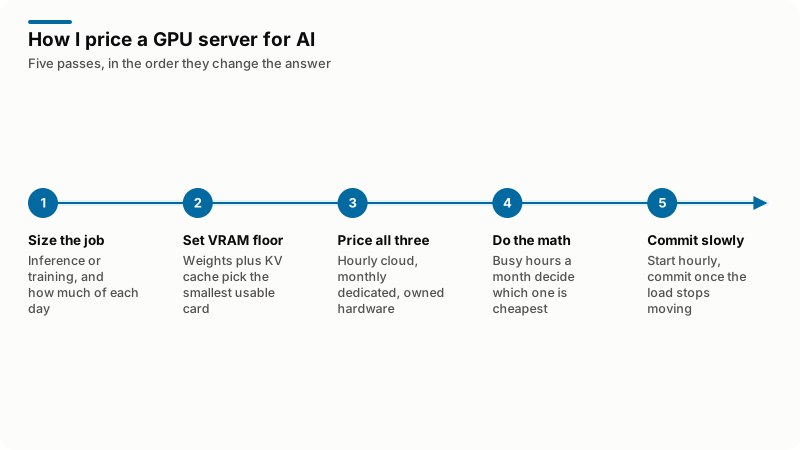
Which job are you buying for: inference or training?
Decide this first, because the two want different machines and different contracts. Inference serves requests in bursts shaped by your users and is usually memory-bound on one card. Training and fine-tuning pin hardware at full load for hours, need several GPUs talking to each other quickly, and hold far more than the weights.
| What differs | Inference | Training and fine-tuning |
|---|---|---|
| Shape of the load | Bursts tied to user traffic | Long runs at full load |
| What sits in VRAM | Weights plus the KV cache for live requests | Weights, gradients, optimizer state, activations |
| GPUs needed | Often one, sometimes two | Several, with fast interconnect |
| Billing that fits | Per second or hour, scaled down when idle | A reserved block for the run |
| Where money leaks | Idle hours that still bill | Failed runs that start again |
That split shows in price lists. On Lambda's pricing page, a single on-demand H100 SXM instance was $4.89 per GPU-hour, while a reserved 16-GPU cluster of the same H100s was $6.16 per GPU-hour. Committed training capacity costs more per hour, not less, because you are also buying the fabric between the cards.
How much VRAM do you actually need?
VRAM is the first constraint and usually the only one that rules options out, because a model that does not fit does not run slowly, it fails to load. Size the weights at the precision you will serve, add the KV cache for your context and concurrency, add headroom, then pick the smallest card that clears the total. I wrote the arithmetic out in how much RAM you need to run an LLM.
The serving stack gives you levers when the number comes out slightly too high. The vLLM documentation on conserving memory lists the practical ones: tensor_parallel_size to split a model across GPUs, a quantized checkpoint, max_model_len to cap context, max_num_seqs to cap the batch, and enforce_eager to release the memory CUDA graphs reserve. Each costs speed or capability, and none turns a 70 GB model into a 24 GB one.
Two vendor numbers are worth carrying into any price list. NVIDIA's L40S page gives 48 GB of memory and a maximum power consumption of 350 W. The H100 page gives 80 GB in SXM form at up to 700 W configurable, and 94 GB in NVL form at 350 W to 400 W. Same family, different memory, very different power, so read the suffix.
What does renting a GPU server by the hour cost?
Less than most people expect at the small end, more than most budgets survive at the large end. These on-demand prices come from two public lists read on 20 November 2026: Lambda's instances pricing and RunPod's GPU cloud pricing, whose page noted it was updated on 12 November 2026. The RunPod column is the Secure Cloud rate.
| GPU and VRAM | Lambda 1x instance, per hour | RunPod Pods, Secure Cloud, per hour |
|---|---|---|
| RTX A5000, 24 GB | Not listed | $0.27 |
| Quadro RTX 6000, 24 GB | $0.69 | Not listed |
| A6000, 48 GB | $1.09 | $0.69 |
| L40S, 48 GB | Not listed | $1.09 |
| A100 PCIe, 80 GB | Not listed | $2.09 |
| H100 PCIe, 80 GB | $3.79 | $2.89 |
| H100 SXM, 80 GB | $4.89 | $4.39 |
| H200, 141 GB | Not listed | $5.29 |
| B200, 180 GB | $7.99 | $7.99 |
Read the conditions under the tables. Lambda prints "plus applicable sales tax/VAT/GST" under every one, and its per-GPU rate falls as the instance grows: an H100 SXM is $4.89 per GPU-hour on a 1x instance and $4.59 on the 8x. RunPod splits its listing into Community Cloud and Secure Cloud, different classes of host, and the gap is wide: its page quotes the H100 PCIe at $2.89 on Secure Cloud or from $1.99 on Community Cloud.
Billing granularity matters as much as the rate. A RunPod L40S Pod was $1.09 per hour and the same 48 GB class on RunPod Serverless was $1.89: 73 percent more per busy hour, nothing per idle hour. That wins outright on anything quiet most of the day.
Storage is the line people forget. RunPod listed volume disk at $0.10 per GB per month while running and $0.20 while idle, and network storage under 1 TB at $0.07. A 500 GB volume of weights bills whether or not a GPU is attached.
What does a monthly dedicated GPU server cost?
A fixed monthly rate for a whole machine, with the provider carrying the hardware risk. This is what people mean by GPU server hosting, and it is the same hosting decision as any other, with a bigger number on it. What matters is not the sticker price but what it works out to per hour, because committing to a month does not automatically buy a discount. Latitude.sh lists an hourly and a monthly price for the same machine, which makes the test easy. These three plans were listed on 20 November 2026.
| Plan | GPUs and VRAM | From, per hour | From, per month | Monthly divided by hourly |
|---|---|---|---|---|
| g3.h100.small | 1x H100, 80 GB | $1.68 | $1,230 | 732 hours |
| g4.rtx6kpro.large | 8x RTX PRO 6000, 96 GB each | $24.00 | $17,520 | 730 hours |
| g4.b300.large | 8x HGX B300, 288 GB each | $64.00 | $46,720 | 730 hours |
An average month holds 730 hours. Both 8-GPU plans divide out to exactly that, so the month costs what the hourly rate costs running around the clock, and the single H100 lands at about 732 hours, marginally worse than hourly. There the monthly price buys reserved capacity and a predictable invoice, not a lower rate.
Run that division on every quote, because some providers do discount a commitment and some do not. Well under 730 is a real discount, worth taking once your load has stopped moving. At 730 you are buying certainty.
What does owning the hardware add on top of the card?
Power, cooling, space, depreciation and the cost of being your own warranty. Buying is the one option whose invoice never arrives as a single number, which is why it looks cheap in a spreadsheet.
Electricity is the line I can put a sourced figure against. The L40S draws up to 350 W, so 0.35 kW across a 730-hour month is 256 kWh. The EIA's Electric Power Monthly table 5.6.A, read on 20 November 2026, put the average US commercial price at 14.47 cents per kWh for August 2026, a preliminary estimate, against 18.16 cents residential and 9.64 cents industrial. That is about $37 a month for the card alone. Host board, fans, drives and cooling add to it, so treat $37 as a floor.
| Cost line | How to work it out | What I can source today |
|---|---|---|
| The card | Vendor or reseller quote | NVIDIA publishes no list price on its product pages |
| Host and chassis | Quote for a chassis that takes the card's power and airflow | Your quote |
| Depreciation | Price divided by the months of useful life you will defend | Your number. I model 36 months, as an assumption |
| Electricity | Kilowatts times 730 hours times your rate per kWh | About $37 a month for a 350 W card at 14.47 cents |
| Cooling, rack and transit | Colocation contract, priced by rack unit and power circuit | Your colocation invoice |
| Failure and spares | A dead card is your problem and your downtime | Your number |
How do you do the utilization math?
Multiply the hourly rate by the hours the GPU will really be busy in a 730-hour month, then compare that with the fixed options. Utilization decides which column wins, not the sticker price.
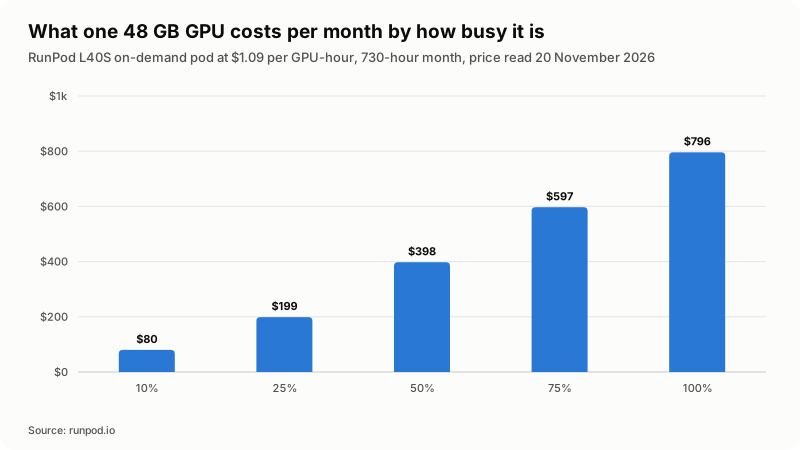
In numbers, that L40S Pod costs about $80 a month at 10 percent utilization, $199 at 25 percent, $398 at 50 percent, $597 at 75 percent and $796 if it never stops. An owned 48 GB box has to land under about $796 a month, all in, to beat rental at full load, and under about $199 at quarter load, where electricity alone has taken a fifth.
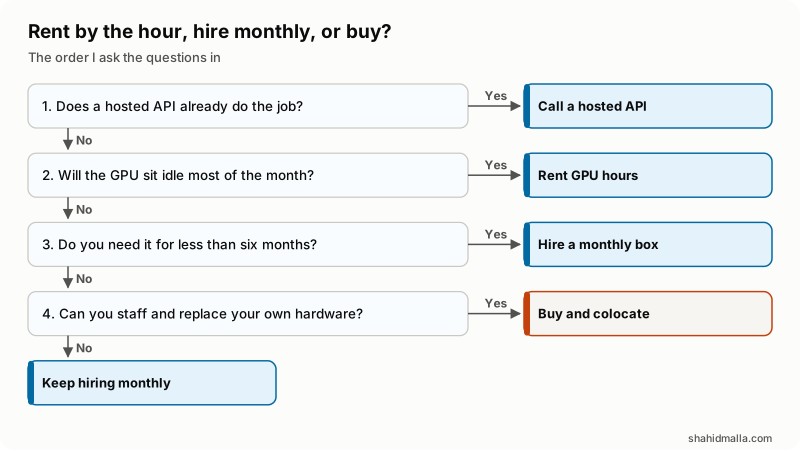
In words: if a hosted API does the job, use it. If not, and the GPU would be idle most of the month, rent hours. For less than six months, hire a monthly box. Only a steady long load, plus people who can replace a failed card, makes buying beat hiring.
When is a hosted API cheaper than any GPU server?
Almost always, until your volume is very large or price is not your reason for self-hosting. An API bills per token, so an idle hour costs nothing. The Claude platform pricing page, read on 20 November 2026, listed Claude Haiku 5.5 at $0.10 per million input tokens for prompts up to 100,000 tokens and $0.50 per million output tokens.
Hold that against $796 a month for a fully busy 48 GB rented GPU. At $0.50 per million output tokens the same money buys roughly 1,590 million output tokens. Below that order of volume the arithmetic is not close. If tokens are a new unit, what a token is in AI explains them.
The comparison is unfair in one direction and I would rather say so: the hosted model is far larger than anything a single 48 GB card serves well. The honest reasons to self-host are data that may not leave your infrastructure, a model no API serves, latency inside your network, or steady volume where a small model is good enough.
What should you check before you sign?
Check what is not in the headline rate, because that is where quotes and invoices part company.
- Does the card clear your VRAM total with headroom, at the context and concurrency you plan to serve?
- Which form factor is listed: PCIe, NVL or SXM? Memory, power and price all differ.
- How fine is the billing, and does the meter stop when the instance stops?
- Does storage keep billing while the GPU is off, and at what idle rate?
- Is there a setup fee or minimum term, and what does it do to a short project?
- Is the price shown with or without VAT, and in which currency?
- Who owns the driver and CUDA stack, and who patches the host?
- Is the GPU in stock in your region today, not just on the pricing page?
What goes wrong with a GPU server for AI?
The common failures are financial, and they repeat. Idle spend is the biggest: a card left running overnight bills like a card doing work, and volumes left after an experiment bill for months. A machine sized to the weights but not the KV cache tests fine, then runs out of memory the first time real concurrency arrives.
Commitments outlive their reason: a one-year reserved cluster signed for a model you have since replaced is an expensive kind of correct decision. On hardware, a 350 W card in an office cupboard is a heat problem before it is a compute problem, and a 700 W SXM card is not an office device at all.
One more from the hosting side: a GPU box is still a server. Patching, access control, backups and monitoring do not disappear because the workload is AI, as my notes on AI server management cover.
What else do people ask about GPU servers for AI?
How much does it cost to rent a GPU server for AI?
On the two lists I read on 20 November 2026, on-demand GPUs ran from $0.27 an hour for a 24 GB RTX A5000 to $8.99 for a 288 GB B300, with the 80 GB cards most people want between $2.09 and $4.89. Multiply by the hours you will be busy, not by 730, and add storage.
What is the cheapest GPU server for AI inference?
The cheapest one that fits your model in VRAM with headroom. For small quantized models that is a 24 GB card, the bottom of both price lists. Paying for 80 GB to serve a model that fits in 24 GB is the most common overspend I see.
Do I need an H100 to run AI?
No. H100 class hardware is for training, very large models and high-throughput serving. NVIDIA lists the L40S at 48 GB, which serves plenty of production inference, and 24 GB cards handle quantized small models. Buy the memory your model needs first.
Is it cheaper to buy a GPU server or rent one?
Renting is cheaper until the GPU is busy most of the month, and where the line falls depends on the provider's own numbers. On Latitude.sh, read on 20 November 2026, both 8-GPU plans price the month at exactly 730 hours of the hourly rate, so hourly never loses on rate alone there. Buying adds power, cooling, space and replacement on top of the card.
Can I run AI on a normal VPS without a GPU?
You can run small quantized models on CPU, slowly, which suits background jobs with nobody waiting. For anything interactive it is the wrong tool. Most small teams do better calling a hosted API from a normal VPS than renting a GPU they barely use.
If you want this sized properly before you commit to hardware, I do that as part of AI development work, with a free scoping call of about 30 minutes and a written quote within one business day.
Last reviewed 20 November 2026. Disclosure: I build AI agents and AI chatbots for a living, including WHMCS, WordPress, SEO and server agents, so I am not neutral about AI infrastructure. I am CTO at ElySpace, a freelance developer for Marmaids LLC, and founder of WHMCSPilot and MagizAI, an AI chatbot product. Every price and specification above comes from the pages linked in the text, read on 20 November 2026.